
Note: This article contains affiliate links. If you click on these links and make a purchase, we may earn a small commission at no extra cost to you. This helps support our research and content. Read our full affiliate disclosure here.
A tidy home often starts with clear labeling. A label maker for home use helps you identify storage bins, pantry goods, cables, and craft supplies so you can find things faster and reduce clutter. The right unit balances simple setup, readable output, and labels that stand up to handling and humidity. This guide covers seven shortlisted label makers that fit typical home tasks. We evaluated each on practical factors such as ease of use, label durability, and formatting flexibility so you can pick the model that matches how you plan to organize your space.
Top Picks at a Glance
| Best Overall The best all-around choice for most situations | DYMO LabelManager 160 |  |
| Best Quality Built to a higher standard if you want something more solid | Brother P-Touch PTD600 |  |
| Best Value The sweet spot between price and what you get | SUPVAN E11 Label Maker |  |
| Best Budget The cheapest option that still gets the job done reliably | NDYIN N12 Label Maker |  |
| Top Rated A top-rated pick with lots of positive feedback | Brother P-touch PTD210 | 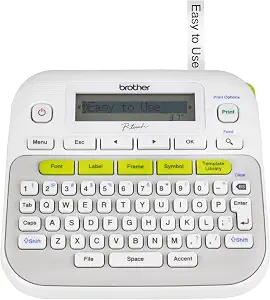 |
| Most Popular A crowd favorite that many people choose with confidence | DYMO LetraTag 100H |  |
| Best Seller A high-volume bestseller chosen again and again | Phomemo D30 Label Maker |  |
DYMO LabelManager 160

| Printer Type | Thermal |
|---|---|
| Compatible Cartridge | DYMO D1 |
| Display Type | LCD |
| Printer Output Type | Black and White |
| Printer Connectivity Type | Wi-Fi |
The DYMO LabelManager 160 is a lightweight, battery-powered thermal label maker designed for quick home organization tasks. You type on a familiar QWERTY keyboard, use one-touch formatting keys to apply styles and symbols, then print labels onto DYMO D1-compatible tapes in common widths. The large LCD and more than 200 symbols help you preview and build clear labels for pantry jars, cables, folders, and storage bins. It is easy to carry between rooms thanks to its compact size, and auto power-off preserves battery life when not in use. Because it prints only black-on-white (or other single-color D1 tapes) and lacks PC connectivity for advanced layout, it is best for straightforward labeling rather than complex multi-line graphics or large projects. Print resolution and speed are typical for a portable thermal unit, giving neat, durable results for everyday home organization but not for high-volume office printing.
Best for: Home users who want an easy, portable label maker for everyday organization tasks and value speed and simplicity over advanced desktop features.
Less Ideal for: People who need high-volume, multi-color, or computer-driven label production should consider a desktop or PC-connectable model instead.
- Familiar QWERTY keyboard and one-touch formatting keys speed label creation
- Compact, lightweight design makes it easy to move around the house
- Supports multiple D1 tape widths and many symbols for versatile home labeling
- Large LCD lets you preview text and formatting before printing
- No PC connectivity or software for advanced layout or bulk printing
- Prints only monochrome labels with thermal D1 cartridges
Verdict: A simple, portable label maker that makes fast, professional-looking monochrome labels for home organization needs.
Brother P-Touch PTD600

| Printer Type | Thermal |
|---|---|
| Print Resolution | 300 dpi color / 400 dpi mono |
| Display Type | Full-color LCD with backlight |
| Connectivity | USB (PC, Mac) |
| Built-In Media | 24mm x 4m TZe laminated tape (included) |
The Brother P-Touch PTD600 is a desktop thermal label printer designed for fast, high-resolution label production at home or in a small office. It prints durable laminated TZe labels in multiple colors and widths, offers a large color LCD that shows your design before printing, and includes a full keyboard for standalone use plus USB connectivity for PC or Mac integration. The unit stores up to 99 labels in internal memory, supports many fonts, frames, symbols and barcodes, and has an automatic cutter for quick batch jobs. Practical benefits include crisp 300–400 dpi output for logos and barcodes, a top-loading tape cassette for easy swaps, and an AC adapter plus USB cable in the box for immediate setup. Limitations are the single USB port and lack of wireless connectivity, which means tethered PC use for advanced editing, and relatively modest print speed for heavy commercial volumes.
Best for: Home users who want a performance-focused desktop labeler for organized projects and occasional small business tasks that need crisp, durable labels and PC-based design control.
Less Ideal for: People who need mobile, wireless printing from phones or very high-volume commercial labeling should look for networked or industrial models instead.
- High-resolution thermal printing (300–400 dpi) suitable for logos and barcodes
- Full-color LCD preview and built-in keyboard for quick on-device label design
- Supports multiple TZe tape widths and laminated durable labels
- Large internal memory that saves up to 99 commonly used labels
- Automatic tape cutter and top-loading cassette for efficient batch printing
- No wireless or Bluetooth connectivity, requiring USB connection for PC/Mac features
- Only one USB port and no direct mobile wireless printing
- Print speed is modest and may feel slow for very high-volume jobs
Verdict: Choose the PTD600 when you want a fast, high-resolution desktop label maker that delivers durable, professional-looking labels with robust on-device and PC-driven design controls.
SUPVAN E11 Label Maker

| Printer Type | Thermal |
|---|---|
| Printer Connectivity Type | Bluetooth |
| Hardware Interface | USB Type C |
| Resolution | 203 dpi |
| Wattage | 10 watts |
The SUPVAN E11 is a handheld thermal label printer that lets you print quickly from its built-in keyboard or design labels in the companion app over Bluetooth. It prints monochrome laminated labels using either continuous or die-cut tape, and the app gives access to many fonts, frames, and icons for customized layouts and batch printing. The E11 is rechargeable and lightweight, making it easy to carry between rooms for pantry, school, garage, or file organization, and minimal-margin printing reduces tape waste. Setup is straightforward via the app or direct keyboard input, and the USB-C port makes recharging simple. Limitations to note are monochrome-only output and manual duplex handling, so it is not for color or high-volume office production, and genuine SUPVAN tapes are recommended for best results.
Best for: Buyers who want a compact, cost-conscious label maker for home organization and light office tasks and who value quick keyboard printing plus a flexible app for occasional custom designs.
Less Ideal for: Users who need color labels, high-volume commercial printing, or advanced desktop label-production features should consider more capable desktop label printers.
- Dual input: physical keyboard for quick labels plus Bluetooth app for advanced designs
- Rechargeable 1200 mAh battery for portable, on-the-go use
- Supports continuous and die-cut laminated tapes for long or shaped labels
- Minimal 0.2" margin printing reduces tape waste
- App offers extensive customization with 30+ fonts and 660+ icons
- Prints only monochrome labels so no color printing
- Best results rely on genuine SUPVAN label tapes
Verdict: A portable, rechargeable thermal label maker that saves tape with minimal margins and pairs fast keyboard printing with a feature-rich app for tidy home organization.
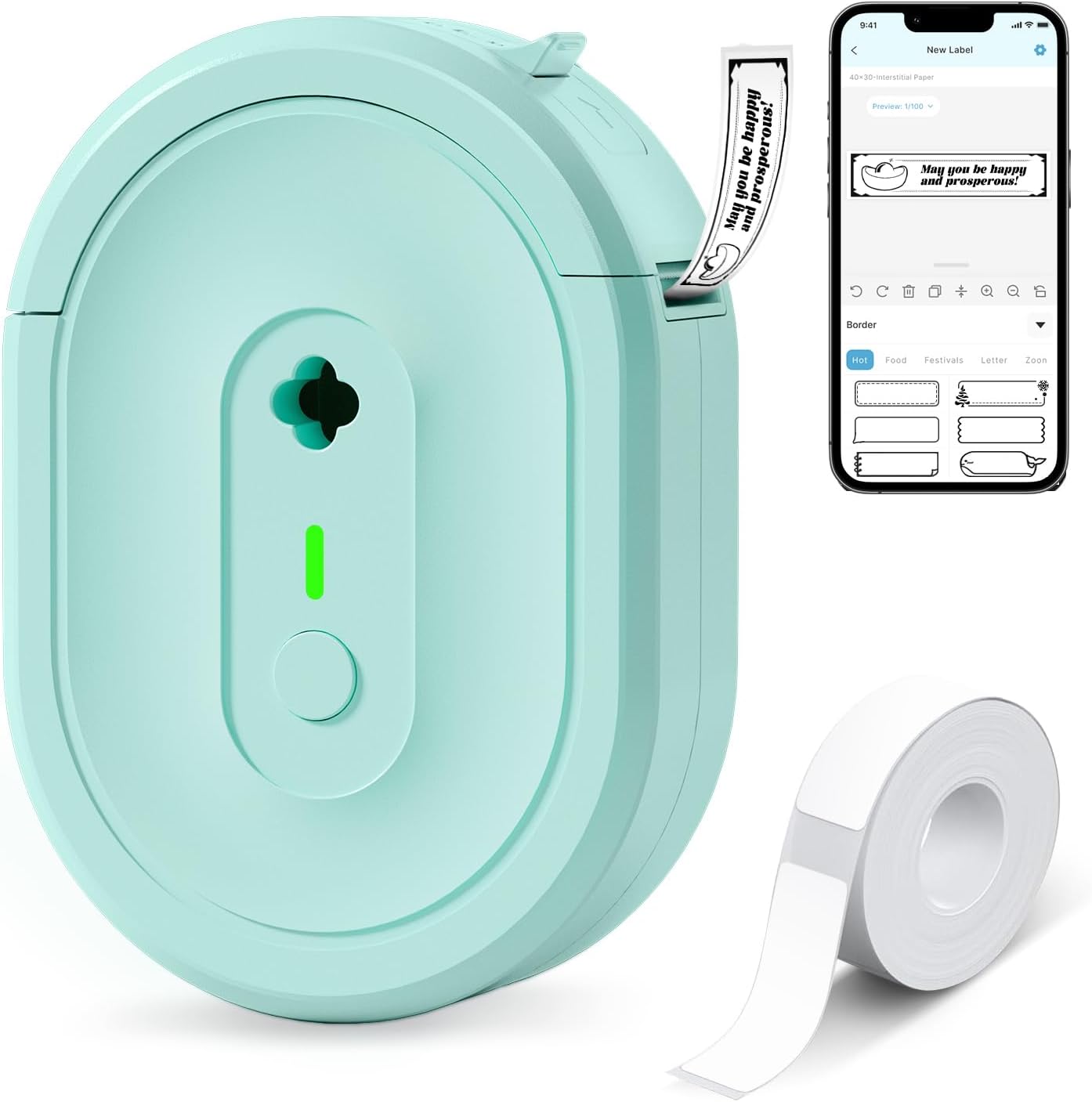
NDYIN N12 Label Maker
| Printer Type | Thermal |
|---|---|
| Connectivity | Bluetooth |
| Resolution | 203 x 203 dpi |
| Built-In Media | 180 pre-cut white labels (14×40mm) |
The NDYIN N12 is a pocket-size thermal label printer that connects to your phone or tablet over Bluetooth and prints monochrome adhesive labels without ink or ribbons. You design labels in the free "Nada Print" app using templates, fonts, symbols, and frames, then send them wirelessly to the N12 for quick printing of fixed-width label rolls. Its direct thermal mechanism and built-in rechargeable battery keep ongoing costs low and make it convenient for kitchen, pantry, cable, file, or price tagging. The unit ships with a small pack of pre-cut labels and a charging cable, and it produces text-and-barcode output at a 203 dpi resolution suitable for everyday identification tasks. Limitations include one-color black-only output and fixed media widths, so it is not suitable for full-color or custom-width printing, and higher-resolution or specialty label needs will require a different printer.
Best for: Buyers looking to label and organize a home on a tight budget who want a simple, portable printer that keeps ongoing costs low and prints directly from a smartphone.
Less Ideal for: People who need color printing, custom-width labels, or professional-grade high-resolution labels for product packaging or branding.
- Direct thermal printing eliminates ink, toner, and ribbons
- Bluetooth pairing with a mobile app for on-phone label design
- Built-in rechargeable battery for portable use
- Includes starter pre-cut labels and charging cable
- Compact, lightweight design for easy storage and transport
- Prints only black-on-white thermal labels with fixed widths
- Not suitable for color labels or high-resolution graphic printing
Verdict: A low-cost, portable Bluetooth thermal label maker that makes quick, ink-free home organization labeling fast and affordable.
Brother P-touch PTD210

| Print media | Labels |
|---|---|
| Paper Size | 12 millimeters |
| Display Type | LCD |
| Printer Connectivity Type | USB |
The Brother P-touch PTD210 is a straightforward handheld label maker built for easy everyday use. It prints monochrome labels up to 12 mm wide and offers one-touch keys, 14 fonts, 10 styles, 97 frames and more than 600 symbols so you can quickly create tidy labels for files, storage, crafts and gift tags. A small LCD preview reduces typos before printing and 27 built-in templates speed common tasks. The unit runs on AAA batteries or an AC adapter and ships with a starter laminated TZe tape, which helps get you labeling right away. Because it is lightweight and portable, it is convenient to move around the house or tuck into a drawer. Expect basic thermal print quality and simple USB connectivity for PC use, but no color printing or advanced network features. If you want durable, no-frills labels and dependable everyday operation, the PTD210 covers core needs without complexity.
Best for: Home users who prioritize a reliable, easy-to-use labeler for everyday organization and occasional small office tasks and who value simplicity over advanced connectivity.
Less Ideal for: Users who need color labels, industrial heavy-duty labeling, or network-enabled printing should consider more advanced models.
- Simple one-touch controls and templates make label creation fast and low-friction
- Large library of fonts, frames and symbols for flexible label designs
- Lightweight and portable for use around the home or small office
- Includes starter laminated TZe tape for immediate use
- Monochrome output only with limited print resolution compared with higher-end models
- Requires AAA batteries or separate AC adapter, which are not included
Verdict: A reliable, no-frills handheld label maker that delivers quick, durable monochrome labels for home organization tasks.
DYMO LetraTag 100H

| Print technology | Direct Thermal Printing |
|---|---|
| Power source | 4x AA Batteries (not included) |
| Font styles | 5 font sizes, 7 print styles, 8 box styles |
| Tapes included | 3 |
The DYMO LetraTag 100H is a small, battery-powered handheld label maker intended for home organization, crafts, and light office tasks. It prints via direct thermal technology so no ink or toner is required, and the built-in graphical LCD lets you preview text, choose from five font sizes, seven print styles and eight box styles, and store up to nine label memories. The unit is lightweight and portable for labeling pantry jars, storage bins, folders, and fabric name tags, and it includes three tape types (paper, plastic white, and clear) to handle common indoor applications. Setup is simple—load four AA batteries and a cassette—and the auto-off feature helps conserve power between jobs. Limitations: print resolution and two-line capacity are basic compared with higher-end thermal printers, and it lacks Bluetooth or app connectivity for designing more complex labels. For straightforward at-home labeling tasks the LetraTag 100H is practical and easy to use, but power users who need higher resolution, advanced design tools, or networked printing may want a different model.
Best for: Buyers who want a simple, reliable handheld solution to tidy up closets, pantry items, school supplies, and small home projects and who value proven user reviews and predictable performance.
Less Ideal for: People who need high-resolution graphics, bulk/commercial labeling, or wireless/app-based design and printing should consider more advanced or desktop models instead.
- Compact and lightweight for portable, on-the-spot labeling
- Graphical LCD preview with multiple font sizes and box styles simplifies layout
- Direct thermal printing requires no ink or toner
- Includes three starter tapes (paper, white plastic, clear) for immediate use
- No wireless or app connectivity for phone/tablet design and printing
- Basic print resolution and formatting compared with desktop label printers
Verdict: A straightforward, proven handheld label maker that delivers easy, no-ink labels for everyday home organization tasks.
Phomemo D30 Label Maker

| Printer Type | Thermal |
|---|---|
| Printer Connectivity Type | Bluetooth |
| Hardware Interface | Bluetooth 4.0, USB Type C |
| Maximum Print Resolution Black and White | 203 dots_per_inch |
| Maximum Media Size | 0.55 inch |
The Phomemo D30 is a compact Bluetooth thermal label printer designed for quick, app-driven labeling at home, school, or for small business tags. You create labels on the Print Master app (iOS/Android) and send them over Bluetooth to print on continuous or pre-cut thermal tape, so you get black text on color or patterned tapes without ink or ribbons. The unit is lightweight, rechargeable via USB‑C, and uses a German thermal print head at 203 dpi for reasonably sharp text and icons; the app supplies thousands of templates, fonts, icons, and features like barcode/QR generation and batch import from Excel. Practical benefits include low ongoing cost because it is inkless, strong creative control from the app, and easy portability for on‑the‑go labeling. Limitations are that it prints only black, requires the app to format labels correctly (paper-size selection affects alignment), and very small media size means it is best for narrow labels rather than large signage. Expect occasional setup steps like pairing through the app and cleaning the print head if prints appear faint.
Best for: Buyers who want a low-maintenance, portable labeler for home organization, classroom supplies, or small craft and price tags and who prefer app-based design tools over hardware keyboards.
Less Ideal for: People who need full-color printing, wide-format labels, or a standalone device that does not rely on a smartphone app should consider other solutions.
- Inkless thermal printing cuts consumable costs and removes the need for ink or ribbons
- Bluetooth + Print Master app offers many templates, fonts, icons and batch import for flexible label design
- Compact, rechargeable and lightweight for easy portability and storage
- 203 dpi thermal head provides clear black text and simple graphics on narrow tapes
- Prints only in black so color requires patterned tapes rather than colored ink
- Small maximum media width limits use to narrow labels and not large-format labeling
- Requires the companion app for most functions and correct paper-size selection to avoid misalignment
Verdict: A pocketable, app-driven thermal label maker that keeps operating costs low and is ideal for tidy, everyday home and classroom labeling.
Choosing the Right Label Maker for Home Use: Key Factors to Consider
Ease Of Setup And Everyday Use
Label makers are most useful when they are quick to start and intuitive to operate. Look for clear keypad layouts or a simple mobile app interface so you can create labels without fuss.
An easy setup reduces the friction of labeling small household projects, which means you are more likely to keep labeling as an ongoing habit rather than a one-off task.
Label Material And Adhesion
Different tapes and materials behave differently on boxes, plastic bins, glass, and fabric. Durable, weather-resistant tapes matter in kitchens, basements, and garages where moisture or temperature changes can degrade paper-based labels.
Also consider the adhesive strength. You want labels that stick firmly to textured storage bins but can be removed cleanly from containers you might repurpose or donate.
Print Clarity And Font Options
Legibility is the main purpose of labeling. High contrast printing and a choice of font sizes let you make small labels for spice jars and large, readable labels for shelf fronts.
Additional formatting like underlines, borders, and simple icons can improve recognition and make organizing faster. If you have vision considerations, prioritize models with bolder print choices.
Tape Widths And Compatibility
Homes have many label sizes needs, from narrow cable tags to wide shelf labels. A label maker that supports multiple tape widths and common adhesive types gives you flexibility across tasks.
Wide compatibility reduces ongoing frustration because you can stock a few tape types to cover most jobs rather than buying device-specific specialty tapes.
Power, Portability, And Battery Life
Consider how and where you will use the label maker. Battery-powered models are convenient for room-to-room jobs and garage use, while mains-powered units are fine for a home office or craft table.
Long battery life matters if you plan long labeling sessions. Rechargeable options can be more economical and convenient than frequent disposable batteries.
Software, Templates, And Connectivity
Mobile apps and desktop software can speed label creation when they offer templates, barcode tools, and quick text entry. Bluetooth or USB connectivity helps you import lists or use a full keyboard for long labeling tasks.
However, some users prefer a standalone unit with a built-in keyboard to avoid pairing or app updates. Choose the connectivity level that fits how often you will create labels and whether you want template saving.
Common Uses Around the Home
Label makers are versatile tools across many rooms. Typical uses include pantry organization, labeling storage bins in closets, tagging cables and chargers, marking craft supplies, and identifying items before moving or donating. Durable labels also help with seasonal storage by clearly marking contents and dates.
- Pantry jars and spice racks
- Storage bins and shelving in closets
- Home office file and cable organization
- Children's school materials and toy bins
Tape Types And When To Use Them
Tapes vary by material and finish. Paper-style tapes are inexpensive and suitable for short-term labeling on boxes or envelopes. For longer-lasting labels in kitchens and laundry rooms, vinyl and laminated tapes offer better moisture resistance. Some tapes have a cloth-like texture for fabrics and soft bins where normal adhesives might peel.
- Paper tape: short-term, low-cost
- Vinyl/laminated: water and abrasion resistant
- Cloth-compatible tapes for soft surfaces
Making Labels That Last
Placement and surface preparation matter as much as tape quality. Clean and dry surfaces before applying a label, and press firmly to ensure full contact. Avoid applying labels to surfaces with loose paint or heavy texture unless you want a temporary tag.
If you expect labels to be handled frequently, choose laminated or thicker tapes and use bolder fonts. For items that will be washed or exposed to condensation, pick waterproof tapes and test them on a small area first.
- Wipe surfaces clean and dry before application
- Use bold type for frequently handled items
- Prefer laminated tapes in humid areas
Organizational Tips And Labeling Systems
Consistent naming conventions speed retrieval. Use short, clear names and consider adding dates or item categories. For example, group holiday decorations by year and room, or use category prefixes for craft supplies.
Color-coding tapes or using simple icons can make scanning shelves faster than reading every label. Keep a master index or digital list for complex storage systems so you can quickly search what is stored and where.
- Adopt short, consistent label text
- Use colors or icons for quick scanning
- Keep a searchable index for large collections
When To Use Mobile Apps Versus Built-In Keyboards
Mobile apps are useful for importing lists, using templates, and editing longer text with a smartphone keyboard. They also let you store templates that you reuse frequently. Built-in keyboards are faster for quick, on-the-spot labels and avoid the need to pair devices.
If you create many labels from a computer or spreadsheet, prioritize models with desktop software or USB connectivity. For occasional household tasks, a standalone unit with straightforward controls may be the most efficient option.
- Mobile apps for template and list import
- Built-in keyboards for quick tasks
- USB or desktop software for bulk labeling
How We Chose the Best Label Maker for Home Use
We prioritized features that matter for everyday home organization and excluded specialty or industrial machines that do not suit casual use. Our selection filters favored units with simple, reliable label output and controls that work for nontechnical users. Key evaluation criteria included ease of setup and daily use, because many home buyers want a device that produces labels quickly without a steep learning curve. Print quality and font/layout flexibility were measured to ensure labels are legible on shelves and containers. Label material durability and adhesion were checked for common household conditions like kitchen humidity and storage handling. Connectivity and software options were considered when they added meaningful convenience for templates or mobile editing. Battery life and power options were noted for portability and frequent short jobs. We excluded heavy-duty commercial label printers and units requiring special enterprise consumables. The goal was to surface practical, reliable choices that make organizing simple and long-lasting.
Our full evaluation process is outlined in our review methodology.
FAQ
What tape material is best for kitchen labels?
Vinyl or laminated tape is usually best for kitchens because it resists moisture and wiping. Paper tapes can work for short-term use but will degrade faster around steam and spills.
Can I remove labels cleanly without residue?
It depends on the tape adhesive and the surface. Some removable tapes are designed to peel off cleanly, while strong permanent adhesives may leave residue on painted or textured surfaces.
Are mobile app label makers more reliable than standalone units?
Apps add convenience for templates and longer text but introduce pairing and update steps. Standalone units avoid those steps and are often more straightforward for quick labeling jobs.
What tape width should I buy first?
Start with a medium width that fits most use cases, such as a 12 mm or similar; it is wide enough for shelf and pantry labels yet narrow enough for cables with the right adapter.
How long do printed labels typically last?
Laminated or vinyl labels can last several years under normal indoor conditions. Paper-based labels will usually fade or peel sooner, especially in humid or frequently handled applications.
Final Verdict
Prioritize ease of use and label durability when choosing a label maker for home use. Decide whether you need mobile connectivity and a wide range of tape sizes, or if a simple standalone unit with strong adhesive tapes will cover most tasks. Weigh the tradeoffs between portability and power, and choose tape materials that match common household conditions like kitchen humidity or textured storage bins. With the right combination of features, you can streamline organization and keep labels readable over time.