
Note: This article contains affiliate links. If you click on these links and make a purchase, we may earn a small commission at no extra cost to you. This helps support our research and content. Read our full affiliate disclosure here.
If you need labels that look purpose-built rather than generic, a label maker with different fonts gives you the flexibility to match form and function. Whether you are organizing a home office, tagging storage bins, or making product-identification labels for a small project, font choices affect readability, space usage, and the tone of the label. This guide presents our shortlist of the top label makers with different fonts and explains the practical criteria we used to evaluate them. We focus on font variety, typographic control, and everyday usability so you can pick the model that best fits the way you work. Read on to see how the options compare and which features matter most for your tasks.
Top Picks at a Glance
| Best Overall The best all-around choice for most situations | DYMO LabelManager 280 |  |
| Best Quality Built to a higher standard if you want something more solid | Brother P-touch PTD610BT |  |
| Best Value The sweet spot between price and what you get | SUPVAN E11 Label Maker |  |
| Best Budget The cheapest option that still gets the job done reliably | NDYIN N12 Label Maker |  |
| Top Rated A top-rated pick with lots of positive feedback | Brother P-touch PTD210 | 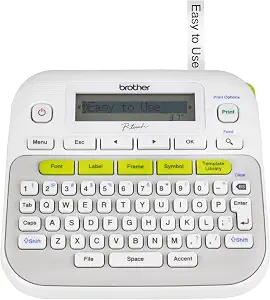 |
| Most Popular A crowd favorite that many people choose with confidence | Phomemo D30 Portable Label Maker | 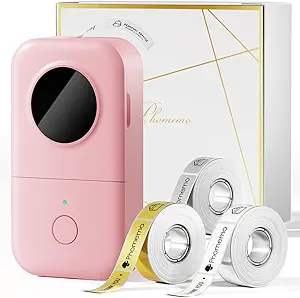 |
DYMO LabelManager 280

| Printer Type | Thermal |
|---|---|
| Label widths | 1/4, 3/8, 1/2 inch |
| Connectivity | USB (PC/Mac) |
| Power | Rechargeable battery |
| Display | LCD |
The DYMO LabelManager 280 is a portable thermal label maker built for quick, everyday labeling tasks at home or in small offices. It uses a familiar QWERTY keyboard and a large graphical LCD so you can type and format text quickly, then print on DYMO D1 tapes in 1/4, 3/8, or 1/2 inch widths. A rechargeable battery and USB connectivity let you work untethered or connect to a PC or Mac to access additional fonts, graphics, and barcodes for more creative or specialized labels. The unit offers multiple font sizes, styles, symbols, repeat printing and simple one-touch formatting keys, and labels are cut with a manual cutter. Practical benefits include durable D1 tapes that resist fading and adhere to many surfaces and the comfort and speed of the keyboard for longer labeling sessions. Limits to consider are its monochrome thermal output and manual tape cutter, which keep the machine focused on text and simple graphics rather than high-resolution images, and the label widths are restricted to standard D1 sizes.
Best for: Buyers who want a fast, easy-to-use handheld label maker for organization and light professional tasks, with the option to customize fonts and graphics from a computer.
Less Ideal for: If you need full-color labels, very high-resolution graphics, or a heavy-duty industrial labeling solution, this consumer handheld model is not the best fit.
- QWERTY keyboard and large LCD make typing and formatting labels fast and comfortable
- Rechargeable battery enables portable, untethered use
- PC/Mac connectivity unlocks extra fonts, graphics, and barcode printing
- Uses durable DYMO D1 tapes that resist fading, heat, and household cleaners
- Monochrome thermal printing limits output to text and simple graphics
- Manual tape cutter requires an extra step compared with automatic cutters
Verdict: Choose the LabelManager 280 if you want a portable, keyboard-friendly label maker that pairs with a computer for extra font and graphic options.
Brother P-touch PTD610BT

| Printer Type | Thermal |
|---|---|
| Maximum tape width | 24mm |
| Resolution | 180 x 360 dpi |
| Connectivity | USB, wireless |
| Built-In memory | Stores up to 90 labels |
The Brother P-touch PTD610BT is a business-focused thermal label printer that prints laminated P-touch TZe tapes up to 24mm wide and connects to computers and mobile devices via Bluetooth or USB. It is typically used for inventory tags, barcodes, asset labels, cable marking, and retail shelf tags where durability and legibility matter. Notable features include a full-color, two-line LCD with print preview, a QWERTY keyboard for on-device creation, the ability to store frequently used labels, and integration with Brother P-touch Editor and the iPrint&Label mobile app for advanced layouts, logos, and barcodes. Practical benefits are crisp high-resolution output for readable barcodes and logos, an automatic cutter that speeds repetitive jobs, and broad template and symbol libraries that make different-font labels and multi-line designs easy. Important limitations are that it relies on Brother TZe tape consumables and is optimized for label printing only, so it is not a general-purpose printer for paper documents. Setup and Bluetooth pairing are straightforward but require using the app or desktop software to unlock full customization.
Best for: Buyers who need a durable, business-grade label maker that produces professional multi-font labels, barcodes, and graphics and who value mobile and PC design workflows for frequent labeling tasks.
Less Ideal for: Casual home users who only need occasional simple labels or people seeking a multi-function office printer that also handles standard paper documents.
- Bluetooth and USB connectivity for printing from mobile devices or PC
- Full-color, backlit LCD with print preview for accurate label layout
- High-resolution thermal printing suitable for crisp barcodes and logos
- Auto cutter and built-in memory for fast repetitive labeling tasks
- Large library of fonts, styles, frames, and symbols for varied label designs
- Requires Brother TZe tape cartridges which adds ongoing consumable cost
- Prints labels only and does not replace general office printers
Verdict: Choose the PTD610BT when you need a fast, durable label maker that produces crisp multi-font labels and barcodes from both mobile devices and a PC.
SUPVAN E11 Label Maker

| Printer Type | Thermal |
|---|---|
| Resolution | 203 dpi |
| Connectivity | Bluetooth |
| Power Wattage | 10 watts |
| Built-In Media | Continuous and die-cut label tapes |
The SUPVAN E11 combines a tactile QWERTY keyboard with Bluetooth app control to handle everyday labeling tasks at home, school, or the office. Use the built-in keyboard for quick on-the-spot labels or design richer layouts from the app where you get 30+ fonts, frames, and icons plus QR/barcode support. It prints via thermal transfer at 203 dpi onto die-cut or continuous laminated tapes that resist water, oil, heat, and scratches, and its minimal 0.2" margin helps reduce tape waste for long or batch labels. The unit is lightweight and rechargeable via USB-C, so it is portable and ready for frequent use without replacement batteries. Limitations include monochrome-only output and a single 203 dpi resolution, so it will not produce fine photo-quality graphics, and labeling depends on SUPVAN-compatible tapes for best results.
Best for: Buyers who want a practical, low-waste label maker that balances fast keyboard printing with app-based design flexibility for home and office organization.
Less Ideal for: People who need color printing, photo-quality labels, or industrial heavy-duty labeling solutions should look elsewhere.
- Fast physical keyboard for quick single labels and Bluetooth app for advanced layouts
- Supports both continuous and die-cut laminated tapes for batch and long labels
- Minimal 0.2" printing margin reduces tape waste
- Rechargeable 1200 mAh battery with USB-C makes it portable and low-maintenance
- Durable laminated labels that are waterproof, oilproof, heat and scratch resistant
- Prints only in monochrome at 203 dpi which limits fine detail and color labeling
- Requires SUPVAN-compatible label tapes for guaranteed compatibility
Verdict: Choose the SUPVAN E11 when you want a compact, rechargeable label maker that saves tape with narrow margins while offering both keyboard speed and app-driven font variety.
NDYIN N12 Label Maker
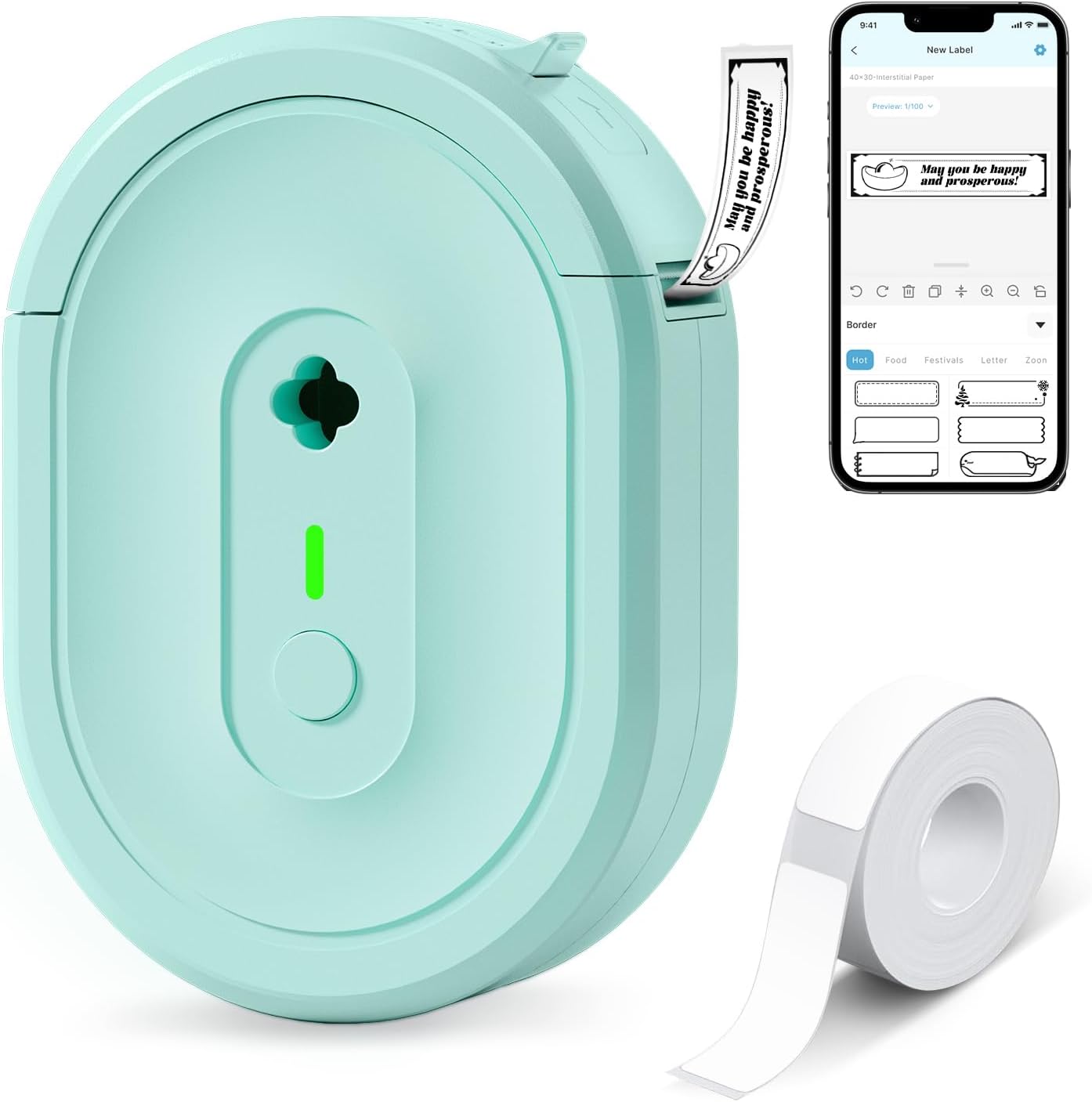
| Printer Type | Thermal |
|---|---|
| Printer Connectivity Type | Bluetooth |
| Maximum Print Resolution Black and White | 203 dots_per_inch |
| Built-In Media | 1*180 Pre-cut white labels(14*40mm), 1*Charging Cable, Setup Guide |
| Specific Uses For Product | Home, Office, School |
The NDYIN N12 is a pocketable thermal label maker designed for quick, app-driven label creation at home, school, or a small office. It pairs over Bluetooth with the free "Nada Print" app to access hundreds of fonts, frames, and symbols, then prints direct-thermal monochrome labels—no ink, toner, or ribbons required. The included starter roll of pre-cut labels and rechargeable battery make it ready to use out of the box, and its small footprint keeps it handy for kitchen jars, cable tags, file labels, and price tags. Print resolution is modest at 203 dpi, so text and barcodes are clear enough for everyday labeling but not photo-quality. Label widths are fixed to common small sizes, which simplifies setup but limits very large labels. Setup relies on the app for sizing and templates, so you need a smartphone or tablet to design and send prints. If you want an inexpensive, portable way to produce neat black labels with a wide selection of type and layout choices, the N12 covers that use case well.
Best for: Buyers seeking an affordable, portable label printer that prioritizes low running costs and lots of built-in font and template options for home, school, or small business labeling.
Less Ideal for: Users who need high-resolution graphics, color labels, wide-format labels, or a standalone printer that works without a smartphone app should look elsewhere.
- Direct thermal printing eliminates ink, toner, and ribbons
- Bluetooth pairing with a mobile app provides access to many fonts, symbols, and templates
- Compact, rechargeable and portable for handheld or countertop use
- Includes starter pre-cut labels and charging cable for immediate use
- Prints only black-and-white at a modest 203 dpi resolution
- Label widths are limited to small fixed sizes
Verdict: If you want a budget-friendly, app-driven portable label maker with many font and template choices and minimal ongoing cost, the N12 is a practical pick.
Brother P-touch PTD210

| Printer Type | Thermal |
|---|---|
| Print media | Labels |
| Display Type | LCD |
| Printer Connectivity Type | USB |
| Paper Size | 12 millimeters |
The Brother P-touch PTD210 is a compact handheld labeler built for straightforward label creation around the home or small office. It prints one- or two-line monochrome labels on 12 mm TZe tape and gives quick access to 14 fonts, 10 styles, 97 frames and more than 600 symbols via one-touch keys and an LCD preview, which reduces misprints. Use the built-in templates to make file labels, gift tags, scrapbook captions, or pantry markers without a PC, or connect via USB for basic PC workflows. It runs on six AAA batteries or an AC adapter and includes a starter laminated TZe tape so you can print immediately. The unit is lightweight and portable, and the tape compatibility with Brother TZe cartridges means labels are durable and easy to source. Limitations to consider are the monochrome-only output and the narrow 12 mm maximum label width, which restricts larger signage and color printing options.
Best for: Buyers who prioritize a reliable, easy-to-use handheld labeler that produces consistent, durable monochrome labels for home organization and small-office tasks.
Less Ideal for: If you need wide, colorful, or large-format signs or a multi-line color printing solution, choose a different model with wider tape and color capability.
- Straightforward one-touch controls with LCD preview to reduce typing errors
- Wide selection of built-in fonts, frames, templates and symbols for quick variety
- Portable power options with included starter TZe laminated tape for immediate use
- USB connectivity for simple PC connection and basic workflows
- Prints only monochrome labels and supports a single maximum tape width of 12 mm
- No backlight on the display which can make editing harder in low light
Verdict: Choose the PTD210 when you want a dependable, portable label maker with lots of built-in fonts and templates for consistent monochrome labeling.
Phomemo D30 Portable Label Maker

| Printer Type | Thermal |
|---|---|
| Printer Output Type | Monochrome |
| Resolution | 203 x 203 DPI |
| Printer Connectivity Type | Bluetooth |
| Print media | Labels |
The Phomemo D30 is a small, rechargeable thermal label maker that links to iOS and Android devices over Bluetooth and prints black text or graphics onto a variety of pre-cut and continuous label tapes. You design labels in the app using built-in fonts, icons, frames and templates, then send jobs wirelessly for quick, inkless output at a modest 203 dpi. The device is lightweight and clearly aimed at home, classroom, and small-business tasks like pantry tags, school name labels, file folders, cable IDs and simple price tags. Practical strengths are the inkless thermal printing that keeps consumable costs down, a wide library of templates and symbols in the app, and the ability to use decorative patterned tapes to add color without color printing. Important limits are monochrome output only (so color requires patterned tapes), a modest 203 dpi resolution that is fine for text but not photographic detail, and small media width so it is not suited to wider labels or heavy-duty industrial tagging.
Best for: Buyers who want an easy, app-driven label maker for home, school or small-business organization that prioritizes creative fonts and templates over high-resolution or color printing.
Less Ideal for: People who need full-color printing, wide-format labels, or photographic-quality print should look at larger desktop or color label printers.
- Bluetooth app control with many templates, fonts, icons and QR/barcode support
- Inkless thermal printing keeps ongoing consumable costs low
- Accepts both continuous and pre-cut label tapes including decorative patterned rolls
- Rechargeable and pocketable for easy portable use
- Prints only monochrome black output, so color requires patterned tapes
- Limited to narrow label widths and 203 dpi resolution
Verdict: If you want a portable, app-driven label maker with lots of fonts and templates and minimal running cost, the Phomemo D30 delivers a versatile, pocketable solution.
Choosing the Right Label Maker with Different Fonts: Key Factors to Consider
Font Variety
Font Variety matters because different tasks call for different typographic approaches. A larger selection of font families lets you choose highly legible sans-serif faces for small labels, condensed styles for limited-width tape, or decorative scripts for gift tags and craft projects.
Beyond the raw count of fonts, look for meaningful differences in weight, width, and character set. Some devices present many nominal options that are actually minor variations; prioritize label makers that include truly distinct styles such as serif, sans, condensed, and monospaced fonts when those choices matter for legibility or design.
Text Formatting Controls
Formatting controls determine how usable the extra fonts are in practice. Essential controls include adjustable font size, bold or outline options, letter and line spacing, rotation, and alignment. Without these, a font that looks good at one size may be unusable at another.
Devices that provide live previews or WYSIWYG editing—either on a built-in screen or in an app—save time and reduce trial-and-error. If you plan to create multi-line labels or use multiple font styles on the same label, ensure the device allows simple layout adjustments and supports combining styles reliably.
Print Clarity and Tape Material
Print clarity is the baseline for any label. The same font can render very differently depending on print resolution and tape material. High-contrast fonts with clean strokes print best on thermal-transfer or laminated tapes.
Consider the types of tape you will use: paper, laminated plastic, or fabric-friendly options. Durable materials and strong adhesion matter when labels will be exposed to moisture, abrasion, or sunlight. A label maker that pairs font choices with appropriate tape types gives you usable, long-lasting results.
Connectivity and Workflow
Connectivity affects how you create labels and whether you can rely on templates or advanced editing. Bluetooth or USB connections to an app or desktop software let you import custom fonts, use keyboard input, or manage multi-label projects efficiently.
If you frequently produce similar labels, look for support for templates and batch printing. Conversely, if you need quick, on-the-spot labeling, a standalone device with easy on-device controls and a clear display may be preferable. Match connectivity to how you will actually work.
Tape Width and Compatibility
Different fonts require different printable widths to remain legible. Narrow tape forces font size down and may require condensed faces; wider tape opens up design options. Confirm the range of tape widths a label maker supports and whether special-width tapes are easy to source.
Compatibility also includes the availability of colors and adhesive types. If color contrast is important for legibility or coding, choose a device that supports multiple tape colors and materials that suit the intended environment.
Ease of Use and Learning Curve
A label maker with many fonts can still be frustrating if the interface is cluttered or confusing. Consider the learning curve for selecting fonts, adjusting sizes, and previewing output. Devices with clear menus, tactile keys, or intuitive apps reduce mistakes and speed production.
Also evaluate battery life or power options, the simplicity of changing tapes, and how easy it is to replace consumables. For occasional users, minimal setup and straightforward operation usually matter more than advanced feature sets.
When Different Fonts Really Matter
Not every labeling task needs a dozen decorative fonts. Focus on situations where font choice affects comprehension or brand presentation. Examples include small text on shelving where legibility prevents misfiling, product tags that need a professional look, or event labels where design contributes to perceived value.
For routine home and office organization, the most valuable font features are clarity at small sizes, a condensed option for narrow tape, and a bold face for emphasis. Decorative fonts are useful for crafts and presentation but should be tested in the intended tape size before large print runs.
- Small or dense labels benefit from high-legibility sans-serif fonts
- Condensed fonts maximize usable characters on narrow tape
- Bold and high-contrast styles improve readability at a distance
Using an App Versus On-Device Editing
Apps generally offer a larger editing canvas, easy typing, and template management. They also make it simpler to import text from other tools or to reuse label layouts. If you create many labels or need consistent branding, an app-controlled workflow often speeds up production.
On-device editing is faster for quick labels and avoids reliance on a phone or computer. The tradeoff is a smaller screen and limited layout flexibility. Choose an on-device model with a clear preview and intuitive controls if you prefer one-off, rapid labeling without additional devices.
- App workflows: better for templates, batch printing, and keyboard input
- On-device: faster for single labels and when mobility is important
- Consider whether you need to import logos or custom fonts
Design Tips for Readable Labels
Select font sizes that leave a comfortable margin on the label to avoid cramped text. Use uppercase sparingly; while it increases prominence, it reduces legibility in longer strings. Favor high-contrast color combinations for the best readability.
When combining fonts, pair a decorative font with a simple sans-serif for supporting information. Keep the number of font styles per label low to maintain clarity. Test-print samples on the chosen tape width before committing to many copies.
- Use larger sizes for short, glanceable labels
- Reserve decorative fonts for headings or accents
- Always preview at actual size when possible
Maintaining Consistency Across Labels
Consistency in fonts, sizes, and alignment helps create a cohesive labeling system. If you manage multiple areas or users, establish a small set of approved fonts and sizes that fit the tape widths you use most. Store templates in the device or app to enforce the standard.
Consider simple naming conventions and color-coding to pair with typographic choices. This reduces cognitive load for people who use the labels and improves long-term organization.
- Create templates for frequent label types
- Limit the font palette to maintain a unified look
- Use color and font weight to indicate priority or category
Tape Types and Environmental Durability
The right tape material ensures printed fonts remain legible over time. Laminated tapes resist moisture and abrasion, which preserves small or thin letterforms. Paper tapes can be fine for indoor use but may not survive damp or high-traffic conditions.
Adhesive strength and temperature resistance matter for labels used on plastic bins, metal shelving, or outdoor surfaces. Choose tape types that match expected exposure to ensure the fonts you select remain readable and the labels stay attached.
- Laminated tapes for durability and outdoor use
- Paper or eco-friendly tapes for short-term indoor labeling
- High-tack adhesives for textured or dusty surfaces
How We Chose the Best Label Maker with Different Fonts
We prioritized label makers that genuinely expand typographic control while remaining easy to use in routine labeling tasks. Key evaluation dimensions included the number and variety of built-in fonts, the device or software controls available for sizing and style, and the flexibility to adjust spacing and alignment. We also examined output quality, including print clarity on different tape widths and material types, because sharp, legible type matters more than decorative fonts in many uses. Usability was a separate filter: we assessed how simple it is to select fonts, preview text, and change sizes or styles on the device or companion app. Connectivity and workflow mattered for buyers who want to set up templates or print from a phone or computer. Durability of printed labels and compatibility with common tape widths were included because a great font is wasted if the label won't last. We excluded devices that offer only two or three trivial font options or those lacking preview capability, since they do not meaningfully solve the problem of typographic variety. The final selections reflect balance between font control, print quality, and everyday ease of use.
Our full evaluation process is outlined in our review methodology.
FAQ
Can I add custom fonts to a label maker?
Often you can add custom fonts when the label maker supports a companion app or desktop software that accepts imports. Not all devices allow this, so check whether the workflow supports uploading or syncing extra font files.
Which tape width should I choose for more font options?
Wider tape gives you more room for larger sizes and decorative fonts. If you frequently need multi-line labels or complex layouts, opt for tape widths that accommodate larger point sizes and clearer letterforms.
Do different fonts affect adhesive performance?
Fonts themselves do not affect adhesion, but very small text or dense layouts can reduce readability if the tape surface wears. Choose durable tape materials for environments where wear could blur fine strokes.
Is it better to use an app or the device controls for typography?
It depends on your workflow. Apps provide easier typing, template storage, and advanced layout tools. On-device controls are quicker for single labels and when you do not want to pair another device.
How can I ensure printed fonts stay legible over time?
Use high-contrast color combinations, choose durable laminated tapes for exposure to moisture or abrasion, and avoid overly thin or ornate fonts for small sizes to maintain legibility.
Final Verdict
When choosing a label maker with different fonts, prioritize readable typefaces and the controls that let you size and space text effectively. Balance the desire for decorative options with the need for clarity on the tape widths you use most. Decide whether you need an app-driven workflow for templates and batch work or a simple standalone device for quick labels. Focus on font variety, print clarity, and tape compatibility to ensure your labels look intentional and last as long as you need them.