
Note: This article contains affiliate links. If you click on these links and make a purchase, we may earn a small commission at no extra cost to you. This helps support our research and content. Read our full affiliate disclosure here.
If you print regularly at home or in a small office, choosing the right laser printer makes everyday tasks faster and less costly. A solid laser printer reduces wait time, lowers per-page expenses, and requires less frequent intervention than many ink-based alternatives. This guide covers a curated shortlist of the top options across performance and running-cost goals so you can match features to workload. Below we evaluate each shortlisted model across speed, print quality, and ownership cost to help you pick the best Laser Printer for your needs.
Top Picks at a Glance
| Best Overall The best all-around choice for most situations | Canon imageCLASS MF462dw II |  |
| Best Quality Built to a higher standard if you want something more solid | HP LaserJet Pro MFP 3101sdw |  |
| Best Value The sweet spot between price and what you get | Xerox B230 Printer |  |
| Best Budget The cheapest option that still gets the job done reliably | HP LaserJet M402N |  |
| Top Rated A top-rated pick with lots of positive feedback | Brother MFC L2710DW |  |
| Most Popular A crowd favorite that many people choose with confidence | Canon imageCLASS LBP6030w |  |
| Best Seller A high-volume bestseller chosen again and again | Brother DCP-L2640DW |  |
Canon imageCLASS MF462dw II
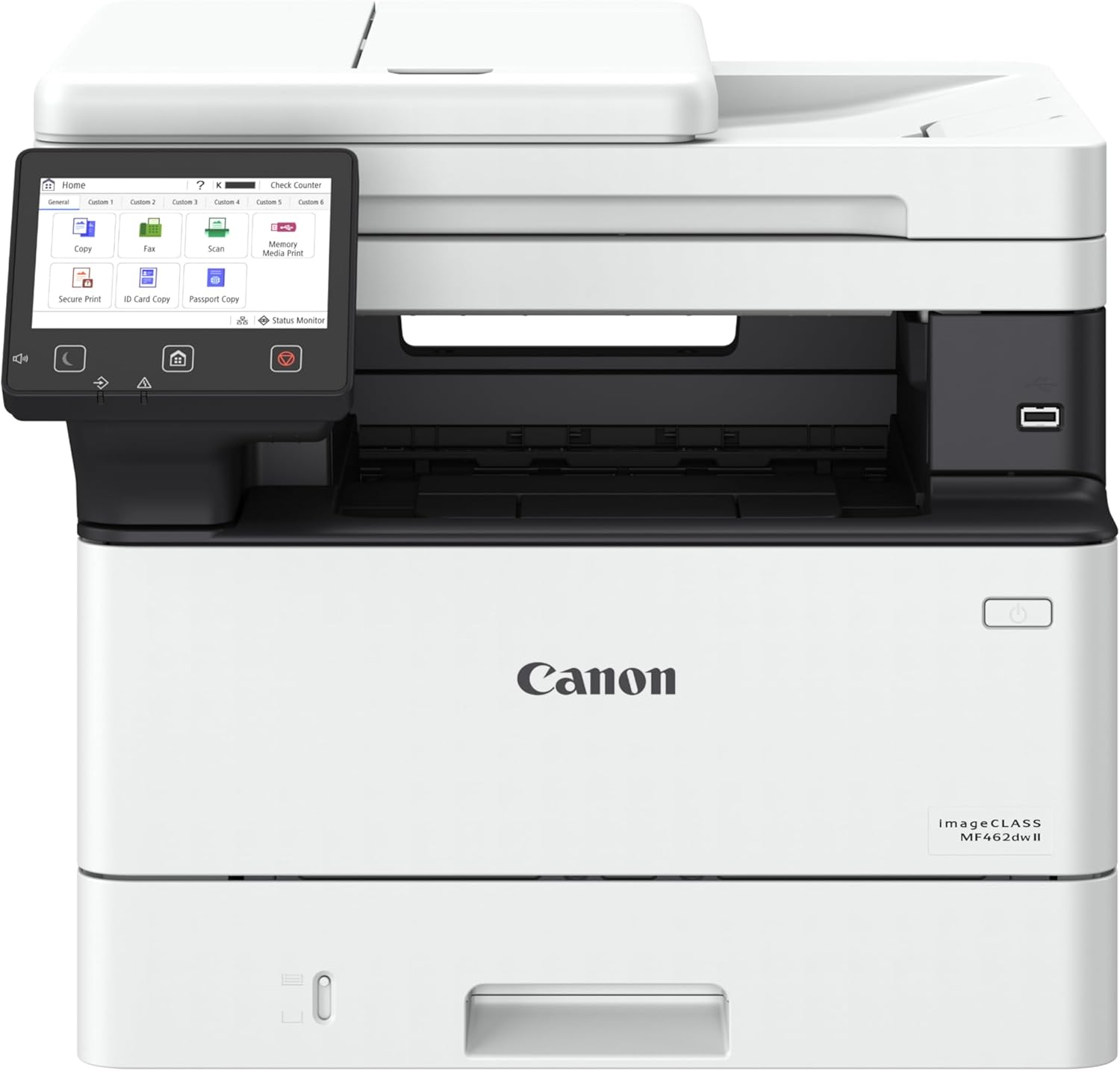
| Printer Type | Laser |
|---|---|
| Maximum B&W Speed | 37 pages_per_minute |
| ADF Capacity | 50-sheet duplex one-pass |
| Standard Paper Capacity | 250-sheet cassette + 100-sheet multipurpose tray |
| Connectivity | Ethernet, Wi-Fi, USB |
The Canon imageCLASS MF462dw II is a fast monochrome laser multifunction designed for small or home offices that need reliable daily printing, scanning, copying and faxing. It prints up to 37 pages per minute and reaches the first page in roughly five seconds, so it keeps pace with moderate office workloads. The 50-sheet one-pass duplex ADF and automatic two-sided printing speed up multi-page scanning and copying tasks, while the 5" color touchscreen and Application Library make common jobs and workflows accessible without diving into menus. Standard paper handling includes a 250-sheet cassette plus a 100-sheet multipurpose tray, with optional expansion available for higher volume needs. Connectivity covers Ethernet, Wi-Fi, USB and mobile printing via Canon PRINT, AirPrint and Mopria. Print quality is sharp for text thanks to up to 1200 x 1200 dpi black resolution, and Canon Toner 070 options offer decent page yields. Expect typical laser maintenance like toner replacement and a relatively large footprint compared with compact home printers, but for steady black-and-white office work this model balances speed, convenience and dependable output.
Best for: Buyers who need a dependable, workhorse monochrome MFP for steady office printing, scanning and copying with simple touchscreen controls and mobile connectivity.
Less Ideal for: Users who require color printing, very compact desktop space, or primarily occasional home printing should consider other models.
- Fast monochrome print speed up to 37 ppm for efficient batch printing
- One-pass duplex 50-sheet ADF and automatic two-sided printing for quicker multi-page scans/copies
- 5" color touchscreen with customizable Application Library simplifies frequent tasks
- Standard 250-sheet cassette plus 100-sheet multipurpose tray with optional expandable capacity
- Multiple connectivity options including Ethernet, Wi‑Fi, USB and mobile printing support
- Large physical footprint and heavier than compact consumer models
- Monochrome-only output limits use for color documents or marketing materials
Verdict: A strong, no-nonsense monochrome MFP that delivers fast text printing and efficient duplex scanning for small offices that prioritize speed and reliability.
HP LaserJet Pro MFP 3101sdw

| Printer Type | Laser |
|---|---|
| Printer Output Type | Monochrome |
| Maximum Print Resolution Black and White | Up to 1200 x 1200 dpi |
| B&W Pages per Minute | 40 |
| Maximum Sheet Capacity | 250 |
The HP LaserJet Pro MFP 3101sdw is a business-focused monochrome laser all-in-one that handles printing, scanning and copying for small teams. It delivers high-speed black-and-white output—rated up to 35–40 ppm depending on spec listings—with first-page times around seven seconds, so it keeps short print runs and multi-page jobs moving. The unit includes a 250-sheet input tray and a 50-sheet automatic document feeder for batch scanning and duplex copying, and its 1200 x 1200 dpi resolution produces crisp text and simple graphics. Connectivity covers Ethernet, USB, Wi‑Fi, AirPrint and Mopria, plus mobile app control for remote printing and basic job management. Practical benefits are fast throughput, reliable factory-quality laser output, and features that reduce manual handling for shared office workflows. Limitations include monochrome-only output and a focus on business document printing rather than photo or color jobs, and the printer requires HP chips in cartridges which restricts third-party toner options for some buyers.
Best for: Buyers who prioritize fast, reliable black-and-white output and streamlined scanning/copying for small office workflows and shared printer setups.
Less Ideal for: Those who need color printing, photo-quality output, or a printer that accepts third-party non-chipped cartridges without restriction.
- Fast monochrome printing suitable for busy small teams
- Automatic duplexing and a 50-sheet ADF for efficient two-sided scanning and copying
- 250-sheet input capacity reduces frequent paper refills for moderate workloads
- Multiple connectivity options including Ethernet, Wi‑Fi, AirPrint and mobile app control
- 1200 x 1200 dpi resolution for sharp text and business graphics
- Monochrome only so it cannot produce color prints or photos
- Requires HP-chipped cartridges which limits use of third-party toner options
Verdict: Choose this model when you need a fast, dependable monochrome all-in-one that keeps small teams productive with high-speed printing and efficient scanning.
Xerox B230 Printer
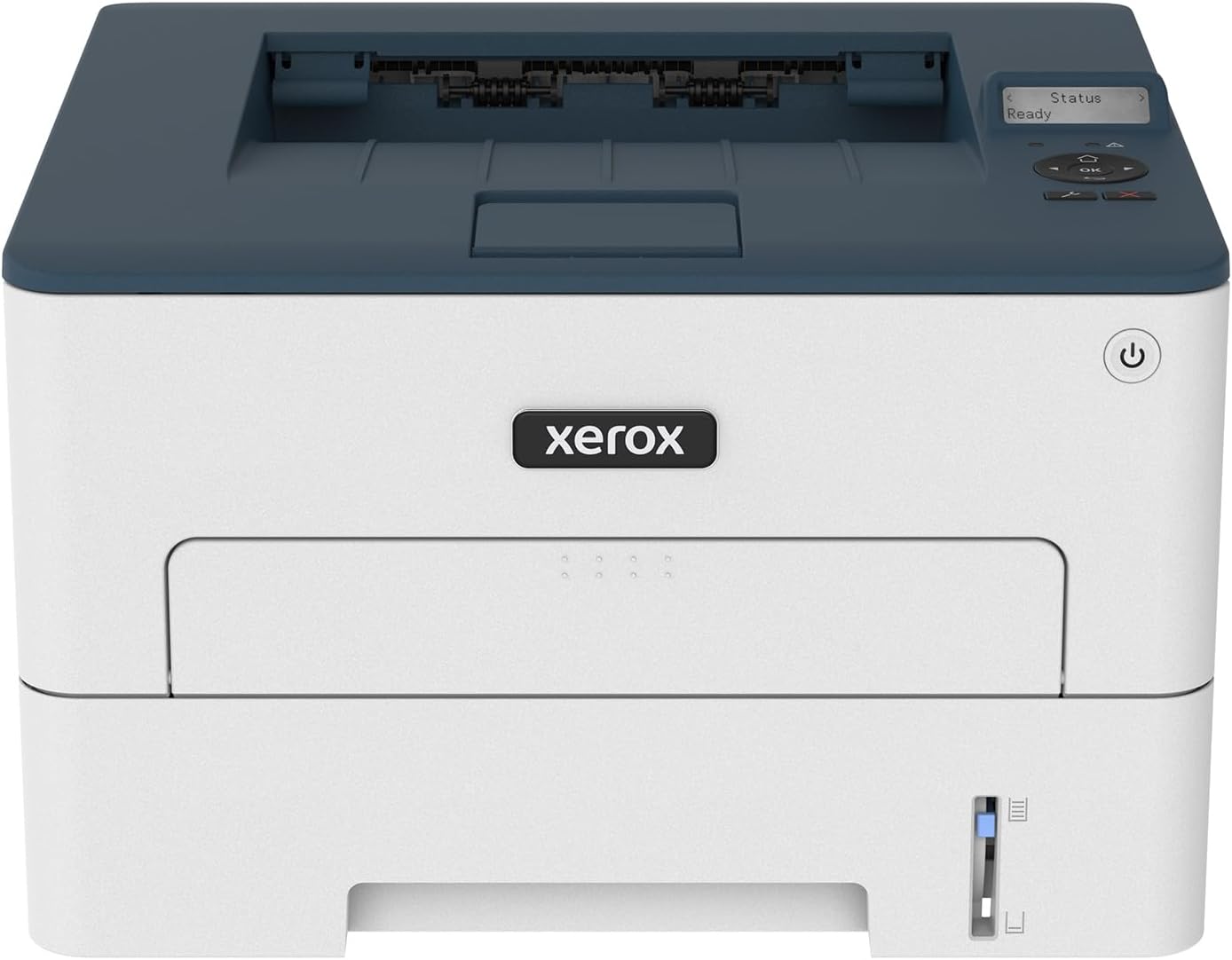
| Printer Type | Laser |
|---|---|
| Print Speed | 36 pages per minute |
| Connectivity | USB, Wi-Fi, Ethernet |
| Maximum Sheet Capacity | 250 |
| Duplex | Automatic |
The Xerox B230 is a no-frills black-and-white laser built for small business and home office use, offering up to 36 ppm print speed and automatic two-sided printing to keep routine jobs moving. It connects via Wi‑Fi, Wi‑Fi Direct, USB and Ethernet and supports mobile printing through Apple AirPrint, Mopria and Chromebook, so printing from phones and laptops is straightforward. The printer includes a 250-sheet standard input capacity, a 1 GHz dual-core processor with 256 MB memory for steady throughput, and a 2400 x 2400 dpi resolution that produces crisp text. Setup is intended to be quick using Xerox Smart Start and mobile pairing, and the device includes basic security features and remote control options for shared environments. Practical benefits include low running complexity, built-in duplexing to save paper, and compatibility with Xerox toner recycling. Limitations are its monochrome-only output and modest memory, which may slow large or complex print jobs compared with higher-tier office models.
Best for: Buyers seeking a compact, reliable monochrome laser that minimizes fuss and operating cost for a small office or home-office workflow.
Less Ideal for: Anyone needing color printing, high-volume workgroup performance, or advanced finishing features should look at higher-tier or color models instead.
- Fast monochrome printing up to 36 pages per minute for quick document output
- Built-in Wi‑Fi, Ethernet and mobile printing (AirPrint, Mopria, Chromebook) for easy connectivity
- Automatic duplexing reduces paper use and supports legal-sized two-sided prints
- 250-sheet tray keeps refill frequency low for small teams
- High 2400 x 2400 dpi resolution yields sharp text and fine line detail
- Monochrome only, so it cannot print color documents or graphics
- Limited memory and basic processor may struggle with very large or graphics-heavy print jobs
Verdict: A compact, practical monochrome laser that delivers fast, reliable two-sided printing and simple mobile connectivity for small offices.
HP LaserJet M402N

| Printer Type | Laser |
|---|---|
| Printer Output Type | Monochrome |
| B&W Pages per Minute | 40 pages_per_minute |
| Maximum Print Resolution Black and White | 1200 x 1200 dpi |
| Printer Connectivity Type | Ethernet, USB |
The HP LaserJet M402N is a straightforward office-focused monochrome laser printer that delivers fast, reliable black-and-white prints for small teams or home offices. It prints up to 40 pages per minute and ships with an introductory toner so you can start printing right away; paper handling includes a single tray with a 250-sheet maximum and support for A4 media. Connectivity is wired only via Ethernet or USB, which keeps setup simple and stable for networked or direct PC printing but means no built-in Wi-Fi. The printer offers 1200 x 1200 dpi resolution for sharp text and basic graphics and uses HP toner cartridges including optional high-yield replacements for lower running costs. Practical benefits include quick first-page times, an LED control panel, and security features that protect the device from boot to shutdown. Limitations are the lack of duplex automatic printing and absence of wireless printing, so users who need two-sided output or mobile/Wi-Fi printing will need a different model or manual duplex workarounds.
Best for: Buyers prioritizing a dependable, fast monochrome printer on a budget who need stable wired network printing and low per-page costs.
Less Ideal for: Users who require built-in wireless/mobile printing or automatic duplexing for frequent two-sided documents should consider other options.
- Fast print speed up to 40 ppm for high-volume black-and-white jobs
- 1200 x 1200 dpi resolution yields crisp text and clear mono graphics
- 250-sheet input capacity reduces how often you refill paper
- Wired Ethernet and USB keep network setup stable and reliable
- Ships with starter toner and supports high-yield cartridges to lower running costs
- No built-in Wi-Fi for wireless or mobile printing
- Simplex-only printing so two-sided output requires manual duplexing
Verdict: A no-frills, high-speed monochrome laser built for budget-conscious offices that need reliable wired printing and low running costs.
Brother MFC L2710DW

| Printer Type | Laser |
|---|---|
| Printer Output Type | Monochrome |
| Maximum Print Resolution Black and White | 2400 x 600 dpi |
| Maximum Sheet Capacity | 250 |
| Printer Connectivity Type | Wi-Fi, wired |
The Brother MFC L2710DW is a compact monochrome laser all-in-one built for steady home or small-office use. It handles print, copy, scan and fax tasks, offers an automatic duplexer for two-sided printing, and supports wired and Wi-Fi networking plus mobile printing standards like AirPrint and Google Cloud Print. The 250-sheet capacity and a manual feed slot let you run longer jobs or switch to envelopes and cardstock without fuss, while the 64MB memory and 30 ppm class print speed keep basic document workflows moving. Setup includes a starter toner and a long-life drum, and the printer is compatible with Brother TN730/TN760 cartridges or Brother Refresh subscription for automated toner delivery. Trade-offs are predictable: it is a monochrome device only, so no color printing, and the 64MB memory and modest feature set mean it is aimed at reliable everyday document work rather than heavy-duty, high-volume production or advanced finishing features.
Best for: Buyers who prioritize a reliable, no-nonsense monochrome printer for steady home or small-office document work and value predictable uptime and simple network printing.
Less Ideal for: Users who need color printing, advanced finishing, or very high-volume production-level throughput should consider other models built for those demands.
- Automatic duplexing for two-sided documents
- Wired and Wi-Fi networking with mobile print support
- 250-sheet capacity plus manual feed for flexible media handling
- Includes starter toner and long-life drum for immediate use
- Compatible with Brother toner subscription for convenient resupply
- Monochrome only so no color printing
- Modest memory and feature set not aimed at very high-volume production
Verdict: A dependable compact monochrome all-in-one that delivers consistent duplexed document printing and simple networked setup for homes and small offices.
Canon imageCLASS LBP6030w

| Printer Type | Laser |
|---|---|
| Printer Output Type | Black & White |
| Maximum Copy Speed Black and White | 19 pages_per_minute |
| Printer Connectivity Type | Wi-Fi |
| Compatible Cartridge | Canon Genuine Toner 125 (1,600 page yield) |
The Canon imageCLASS LBP6030w is a small, single-function monochrome laser printer meant for everyday document printing in a home or small office. It prints up to 19 pages per minute with an 8 second first-page-out time and connects via Wi-Fi or USB, so you can print from a laptop or compatible mobile device without a wired connection. The 150-sheet input capacity and support for Canon Genuine Toner 125 (approximately 1,600-page yield) make it suitable for light to moderate monthly volumes, and Energy Saver mode drops power use to under 2 watts. Its compact footprint helps it fit on a shelf or tight desk space. Notable limitations are the lack of duplexing and that it is print-only with no scanning or copying functions, so it is not a full multifunction solution. Also resolution tops out at 600 dpi which is fine for text but not for high-detail graphics or photo work. Setup and app control are straightforward for typical home office tasks but heavy users will want a higher-capacity or duplex model.
Best for: Buyers who prioritize reliable, compact monochrome printing for everyday documents and want a simple wireless printer with a proven brand and real-world user feedback.
Less Ideal for: Users who need two-sided printing, scanning or high-volume enterprise workloads should consider a duplex multifunction or higher-capacity laser instead.
- Fast monochrome printing up to 19 ppm for quick document output
- Compact, space-saving design that fits small desks or shelves
- Wireless and USB connectivity for printing from laptops and mobile devices
- 150-sheet input capacity suitable for routine home or small office print runs
- Energy Saver mode keeps standby power consumption very low
- No automatic duplex printing so two-sided jobs require manual reloading
- Print-only device with no scanning, copying, or fax functions
- 600 dpi resolution limits photo or high-detail graphic quality
Verdict: A compact, no-frills monochrome laser that delivers reliable, fast document printing for home and small office users who value simplicity and wireless convenience.
Brother DCP-L2640DW

| Printer Type | Laser |
|---|---|
| B&W Pages per Minute | 36 pages_per_minute |
| Auto Document Feeder | 50 pages |
| Maximum Sheet Capacity | 250 |
| Printer Connectivity Type | Ethernet, USB, Wi-Fi |
The Brother DCP-L2640DW is a small-footprint monochrome laser 3-in-1 designed for busy home offices and small businesses that need reliable black-and-white output. It prints up to 36 ppm, offers automatic duplex printing to save paper, and includes a 50-sheet auto document feeder for faster multi-page scanning and copying. Connectivity options are flexible with dual-band Wi-Fi, Ethernet, and USB so multiple users can share the device, and the Brother Mobile Connect app adds remote printing and supply management. The built-in 250-sheet tray and toner-saver mode help reduce interventions during higher-volume jobs, and the printer accepts standard and high-yield TN830 cartridges for predictable replacement routines. Downsides to consider are that it is mono only, so no color printing, and it is a bit heavier and bulkier than compact consumer ink models, which matters if desk space is limited. For buyers who prioritize dependable, fast black-and-white printing and straightforward connectivity, this model delivers solid performance with practical business features.
Best for: Buyers who want a dependable, business-focused black-and-white printer that handles steady volumes with simple network sharing and low-maintenance operation.
Less Ideal for: Users who need color printing, very small portable printers, or primarily print occasional photos and graphics.
- Fast monochrome printing up to 36 pages per minute for quick document output
- 50-sheet auto document feeder and 250-sheet tray reduce manual handling
- Automatic duplexing cuts paper use and supports two-sided workflows
- Multiple connectivity options including dual-band Wi-Fi, Ethernet, and USB
- Supports high-yield TN830XL toner for lower running costs and less frequent replacements
- Prints only in black and white so no color output for graphics or photos
- Relatively heavy and larger footprint compared with consumer inkjet models
Verdict: A reliable, fast monochrome multifunction laser that suits risk-averse buyers who want proven, low-maintenance black-and-white printing for small offices.
Choosing the Right Laser Printer: Key Factors to Consider
Print Speed and Throughput
Print speed, measured in pages per minute, directly affects how quickly you can complete print jobs in a busy household or office. Faster PPM reduces wait times for multi-page documents and decreases bottlenecks when multiple users share the device.
Throughput also ties to the device's processor and memory. Complex print jobs with many pages or embedded graphics can slow older or underpowered printers, so consider both rated speed and real-world performance under multi-page, mixed-content loads.
Toner Yield and Ongoing Cost
Toner yield and cost per page determine the long-term expense of operating a laser printer. A low-cost upfront printer with expensive consumables can be far more costly over months of regular use.
Look for clear yield figures for standard and high-capacity toner cartridges and consider whether a model supports high-yield or third-party toner options. Also account for occasional maintenance parts that can affect ownership cost.
Duty Cycle and Expected Reliability
A printer's monthly duty cycle indicates the maximum recommended monthly page volume the manufacturer designed it to handle. Choosing a device with a duty cycle well above your typical monthly usage reduces wear and the chance of premature failure.
Reliability is influenced by build quality and the design of moving parts. Devices intended for higher-volume environments often include more robust paper paths and fewer jams, which matters if you want low-maintenance operation.
Connectivity and Mobile Printing
Connectivity affects how easily you can print from multiple devices. Ethernet is essential for shared office setups, while Wi-Fi and Wi-Fi Direct enable wireless printing from laptops, tablets, and phones.
Look for support for standard mobile printing protocols and for straightforward setup tools. Advanced network features like user authentication or secure printing are worth considering for business environments.
Paper Handling and Media Support
Paper handling features such as input tray capacity, automatic duplexing, and multipurpose trays determine how much manual intervention your workflow requires. Larger input trays reduce refill frequency, and duplexing saves paper for two-sided documents.
Media support matters if you occasionally print envelopes, labels, or heavier paper stocks. Confirm the supported sizes and thicknesses to avoid printing errors or jams with specialty media.
Print Quality for Text and Graphics
Most laser printers excel at crisp text, but models vary in rendering fine details, grayscale gradients, and simple graphics. If your work includes invoices, charts, or black-and-white images, inspect sample output or manufacturer specifications for resolution and recommended use cases.
High-quality text reproduction improves legibility of small fonts and dense documents, which is important for contracts, legal forms, and reports.
Home Office Vs Small Business Needs
Deciding between a home-office and a small-business laser printer comes down to three main differences: monthly volume, required features, and resilience. Home offices typically need moderate monthly output, modest input capacity, and straightforward connectivity. Small businesses benefit from higher duty cycles, larger trays, and more advanced networking.
If you occasionally print large documents, prioritize a model with a higher duty cycle and larger input capacity. For shared environments, look for robust network features and administrative controls to manage access and track usage.
- Home office: lower duty cycle, compact footprint, simple wireless setup
- Small business: higher duty cycle, larger trays, secure network options
- Both: prioritize clear toner-yield information to estimate running cost
Estimating Real-World Running Costs
Estimating ongoing costs requires combining toner yield data with expected monthly volume. Manufacturers publish cartridge yields that let you calculate a per-page toner cost. Factor in occasional maintenance items and the potential need for higher-capacity cartridges if your monthly volume spikes.
To make a simple estimate, divide the cartridge cost by its published yield to get a per-page toner cost, then multiply by your expected monthly pages. This gives a practical sense of long-term expenses and helps compare models beyond the purchase price.
- Check both standard and high-yield cartridge options
- Account for duplexing to reduce paper expenses
- Include possible maintenance parts in multi-year cost estimates
Setup, Drivers, and Cross-Platform Support
Look for printers with well-supported drivers for your operating systems and easy setup utilities. Modern models often provide native support for common mobile printing protocols and offer web-based admin tools for networked devices. Confirm driver availability for all desktop and mobile platforms in your environment.
For mixed-OS environments, consider printers that support standard protocols like IPP, AirPrint-like features, or vendor-neutral drivers to minimize compatibility issues.
- Verify driver support for all computers and mobile devices
- Prefer printers with intuitive web or app-based setup
- Consider firmware update processes and network management tools
Maintenance and Troubleshooting Tips
Routine maintenance keeps a laser printer running smoothly. Regularly check and clean paper paths, remove stuck paper carefully, and replace consumables promptly to avoid degraded output. Use manufacturer guidance for resetting counters or replacing maintenance kits when recommended.
If you experience repeated jams or inconsistent output, narrow troubleshooting to paper quality, tray settings, and firmware updates before assuming a hardware fault. Keeping the printer in a stable, dust-minimized environment helps reduce common issues.
- Use recommended paper weights and keep trays adjusted
- Store spare toner properly and replace before yields drop critically
- Perform periodic firmware updates to address known issues
Security Considerations for Networked Printers
Networked printers can be an overlooked attack surface. For shared or business environments, enable secure printing features such as user authentication, encrypted connections, and administrative access controls. Disable unnecessary services and restrict management interfaces to trusted networks.
Regularly apply firmware updates to address security vulnerabilities and review usage logs if available. Use network segmentation or VLANs in larger setups to isolate printing functions from sensitive systems.
- Enable encryption for wireless connections
- Use access controls for shared devices
- Keep firmware current to reduce exposure
How We Chose the Best Laser Printer
We focused on practical, measurable attributes that matter to people who rely on laser printers for frequent or high-volume printing. Key evaluation criteria included print speed in pages per minute, because throughput determines whether a device keeps up with busy workflows; duty cycle and reliability indicators, which predict how long a machine will operate before service is needed; and per-page running cost, calculated from toner yield and recommended consumables. We also weighed print quality for text and simple graphics, especially for business documents, and connectivity options such as wired network and modern wireless features that affect setup and daily use. Excluded devices were compact home inkjets and specialty wide-format printers that do not target standard office document printing. We also excluded models that lack clear toner-yield specs or that depend on proprietary consumable arrangements that obscure real running costs. The remaining selections reflect a balance of speed, long-term cost, build durability, and connectivity suited to frequent document printing.
Our full evaluation process is outlined in our review methodology.
FAQ
How do I calculate the cost per page for a laser printer?
Divide the toner cartridge cost by its published page yield to get a per-page toner cost. Add an estimated per-page portion for paper and occasional maintenance parts for a fuller operating-cost picture.
What monthly volume should I expect from a typical laser printer?
Expect moderate models to handle a few hundred pages per month comfortably, while office-grade devices are designed for thousands. Match the printer's rated monthly duty cycle to your average and peak monthly volumes to avoid overworking the machine.
Is duplexing important for laser printers?
Automatic duplexing reduces paper use and is valuable for two-sided reports and manuals. It also speeds workflow by printing both sides without manual intervention, which is helpful in shared environments.
Can laser printers print on envelopes and labels?
Many laser printers support envelopes and labels, but you should check supported media sizes and recommended paper weights. Using media outside those specs can increase the chance of jams or poor print quality.
How often do I need to replace maintenance kits or rollers?
Replacement intervals vary by model and usage but are typically measured in tens of thousands of pages. Replace rollers and maintenance kits according to the manufacturer's schedule or when you observe more frequent jams or decreased print quality.
Are wireless laser printers as reliable as wired ones?
Wireless models can be reliable, but stability depends on your Wi-Fi network. For shared office setups, wired Ethernet connections generally offer more consistent performance and easier centralized management.
Final Verdict
Prioritize the factors that affect your day-to-day workflow: match rated monthly duty cycle to your expected volume, choose a model with clear toner-yield data to predict running costs, and select the connectivity and tray capacity that fit how you work. Tradeoffs are inevitable; faster machines with larger trays usually cost more to buy but can lower long-term interruption and labor. Focus on realistic monthly costs and reliable network support when choosing. That approach helps you pick a Laser Printer that balances speed, durability, and operating cost for dependable document production.