
Note: This article contains affiliate links. If you click on these links and make a purchase, we may earn a small commission at no extra cost to you. This helps support our research and content. Read our full affiliate disclosure here.
Picking the right printer for labels changes how smoothly everyday labeling tasks run, whether you are organizing inventory, shipping packages, or making identification tags. You want crisp, legible text and graphics, minimal jams, and simple connectivity so labels print reliably when you need them. This guide looks at a short list of top-performing printers for labels across common home and small-business needs. We evaluated usability, output quality, and connection options so you can find a solution that fits the way you work. Read on for quick takeaways and the criteria used to pick these top options.
Top Picks at a Glance
| Best Overall The best all-around choice for most situations | Brother QL-810W Label Printer |  |
| Best Quality Built to a higher standard if you want something more solid | Primera LX500 |  |
| Best Value The sweet spot between price and what you get | Rollo USB Shipping Label Printer X1038 |  |
| Best Budget The cheapest option that still gets the job done reliably | NDYIN N12 Label Maker |  |
| Top Rated A top-rated pick with lots of positive feedback | HKHKPI N40 4×6 Label Printer |  |
| Most Popular A crowd favorite that many people choose with confidence | JADENS JD268BT 4×6 Label Printer |  |
| Best Seller A high-volume bestseller chosen again and again | Nelko P21 Label Maker |  |
Brother QL-810W Label Printer

| Printer Type | Thermal |
|---|---|
| Connectivity | USB, Wireless |
| Maximum Print Resolution Black and White | 300 dpi |
| Print Speed B&W | 110 pages_per_minute |
The Brother QL-810W is a thermal label printer designed to produce address, shipping, file-folder, and badge labels quickly from a computer or mobile device. It connects over USB or built-in wireless and works with Brother s DK rolls, including a black/red roll for two-color labels, and includes starter rolls and P‑touch editor software. In practice it shines when you need many labels fast — Brother quotes up to 110 standard address labels per minute at 300 dpi — and the automatic cutter and app control make batch jobs and mobile printing straightforward. Because it uses direct thermal media there is no ink or toner to replace, but you must use Brother-compatible DK rolls for reliable results. The printer is compact and easy to integrate on a small desk or counter, and developer SDKs help with system integration. Limitations are the reliance on proprietary label rolls and the simplex-only output, so it is a focused labeling tool rather than a general-purpose office printer.
Best for: Buyers who need a dedicated, high-throughput label printer for shipping, office organization, or retail tasks and value fast mobile or networked printing with simple setup.
Less Ideal for: Users who want a multi-function office printer for documents or who prefer open media compatibility with third-party continuous label stock.
- Very fast label throughput up to 110 address labels per minute for batch jobs
- Built-in Wi‑Fi and USB let you print from smartphones, tablets, Macs, and PCs
- Automatic cutter and included starter DK rolls simplify daily use
- Direct thermal printing requires no ink or toner and works with Brother DK media
- Supports two-color black/red printing with compatible DK-2251 rolls
- Requires Brother DK label rolls rather than generic media
- No toner/ink means labels can fade with heat or sunlight over time
Verdict: Pick the QL-810W when you need a compact, ultra-fast thermal label printer that handles high-volume address and shipping jobs from mobile or desktop devices.
Primera LX500

| Printer Type | Inkjet |
|---|---|
| Maximum print Resolution Color | 4800×1200 dpi |
| Maximum Media Size | 4" x 24" |
| Compatible Cartridge | Single tri-color dye Ink cartridge |
| Printer Connectivity Type | USB |
The Primera LX500 is a roll-fed inkjet label printer built for small to medium runs where color accuracy and detail matter. It prints at up to 4800 x 1200 dpi with a single dye-based tri-color cartridge, produces 16.7 million colors, and handles labels from 0.5" square up to 4" x 24". The built-in cutter and starter roll make it ready for immediate use, and Bartender Ultralite Primera Edition software plus USB connectivity cover basic workflow needs. In practice the LX500 delivers sharp, photo-quality product, retail, and promotional labels and is easy to set up on a single computer via USB. Expect reliable performance for batch printing but plan for ongoing consumable costs from dye ink and label media. It lacks multiple USB ports and modern wireless connectivity, so integration into larger networks requires a connected PC. For buyers focused on print quality and flexible media sizes, the LX500 is a capable, dependable option; users needing networked or high-speed industrial throughput should consider other solutions.
Best for: Buyers who prioritize high-quality, full-color label printing for small to medium runs and want a compact, ready-to-use desktop solution focused on print fidelity.
Less Ideal for: Organizations that need networked printers, multi-user shared access, or very high-volume industrial throughput should look at network-enabled or production-class label printers instead.
- Very high print resolution up to 4800 x 1200 dpi for photo-quality color labels
- Built-in cutter and starter roll let you print finished labels immediately
- Wide media flexibility from 0.5" x 0.5" up to 4" x 24"
- Includes Bartender Ultralite Primera Edition software for label design
- Limited connectivity with only a single USB 2.0 port and no built-in Wi-Fi
- Uses dye-based single tri-color cartridge which can raise ink costs for heavy color use
Verdict: Choose the LX500 when you need compact, photo-quality full-color labels and flexible media sizes for small to medium print runs.
Rollo USB Shipping Label Printer X1038

| Printer Type | Thermal |
|---|---|
| Print Resolution | 203 x 203 DPI |
| Maximum Media Size | 4.1 Inch Width |
| Paper Size | 4 inch x 6 inches |
| Hardware Interface | USB |
The Rollo USB Shipping Label Printer is a compact direct-thermal 4×6 printer built for frequent label work without ink or toner. It connects over USB to Windows and Mac systems and prints standard shipping, barcode, and custom stickers using labels from about 1.57 to 4.1 inches wide. Notable features include auto label detection, a 203 DPI thermal print head for clear scannable text and barcodes, and a high throughput claim of roughly one 4×6 label per second, which makes batching shipments fast. The unit accepts both roll and fan-fold media and ships with a power adapter and USB cable so it is ready for basic setup. Because it is a direct thermal printer, you avoid ink costs but labels are heat-sensitive and may darken over time if exposed to heat or sunlight. The USB-only wired interface means it must stay near a computer unless you add a network bridge, and its footprint is best suited to desktop or small packing-station setups rather than mobile use. For sellers who prioritize speed and low running costs, the Rollo is a practical choice; for those needing wireless printing or long-term archival labels, consider alternatives.
Best for: Buyers who want a no-nonsense, fast label printer to cut per-label cost and speed up shipping workflows at a packing station.
Less Ideal for: People who need wireless or mobile printing from phones or who require long-life archival labels that resist heat and sunlight.
- Inkless direct thermal printing eliminates ongoing ink or toner purchases
- Auto label detection supports multiple label widths without frequent adjustments
- 203 DPI print head produces clear, scannable barcodes and text
- Accepts roll and fan-fold 4×6 media so you can use common shipping labels
- Includes power adapter and USB cable for straightforward setup
- Wired USB connectivity only, no built-in Wi‑Fi or Bluetooth
- Direct thermal prints are sensitive to heat and may fade or darken over time
Verdict: A fast, inkless desktop label printer built to speed up shipping and save on consumables for practical small-business workflows.
NDYIN N12 Label Maker
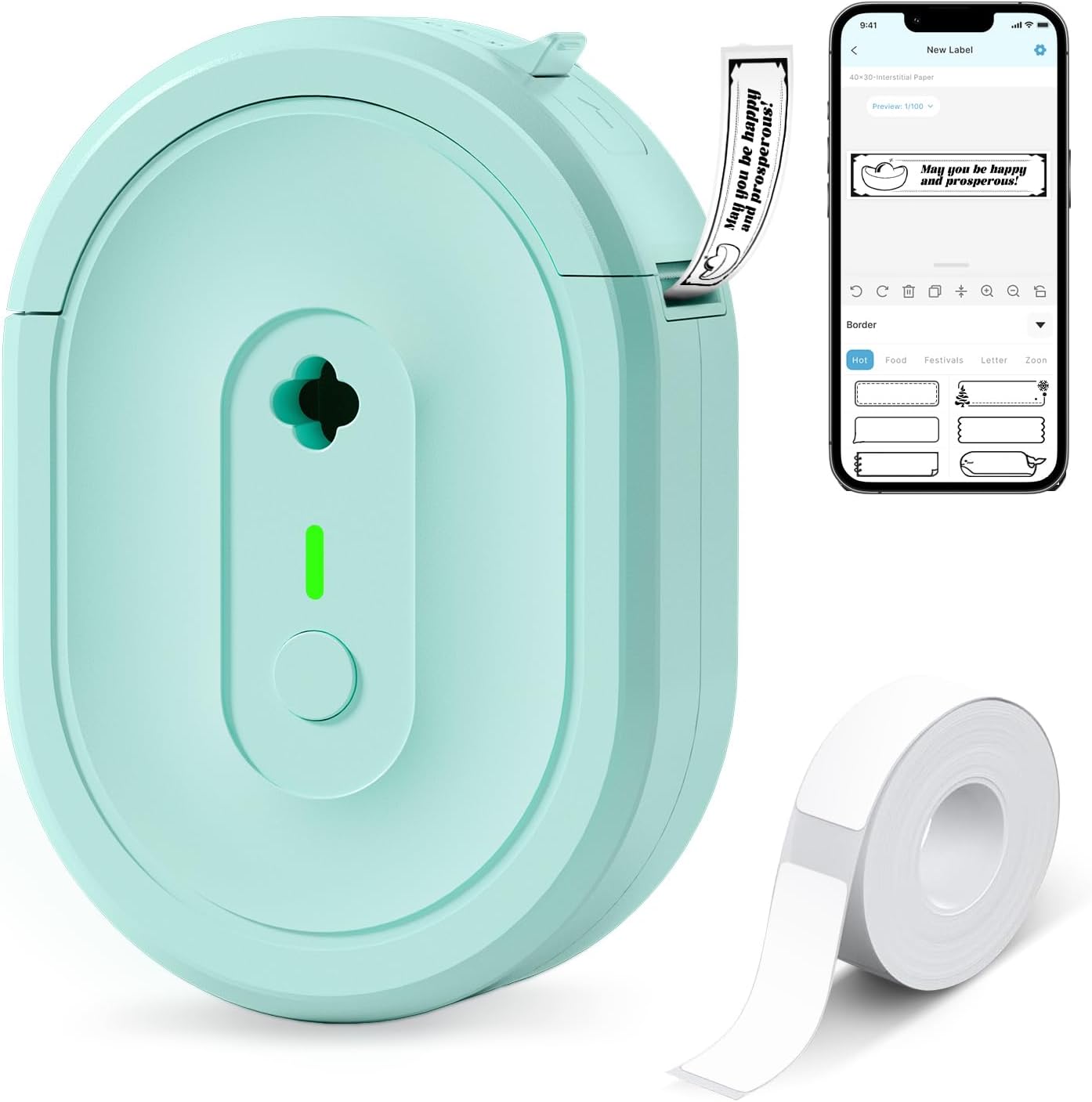
| Printer Type | Thermal |
|---|---|
| Printer Connectivity Type | Bluetooth |
| Resolution | 203 x 203 dpi |
| Built-In Media | 1*180 Pre-cut white labels (14x40mm) |
| Battery | Rechargeable lithium battery |
The NDYIN N12 is a small, portable thermal label printer that connects to phones and tablets over Bluetooth and prints direct-thermal black text onto pre-cut or roll labels. You design labels in the free Nada Print app using templates, fonts, symbols, and frames, then send them to the N12 for quick one-color output; it includes a rechargeable battery and a charging cable so it is convenient to carry between home, office, and classroom tasks. The unit ships with a set of pre-cut labels and supports multiple fixed label widths, making it suitable for pantry jars, cable tagging, file folders, price tags, and small business labeling. Because it is thermal-only, print is limited to black and resolution tops out at 203 dpi, so extremely fine graphics or photo-quality prints are not possible. The compact form and lack of ink or ribbon lower ongoing costs, but label size options are fixed in the app so flexible custom roll lengths require checking compatibility before buying.
Best for: Buyers who want an affordable, portable label printer for everyday organization, school projects, or small-business tags and prefer low ongoing costs over photo-quality output.
Less Ideal for: Users who need high-resolution, multicolor labels or fully customizable continuous-roll sizing for complex graphics should look at higher-end models.
- Direct thermal printing removes the need for ink, toner, or ribbons, lowering running costs
- Bluetooth connection and Nada Print app with many templates and fonts for quick label design
- Rechargeable battery and compact size make it portable for home, school, and small business use
- Includes starter pre-cut labels and a charging cable out of the box
- Print is monochrome only and limited to 203 dpi, so fine graphics and photo-quality prints are not supported
- Label widths and lengths are fixed through the app, limiting custom sizing without compatible media
Verdict: A budget-friendly, portable Bluetooth label printer that cuts ongoing costs with direct thermal printing while offering easy label design through a mobile app.
HKHKPI N40 4×6 Label Printer

| Printer Type | Thermal |
|---|---|
| Print Resolution | 203 x 203 dpi |
| Maximum Media Size | 4 x 6 inches |
| Printer Connectivity Type | Bluetooth, USB |
| Maximum Sheet Capacity | 100 |
The HKHKPI N40 is a small, portable thermal label printer built for shipping and general labeling tasks. It prints 4×6 and other-width thermal labels without ink, using a 203 dpi print head rated for long life, and accepts both roll and foldable media from 25mm up to 110mm. Setup is straightforward via Bluetooth with the vendor app or by USB, and the unit offers automatic calibration, paper ejection, and basic self-diagnostics to reduce jams and wasted labels. In practical use it is suited to small business shipping stations or home offices where you need fast, single-sided label output—the spec sheet lists a high nominal throughput and a 100-sheet capacity for pre-cut labels. Limitations to note are the monochrome-only thermal output and simplex printing; it is not intended for full-page color or duplex tasks and the published speed figure is conservative for mixed label formats. For reliability-focused buyers the long print-head life, simple maintenance, and solid connectivity make it a dependable choice for daily label volumes.
Best for: Buyers who prioritize a reliable, low-maintenance label printer for daily shipping and inventory tasks and want straightforward Bluetooth or USB setup for small business or home office use.
Less Ideal for: Users who need color printing, duplex output, or high-end commercial production features should consider different desktop printers designed for those needs.
- Inkless thermal printing eliminates ink and toner costs and mess
- Bluetooth and USB connectivity for phone and PC printing
- Supports wide media range (25mm–110mm) including 4×6 shipping labels
- Automatic calibration and self-diagnostics reduce jams and wasted labels
- Monochrome-only thermal output is not suitable for color labels
- Simplex (single-sided) printing only
Verdict: A compact, low-maintenance thermal label printer that reliably handles daily 4×6 shipping and barcode labels with easy Bluetooth or USB setup.
JADENS JD268BT 4×6 Label Printer

| Printer Type | Thermal |
|---|---|
| Maximum Media Size | 4 x 6 inches |
| Resolution | 203 x 203 DPI |
| Printer Connectivity Type | Bluetooth |
| Maximum Sheet Capacity | 50 |
The JADENS JD268BT is a compact thermal label printer built for shipping and small-office workflows. It prints 4×6 and other common label sizes using a 203 x 203 DPI thermal head, so there is no ink or toner to replace and outputs crisp monochrome shipping labels and barcodes. Connectivity includes Bluetooth for wireless printing and a USB port for Windows and Mac, and JADENS supplies a driver and an app for mobile printing. The unit accepts rolls and fan-fold media with a reported 50-sheet capacity and supports simple feed calibration when you change label types. Practical benefits include fast, mess-free printing and broad integration with marketplaces and shipping platforms, which makes batch label production straightforward. Limitations are the basic 203 DPI resolution (adequate for shipping but not for high-detail graphics) and reliance on the vendor app for mobile printing on phones, which may be less plug-and-play than some factory-grade models. The printer is a sensible choice when you need a low-maintenance, entry-level shipping label solution rather than a heavy-duty commercial printer.
Best for: Buyers who prioritize straightforward, low-maintenance shipping label printing and want a compact printer that integrates with common marketplace and shipping platforms and has good user reviews for reliability.
Less Ideal for: Users who need high-resolution label graphics, photo-quality output, or an industrial-grade printer for very high monthly print volumes should consider a higher-end model.
- Thermal, inkless printing eliminates ink and toner mess and recurring ink costs
- Supports common shipping label sizes including 4×6 and various sticker formats
- Bluetooth and USB connectivity for flexible connection to phones, Windows, and Mac
- Includes driver, app, and starter labels for quick setup and calibration
- 203 x 203 DPI resolution is basic and not ideal for fine graphic or photo-quality printing
- Mobile Bluetooth printing requires the vendor app which can add setup steps
Verdict: A compact, inkless 4×6 thermal printer that delivers reliable, no-fuss shipping labels for small businesses and home sellers.
Nelko P21 Label Maker
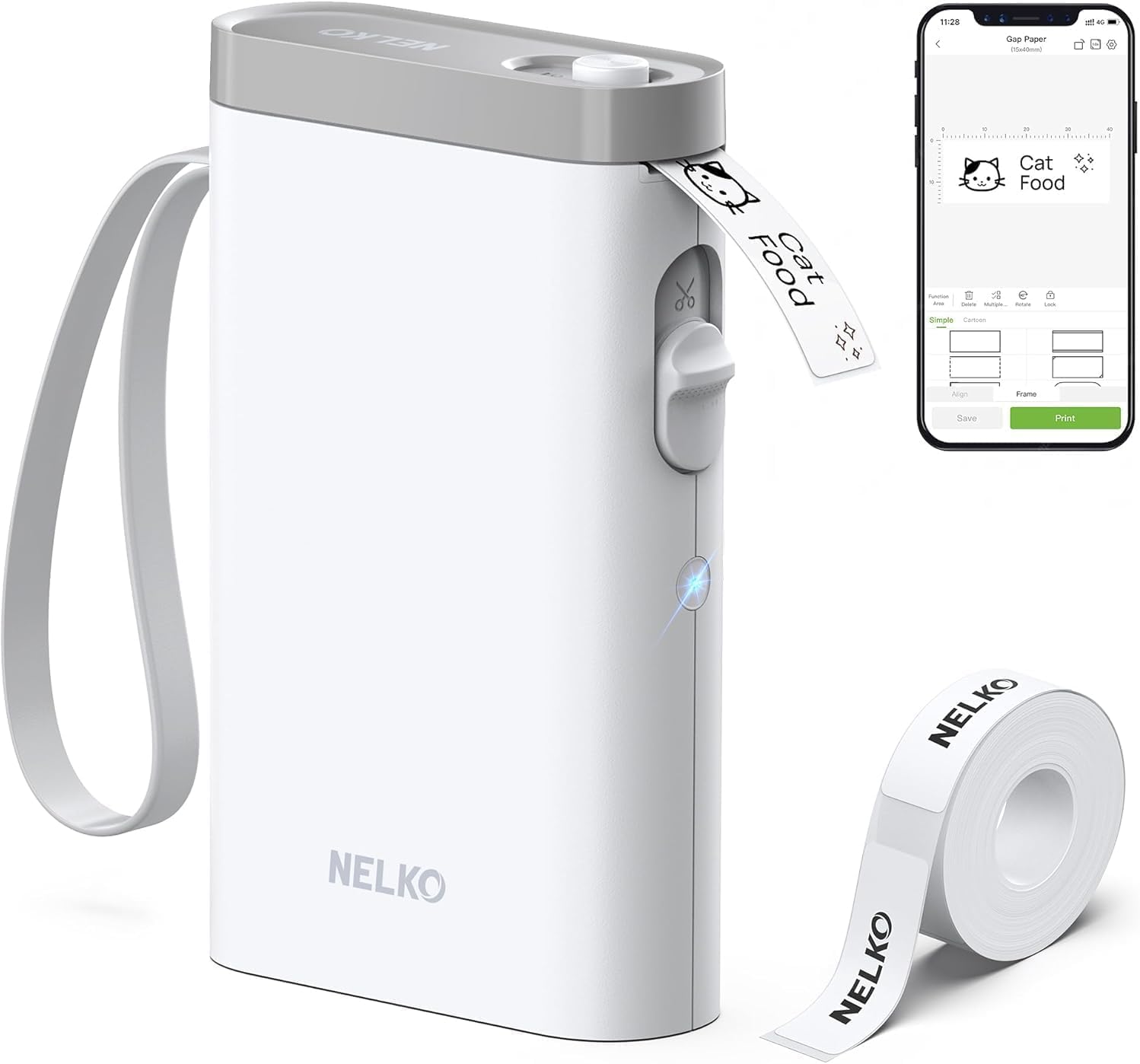
| Printer Type | Thermal |
|---|---|
| Print Resolution | 203 DPI |
| Printer Connectivity Type | Bluetooth |
| Hardware Interface | USB Type C |
| Paper Size | 15X30mm,12X40mm,14x40mm,14X50mm,14x75mm |
The Nelko P21 is a pocketable thermal label printer that pairs with the Nelko mobile app to design and print preformatted or custom monochrome labels. You create labels on your phone, choose a tape size in the app, then send jobs over Bluetooth; the device includes a built-in cutter and a rechargeable USB‑C battery so you can print on the go without ink. The unit uses direct thermal paper and a 203 DPI print head for crisp text, and the app supplies templates, icons, borders, and barcode/QR support for common home, classroom, and small‑business labeling tasks. Setup is straightforward on iOS and most Android phones, though the listing notes incompatibility with Android 14 and requires the Nelko app for Bluetooth pairing. Practical limits are fixed tape widths and monochrome output, and print length is constrained to supported tape sizes, so it is best for item tags, bins, price labels, and classroom uses rather than full‑size shipping labels or long continuous runs.
Best for: Buyers who want an easy, low‑risk label solution for home, classroom, or small business organization and prefer a compact, app-driven printer that requires minimal setup and maintenance.
Less Ideal for: People who need large shipping labels, full computer integration, multi‑color printing, or continuous long-run label production should consider a different desktop or commercial label printer.
- Very portable, pocketable design with built‑in rechargeable battery and USB‑C charging
- 203 DPI thermal printing gives clear black text without ink or toner
- App-driven templates, icons, borders and QR/barcode support simplify label design
- Built‑in cutter and compatible tape sizes for quick, ready‑to‑use labels
- Includes a roll of label paper and basic accessories in the box
- Requires the Nelko mobile app for Bluetooth pairing and printing
- Not compatible with desktop computers and has reported Android 14 issues
- Prints only monochrome on fixed-width thermal tape, limiting format flexibility
Verdict: A compact, app‑controlled thermal label maker that delivers crisp monochrome labels for everyday home, classroom, and small‑business organization needs.
Choosing the Right Printer for Labels: Key Factors to Consider
Print Resolution and Legibility
Label printers must produce sharp text and clear barcodes so scanners and human readers can reliably interpret information. Higher resolution reduces banding and jagged edges on small type and narrow barcodes. When you need tiny fonts or dense barcode patterns, choose a printer with higher DPI and consistent ink or thermal transfer application.
Poor resolution increases read errors and mislabels, which can slow operations and drive reprints. Consider resolution together with the expected label size and the typical distance at which labels are read.
Media Compatibility and Feed Mechanism
Different labeling tasks use sheets, continuous rolls, fanfold stock, or die-cut labels. A suitable feed mechanism prevents misfeeds, peeling errors, and wrinkling. Check supported widths, core sizes, and whether the unit uses roll-fed or cassette systems.
Feed reliability is especially important for long runs. A printer that securely guides labels and offers adjustable sensors reduces jams and wasted consumables. Also note whether the printer supports both direct thermal and thermal transfer methods if you require durable labels or different media types.
Connectivity and Software Integration
How the printer connects affects where and how you can print. USB is fine for single-station use, while Ethernet or Wi-Fi lets multiple users send jobs from different devices. Mobile printing protocols and cloud or app support can streamline label production from tablets and phones.
Driver quality and software tools also matter. Reliable drivers and a straightforward label design app save time and reduce formatting errors. Check for common label formats and barcode symbologies in the software feature set.
Speed, Duty Cycle, and Reliability
Consider how many labels you will print per day and whether the printer's rated duty cycle can handle that load. Higher-speed models reduce wait time on large batches, while robust thermal elements and motors sustain longer continuous use.
Undersized duty cycles lead to overheating and shortened component life. Match the printer's rated monthly or daily volume to your expected workload to avoid excessive maintenance or early replacement.
Ease of Use and Ongoing Maintenance
Simple label loading, an intuitive control panel, and easy access to cutters and print heads reduce downtime. Features like drop-in roll loading, clear media guides, and one-touch calibrations speed daily tasks.
Maintenance tasks such as cleaning the print head, replacing ribbon or cores, and clearing jams should be straightforward. Consider availability of replacement parts and how often routine service is likely to be required based on your volume.
Consumables and Long-Term Cost
Label stock, ribbons (for thermal transfer), and any required cores or liners are ongoing costs that affect total ownership. Some printers require proprietary ribbons or carriers, while others accept generic third-party supplies.
Factor in expected life of consumables and the frequency of replacement when estimating long-term costs. Also consider media yield per roll and the ease of sourcing compatible labels for your specific sizes and materials.
Direct Thermal Vs Thermal Transfer
Direct thermal printers use heat-sensitive media and do not require ink or ribbon. They are simple to operate and cost-effective for short-lived labels such as shipping or retail tags. However, labels produced by direct thermal printing are more vulnerable to heat and sunlight, so they are less suitable for long-term outdoor use.
Thermal transfer printers use a ribbon to transfer ink to the label surface, creating more durable output that resists abrasion and fading. This method supports a wider range of materials and is preferable when labels must last months or years, or when they will be exposed to harsh conditions.
- Direct thermal: lower consumable complexity, best for short-term labels
- Thermal transfer: durable labels, ribbon management required
- Choose based on label lifespan and exposure conditions
Barcode and Specialty Labeling Considerations
If you print barcodes, verify the printer supports the barcode symbologies you need and that resolution is adequate for dense codes. Some workflows require 2D codes like QR or DataMatrix as well as linear barcodes; ensure your label software and printer drivers can render these reliably.
For specialty labels such as heat-resistant, chemical-resistant, or glossy stock, confirm the printer can handle the material thickness and that the chosen print method bonds well to the substrate.
- Confirm supported barcode types in the printer's driver or app
- Test on the actual label material for scan reliability
- Consider protective overlaminates or thermal transfer ribbons for durability
Setting Up a Multi-User Labeling Workflow
When multiple people need access, prefer networked printers with secure user management and straightforward sharing. Centralized label templates and a common design library help maintain consistency across teams. Consider a dedicated labeling workstation for high-volume operations to reduce interruptions.
Also evaluate how the printer integrates with your inventory, shipping, or asset-management systems. Native APIs or supported label-creation platforms speed automatisation and reduce manual entry errors.
- Use Ethernet or Wi-Fi for office-wide access
- Standardize templates to avoid formatting errors
- Look for API or integration support for automation
Portable and On-Demand Label Printing
If you need labels on the go, portable label printers offer battery operation and lightweight designs. These units excel for field inventory, mobile ticketing, or temporary labeling tasks. Check battery life, ruggedness, and pairing reliability with phones or tablets before committing.
Portable models often trade speed and media capacity for mobility, so match expectations to the frequency and size of labeling jobs you will handle away from a fixed location.
- Verify Bluetooth or mobile protocol compatibility
- Expect smaller roll capacity and lower continuous duty
- Choose ruggedized units if used outdoors or in warehouses
Calibration, Test Prints, and Quality Checks
Regular calibration and test printing help maintain consistent label output. Use test prints to confirm alignment, darkness, and barcode scannability before large runs. Many printers include sensors or calibration routines that reduce setup time and cut waste.
Routine quality checks also catch early signs of wear, such as banding or uneven ink transfer, so you can service the unit before labels fail in production.
- Run calibration after loading new media
- Keep a small sample of each label type for test prints
- Schedule periodic inspections for print-head wear
How We Chose the Best Printer for Labels
We focused on criteria that matter most when buying a printer for labels in home, office, and small-business settings. First, print quality was prioritized, including resolution for text and barcode clarity and consistency across long print runs. Second, media compatibility and feed reliability were examined, covering supported label sizes, roll or sheet handling, and mechanisms that reduce jams. Third, connectivity and workflow integration were assessed, including USB, Ethernet, Wi-Fi, and mobile printing support plus driver and app stability. Fourth, speed and duty-cycle considerations were weighed to ensure options can handle typical daily label volumes without overheating or excessive wear. Fifth, ease of use and maintenance were judged, such as label loading, cutter or peel mechanisms, and consumable replacement. We excluded devices designed solely for general document printing where label handling is an afterthought. Our shortlist reflects products that reliably handle labels, offer practical connectivity, and minimize downtime for users who print labels regularly.
Our full evaluation process is outlined in our review methodology.
FAQ
What print method should I choose for long-lasting labels?
Thermal transfer printing is usually best for long-lasting labels because the ribbon provides durable ink adhesion to a variety of materials. Direct thermal is simpler but less resistant to heat and sunlight.
Can I print standard address labels with any label printer?
Many label printers handle common address-label sizes, but you should confirm the device supports the specific width and media type you plan to use. Also check the software for prebuilt templates to simplify printing.
How important is DPI for barcode scanning reliability?
Higher DPI helps produce clearer, denser barcodes that scan reliably, especially for small or high-density codes. Match resolution to the barcode type and scanning distance to avoid read errors.
Are wireless connections reliable for label printing?
Wireless connections can be reliable when the network is stable and drivers support mobile protocols. For mission-critical or multi-user environments, wired Ethernet typically offers more consistent throughput and fewer interruptions.
How often should I replace ribbons or thermal elements?
Replacement frequency depends on print volume and ribbon coverage. Monitor output for fading or banding as signs of ribbon or print-head wear, and follow the manufacturer's maintenance intervals for cleaning and replacement.
Final Verdict
Choosing the right printer for labels means balancing durability, media handling, and workflow fit. Prioritize print resolution and feed reliability if you need precise, scannable codes and consistent output. If labels must endure harsh conditions, thermal transfer and compatible ribbons are essential, while direct thermal is appropriate for short-term, low-cost jobs. Match connectivity and duty cycle to your environment to avoid bottlenecks, and favor units that simplify maintenance and label loading. With those tradeoffs in mind, you can select a label printer that meets your volume and durability needs without unnecessary complexity.