
Note: This article contains affiliate links. If you click on these links and make a purchase, we may earn a small commission at no extra cost to you. This helps support our research and content. Read our full affiliate disclosure here.
If you print regularly, ink cost quickly becomes the dominant expense. Choosing a printer with cheap ink matters more than feature checklists because it determines your long-term operating cost and how often you need to replace cartridges. This guide highlights our top shortlisted printers for users who need low per-page cost, reliable black text, and reasonable color output. Each pick was chosen for a balance of affordable consumables, good yield options, and practical performance for home and small-office use. Below you will find concise evaluations and the factors we used to judge ink expense and day-to-day reliability before the full product list.
Top Picks at a Glance
| Best Overall The best all-around choice for most situations | Brother MFC-J4335DW |  |
| Best Quality Built to a higher standard if you want something more solid | Epson WorkForce Pro WF-4830 |  |
| Best Value The sweet spot between price and what you get | Epson EcoTank ET-2400 |  |
| Best Budget The cheapest option that still gets the job done reliably | Canon PIXMA TS3720 | 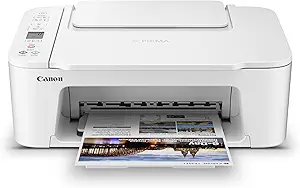 |
| Top Rated A top-rated pick with lots of positive feedback | Canon PIXMA TR4720 |  |
| Most Popular A crowd favorite that many people choose with confidence | HP DeskJet 2855e |  |
Brother MFC-J4335DW

| Printer Type | Inkjet |
|---|---|
| Functions | Print, Copy, Scan, Fax |
| ADF Capacity | 20 pages |
| Paper Tray Capacity | 150 sheets |
| Connectivity | USB, wireless |
The Brother MFC-J4335DW is a compact multifunction inkjet designed for home offices and small business users who want low ink costs and steady day-to-day productivity. It prints, copies, scans, and faxes, and its INKvestment Tank design uses front-loading cartridges that refill an internal tank to extend yield and reduce cartridge swaps; Brother supplies enough ink in-box for up to a year of typical use. The printer includes a 150-sheet tray, 20-page automatic document feeder, automatic duplexing, a 1.8" color display, and wireless/Mobile Connect support for printing from phones and cloud services. Print speeds are brisk for the class at up to 20 ppm black and 16 ppm color, and the automatic duplex and ADF make multi-page jobs easier. Expect solid everyday color quality at 600 dpi but not photo-lab grade output. If you prioritize low running costs, simple ink monitoring via the Page Gauge, and reliable wireless setup, this model delivers practical savings and usability in a small footprint.
Best for: Buyers who want an affordable-to-operate, compact all-in-one that minimizes refill hassle and supports wireless mobile and cloud printing for everyday documents.
Less Ideal for: Users who need high-end photo quality or advanced wired network features should consider a dedicated photo printer or a model with Ethernet and higher dpi.
- INKvestment Tank system provides high ink yield and reduces frequency of cartridge changes
- Includes up to one year of ink in-box for extended initial use
- Automatic duplex printing and 20-page ADF speed up multi-page workflows
- Wireless and mobile/cloud printing with Brother Mobile Connect for easy setup and remote printing
- Print resolution and color photo quality are limited to 600 dpi, so photos are not studio-quality
- Single USB port and no Ethernet may limit wired network options
Verdict: Choose this Brother MFC model if you want a compact all-in-one that cuts ongoing ink costs with a high-yield INKvestment Tank and plenty of initial ink in-box.
Epson WorkForce Pro WF-4830

| Printer Type | Inkjet |
|---|---|
| Print Speed B&W | 25 pages_per_minute |
| Print Speed Color | 12 pages_per_minute |
| Auto Document Feeder | 50-sheet |
| Duplex | auto |
The Epson WorkForce Pro WF-4830 is a business-focused all-in-one inkjet that handles printing, scanning, copying and faxing for a busy home office or small business. It uses PrecisionCore heat-free printheads and DURABrite Ultra pigment inks to deliver sharp text and reasonably vivid color prints at speeds up to 25 ppm black and 12 ppm color. Practical features include a 50-sheet auto document feeder for multi-page jobs, auto two-sided print/scan/copy, a 4.3-inch color touchscreen for easy control, and dual 250-sheet trays for a 500-sheet total capacity so you can load long runs without frequent refills. Connectivity covers Wi-Fi, Ethernet and USB plus smartphone support and an app for remote setup and monitoring. Limitations to consider are ink compatibility—Epson requires genuine cartridges—and color photo output is less vibrant than comparable photo-focused printers. For buyers prioritizing reliable, fast black-and-white output and lower per-page ink costs in text-heavy work, the WF-4830 is a solid choice, while heavy photo users should look elsewhere.
Best for: Someone who needs dependable, high-throughput printing for text-heavy office work and values speed, automatic duplexing, and large paper capacity to minimize interruptions.
Less Ideal for: Photographers or hobbyists who need top-tier photo color and glossy photo output quality should consider a dedicated photo printer instead.
- Fast black-and-white print speed up to 25 ppm for quick document production
- 500-sheet total paper capacity from two 250-sheet trays reduces reloading
- Auto two-sided print, copy and scan plus 50-sheet ADF speeds multi-page workflows
- Wireless, Ethernet and USB connectivity with smartphone and app support for easy remote use
- Requires genuine Epson DURABrite cartridges which limits third-party ink options
Verdict: Choose the WF-4830 if you want a fast, reliable all-in-one that lowers per-page costs for document-heavy office use.
Epson EcoTank ET-2400

| Printer Type | Inkjet |
|---|---|
| Printer Connectivity Type | USB, Wi-Fi |
| Maximum Media Size | 8.5 x 14 inch |
| B&W Pages per Minute | 10 pages_per_minute |
| Color Pages per Minute | 5 pages_per_minute |
The ET-2400 replaces disposable cartridges with large refillable EcoTank bottles, letting you print many pages between refills and lowering ongoing ink cost. It prints color documents and photos, scans on a flatbed, and copies without extra cartridges, and connects via USB or Wi‑Fi for mobile and PC printing. Notable practical features include a rear feed tray that holds up to 100 sheets, manual duplexing, and a high maximum resolution for sharp text and detailed images. The included starter ink bottles are sized to handle a lot of printing out of the box, and Epson's keyed EcoFit bottles make refills straightforward and less messy than aftermarket options. Expect modest speed — about 10 ppm black and 5 ppm color — so it is best for everyday home tasks rather than heavy office throughput, and duplex printing must be done manually. If you prioritize low-cost per page and minimal cartridge fuss, this model delivers consistent print quality and much lower ink expense over time compared with cartridge-based home printers.
Best for: Buyers who want to minimize ink expenses and avoid frequent cartridge changes while covering typical home printing, scanning, and copying needs with reliable print quality.
Less Ideal for: Users who need rapid high-volume two-sided printing or advanced office workflow features like an auto document feeder and high sheet capacity should look elsewhere.
- Cartridge-free EcoTank system cuts long-term ink cost and waste
- High-capacity starter and replacement ink bottles reduce refill frequency
- Wi‑Fi and USB connectivity with mobile printing support
- Rear 100-sheet tray lets you load larger print jobs
- High maximum print resolution for sharp text and color images
- No automatic duplexer; two-sided printing is manual
- Relatively slow color print speed compared with fast office lasers
- Includes only a single paper tray and modest output capacity
Verdict: Choose the ET-2400 if you want a cartridge-free home all-in-one that slashes ink cost and hassle for everyday printing needs.
Canon PIXMA TS3720

| Printer Type | Inkjet |
|---|---|
| Maximum Media Size | 8.5 x 14 inch |
| Maximum Sheet Capacity | 60 |
| Printer Connectivity Type | USB, Wi-Fi |
| Compatible Cartridge | Canon CL-276, Canon PG-275 |
The Canon PIXMA TS3720 is a compact all-in-one inkjet intended for everyday home use, offering print, copy and scan functions in a small footprint. It uses a two-cartridge hybrid FINE ink system with a pigment black and dye color cartridge, which keeps supplies simple and replacement straightforward. Setup is quick and you can print from a phone or Chromebook via Wi‑Fi, the Canon PRINT app, AirPrint or USB, and the rear tray handles a range of media including borderless 5×7 photos and envelopes. Print speeds are modest at about 7.7 ppm black and 4 ppm color, so it is best for occasional document batches and photos rather than heavy office loads. The 60-sheet paper capacity and single-sided printing limit throughput, and it lacks automatic duplexing and a large input tray. For budget buyers the low initial cost and simple two-cartridge system make ink management easier, though frequent high-volume printing will increase ongoing ink spend compared with high-yield or tank-based systems.
Best for: Buyers who prioritize a low upfront cost and need a basic, easy-to-use home printer for occasional documents, schoolwork and photos, with simple ink replacement and mobile printing.
Less Ideal for: Users who print large volumes, need automatic duplexing or higher-capacity trays, or who want the lowest long-term ink cost from refillable/tank systems.
- Compact all-in-one that prints, copies, and scans in a small footprint
- Simple two-cartridge hybrid ink system for easy replacement
- Wireless and mobile printing support including Canon PRINT, AirPrint, and Chromebook compatibility
- Supports borderless photos and a variety of media sizes up to 8.5 x 14 in
- Quick and straightforward out-of-box setup
- Single-sided printing only; no automatic duplexing
- Small 60-sheet paper capacity limits large print jobs
- Modest color print speed may be slow for frequent photo or color document printing
Verdict: If you want an affordable, compact home all-in-one with simple two-cartridge ink management and easy mobile printing, the PIXMA TS3720 is a practical budget pick for light use.
Canon PIXMA TR4720

| Printer Type | Inkjet |
|---|---|
| Printer Connectivity Type | Wi-Fi |
| Duplex | Automatic |
| Compatible Cartridge | PG-275, CL-276 |
| Maximum print Resolution Color | 4800 x 1200 dpi |
The Canon PIXMA TR4720 is a small, straightforward all-in-one inkjet designed for home and small-office use where basic document tasks are the priority. It handles printing, scanning, copying and faxing, and includes an automatic document feeder for multi-page scans or faxes. Setup and mobile printing are handled through Canon's app and it connects via Wi‑Fi for easy placement without a dedicated PC. Print resolution is strong for an entry-level model, and the printer ships with starter PG-275 black and CL-276 color cartridges that are compatible with inexpensive replacement cartridges commonly available. Paper handling supports letter/A4 and a 100-sheet capacity, and automatic duplex printing saves paper on two-sided jobs. Limitations include modest output speed and basic scan features compared with higher-end models, and the starter cartridges are lower yield so replacement frequency will depend on your volume. For buyers focused on everyday document tasks and low per-page ink options, the TR4720 delivers reliable performance in a compact footprint.
Best for: Buyers who want a reliable, space-saving all-in-one for everyday document tasks and prefer printers that work well with affordable replacement ink options.
Less Ideal for: Users who need high-volume throughput, professional photo quality, or advanced scanning features should look at higher-end models.
- All-in-one functions: print, scan, copy and fax in one compact unit
- Automatic document feeder for multi-page scanning and faxing
- Wi‑Fi and mobile app control for easy wireless printing from phones
- Automatic duplex printing reduces paper use and manual flipping
- Starter ink cartridges are low yield so replacements may be needed sooner with moderate use
- Not aimed at high-volume or photo-centric users due to basic speed and scan features
Verdict: Choose the PIXMA TR4720 if you want a compact, dependable all-in-one that pairs well with low-cost replacement cartridges for affordable everyday printing.
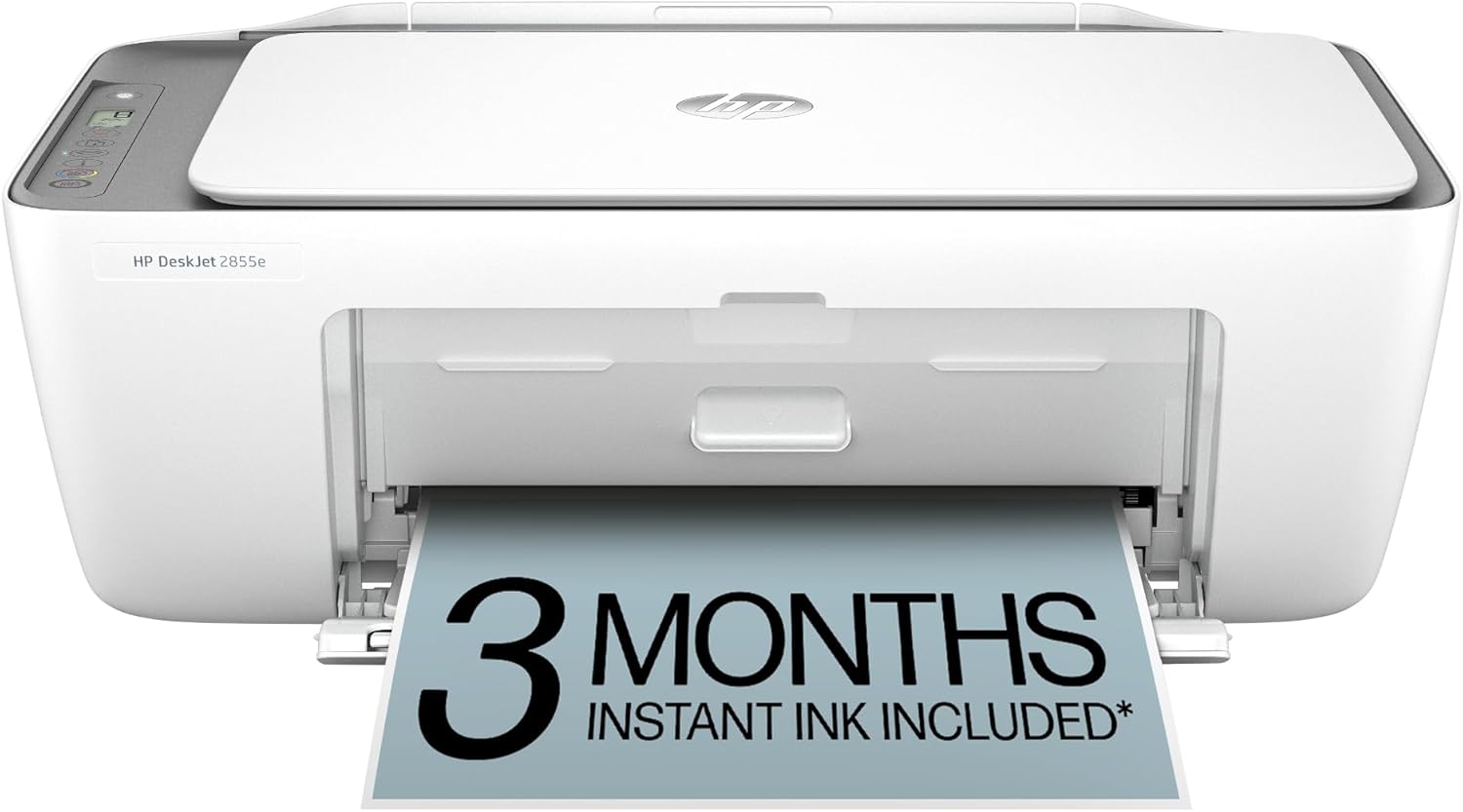
HP DeskJet 2855e
| Printer Type | Inkjet |
|---|---|
| Maximum print Resolution Color | 4800 x 1200 dpi |
| Color Pages per Minute | 5.5 pages_per_minute |
| B&W Pages per Minute | 7.5 pages_per_minute |
| Printer Connectivity Type | single band wi-fi (2.4ghz only) |
The HP DeskJet 2855e is a small all-in-one inkjet aimed at home use, combining basic color printing with a flatbed scanner and copying functions. It connects over single-band 2.4 GHz Wi-Fi or USB and is controlled via the HP app for printing directly from smartphones and tablets. Notable features include HP AI print formatting to trim unwanted web content, a 60-sheet input tray, and an included 3-month Instant Ink trial with HP+ activation for automatic ink delivery. Print speeds are modest at about 7.5 ppm black and 5.5 ppm color, and duplex printing is manual. The printer is compact and low-power, so it fits on a desk or shelf and is fine for occasional document and photo printing. Limitations include its single-band 2.4 GHz-only Wi-Fi, manual duplexing, and modest paper capacity, so it is not designed for heavy or high-volume office workflows. If you want a straightforward, app-driven home printer that pairs with an ink subscription, this model covers the basics efficiently.
Best for: Buyers who want an inexpensive, app-driven home printer that handles occasional color documents and scans and prefer the convenience of automatic ink delivery.
Less Ideal for: Users who need fast, high-volume printing, automatic duplexing, or robust network options for a busy home office should look at more capable models.
- All-in-one functions: print, scan, and copy in a compact unit
- Works with HP app and smartphone printing for easy mobile workflows
- Includes 3-month Instant Ink trial to simplify ink replacement
- HP AI formatting reduces wasted pages when printing web content
- Wi-Fi limited to single-band 2.4 GHz only
- No automatic duplex; double-sided printing requires manual page flipping
Verdict: Choose the DeskJet 2855e if you want a compact, app-friendly home all-in-one that pairs well with an ink subscription for low-effort maintenance.
Choosing the Right Printer with Cheap Ink: Key Factors to Consider
Ink Cost Per Page
Ink cost per page is the most direct measure of running expense and can vary dramatically between cartridge types and refill systems. Calculate cost per page using the cartridge yield and official or common refill prices rather than the sticker price of the printer.
Lower per-page costs matter most for high-volume text printing and frequent color use. If you print photos occasionally, factor in how much color duty increases your effective cost per page compared with black-and-white-only usage.
Cartridge Yield And Refill Options
High-yield or XL cartridges spread the fixed cost over more pages and usually reduce per-page spend. Check whether the model supports XL or extra-high-yield cartridges and whether those options are readily available from multiple suppliers.
Refillable tanks or continuous ink systems can offer the lowest running costs for heavy use, but they introduce different maintenance tradeoffs. Availability of third-party cartridges or refills will affect both cost and convenience, so prioritize models with broad consumable support when cheap ink is a key goal.
Maintenance Frequency And Reliability
Some low-cost-ink designs require frequent head cleanings or maintenance cycles that consume ink, eroding any savings. Consider how often a printer needs automated cleaning and whether it is likely to clog when used infrequently.
Reliable feed and fewer service cycles mean less wasted ink and less downtime. For shared household or small-office printers, durability and predictable maintenance have a direct impact on the real cost of ownership.
Print Quality For Your Use Case
Cheap ink is valuable only if the resulting output meets your needs. For mostly text printing, legible, crisp black output is the priority. For occasional color charts or marketing sheets, reasonable color accuracy and saturation are important.
Assess whether a printer's economical ink delivers acceptable quality for your typical jobs. If you print photos often, low-cost ink systems may require compromises in color depth and gradation compared with more photo-oriented designs.
Connectivity And Consumable Convenience
Convenient connectivity and easy cartridge replacement reduce friction in daily use. Wireless printing, mobile app support, and clear cartridge access points save time and lower the chance of errors when swapping supplies.
Also consider how straightforward it is to buy and install replacement ink locally or online. A cheap ink system loses value if you frequently face supply shortages or complicated replacement procedures.
How Refillable Ink Systems Save Money
Refillable ink tanks and integrated bottle-fill systems replace small cartridges with large reservoirs, which lowers per-page ink cost by using bulk ink. These systems are most effective for users who print regularly because they amortize the initial device cost across many pages.
Refillable setups require more user involvement for occasional top-ups and tracking levels, but they cut consumable purchases and reduce plastic waste. For moderate to high monthly volumes, the savings can be substantial compared with standard cartridges.
- Lower long-term cost with bulk ink bottles
- Better choice for users with regular, predictable printing needs
- Requires periodic manual refilling and level monitoring
When High-Yield Cartridges Make Sense
High-yield or XL cartridges are a simple way to lower per-page cost without changing workflow. They plug into an otherwise standard cartridge system and extend intervals between replacements, which is ideal for home offices with steady, mid-volume printing.
Choose models with widely available high-yield cartridges to avoid supply issues. Also check whether the printer's firmware or design reduces yield in mixed color jobs, because mixing high-yield black with standard color can affect cost calculations.
- Easy drop-in upgrade from standard cartridges
- Good for steady but not extreme monthly printing
- Availability of high-yield options determines real savings
Ink Usage Patterns And Monthly Volume
Estimate your monthly page count before selecting a cheap-ink printer. Low-volume users who print only occasionally may not recover the higher upfront cost of refillable systems, while heavy users benefit most from bulk ink or high-yield cartridges.
Also factor in the mix of color versus black prints. Color-heavy workflows will increase overall ink consumption and may shift the optimal choice toward systems with inexpensive color refills or separate large color tanks.
- Match system type to your monthly page volume
- Consider black versus color print percentages
- Account for occasional high-volume tasks like multi-page reports
Practical Tips To Reduce Ink Waste
Adjusting default print settings to draft or grayscale for everyday documents can significantly lower ink use. Use duplex printing and reduce margins when appropriate to lessen paper and ink usage.
Schedule regular light use to prevent nozzles from drying in low-use scenarios, and run maintenance tasks manually if you see performance degrade. Keep spares of the most-used cartridges or bottles so you are not forced into urgent replacements with limited options.
- Use draft mode for non-critical text
- Print in grayscale for documents without color needs
- Run occasional prints to prevent nozzle clogging
Environmental And Waste Considerations
Lowering per-page ink cost often aligns with reduced packaging waste when using refillable tanks or bulk bottles. Consider the environmental impact of disposable cartridges and whether the vendor offers recycling or take-back options.
Smarter consumable choices can cut both cost and waste. If sustainability matters, prioritize systems that minimize plastic disposables or support recycling programs.
- Refillable systems produce less plastic waste
- Look for recycling programs where available
- Bulk bottles generally have a lower packaging footprint
How We Chose the Best Printer with Cheap Ink
We focused on what actually affects ownership cost and everyday usability for printers where ink price is a primary concern. Key evaluation criteria included effective cost per page using standard ink or compatible high-yield cartridges, cartridge yield and availability, maintenance overhead such as frequency of head cleaning, and real-world print reliability for black text and common color jobs. We also considered set-up complexity and mobile printing support since these affect how quickly a printer becomes useful in a home or small office. Products that rely on rare or proprietary single-sourced cartridges were excluded unless they offered substantially better per-page economics through high-capacity options. We filtered out printers where cheap-sounding toner or ink claims depended on unrealistic print volumes or sacrificed basic print quality. The final list favors models that offer genuine low running costs through high-yield cartridges, refillable systems, or broadly available economy consumables while still delivering consistent text and acceptable color prints.
Our full evaluation process is outlined in our review methodology.
FAQ
How do I calculate the real ink cost per page?
Divide the price of a cartridge or bottle by the manufacturer-stated yield to get a base cost per page. For real-world estimates, adjust the yield downward by 10 to 20 percent to account for maintenance cycles and partial coverage prints.
Are refillable ink tanks reliable for occasional users?
Refillable tanks are cost-effective for frequent users. For occasional use, they can be prone to nozzle drying if left idle for long periods. Regular light printing helps maintain nozzle health and preserves the savings benefits.
Will third-party cartridges always save money?
Third-party cartridges often reduce upfront cost, but savings vary by supplier and yield. They can be a good option when the products are reputable and widely tested, but be aware some third-party supplies may trigger more maintenance or lower yield.
Does print quality suffer with cheap ink options?
Cheap ink systems can deliver acceptable quality for text and routine color tasks. However, for high-fidelity photo printing, budget inks or refillable systems may not match photo-oriented designs in color depth and fine gradation.
How often should I replace cartridges to avoid print issues?
Replace cartridges when the printer reports low levels or when quality noticeably degrades. For infrequent printers, changing cartridges before extended idle periods and running a short test print weekly helps avoid clogging and wasted ink from deep cleans.
Final Verdict
Prioritize the factors that matter most to your usage pattern: per-page cost and cartridge yield for high-volume printing, or refillable systems for consistent long-term savings. Balance those savings against maintenance needs and the level of print quality you require for text and color work. Choose a printer that aligns with your monthly page volume and willingness to perform routine upkeep. That approach minimizes surprises and ensures cheap ink translates into genuine savings without compromising reliability.