
Note: This article contains affiliate links. If you click on these links and make a purchase, we may earn a small commission at no extra cost to you. This helps support our research and content. Read our full affiliate disclosure here.
If you print frequently, a refillable ink-tank printer can dramatically lower your running costs and reduce downtime from cartridge swaps. You want dependable page yields, predictable color results, and a simple refill workflow that does not create a mess in a home or small office environment. This guide lists the top seven refillable ink-tank printers we shortlisted for everyday document and photo tasks. Each pick was evaluated for print cost per page, output quality, ease of maintenance, and connectivity options. Read on to find the models that best match how you print and set up your workspace.
Top Picks at a Glance
| Best Overall The best all-around choice for most situations | HP Smart Tank 5003 |  |
| Best Quality Built to a higher standard if you want something more solid | Epson EcoTank Photo ET-8500 |  |
| Best Value The sweet spot between price and what you get | Brother INKvestment Tank MFC-T580DW |  |
| Best Budget The cheapest option that still gets the job done reliably | Canon MegaTank G3270 |  |
| Top Rated A top-rated pick with lots of positive feedback | Canon PIXMA G6020 |  |
| Most Popular A crowd favorite that many people choose with confidence | HP Smart Tank 5101 |  |
| Best Seller A high-volume bestseller chosen again and again | Epson EcoTank ET-2800 |  |
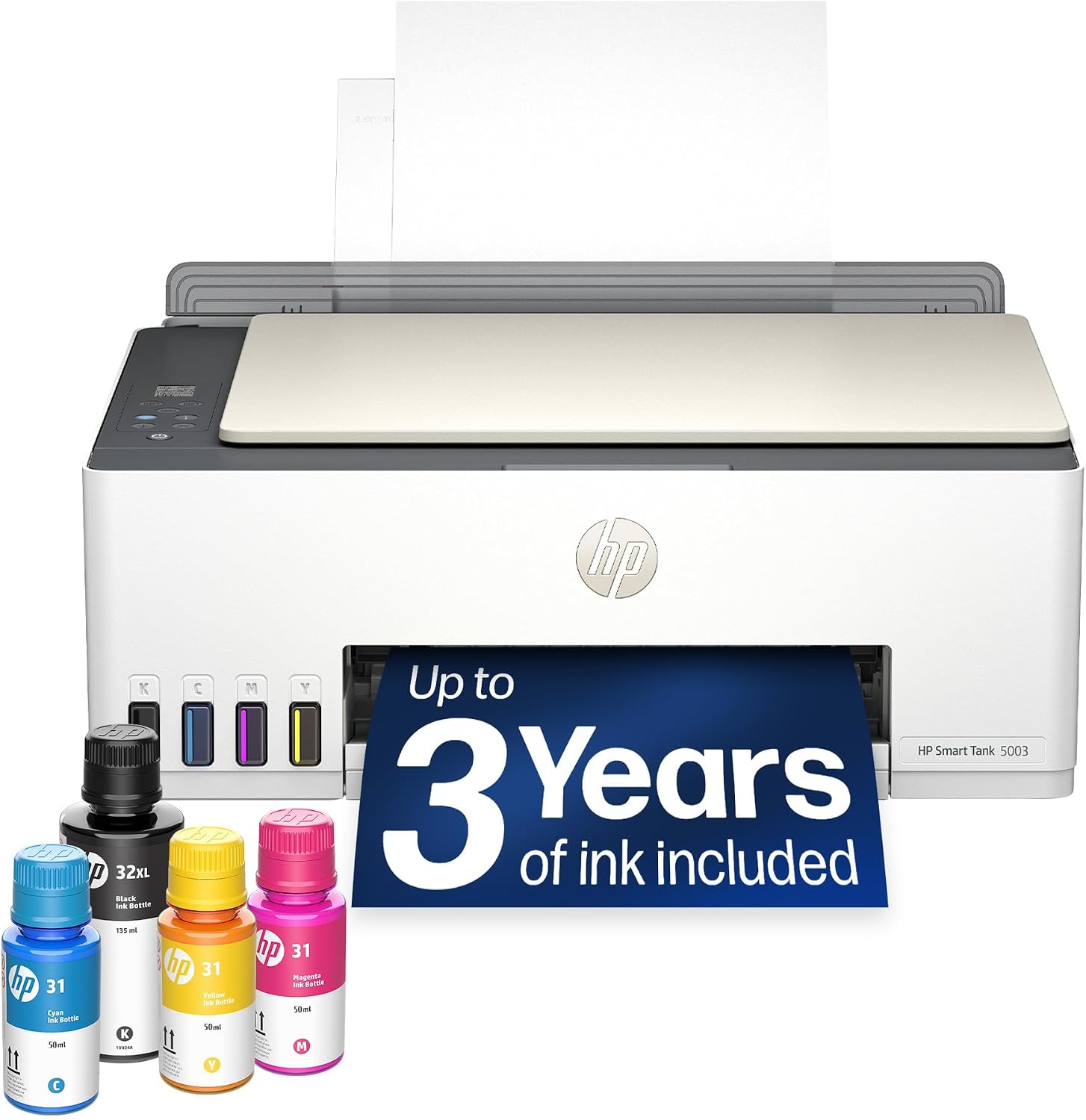
HP Smart Tank 5003
| Printer Type | HP Thermal Inkjet |
|---|---|
| Print Output | Color |
| Maximum Sheet Capacity | 100 |
| Connectivity | AirPrint, HP ePrint, Mopria, USB, Wi‑Fi |
| Included Ink | Up to 3 years of Original HP Ink |
The HP Smart Tank 5003 is a cartridge-free all-in-one inkjet built for high-volume home printing with wireless convenience. It combines a refillable ink tank system with mobile-friendly connectivity like AirPrint, HP ePrint and Mopria, letting you print from phones, tablets, or a PC without fuss. The printer ships with large-capacity ink bottles that HP says deliver up to three years of ink, which lowers running costs for users who print frequently; refilling is designed to be mess-resistant using keyed bottles. Print quality is strong for everyday documents and photos thanks to high optimized dpi, though color speeds are modest compared with laser alternatives. The flatbed scanner and copy functions make it useful for occasional document workflows, and a 100-sheet input keeps basic batch jobs easy. Manual duplex is supported via driver controls rather than an automatic feeder, so two-sided printing needs a few extra steps. For a balanced home buyer who values low cost per page and convenience, the Smart Tank 5003 offers a straightforward, economical solution with solid print quality and easy mobile setup.
Best for: Buyers who want a reliable, low-cost-per-page home printer that handles frequent color and document printing with easy mobile setup and refillable ink.
Less Ideal for: People who need fast, heavy-duty office printing with automatic duplexing and high monthly page volumes should consider office-grade models instead.
- Cartridge-free refillable ink tank with large included ink bottles reduces cost per page
- Wireless and mobile printing support including Apple AirPrint, HP ePrint and Mopria
- High optimized print resolution for sharp text and detailed color prints
- All-in-one functionality with flatbed scanner and copying built in
- No automatic duplex unit; two-sided printing requires manual page flipping
- Color print speed is relatively slow compared with some laser or office-focused printers
Verdict: Choose the Smart Tank 5003 if you want an economical, easy-to-refill home all-in-one that cuts ongoing ink costs while supporting wireless mobile printing.
Epson EcoTank Photo ET-8500

| Printer Type | Inkjet |
|---|---|
| Print Resolution (Color) | 4800 x 1200 dpi |
| Color Pages per Minute | 12 pages_per_minute |
| Printer Connectivity Type | Ethernet, USB, Wi-Fi |
| Duplex | auto |
The Epson EcoTank Photo ET-8500 is a cartridge-free, 6-color inkjet all-in-one designed for people who need high-quality photos and versatile media handling without frequent cartridge swaps. It prints borderless photos up to 13 x 19 inches, supports cardstock and thicker media, and includes a native high-resolution flatbed scanner for photo scanning and copying. The refillable EcoTank bottles supply large ink yields that drive down running costs and are keyed to minimize refill mistakes, while a 4.3-inch color touch panel and Wi-Fi, Ethernet, USB and SD card support make printing from computers and mobile devices straightforward. Print speed is modest for a photo-focused machine, with up to 12 ppm color and 16 ppm black and white, and the 10-sheet input capacity and single tray limit heavy office throughput. Power consumption is relatively high at 207 watts during operation. For photographers and creatives who prioritize image quality and low ink cost per page, the ET-8500 balances excellent color fidelity and media flexibility against a bulkier footprint and office-scale speed limitations.
Best for: Buyers who prioritize photo print quality and low long-term ink cost for creative projects and small batch photo runs rather than high-volume office throughput.
Less Ideal for: Those who need fast, high-volume document printing or large-capacity paper handling for heavy office use should consider more business-focused printers.
- Six-color Claria ET Premium ink for higher-fidelity photo color and smoother gradations
- Refillable EcoTank bottles provide very large ink yields and lower ongoing ink cost
- Borderless printing up to 13 x 19 inches and support for thicker media and cardstock
- Multiple connectivity options including Wi-Fi, Ethernet, USB and SD card plus a 4.3-inch touch display
- Small paper capacity and single tray limit continuous high-volume printing
- Relatively high power consumption during operation
Verdict: Choose the ET-8500 if you want lab-quality, large-format photo prints with very low ink costs thanks to refillable tanks.
Brother INKvestment Tank MFC-T580DW

| Functions | Print / Copy / Scan |
|---|---|
| Print speed (black/color) | Up to 16 ppm / 9 ppm |
| Paper tray capacity | 150 sheets |
| Connectivity | Wireless, Wi‑Fi Direct, USB 2.0 |
| Ink system | Refillable spill-free ink bottles |
The Brother INKvestment Tank MFC-T580DW is an all-in-one refillable ink-tank printer built for steady home or small office use. It prints, scans, and copies, offers automatic duplexing, and uses spill-free Brother ink bottles that refill the integrated tanks quickly to reduce interruptions and cartridge waste. A 150-sheet tray and a manual feed slot handle routine print jobs, while wireless, Wi‑Fi Direct, and USB connections plus the Brother Mobile Connect app make mobile printing and basic device management straightforward. Print speeds are modest—up to 16 ppm black and 9 ppm color—so it is fine for documents, flyers, and occasional color projects but not optimized for high-volume fast production. The one-line LCD keeps controls simple but limits on-device menu depth. Brother recommends genuine BTD180 high-yield bottles for reliable results and the included ink bundle aims to keep you running for a long time before refills are needed. If you want a compact, lower-maintenance printer that emphasizes low running cost and easy refilling, this model delivers sensible value with practical features.
Best for: Buyers who prioritize low ongoing ink cost and low-maintenance operation for home or small-office printing and value a compact all-in-one that simplifies refilling and mobile printing.
Less Ideal for: Users who need rapid high-volume printing, advanced on-device controls, or an automatic document feeder for multi-page scanning and copying.
- Refillable spill-free ink tanks with up to three years of ink included reduce cartridge replacements and waste
- Wireless, Wi‑Fi Direct and USB connectivity plus Brother Mobile Connect app for mobile printing and setup
- Automatic duplex printing and a 150-sheet easy-load tray support everyday home and small office workflows
- Compact all-in-one design that handles printing, copying, and flatbed scanning in a small footprint
- Modest print speeds (up to 16 ppm black / 9 ppm color) compared with faster office-focused models
- Simple one-line LCD limits on-device control and menu navigation for advanced settings
Verdict: Choose this Brother INKvestment Tank when you want a compact all-in-one that dramatically lowers ink replacement hassle and cost through easy refillable tanks.
Canon MegaTank G3270

| Printer Type | Inkjet |
|---|---|
| Printer Connectivity Type | USB, Wi-Fi |
| Maximum print Resolution Color | 4800 x 1200 dots_per_inch |
| B&W Pages per Minute | 11 |
| Color Pages per Minute | 6 |
The Canon MegaTank G3270 is a wireless refillable ink-tank all-in-one aimed at low-cost long-run printing for home and home-office users. It uses refillable GI-21 ink bottles that Canon says yield thousands of pages from one set, and the printer includes the bottles, print heads, and a 1.35" LCD for basic setup and status. Typical use is straightforward: print everyday documents and photos from a PC or mobile device over Wi-Fi, scan on the flatbed, and copy with single-sided output. Notable features include borderless printing, a rear paper tray that handles a wide range of media sizes up to legal, and low power draw at 16 watts. Print quality is strong for an ink-tank machine with up to 4800 x 1200 dpi and decent photo capability, while speeds are modest at about 11 ppm black and 6 ppm color. Limitations include single-sided printing only and a relatively small 100-sheet tray, so heavy duplex or high-volume office workflows will feel constrained despite the very low per-page ink cost.
Best for: Buyers prioritizing the lowest long-term ink costs and who print frequently at home or in a small home office and want wireless, refillable convenience.
Less Ideal for: Users who need automatic two-sided printing, large input capacity, or heavy daily office throughput should look at more robust business-class models.
- Refillable ink bottles provide very high page yield and low cost per page
- Wireless printing and mobile compatibility for easy printing from smartphones and tablets
- High maximum print resolution (4800 x 1200 dpi) for detailed color and photo prints
- Includes ink bottles, print heads, and basic setup items out of the box
- Simplex-only printing (no automatic duplex)
- Paper tray holds only 100 sheets, which limits unattended high-volume runs
Verdict: Choose the MegaTank G3270 if you want a refillable, wireless all-in-one that slashes ink costs for frequent home or small office printing.
Canon PIXMA G6020

| Printer Type | Inkjet |
|---|---|
| Duplex | Yes |
| Maximum print Resolution Color | 4800 x 1200 dots_per_inch |
| Color Pages per Minute | 6.8 pages_per_minute |
| Printer Connectivity Type | USB, wireless |
The PIXMA G6020 is a refillable ink-tank all-in-one built for steady home or small-office use where low running costs matter. It handles printing, copying, and sheetfed scanning with wireless, USB, and Ethernet connectivity and supports automatic two-sided printing for routine document jobs. The built-in MegaTank system ships with a full set of ink bottles plus two bonus black bottles, and Canon rates very high page yields (up to thousands of pages per refill), which keeps ink costs low and reduces downtime for replacements. Print quality is strong for text and respectable for color photos at up to 4800 x 1200 dpi, and the 2-line display and Alexa control make basic operation straightforward. Paper handling is practical with a large input capacity and multiple tray sizes supported. Expect modest print speeds compared with laser models and occasional setup/maintenance tasks typical of inkjet tank systems, but for users prioritizing long runs of reliable, low-cost printing the G6020 is a practical choice.
Best for: Buyers who want a dependable, low-cost-per-page refillable ink system for steady document and occasional photo printing in a home or small business setting.
Less Ideal for: Those who need the fastest possible throughput for high-volume color production or who prefer a toner-based printer with higher daily duty cycles.
- MegaTank refillable ink system ships with full ink set plus two bonus black bottles for very high page yield
- Wireless, USB, and Ethernet connectivity with mobile and voice printing support
- Auto two-sided printing and large sheet capacity reduce manual handling for everyday jobs
- High maximum print resolution (4800 x 1200) for sharp text and good photo detail
- Inkjet print speeds are moderate compared with laser printers, especially for color
- Maintenance and occasional nozzle cleaning can be required with heavy color use
Verdict: Pick the PIXMA G6020 if you want a reliable refillable MegaTank printer that dramatically lowers ink costs for steady home or small-office printing.
HP Smart Tank 5101

| Printer Type | HP Thermal Inkjet |
|---|---|
| Functions | Print, Scan, Copy |
| Connectivity | Wireless; USB 2.0 |
| Included Ink | Up to 2 years of Original HP ink |
| Max Color Resolution | 4800 x 1200 dpi |
The HP Smart Tank 5101 is a cartridge-free ink tank all-in-one designed for home and light home-office use. It handles everyday color documents, schoolwork, and occasional photos while offering wireless printing from phones and computers via the HP Smart app, AirPrint, and Mopria. The refillable tank system ships with up to two years of original HP ink, which drastically lowers per-page costs for high-volume users and makes refills straightforward with mess-minimizing bottles. Print quality is good for text and basic color graphics, with a maximum color resolution of 4800 x 1200 dpi and respectable black text clarity. It includes a flatbed scanner and copy function but lacks an automatic document feeder and automatic duplexing, so multi-page scanning and two-sided printing require manual handling. Tray capacity is modest and color print speed is slower than some models, but the unit is compact and simple to set up for family use. Security and app features like AI print formatting add convenience for casual workflows.
Best for: Buyers who want a low-cost, low-maintenance printer for steady family or home-office printing and who prioritize long-term ink savings and proven manufacturer support.
Less Ideal for: Those who need high-speed color printing, automatic two-sided workflows, or bulk multi-page scanning without manual intervention should consider other models.
- Refillable ink tanks with up to two years of included HP ink reduce running costs
- Wireless printing with HP Smart app, Apple AirPrint, and Mopria for easy mobile printing
- High color resolution (4800 x 1200 dpi) for sharper color documents and photos
- Flatbed scanner and copy functions add basic multifunction capability
- Mess-minimizing ink bottle refill system simplifies topping up ink
- No automatic duplexing so two-sided printing is manual
- No automatic document feeder for multi-page scanning or copying
- Color print speed is relatively modest compared with faster models
Verdict: If you want an affordable, low-maintenance refillable printer for steady home printing with years of included ink, the HP Smart Tank 5101 is an efficient, reliable choice.
Epson EcoTank ET-2800

| Printer Type | Inkjet |
|---|---|
| Printer Connectivity Type | USB, Wi-Fi |
| Maximum print Resolution Color | 5760 x 1440 dpi |
| B&W Pages per Minute | 10 |
| Color Pages per Minute | 5 |
The Epson EcoTank ET-2800 is a cartridge-free all-in-one inkjet designed for everyday home printing, copying and scanning. It uses high-capacity refillable ink tanks and includes ink bottles that Epson says equal roughly 90 standard cartridges, which reduces how often you need replacements and cuts plastic waste. In typical use the ET-2800 handles document jobs and occasional photos, prints up to 10 ISO B/W pages per minute and offers 5 ppm in color, a flatbed scanner, and borderless photo support. Connectivity includes Wi-Fi and USB with mobile and voice-activated printing through the app, and a color LCD makes basic operation straightforward. Print quality is sharp thanks to Epson PrecisionCore and high dpi resolution, and the low running cost is the printer's main practical benefit. Limitations to consider are the modest paper handling (single 100-sheet capacity and no auto duplex) and slower color speed for heavy photo workloads, so it is best suited to households that value low ink cost and fuss-free refills over advanced paper handling or fastest photo throughput.
Best for: Buyers who want a low-maintenance home printer that minimizes ink replacements and long-term ink cost while keeping setup and mobile printing simple.
Less Ideal for: Those who need fast color photo throughput, advanced paper handling, or built-in automatic two-sided printing for heavy office workflows.
- Cartridge-free EcoTank system with high-capacity refillable ink tanks for far fewer replacements
- Low running cost equivalent to many cartridge sets (manufacturer claims up to thousands of pages per ink set)
- Wireless, mobile and voice-activated printing for easy setup and everyday use
- High print resolution and PrecisionCore technology for sharp text and decent photo detail
- No automatic duplexing which requires manual page flipping for two-sided prints
- Single 100-sheet capacity and basic paper handling limit heavy office use
Verdict: Choose the ET-2800 if you want a worry-free, low-cost refillable ink printer for everyday home document printing and occasional photos.
Choosing the Right Refillable Ink-Tank Printer: Key Factors to Consider
Ink Cost Per Page
How much you pay for ink over time is the single biggest operating expense for high-volume printing. A low cost per page can repay any initial investment quickly, especially if you print a lot of drafts or color documents. Consider both the advertised ink yield and realistic yields for mixed black-and-color workloads.
Also account for the cost of replacement ink bottles and whether the printer uses individual color tanks or a combined color reservoir. Individual tanks let you replace only the depleted color, which reduces waste and improves long-term economy.
Print Quality
Print quality matters differently depending on use. For text-heavy documents, sharp, dark black output and consistent toner density are most important. For graphics and photos, look for models with finer droplet sizes, good color reproduction, and the ability to handle photo paper.
Pay attention to how the printer handles color saturation and skin tones if you print images occasionally. Also consider how the device manages small text and thin lines, since some refillable systems optimize cost at the expense of crispness.
Refill Ease and Mess Control
The practical appeal of refillable tanks depends on how easy and clean the refill process is. Clear, refillable reservoirs with stable bottle attachment reduce spills and air bubbles. Look for features like one-way fill valves or keyed bottle nozzles that prevent cross-contamination between colors.
Maintenance tasks such as nozzle cleaning and occasional top-offs should be straightforward. If the system requires frequent manual priming or complicated cleaning cycles, the time saved on ink costs can be lost to upkeep.
Paper Handling and Duty Cycle
Think about how many pages you print monthly and whether the printer's recommended duty cycle matches that volume. A mismatch will lead to premature wear, more frequent service, or degraded reliability. Check input tray capacity and whether the printer supports multiple paper sizes or a rear feed for specialty sheets.
Robust paper handling also reduces jams and misfeeds when printing mixed batches. If you frequently print envelopes, labels, or thick paper, ensure the model supports those media without manual intervention.
Connectivity and Workflow Integration
Modern printers need to fit into diverse workflows. Built-in Wi-Fi and Ethernet allow multiple users to share a single device, while USB remains useful for direct connections. Support for mobile printing standards enables printing from phones and tablets without extra drivers.
Also consider driver and software support for your operating system and whether the printer supports print-from-cloud or email-to-print features for remote submissions. Simple, reliable connectivity reduces setup time and daily friction.
Maintenance and Support
Even low-cost-running printers need occasional care. Check how easy routine maintenance tasks are, including head cleaning and firmware updates. Availability of user-replaceable parts like maintenance tanks or feed rollers extends useful life.
Consider the manufacturer support options and how straightforward warranty or service procedures are, since a refillable system that is hard to repair can become costly over time.
Who Benefits Most From Refillable Ink-Tank Printers
Refillable ink-tank printers are best for users who print regularly and want to lower per-page costs. They are particularly well suited to small offices, home-based businesses, and students who produce a mix of text and occasional color graphics.
If you print only a few pages per week, the up-front setup and potential for ink drying might make alternative solutions more appropriate. But for anyone approaching monthly double- or triple-digit page counts, a refillable tank system usually offers meaningful savings and less frequent interruptions.
- High monthly page volumes gain the biggest savings
- Good choice for mixed black-and-color workloads
- Less attractive for very light users who print rarely
Setting Up and Refilling Without the Mess
Plan your workspace before you open the bottles. Use a stable, flat surface and keep paper towels handy during the first few refills. Many modern refill systems use keyed bottles that click into place; align bottles carefully and avoid squeezing forcefully.
Follow the manufacturer's instructions for initial priming and avoid interrupting the process once begun. If you see air bubbles, tap the reservoir gently to release them and complete any recommended nozzle checks to confirm proper flow.
- Work on a protected surface
- Use the original bottles and follow fill sequence
- Run a nozzle check after the first few pages
Managing Print Quality Over Time
Regular use prevents ink from drying in printheads. If you have long idle periods, run a small test page weekly. Most systems include automated cleaning routines; use them sparingly because excessive cleaning consumes ink but perform them when you notice streaks or color shifts.
Keep spare ink bottles for colors that deplete faster and track actual yields so you know when to reorder. Storing ink bottles in a cool, dark place helps maintain their shelf life and color consistency.
- Print a weekly test page for intermittent users
- Use sparing automated clean cycles to avoid waste
- Store spare ink sealed and in a cool, dark place
Paper and Media Tips for Best Results
Choose paper that matches the task. Plain office paper is fine for drafts and most documents, while coated photo paper yields far better color reproduction for images. Check the printer's supported weight range before feeding heavy stock.
Avoid overfilling input trays and load media in small batches for mixed jobs. If you print labels or envelopes, select a feed path designed for heavier media or use a rear feed if available to reduce bending.
- Match paper type to output needs
- Feed heavy stock via rear or single-sheet feed when possible
- Avoid mixing media types in a single print run
Reducing Waste and Environmental Considerations
Refillable systems reduce plastic waste compared with frequent disposable cartridges, especially when using concentrated bottled inks. To maximize environmental benefits, look for refill bottles with resealable caps and recyclable packaging.
Dispose of empty plastic packaging according to local recycling rules and consider programs for used consumable collection if offered by local services. Regular maintenance also reduces scrap pages caused by print errors and misfeeds.
- Choose resealable bottles to minimize spills
- Recycle packaging when possible
- Maintain the printer to reduce misprints and waste
How We Chose the Best Refillable Ink-Tank Printer
We focused on metrics that directly affect ownership cost and day-to-day reliability. Primary evaluation criteria included long-term print cost measured as ink cost per page for black-and-white and color jobs, and sustained print quality over extended ink yields. We also examined paper handling and duty cycle to ensure selected units can handle typical home and small office workloads without frequent jams or errors. Ease of refilling and maintenance was another filter because messy or hard-to-access tanks defeat the purpose of refillable systems. Connectivity and mobile printing options were considered to reflect modern workflows. Finally, we checked out supported media types and tray flexibility so prints range from plain text to occasional photos. We excluded single-use cartridge-only devices, specialty label printers, and machines intended for heavy commercial print shops. Entries that scored poorly on refill reliability, or lacked measured ink yield information, were removed. The final list prioritizes low running cost, dependable output, and simple upkeep.
Our full evaluation process is outlined in our review methodology.
FAQ
How often will I need to refill the ink tanks?
Frequency depends on your monthly page volume and the mix of color versus black prints. Heavy users may refill a bottle every few months, while light users might go many months between refills. Tracking pages printed will give the best estimate.
Do refillable tanks require special maintenance?
They require routine checks for ink levels and occasional nozzle cleaning. Unlike cartridges, tanks expose ink reservoirs, so following recommended cleaning and priming steps is important to avoid clogs or air ingestion.
Are refillable printers compatible with mobile devices?
Many modern refillable ink-tank printers include Wi-Fi, AirPrint, or other mobile printing standards. Support varies by model, so verify that the printer offers the connectivity you need for phones, tablets, or cloud printing.
Will refillable systems print good photos?
Some refillable printers handle photo paper and produce decent images for casual use. Photo-grade output depends on ink formulation, droplet size, and paper choice, so models designed with photo printing in mind will perform best for images.
What should I do if a color is running out mid-job?
Pause the job and replace or top up the depleted color if possible. Running with a missing color can produce poor or incomplete prints. Keeping spare bottles on hand helps avoid interrupted print runs.
Can refillable printers save money compared with cartridges?
For moderate to heavy printing, refillable ink-tank printers typically offer a lower ink cost per page. Savings depend on your usage patterns and the cost of replacement bottles, so calculate expected monthly print volume before deciding.
Final Verdict
Refillable ink-tank printers offer clear advantages for users who print regularly and want to cut operating costs while maintaining usable color and text quality. Prioritize models with low ink cost per page, reliable refill systems, and paper handling that matches your monthly volume. Tradeoffs typically center on initial setup and occasional maintenance versus long-term savings. Choose a printer that aligns with how you print most often. If low running cost and fewer supply swaps are your priorities, focus on refill ease, documented ink yields, and solid connectivity so the device integrates smoothly into your daily workflow.