
Note: This article contains affiliate links. If you click on these links and make a purchase, we may earn a small commission at no extra cost to you. This helps support our research and content. Read our full affiliate disclosure here.
If you travel frequently for work or leisure, a compact printer can save time and frustration when you need receipts, boarding passes, contracts, or quick photo prints. Picking the right small printer for travel means balancing size and weight with print quality, battery life, and connection options so the device fits your workflow and packing habits. This guide shortlists the top small printers for travel and explains the practical differences that matter in everyday use. Read on to see which portable models made the cut and why they stand out based on real-world decision factors like output quality and connectivity.
Top Picks at a Glance
| Best Overall The best all-around choice for most situations | HP OfficeJet 200 Mobile Printer |  |
| Best Quality Built to a higher standard if you want something more solid | HP OfficeJet 250 Mobile Printer |  |
| Best Value The sweet spot between price and what you get | Gloryang PD-A4 Portable Printer |  |
| Best Budget The cheapest option that still gets the job done reliably | iDPRT MT610 Pro 610Pro-Black |  |
| Top Rated A top-rated pick with lots of positive feedback | Canon PIXMA TR150 Portable Printer |  |
| Most Popular A crowd favorite that many people choose with confidence | Canon PIXMA TR160 Portable Printer |  |
| Best Seller A high-volume bestseller chosen again and again | TATTMUSE A285M Portable Thermal Printer |  |
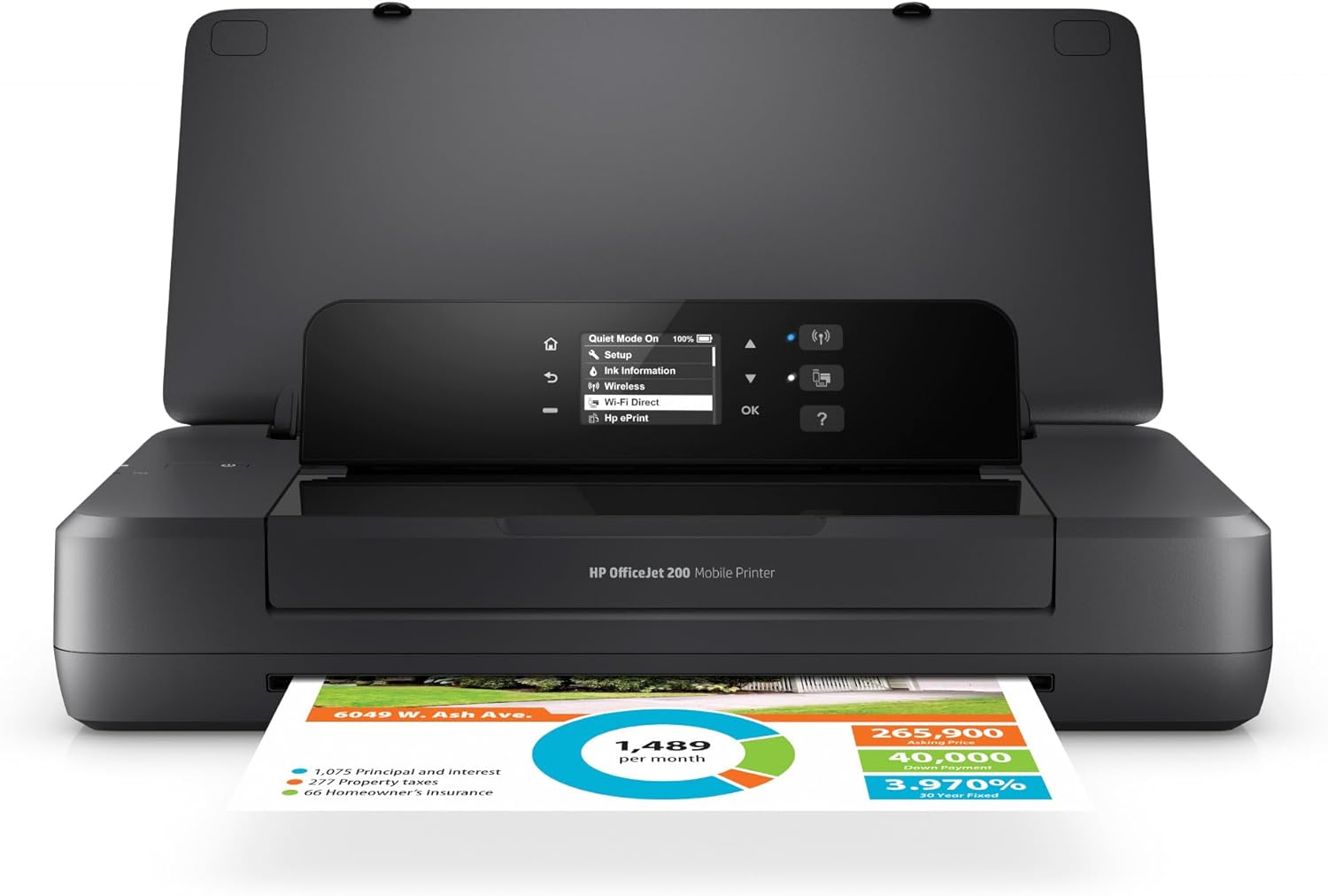
HP OfficeJet 200 Mobile Printer
| Printer Type | Inkjet |
|---|---|
| Print Resolution | 600 x 600 dpi |
| Printer Connectivity Type | USB, Wi-Fi |
| Maximum Media Size | 8.5 x 14 inch |
| Maximum Sheet Capacity | 50 |
The HP OfficeJet 200 is a pocketable inkjet aimed at professionals who need color printing away from a desk. It prints directly from laptops, tablets, or phones over Wi‑Fi or USB and supports cloud printing via the HP Smart app, making it practical for client visits, travel, or mobile work. The built-in battery and HP Fast Charge let you recharge quickly in a home, office, or car and the two-inch mono graphic control panel keeps setup and basic operation straightforward. It handles a variety of media from envelopes to photo paper and offers up to 600 dpi output for readable text and decent color graphics, while a 50-sheet maximum capacity and manual duplex limit throughput. The unit is quiet and ENERGY STAR certified, but it is not a high-volume office machine and print speeds are modest compared with desktop models. For one-off reports, invoices, or occasional color materials on the road, it delivers reliable, portable performance; for heavy daily printing choose a larger desktop printer.
Best for: Buyers who need a genuinely portable printer for occasional color documents, invoices, or client materials while traveling and value quick setup and battery-powered operation.
Less Ideal for: Users who print large volumes, need fast duplexing, or require a high-capacity workstation printer should choose a full-size desktop model instead.
- Truly portable with an included rechargeable battery and HP Fast Charge support
- Wireless and USB connectivity with HP Smart app and cloud printing support
- Accepts multiple paper types and sizes including envelopes and photo paper
- Decent 600 x 600 dpi print quality for text and color graphics
- Quiet operation and ENERGY STAR certification
- Limited sheet capacity and manual duplex slow multi-page workflows
- Modest print speeds compared with full-size office printers
Verdict: If you want dependable, battery-powered color printing for travel and remote client work, the HP OfficeJet 200 is the compact choice that actually fits in a briefcase.
HP OfficeJet 250 Mobile Printer

| Printer Type | Inkjet |
|---|---|
| Printer Connectivity Type | wired, wireless |
| Color Pages per Minute | 19 pages_per_minute |
| B&W Pages per Minute | 20 pages_per_minute |
| Maximum print Resolution Color | 4800 x 1200 dpi |
The HP OfficeJet 250 is a portable all-in-one that brings full printer, scanner, and copier functionality to the road. It prints color documents and photos, scans via the built-in scanner or the 10-page automatic document feeder, and copies quickly with up to 19 color and 20 black and white pages per minute. The 2.65-inch color touchscreen and wireless options, including cloud printing and USB, make it easy to print from laptops and phones without a router, and the included battery supports charging in the car or via AC with HP Fast Charge. Practical benefits for travelers include borderless printing, support for common paper sizes and envelopes, and integration with the HP Smart app for scanning to cloud services. Trade-offs for performance-focused buyers are that duplex printing is manual and page yields depend on HP 62 cartridges, so heavy-volume users will face more frequent cartridge changes and higher running costs than larger office machines.
Best for: Frequent travelers or mobile professionals who need a compact, battery-powered printer that can produce business-ready documents and scans away from the office.
Less Ideal for: Users who need high-volume, low-cost printing or automatic duplexing for heavy two-sided workloads should look at larger desktop printers instead.
- Battery-powered mobile design with fast charging for use in car or on the go
- Compact all-in-one: print, scan and copy with a 10-page automatic document feeder
- Wireless printing and cloud integration via HP Smart app for printing from phones and cloud storage
- Relatively fast print speeds for a portable unit (up to 19 color / 20 B&W ppm)
- Manual duplex only, so two-sided printing requires user intervention
- Relies on HP 62 cartridges which may increase operating cost for high-volume use
Verdict: If you need a performance-oriented, truly portable all-in-one for travel that prints, scans, and copies reliably from a battery, the OfficeJet 250 is a top choice.
Gloryang PD-A4 Portable Printer

| Printer Type | Thermal |
|---|---|
| Maximum Media Size | Letter (8.5 x 11 inches) |
| Printer Connectivity Type | Bluetooth |
| Maximum Print Resolution Black and White | 203x 203 dpi |
| B&W Pages per Minute | 35 pages_per_minute |
The Gloryang PD-A4 is a travel-focused thermal printer that connects over Bluetooth to iOS and Android devices and can also work with laptops after installing a driver. It prints monochrome using thermal paper, so there is no ink, toner, or ribbons to refill, and the kit includes three letter-size rolls and a small carrying case for easy transport. The printer supports multiple paper widths up to US Letter and offers 203 dpi output (300 dpi listed for some copy modes), with burst printing speeds up to 35 pages per minute in tests — practical for receipts, contracts, labels, and quick document prints on the road. Two built-in batteries provide long standby and several hours of continuous printing on a charge, and the app lets you format and edit files before sending them. Limitations to expect are reliance on thermal paper only (no regular paper), variable print quality on photographic content, and the need to use the vendor app and drivers for full functionality on some computers. For frequent travelers who need lightweight, inkless document printing, the PD-A4 is a useful portable option.
Best for: Buyers who travel frequently and prioritize a lightweight, no-ink solution for printing contracts, receipts, labels, or quick documents from phones or laptops.
Less Ideal for: People who need full-color prints, photo-grade image quality, or regular plain-paper printing should consider a different printer type.
- Inkless thermal printing eliminates cartridges and lowers running costs
- Supports up to letter-size (8.5 x 11") thermal media for larger portable prints
- Bluetooth app control for on-phone editing and printing
- Includes carry case and three rolls of thermal paper for immediate use
- Built-in battery for hours of portable printing and long standby
- Only prints on thermal paper so standard copy paper is not supported
- Thermal monochrome output limits photo quality and color printing
Verdict: A lightweight, battery-powered thermal printer that lets travelers print inkless monochrome documents up to letter size from phones or laptops.
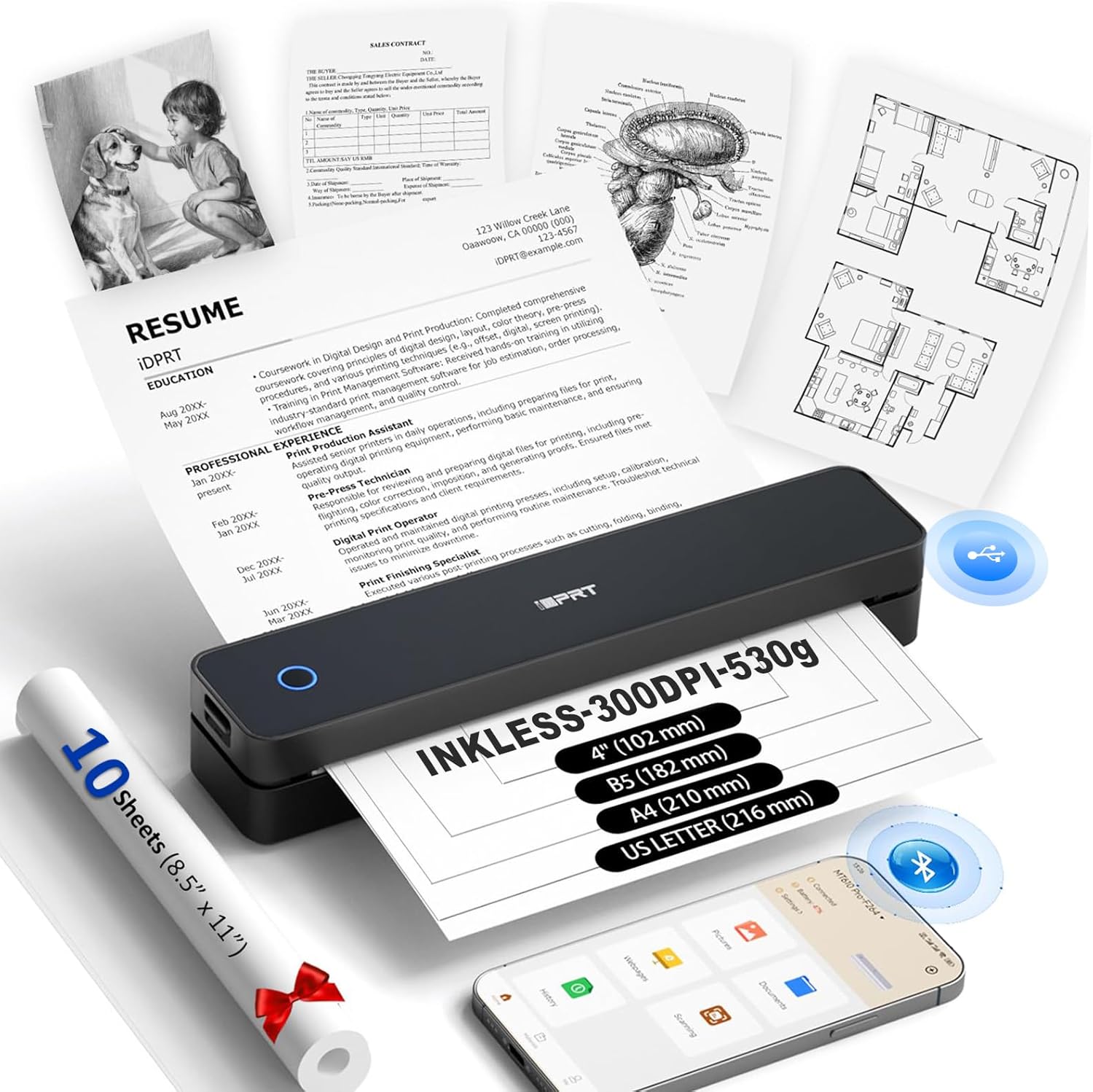
iDPRT MT610 Pro 610Pro-Black
| Printer Type | Thermal |
|---|---|
| Maximum Print Resolution Black and White | 300 x 300 dpi |
| Maximum Media Size | Letter (8.5 x 11 inches) |
| Printer Connectivity Type | Bluetooth, USB |
| B&W Pages per Minute | 30 pages_per_minute |
The iDPRT MT610 Pro is a lightweight inkless thermal printer built for travel and quick document printing without cartridges. It connects to phones and tablets over Bluetooth using the HerePrint app and to laptops via USB with a driver, and it handles up to US Letter or A4 continuous thermal paper at 300 x 300 dpi. Typical uses include printing contracts, notes, receipts, diagrams, and QR codes while commuting or at a client site; a 2000 mAh battery claims around 200 pages per charge so you can print away from wall power. Setup is straightforward for mobile devices but requires driver installation for desktop use. Because it uses thermal paper you get zero ink costs but you must buy the special paper and only get black-and-white output, which limits photo-quality or color needs. Its small footprint and included USB-C cable make it easy to toss in a bag, though duplex printing and color are not supported. For travelers who need affordable, compact text and document prints, it delivers a capable, low-maintenance option.
Best for: Traveling students, field workers, and budget-conscious mobile professionals who need a lightweight, low-maintenance printer for text, receipts, and single-page documents on the go.
Less Ideal for: Anyone who needs color prints, photo-quality output, or regular duplex and standard-paper printing should look at full-size color or laser printers instead.
- Inkless thermal printing eliminates ink cartridges and reduces running costs
- Compact and lightweight for easy packing and travel
- Bluetooth mobile printing via HerePrint app plus USB-C connection for computers
- 300 x 300 dpi resolution suitable for clear text, charts, and QR codes
- Rechargeable battery rated to print up to about 200 pages per charge
- Prints only in black and requires thermal paper, so no color or standard paper compatibility
- Desktop use needs driver installation and USB connection rather than wireless printing
Verdict: If you want an inexpensive, ultra-portable printer for black-and-white documents while traveling, the MT610 Pro gives reliable inkless printing in a travel-ready package.
Canon PIXMA TR150 Portable Printer

| Printer Type | Inkjet |
|---|---|
| Printer Connectivity Type | USB, Wi-Fi |
| Maximum print Resolution Color | 4800 x 1200 dots_per_inch |
| B&W Pages per Minute | 9 pages_per_minute |
| Color Pages per Minute | 5.5 pages_per_minute |
The Canon PIXMA TR150 is a lightweight portable inkjet that lets you print documents and borderless photos from laptops, phones, or the cloud while on the go. It is typically used by travelers, mobile professionals, and small offices who need occasional high-quality color and black and white prints away from a fixed workstation; the optional LK-72 battery pack and USB-C power make it possible to print without an AC outlet. The TR150 uses five-color ink for sharp photos and documents, offers automatic duplexing for two-sided pages, and provides a simple 1.44-inch OLED display with the ability to save up to five custom templates for fast repeat jobs. Its print speed is modest—about 9 ppm mono and 5.5 ppm color—so it is better for short runs rather than heavy batch printing. Practical trade-offs are its small 50-sheet capacity and dependence on replaceable ink tanks, which increases running costs if you print large volumes. For travel and light professional use the TR150 balances portability, print quality, and convenient mobile workflows.
Best for: Buyers who prioritize dependable, travel-ready printing and want a compact device that produces good-looking documents and photos while away from the office.
Less Ideal for: People who need high monthly volumes, very fast throughput, or long unattended batch printing should consider a full-size desktop or office printer instead.
- Truly portable design with an optional detachable battery for printing without AC power
- Wireless and USB-C connectivity for printing from smartphones, laptops, and the cloud
- High maximum print resolution (4800 x 1200 dpi) for detailed photos and graphics
- Automatic duplex printing and saveable templates speed up repeat jobs
- Small 50-sheet input/output capacity limits larger print runs
- Not optimized for high-volume or very fast printing compared with desktop models
Verdict: A compact, travel-focused printer that reliably delivers high-resolution documents and photos when you need quality printing away from a desk.
Canon PIXMA TR160 Portable Printer

| Maximum print resolution color | 4800 x 1200 dpi |
|---|---|
| Color pages per minute | 5.5 pages_per_minute |
| B&W pages per minute | 9 pages_per_minute |
| Maximum sheet capacity | 50 |
| Printer Connectivity Type | USB |
The Canon PIXMA TR160 is a lightweight portable inkjet that aims to bring near-desk quality to travel and mobile work. It uses a 5-color hybrid ink system and can print borderless photos and sharp black text up to 8.5 x 11 inches, with a maximum resolution of 4800 x 1200 dpi. Its 50-sheet tray and USB-C connectivity keep basic workflows simple, while wireless options like Apple AirPrint, Mopria, and a Canon app let you print from phones or tablets without a PC. A 1.44-inch OLED display offers quick status checks and saved templates speed repeat jobs. The unit is clearly optimized for mobility—it is lightweight, has an optional battery, and supports direct wireless mode so you can print without a router. Expect modest speeds (around 5.5 ppm color, 9 ppm black and white) and simplex-only printing, so it is better suited to occasional document and photo jobs rather than high-volume duplex office work. Overall it balances image quality and portability for travelers who need reliable, flexible printing away from a fixed desk.
Best for: Buyers who prioritize dependable, high-quality prints while traveling or working remotely and who value portability and wireless convenience tied to real user feedback.
Less Ideal for: Those who need heavy daily volume, built-in scan/copy capabilities, or automatic two-sided printing should consider a more full-featured office model.
- Very compact and lightweight for easy packing and carrying
- High maximum print resolution for sharp text and detailed photos
- Wireless printing options including app, AirPrint, and direct mode for phone/tablet use
- 50-sheet tray and USB-C port for straightforward mobile workflows
- Optional battery support enables true untethered printing on the go
- No automatic duplexing so two-sided jobs require manual flipping
- Not intended for high-volume office use due to modest sheet capacity and print speeds
- Limited to print-only functions (no scan or copy)
Verdict: For travelers who need real-world, high-quality mobile printing in a small, battery-capable package, the PIXMA TR160 delivers reliable performance and flexible wireless options.
TATTMUSE A285M Portable Thermal Printer

| Printer Type | Thermal |
|---|---|
| Maximum Media Size | 8.5 x 11 inch |
| B&W Pages per Minute | 7 |
| Printer Connectivity Type | Bluetooth, USB |
| Wattage | 11.1 watt-hours |
The TATTMUSE A285M is a lightweight, battery-powered thermal printer designed for mobile printing of receipts, invoices, boarding passes and single-sheet documents. It pairs over Bluetooth with phones and tablets using a companion app and uses a USB-C connection and driver for laptop or desktop printing. Because it is thermal, printing is inkless and maintenance is minimal, and the unit supports multiple thermal paper widths up to US Letter and A4 so you can print full-page documents or narrow receipts. Typical use is travel or field work where portability matters: drop it in a bag, select paper size in the app and print directly from your phone, or plug into a laptop when you need a wired connection. Practical benefits include no cartridges to replace, a small footprint and a built-in paper bin that accepts roll or single-sheet thermal media. Limitations are that it prints only monochrome at roughly 7 ppm and requires thermal paper (not standard copy paper), and desktop use needs a driver install and USB connection rather than Bluetooth.
Best for: Buyers who prioritize a reliable, low-maintenance travel printer for occasional documents, receipts and boarding passes and want a simple Bluetooth workflow from mobile devices.
Less Ideal for: Users who need color printing, high-resolution photos, high-volume office output, or a wireless laptop printing workflow without installing drivers should look elsewhere.
- Inkless thermal printing eliminates cartridges and reduces maintenance
- Bluetooth for phone/tablet printing plus USB-C for laptop connection
- Supports multiple paper widths including US Letter and A4
- Very lightweight and compact for travel with built-in paper bin
- Monochrome-only output and relatively low resolution compared with photo printers
- Requires thermal paper formats only, not compatible with regular copy paper
- Desktop printing needs a driver and wired USB connection
Verdict: Choose the A285M when you want a compact, ink-free travel printer that reliably produces black-and-white receipts and documents from your phone or laptop.
Choosing the Right Small Printer for Travel: Key Factors to Consider
Print Quality & Resolution
Print quality determines how usable your documents and photos will be when you need hard copies on the road. Higher resolution and better color fidelity matter for printing contracts, itineraries, and images you want to show clients or friends. Poor print quality can make text hard to read and photos look washed out, which defeats the purpose of carrying a printer while traveling.
When evaluating print quality, consider both dpi ratings and manufacturer details about color management. For travel use, prioritize sharp text at small point sizes and consistent single-pass printing that avoids frequent smudging or streaks.
Battery Life & Charging Options
Battery life dictates whether a portable printer can handle a day of travel or multiple short trips without needing a recharge. A printer with limited battery capacity can become a liability when you are away from reliable power sources. Look for battery capacity stated in pages-per-charge or real-world time estimates.
Also check charging flexibility. USB-C charging, the ability to charge from power banks, or an included AC adapter expand where you can power the unit. Faster charging and the option to operate while plugged in increase usefulness during travel.
Portability: Size and Weight
A travel printer should fit comfortably in your carry-on, daypack, or briefcase without adding significant bulk. Size and weight are among the first tradeoffs buyers face: smaller, lighter units are easier to pack but may limit paper size or battery capacity.
Consider how often you move between locations and what else you pack. Choose the smallest device that still delivers the print size and durability you need, and remember that accessories like ink cartridges and cables add to total carry weight.
Wireless Connectivity and Mobile App Support
Reliable connectivity is critical for printing from phones, tablets, and laptops while traveling. Printers with robust Wi-Fi, Bluetooth, and direct mobile printing support reduce setup headaches in unfamiliar networks. Native mobile apps often provide easier setup, print preview, and maintenance functions.
Evaluate whether the printer supports common mobile protocols and how straightforward the app-based workflow is for your typical documents and photos. Offline printing via direct USB or Wi-Fi Direct can be useful where network access is restricted.
Media Flexibility and Paper Handling
Travel printing needs vary: some users only need small receipts and boarding passes, while others require full-page documents or 4×6 photos. Media flexibility covers the range of paper sizes, supported media types, and outing formats the printer can handle.
A device that accepts several paper sizes, or that prints borderless photos, is more versatile on the road. Consider feed method and whether you need a dedicated tray or roll media, as those affect bulk and ease of reloading while traveling.
Durability and Ease of Maintenance
Travel gear must survive being packed, jostled, and exposed to variable conditions. Durability includes build quality, how well doors and hinges hold up, and whether the printer can tolerate temperature and humidity changes during transit.
Maintenance considerations include how easy it is to replace ink or thermal media, how often heads need cleaning, and whether the device includes user-friendly diagnostics. Lower-maintenance options reduce the chance of downtime while you are away.
When to Choose a Compact Printer Over a Mobile Print Service
A compact printer is useful when you need immediate, private hard copies or when you travel to areas with unreliable internet. Mobile print services and hotel business centers can handle occasional needs, but they add time, potential privacy risks, and dependency on third parties.
If you frequently print boarding passes, receipts, itineraries, or client documents away from a desk, a portable printer can be faster and more convenient. Choose this route when printing is a regular part of your travel routine rather than an occasional emergency.
- Immediate access to prints without searching for a service center
- Better privacy for sensitive documents
- Predictable output quality and media choices
Packing Tips and Travel-Friendly Accessories
Protect the printer by placing it in a padded compartment or wrap it in clothing to cushion against impacts. Keep cables, chargers, and spare media in a small pouch so you can access them quickly at security checkpoints or in transit.
Bring a lightweight power bank that supports the printer's charging standard if you expect long stretches without AC power. Carry a spare paper pack or an extra media roll to avoid mid-trip reloads, and pack a small cable organizer to prevent tangles.
- Use a padded sleeve or compartment
- Store consumables in a sealed pouch
- Bring a compatible power bank and charging cable
Reducing Running Costs on the Road
Running costs include consumables such as ink cartridges, thermal media, or specialized paper. For frequent travelers, choosing a printer with efficient ink usage or refillable options can lower long-term expenses. Consider how easy it is to source media in destinations you visit.
When possible, carry extra consumables from home to destinations where replacements might be harder to find. Also evaluate whether your expected print volume justifies a slightly larger device with better media economy.
- Check media availability in your travel regions
- Opt for refillable or high-yield consumables if you print often
- Track pages-per-cartridge or per-roll to estimate recurring costs
Printing Photos Versus Documents
Photo printing and document printing place different demands on a travel printer. Photo printing requires finer color reproduction, potentially borderless output, and support for photo paper sizes. Document printing emphasizes crisp text and smudge resistance for handling during transit.
Decide which use case is primary and prioritize devices offering the matching strengths. If you need both, favor printers that strike a balance between color fidelity and text sharpness rather than devices optimized for only one task.
- Photo tasks need higher color accuracy and specialized media
- Document tasks prioritize text clarity and fast single-page output
- Multi-use travelers should look for balanced specs
Operating and Troubleshooting on the Road
On-the-go troubleshooting benefits from simple controls, clear indicator lights, and useful mobile apps that surface error messages and maintenance steps. Avoid models with convoluted maintenance routines that require tools or extensive disassembly.
Familiarize yourself with common fixes such as clearing minor jams, reinstalling media, and running a head-clean cycle from the app. Carry a small cleaning kit and the user manual PDF on a phone or cloud account for quick reference.
- Prefer straightforward error messages and app-guided fixes
- Carry a small cleaning kit for heads and feed paths
- Store a digital copy of the manual for offline access
How We Chose the Best Small Printer for Travel
We prioritized features that directly affect real-world portability and usefulness when selecting the small printers for travel on this list. Primary evaluation criteria included print quality and resolution to ensure legible documents and acceptable photo output, and battery life and charging flexibility so the unit can handle extended trips without frequent recharging. We also assessed weight and compactness, focusing on devices easily carried in typical travel bags. Connectivity and setup were examined next, with emphasis on reliable wireless options, mobile app support, and straightforward pairing. Durability and build quality were considered for repeated handling and transit. Finally, running cost and media options were reviewed to understand the ongoing convenience and suitability for common travel tasks. We excluded bulky desktop printers, thermal-label-only gadgets not intended for standard document/photo printing, and devices that lack common wireless standards. The final list reflects a balance among these concrete, buyer-facing dimensions rather than raw bench tests.
Our full evaluation process is outlined in our review methodology.
FAQ
Can a small travel printer handle full letter-size documents?
Many portable printers can print full letter-size pages, but not all. Check the device specifications for maximum supported paper size. Smaller travel-oriented units may limit you to narrower widths or specialized media formats.
How do I print from my phone to a portable printer while traveling?
Most modern portable printers support Wi-Fi, Bluetooth, or Wi-Fi Direct and provide mobile apps or standard mobile printing protocols. Connect your phone to the printer's network or pair via Bluetooth, then use the app or the phone's share/print function to send files.
Are thermal printers a good choice for travel?
Thermal printers are extremely portable and low-maintenance for receipts and labels, but they are typically limited for full documents or high-quality photos. Choose thermal media only if your primary prints are receipts or simple monochrome content.
What should I do if my portable printer runs out of battery mid-trip?
If the printer supports USB-C or power-bank charging, you can top up from a compatible power bank. Otherwise, look for an AC outlet or use a car charger if supported. Carry spare media to resume printing immediately after recharging.
How often will I need to replace ink or media while traveling?
Replacement frequency depends on print volume and the type of media. Expect to replace cartridges more often with heavy photo use and less frequently for occasional document printing. Carrying a spare cartridge or a small supply of paper reduces the risk of running out in remote locations.
Final Verdict
Choosing the right small printer for travel means balancing portability with the printing capabilities you actually need. Prioritize print quality and battery life if you regularly produce documents and photos, and favor compact size and easy connectivity if you move frequently. Be realistic about running costs and media availability in destinations you visit. With those tradeoffs in mind, select the unit that best matches your primary use case so you get reliable prints without unnecessary bulk.