
Note: This article contains affiliate links. If you click on these links and make a purchase, we may earn a small commission at no extra cost to you. This helps support our research and content. Read our full affiliate disclosure here.
Picking the right smart speaker with a voice assistant changes how you interact with your home audio and connected devices. You want accurate voice recognition, dependable assistant features, and sound that fits how you listen. This guide shortlists the top options for everyday use, evaluating how well each unit handles voice commands, streaming, and integration with common smart-home tasks. Below you will find concise explanations of what mattered in our selection and the evaluation criteria we used to compare the top picks. Read on to decide which smart speaker best fits your room, listening habits, and control needs.
Top Picks at a Glance
| Best Overall The best all-around choice for most situations | Sonos Era 100 | 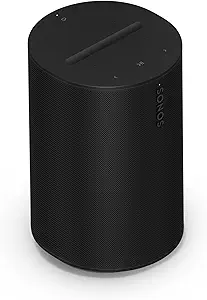 |
| Best Quality Built to a higher standard if you want something more solid | Apple HomePod 2nd Generation |  |
| Best Value The sweet spot between price and what you get | Belkin SOUNDFORM Elite Speaker |  |
| Best Budget The cheapest option that still gets the job done reliably | Google Nest Mini 2nd Gen |  |
| Top Rated A top-rated pick with lots of positive feedback | Amazon Echo Dot (newest model) |  |
| Most Popular A crowd favorite that many people choose with confidence | Bose Portable Smart Speaker |  |
| Best Seller A high-volume bestseller chosen again and again | Amazon Echo Show 5 |  |
Sonos Era 100

| Connectivity Technology | Bluetooth, USB, Wi‑Fi |
|---|---|
| Wireless Technology | Airplay, Bluetooth, NFC, Wi‑Fi |
| Audio Encoding | Dolby Digital 2.0 Stereo |
| Controller Type | Amazon Alexa |
| Speaker Maximum Output Power | 10 watts |
The Sonos Era 100 is a versatile bookshelf smart speaker that focuses on clear stereo separation and tighter low end for everyday listening. It uses a next‑gen dual‑tweeter architecture and a larger midwoofer to produce defined highs and fuller bass from a small enclosure, and Trueplay room tuning helps tailor the EQ to where you place it. Setup and streaming are straightforward via the Sonos app over Wi‑Fi, and you can also pair over Bluetooth or use a 3.5 mm line‑in for external sources. Built‑in voice control and multiroom capability make it easy to add to an existing Sonos system or use hands‑free in a kitchen or living room, while stereo pairing and surround roles expand flexibility. The unit is corded only and not water resistant, and maximum output and battery life numbers suggest it is best for rooms rather than outdoor parties. If you want compact, room‑filling smart sound with broad streaming support and easy app control, the Era 100 is a strong option.
Best for: Buyers who want a compact, app‑driven smart speaker that prioritizes balanced stereo sound, easy setup, and hands‑free voice control for home listening.
Less Ideal for: People who need a portable, battery‑powered speaker for outdoor use or those who require very high SPL for large, noisy areas.
- Dual‑tweeter and larger midwoofer design for clearer stereo separation and stronger bass than typical compact speakers
- Trueplay tuning via the Sonos app adapts the speaker’s EQ to room acoustics
- Multiple streaming and connection options including Wi‑Fi, AirPlay, Bluetooth, USB, and 3.5 mm line‑in
- Built‑in voice assistant and multiroom/stereo pairing support for flexible placement and hands‑free control
- Corded only and not weather resistant, so not suited for outdoor use
- Maximum output and battery figures indicate it is optimized for rooms rather than very large or noisy spaces
Verdict: Choose the Sonos Era 100 if you want a compact, app‑tuned smart speaker that delivers clear stereo sound and seamless voice‑enabled streaming for home use.
Apple HomePod 2nd Generation

| Number of Microphones | 4 |
|---|---|
| Speaker Maximum Output Power | 38 watts |
| Connectivity Technology | Wireless |
| Number of Batteries | 1 Nonstandard Battery required (included) |
The HomePod (2nd Generation) is a performance-focused smart speaker that emphasizes sound quality and seamless Apple ecosystem integration. It uses a 4" woofer and five beamforming tweeters plus room sensing to adapt playback to its placement, and it supports stereo pairing and whole-home audio with multiple HomePods. Siri is built in for hands-free control and it works with Matter and Thread for smart home device control and automations. In everyday use the HomePod delivers clear, detailed midrange and tight bass for its size, and the room-sensing tuning makes setup simple — place it on a tabletop and it adjusts automatically. Practical benefits include easy voice control for music and smart devices, Apple Music integration, and the option to link two units for true stereo. Limitations are platform focus and ecosystem locking: non-Apple streaming sources and cross-platform voice assistants are less seamless, and its compact size means it cannot match the low-frequency output of larger tower speakers.
Best for: Buyers who prioritize audio performance in a compact smart speaker and want tight integration with Apple services and HomeKit-compatible smart home setups.
Less Ideal for: People who need maximum bass output or who favor a platform-agnostic speaker that works equally well with non-Apple services and assistants.
- Room-sensing tuning and beamforming tweeters deliver detailed, well-balanced sound for small to medium rooms
- Built-in Siri for hands-free voice control and music playback
- Supports stereo pairing and whole-home audio with multiple HomePods
- Compatible with Matter and Thread for modern smart home integrations
- Optimized for the Apple ecosystem, making non-Apple streaming and cross-platform integration less convenient
- Limited low-frequency output compared with larger dedicated speakers
Verdict: Choose the HomePod 2nd Gen if you want a compact smart speaker that prioritizes accurate, room-adaptive sound and seamless Siri-driven Apple ecosystem control.
Belkin SOUNDFORM Elite Speaker

| Wireless charging power | iPhone 7.5W, Samsung 9W, Google 10W |
|---|---|
| Voice assistant | Alexa |
| Connectivity | Bluetooth |
| Audio tuning | By Devialet |
The Belkin SOUNDFORM Elite combines a compact smart speaker with a built-in wireless charger, making it a practical bedside or countertop device. It delivers fuller bass and clearer mids than typical single-box Bluetooth speakers thanks to audio tuning by Devialet, and supports multiroom playback so you can expand sound across the home. Alexa integration lets you use voice commands to play music, control smart devices, and get answers without reaching for your phone. The top-mounted wireless charging pad supports fast charging for iPhone, Samsung, and Google devices while vibration-canceling tech helps keep charging steady when the speaker is playing at higher volumes. Setup and Bluetooth pairing are straightforward, though advanced audiophiles may find the soundstage limited by the unit's size. The product leans toward convenience: it is best where you want decent smart-assistant features and wireless charging in one tidy package rather than a high-end standalone hi-fi system.
Best for: Buyers who prioritize consolidated convenience—solid everyday sound, voice assistant controls, and a wireless charger in a single countertop speaker—especially for bedrooms, kitchens, or home offices.
Less Ideal for: Those seeking a true high-end audiophile speaker or a battery-powered portable option should consider other dedicated models.
- Devialet-tuned audio that improves bass and clarity for its size
- Built-in fast wireless charging for iPhone, Samsung, and Google phones
- Alexa voice assistant and smart-home control
- Multiroom playback support to expand sound across rooms
- Limited soundstage compared with larger or dedicated hi-fi speakers
- Not a portable battery-powered design so needs mains power
Verdict: Choose this speaker if you want competent smart-assistant features and convenient wireless phone charging combined with better-than-average compact audio.
Google Nest Mini 2nd Gen

| Audio Output Mode | Stereo |
|---|---|
| Speaker Size | 4 inches |
| Speaker Maximum Output Power | 5 watts |
| Connectivity Technology | Bluetooth |
| Power Source | Corded Electric |
The Nest Mini 2nd Gen is a small, voice-first smart speaker designed for everyday smart-home tasks and music in secondary rooms. It connects over Bluetooth for streaming and responds to voice commands via Google Assistant to control smart devices, answer queries, set timers, and play music. The unit delivers a modest but punchy sound for its size thanks to a 4-inch driver and a quoted 5-watt output, making it fine for bedroom, kitchen, or office listening rather than high-fidelity music playback. It is powered by a corded AC adapter that works globally and can be placed on a countertop or hung on the wall, and its recycled-plastic enclosure keeps it lightweight and unobtrusive. Limitations include limited raw volume and bass compared with larger speakers and reliance on Google services for full functionality, but for tight spaces and voice-driven convenience it provides a straightforward, easy-to-use experience.
Best for: Buyers who want an affordable, easy-to-use voice assistant speaker for casual music, timers, and smart-home control in bedrooms, kitchens, or small living areas.
Less Ideal for: Audio enthusiasts seeking deep bass or high volume for parties and listeners who prefer a platform other than Google Assistant.
- Compact, wall‑mountable design that fits small rooms and countertops
- Google Assistant voice control for smart-home commands and quick queries
- Bluetooth streaming plus stereo audio channels for simple music playback
- Global-compatible AC power adapter for use in multiple regions
- Limited output power and bass not suited for loud or high-fidelity listening
- Depends on Google ecosystem for full feature set
Verdict: A compact, budget-friendly Google Assistant speaker that delivers convenient voice control and decent sound for small rooms.
Amazon Echo Dot (newest model)

| ASIN | B09B8V1LZ3 |
|---|---|
| Brand | Amazon |
| Price | 49.99 USD |
| Features | Motion and indoor temperature sensors; eero Built-in |
The Echo Dot is a small, voice-first smart speaker that lets you play music, ask Alexa questions, set timers, control compatible smart home devices, and run routines triggered by motion or indoor temperature. In everyday use it works as a bedroom or office assistant—tap to snooze alarms, stream music from major services, or pair with other Echo devices for multiroom audio or a basic home theater setup with Fire TV. Notable features include built-in motion and temperature sensors for automated routines and eero Built-in support that can extend Wi-Fi coverage when used with an existing eero network. Practical benefits are straightforward voice control, broad service compatibility, and privacy controls such as a mic-off button. Limitations are expected given its size: sound is full for a small room but lacks the bass and volume of larger speakers, and some smart home integrations require compatible devices or hubs. Overall it delivers reliable daily voice assistant functions in a compact, privacy-minded package.
Best for: Buyers who prioritize a dependable, no-nonsense voice assistant for daily tasks and smart home control, and who want a compact speaker that reliably handles alarms, music in small rooms, and automated routines.
Less Ideal for: If you need loud, room-filling audio or deep bass for music-only listening, choose a larger dedicated speaker instead.
- Hands-free Alexa for timers, questions, and routines
- Built-in motion and temperature sensors enable automated routines without extra hardware
- Supports major music services and Bluetooth streaming
- Eero Built-in can extend Wi-Fi coverage on an eero network
- Privacy controls including a mic off button
- Small driver size limits bass and maximum volume compared with larger speakers
- Some smart home features depend on device compatibility or ecosystem limitations
Verdict: A compact, privacy-minded Alexa speaker that reliably covers everyday voice assistant and smart home needs in small rooms.
Bose Portable Smart Speaker

| Wireless Technology | Bluetooth, Wi-Fi |
|---|---|
| Battery Average Life | 12 hours |
| Water Resistance Level | Water Resistant |
| Connectivity Technology | 1x USB Type-C (Power) |
| Speaker Maximum Output Power | 90 watts |
The Bose Portable Smart Speaker combines true portability with multiroom smart-speaker functionality. It projects 360-degree sound and stronger bass than prior Revolve models, so it works well in the middle of a room or outdoors at a small gathering. You can control playback over Wi‑Fi with built-in Alexa or Google Assistant for hands-free music, smart-home commands, and streaming from services like Spotify or Apple AirPlay 2, while Bluetooth covers listening when you are away from Wi‑Fi. The speaker is water resistant, has a convenient handle, and charges via USB-C, making it easy to move between rooms or take on short outdoor trips. Battery life is rated up to 12 hours, which covers most day use but is shorter than some competing portable Bluetooth speakers. The speaker also supports multiroom pairing with other Bose smart products, and includes a microphone mute for privacy. If you want a portable, voice-enabled speaker that sounds notably bigger than its size, this is a sensible choice; heavy users who need very long battery runtimes or the lowest price may want alternatives.
Best for: Buyers who value high-quality, room-filling sound from a compact, voice-enabled speaker and want the convenience of Wi‑Fi streaming and multiroom setup backed by broad user feedback.
Less Ideal for: Anyone who prioritizes the longest possible battery life for extended outdoor use or who needs a budget-focused, no-frills Bluetooth speaker.
- 360-degree sound with enhanced bass for even coverage in rooms or outdoor spaces
- Built-in Alexa and Google Assistant for voice control over Wi‑Fi and smart-home devices
- Wi‑Fi, Bluetooth and AirPlay 2 support for flexible streaming options
- Water-resistant design with a handle and USB‑C power for true portability
- Multiroom pairing with other Bose smart speakers for whole-home audio
- Battery life up to 12 hours is shorter than some rival portable speakers
- No dedicated auxiliary input for wired connections
Verdict: Choose this speaker if you want a compact, voice‑enabled portable speaker that delivers true 360° Bose sound with Wi‑Fi streaming and multiroom capability.
Amazon Echo Show 5

| Display size | 5.5 inches |
|---|---|
| Camera | 2 MP |
| Manufacturer | Amazon |
| Primary function | Smart display with Alexa |
The Echo Show 5 brings Alexa to a small bedside or countertop display so you can see weather, video calls, security cameras, and media at a glance. It is typically used as a kitchen companion, nightstand clock, or small-room smart hub for controlling lights and thermostats, making announcements, and streaming music or short videos. Notable features include a 5.5-inch touchscreen, a 2 MP camera for video calls and Drop In, and updated speakers with deeper bass and clearer vocals than earlier models. Practical benefits include hands-free control of compatible smart devices, a photo slideshow background when idle, and built-in privacy controls such as a camera shutter and mic/camera off button. Limits to consider are the small screen size for long-form video, and the experience is tied to Alexa and compatible services, so users who prefer different voice ecosystems or larger displays will want a different model. The Show 5 is easy to set up and suits everyday smart-home tasks without taking much counter space.
Best for: Buyers who want a simple, reliable smart display to manage daily tasks, make video calls, and control smart-home devices without a steep learning curve or big device footprint.
Less Ideal for: Users seeking a large-screen media device or those who prefer a different voice assistant platform should consider alternatives.
- Compact 5.5-inch display fits small spaces
- Improved speaker tuning with deeper bass and clearer vocals for its size
- Built-in 2 MP camera for video calling and home check-ins
- Multiple privacy controls including camera shutter and mic off button
- Makes smart-home control and quick info glanceable with Alexa integration
- Small screen limits comfort for extended video watching or detailed content
- Functionality depends on Alexa ecosystem and compatible services
Verdict: A compact, privacy-minded smart display that gives risk-averse buyers straightforward Alexa control, video calling, and improved sound in a small footprint.
Choosing the Right Smart Speaker with a Voice Assistant: Key Factors to Consider
Voice Recognition Accuracy
How reliably the unit hears commands matters for hands‑free use. Far‑field microphones, beamforming arrays, and noise‑reduction software all improve wake‑word detection and command parsing. In larger rooms or noisy environments, better microphone hardware reduces repeated requests and frustration.
Accurate recognition shortens the interaction loop and makes voice control feel natural. Consider how the device performs at different distances and with background sounds such as TV audio, music, or conversation.
Audio Performance
Speaker size, driver configuration, and built‑in DSP shape how a smart speaker sounds. Look for clear mids for voice, balanced bass for music, and enough volume to fill the intended space. Some units emphasize speech clarity over musicality, while others aim for fuller soundstage and richer bass.
If you plan to use the device primarily for music, prioritize frequency balance and stereo staging. For kitchen or bedroom use, intelligible voice and moderate volume are often more important than deep bass.
Smart‑Home Integration
A smart speaker often doubles as a hub for lighting, thermostats, and other connected devices. Check which protocols and partner devices are supported and whether local control or cloud‑to‑cloud connections are used. Broader integration means you can centralize voice control for more of your home.
Also consider routines, multi‑device grouping, and whether the speaker can trigger scenes or automations. The convenience of controlling several device types from one assistant reduces friction in daily routines.
Setup and Daily Usability
Initial setup should be quick and tolerant of different network conditions. Mobile apps that guide configuration, network switching, and account linking reduce friction. Day‑to‑day usability includes reliable wake‑word response, clear status indicators, and straightforward volume and playback controls.
Look for features like multiroom grouping, easy Bluetooth pairing, and compatibility with the streaming services you use. Simpler daily management means less time troubleshooting and more time using the speaker.
Privacy and Controls
Voice assistants run on cloud services by default, so check options for muting microphones, reviewing voice history, and controlling what gets stored. Devices that surface privacy settings in the app and offer hardware mute switches give users direct control over listening behavior.
Some products provide local voice processing for basic commands, reducing cloud dependence. If privacy is a priority, weigh the availability and transparency of these features when choosing a speaker.
Expandability and Multi‑Room Support
If you plan to use multiple speakers, look at multiroom and pairing features. Some ecosystems allow stereo pairing or synchronized playback across many units, while others limit grouping or require specific configurations.
Consider future needs: a speaker that can join a larger setup gives more flexibility for whole‑home audio or coordinated voice announcements.
Which Rooms Benefit Most From a Smart Speaker
Room size and primary use dictate the best placement. In kitchens and bedrooms, prioritize clear voice pickup and compact size. Living rooms and open layouts usually benefit from larger speakers with fuller sound and higher maximum volume.
Think about distance to the speaker and typical background noise. If the device will sit far from seating areas, choose one with strong far‑field microphones. For music in a living room, stereo pairing or a larger single unit is preferable.
- Kitchen: prioritize voice pickup and splash‑resistant surfaces
- Bedroom: choose quieter wake‑word sensitivity and low light indicators
- Living room: favor stronger audio performance and stereo options
Managing Multiple Assistants and Ecosystems
Many homes will encounter multiple assistant platforms. Decide whether you want a single ecosystem for simplicity or multiple assistants for specific functions. Using one assistant reduces friction for routines and device linking.
If multiple ecosystems are present, look for devices that offer bridging or support common smart‑home standards. Clear naming and group management help avoid accidental cross‑control during voice commands.
- Use consistent device names to avoid confusion
- Reserve one primary assistant for household automations
Improving Voice Reliability in Noisy Spaces
Position the speaker away from loud appliances and reflective surfaces to improve microphone performance. Angling the speaker toward typical listening positions can help when far‑field sensitivity is limited.
When background noise is unavoidable, reduce competing audio volume or use wake‑word training features if available. Some systems support voice profiles that improve recognition for frequent household members.
- Avoid placing speakers near range hoods or open windows
- Use voice profiles if the assistant supports personalized recognition
Network Considerations and Streaming
Reliable Wi‑Fi is essential for streaming and assistant responsiveness. Place speakers within strong coverage and consider wired backhaul for hubs when supported. Some speakers offer Bluetooth fallback for local playback when Wi‑Fi is unstable.
Check supported streaming services and codec compatibility if you use higher‑resolution audio sources. Seamless handoff between devices and buffering behavior affect how pleasant streaming will be day to day.
- Ensure speakers are on the same network segment for grouping
- Prefer 5 GHz when available for higher throughput and lower interference
Accessibility and Voice Features
Voice assistants can greatly improve accessibility for users with limited mobility or vision. Look for clear speech synthesis, adjustable speaking rates, and touch or app alternatives for the same controls.
Custom routines and voice shortcuts reduce complexity for common tasks. Check whether the assistant supports spoken confirmations and context awareness to make interactions more intuitive.
- Enable spoken feedback for confirmations
- Use routines to simplify multi‑step commands
How We Chose the Best Smart Speaker with a Voice Assistant
We selected candidates that offer consistent voice recognition, solid audio performance, and practical smart-home control features. Our editorial filters favored devices with clear microphone arrays or far-field voice pickup, a history of delivering reliable assistant responses, and flexible music streaming options. We prioritized products that give users straightforward setup, frequent software updates, and compatibility with a broad set of smart-home protocols. Key evaluation criteria included voice-recognition accuracy, sound reproduction across genres, smart-home integration breadth, and ease of setup and ongoing use. We also considered privacy controls and local processing options for users who prefer reduced cloud dependency. Devices that lacked basic assistant responsiveness, had poor microphone performance, or offered minimal integration with common streaming services were excluded. We focused on features and behaviors that affect daily use rather than marketing claims.
Our full evaluation process is outlined in our review methodology.
FAQ
Can a smart speaker still work offline?
Most voice assistants require an internet connection for natural language processing and streaming. Some devices can perform limited local functions, like controlling devices on the same local network or playing cached audio, but full assistant features usually need online access.
How do I improve wake‑word detection at longer distances?
Place the speaker in an open area away from noisy appliances and reflective surfaces. Reduce competing audio levels and consider enabling any provided microphone sensitivity or wake‑word training options in the app.
Are voice profiles important?
Voice profiles help the assistant distinguish between users for personalized results and can improve recognition accuracy. They are especially useful in multi‑occupant homes for tailoring responses and access to account‑specific information.
Will a smart speaker control lights and thermostats?
Yes, many smart speakers can send commands to compatible lighting and climate devices. The exact capabilities depend on the assistant and the device ecosystem, but common actions include toggling lights, adjusting brightness, and changing thermostat set points.
How do I protect my privacy when using a voice assistant?
Use hardware mute switches, regularly review and delete voice history, and configure privacy settings in the companion app. If available, enable local processing for basic commands and limit account linking to only necessary services.
Final Verdict
Choosing the best smart speaker with a voice assistant comes down to matching voice reliability, audio expectations, and ecosystem needs. Prioritize voice recognition and smart‑home compatibility if you plan to use the device for hands‑free control. If music quality matters most, favor units with stronger audio performance and multiroom capabilities. Weigh privacy options and setup simplicity against feature breadth. Focus on the few criteria that matter most for your daily routines, and pick a speaker that balances those tradeoffs for confident long‑term use.