
Note: This article contains affiliate links. If you click on these links and make a purchase, we may earn a small commission at no extra cost to you. This helps support our research and content. Read our full affiliate disclosure here.
If you plan to produce custom apparel, mugs, or small décor with dye-sublimation, the right sublimation printer for heat transfer makes a big difference. You need dependable color accuracy, crisp detail, and a printer that fits your production rhythm so transfers come out consistent and durable. This guide highlights our top six shortlisted options for heat-transfer work, focusing on print quality, ink and paper handling, and everyday workflow. Use the evaluation notes to match a printer to your project volume and media types, then pick the unit that best balances precision and ease of use.
Top Picks at a Glance
| Best Overall The best all-around choice for most situations | Sawgrass SG500 Sublimation Printer |  |
| Best Quality Built to a higher standard if you want something more solid | Sawgrass SG1000 Sublimation Printer |  |
| Best Value The sweet spot between price and what you get | Pinckney Super-Tank Sublimation Printer |  |
| Best Budget The cheapest option that still gets the job done reliably | PRINTERWORLD612 Sublimation Printer |  |
| Top Rated A top-rated pick with lots of positive feedback | Epson SureColor F170 Sublimation Printer |  |
| Most Popular A crowd favorite that many people choose with confidence | Brother SP-1 Sublimation Printer |  |
Sawgrass SG500 Sublimation Printer

| Printer Type | Dye Sublimation |
|---|---|
| Print Resolution | 1200 x 1200 |
| Color Pages per Minute | 10 |
| Printer Connectivity Type | Wi-Fi |
The Sawgrass SG500 is a compact dye sublimation printer aimed at creators and small businesses that need high-quality color transfers for apparel, drinkware, and signage. It prints up to 8.5 x 14 inch media (with a bypass option for longer sheets), uses a four-color SubliJet UHD inkset, and targets sharp, vivid CMYK output at up to 1200 dpi. Typical use is production of heat-transfer designs where color accuracy matters; the bundled Sawgrass Print Utility and MySawgrass platform simplify color management and design workflows. Practical benefits include desktop-friendly size, Wi-Fi and USB connectivity, automatic printhead maintenance to reduce clogging, and a starter ink and paper bundle for quick setup. Performance is oriented to steady small-batch work rather than heavy industrial throughput, with color prints rated around 10 ppm and simplex-only output. Buyers should expect a focus on sublimation-ready media and periodic supply costs for specialized inks and paper, but the SG500 delivers consistent, professional-looking transfers for hobbyists and growing shops.
Best for: Creative hobbyists and small business owners who prioritize color accuracy and professional-looking heat transfers and want an easy-to-use desktop sublimation solution that scales with occasional production needs.
Less Ideal for: Large print shops or users who need high-volume, fast throughput or built-in duplexing should consider higher-capacity production printers instead.
- Designed for dye sublimation with SubliJet UHD CMYK inks for vivid, fade-resistant transfers
- High print resolution up to 1200 dpi for detailed, sharp output
- Compact desktop footprint with Wi-Fi and USB connectivity for flexible placement
- Includes access to Sawgrass Print Utility and MySawgrass design tools for easier color management and templates
- Simplex-only printing limits automatic duplex or two-sided workflows
- Color print speed is modest at about 10 pages per minute, not optimized for high-volume production
Verdict: Buy the SG500 if you need a reliable desktop sublimation printer that delivers sharp, color-accurate transfers and integrates with Sawgrass software for straightforward heat-transfer production.
Sawgrass SG1000 Sublimation Printer
| Printer Type | Dye Sublimation |
|---|---|
| Maximum Media Size | 11 x 17 inch |
| Print Resolution | 4800 x 1200 dpi |
| Color Pages per Minute | 10 |
| Printer Connectivity Type | Wi-Fi |
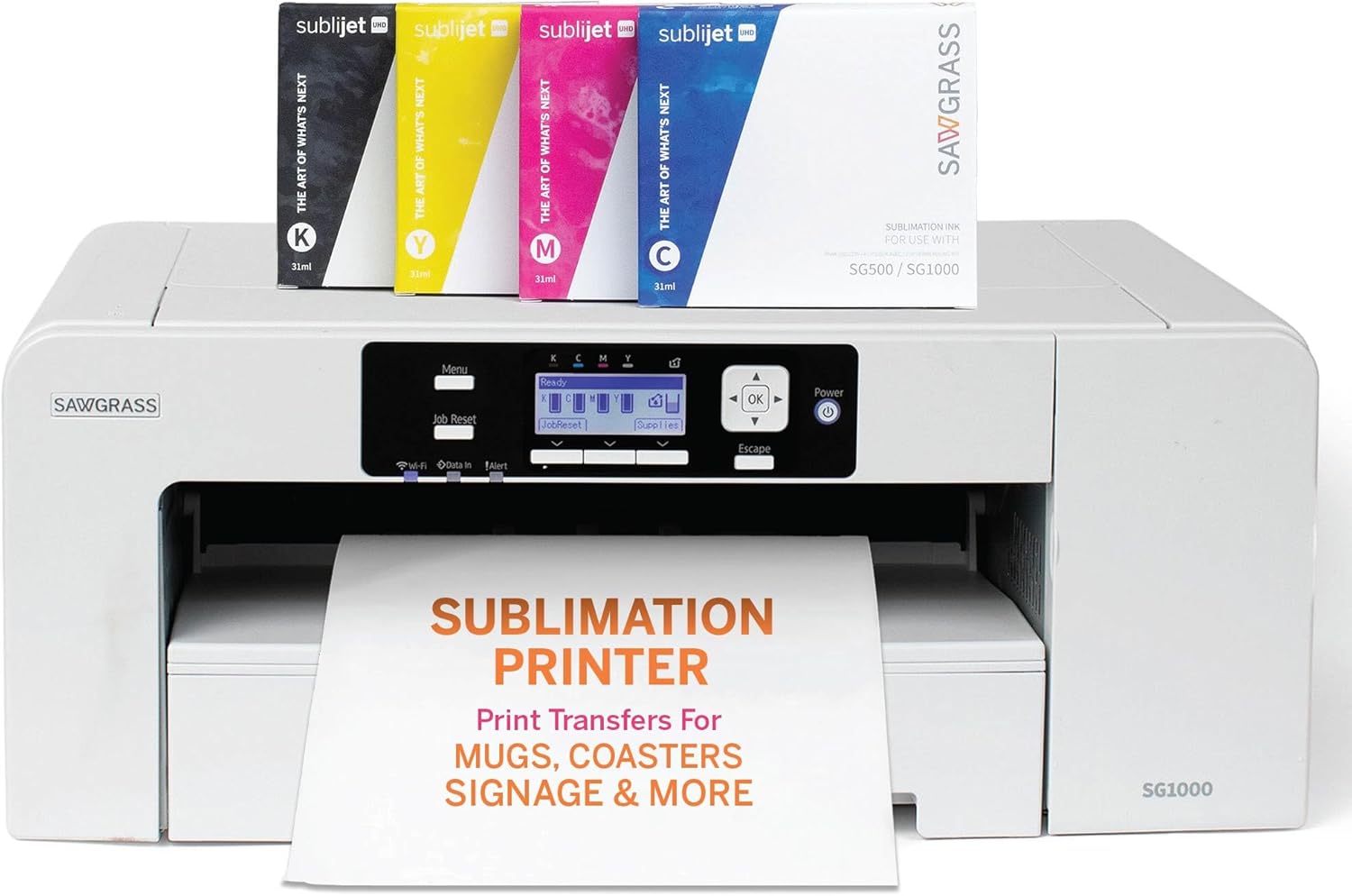
The Sawgrass SG1000 is a desktop dye sublimation printer sized for small shops or ambitious hobbyists who need larger-format sublimation prints. It prints color at high resolution (up to 4800 x 1200 dpi) and accepts media up to 11 x 17 inches, so it handles banners, panels, apparel transfers and other heat-transfer projects without needing a production press. The unit includes 31 mL SubliJet UHD CMYK inks and TruePix paper and offers automatic maintenance routines to reduce clogged nozzles during idle periods. Network-ready connectivity with Wi-Fi and USB makes it easy to add to a studio workflow, and Sawgrass supplies software tools for color management and templates. Practical limits are its single-tray, print-only design and modest sheet capacity, which mean it is optimized for quality and versatility rather than high-volume continuous output; businesses that need heavy batch throughput may prefer an industrial printer. The SG1000's onboarding and support resources help speed setup and color profiling for repeatable heat-transfer results.
Best for: Buyers who prioritize professional print quality and reliable color-managed sublimation output for heat-transfer goods and small-batch production will appreciate this printer.
Less Ideal for: Shops that require industrial-scale, nonstop production or multifunction office features should consider higher-capacity production printers or MFPs instead.
- High maximum print resolution (4800 x 1200 dpi) for sharp, vivid sublimation transfers
- Supports media up to 11 x 17 inches for larger heat-transfer projects
- Includes 31 mL SubliJet UHD CMYK inks and TruePix paper to get started
- Automatic maintenance minimizes clogged nozzles after idle periods
- Wi-Fi and USB connectivity plus Sawgrass Print Utility for easier color management
- Single-tray, print-only design limits copying and multifunction use
- Not optimized for very high-volume continuous production
Verdict: Choose the SG1000 when you need factory-quality, color-accurate sublimation prints up to tabloid size for small businesses and serious creators.
Pinckney Super-Tank Sublimation Printer

| Printer Type | Dye Sublimation |
|---|---|
| Maximum print Resolution Color | 5760 x 1440 dpi |
| Printer Connectivity Type | Wi-Fi |
| Maximum Media Size | 8.5 x 11 inch |
| Maximum Sheet Capacity | 100 |
This Pinckney bundle converts an EcoTank-style all-in-one into a cartridge-free dye sublimation printer aimed at hobbyists and small shops doing heat transfers. It includes high-capacity sublimation inks (one larger black bottle and three smaller color bottles) and an easy-fill nozzle to top the integrated tanks without syringes, which speeds refill and reduces mess. The unit prints up to 5760 x 1440 dpi, supports letter-size and several specialty paper sizes, and offers Wi‑Fi and USB 2.0 connectivity plus a built-in scanner/copier for creating transfers from originals. Practical benefits include low running cost from the super-tank design, vivid results after heat pressing, and straightforward setup for fabric or small hard-substrates. Limits to expect are that it is optimized for heat-transfer workflows rather than general photo finishing, maximum media is 8.5 x 11 for standard transfers, and some users may need to run nozzle checks and alignment to avoid occasional head clogs typical of sublimation conversions. The bundle is useful for steady printing volumes but not intended for large-format or duplex printing.
Best for: Buyers who want a practical, low-running-cost sublimation setup for steady small-batch heat-transfer projects and prefer fewer refill interruptions and straightforward refill handling.
Less Ideal for: Shops that need wide-format printing, true photo lab color management, or heavy industrial production should consider larger purpose-built sublimation printers instead.
- Cartridge-free super-tank design lowers refill frequency and operating cost
- Easy-fill nozzle that fits the ink inlet to refill without syringes or squeezing
- High maximum print resolution (5760 x 1440 dpi) for detailed transfer prints
- Built-in scanner and copier add workflow convenience for creating transfer originals
- Wi‑Fi and USB connectivity for flexible device printing
- Maximum standard media size limited to letter (8.5 x 11) for most transfer work
- Converted sublimation systems can require nozzle checks and occasional head maintenance
Verdict: A practical super-tank sublimation all-in-one that cuts refill hassle and operating cost for hobbyists and small shops focused on letter-size heat transfers.
PRINTERWORLD612 Sublimation Printer

| Printer Type | Dye Sublimation |
|---|---|
| Ink Color | Black, Magenta, Cyan, Yellow |
| Resolution | 5760 x 1440 dpi |
| Printer Connectivity Type | USB WIFI |
| Maximum Media Size | 8.5 x 11 inch |
This PRINTERWORLD612 sublimation printer is a converted dye-sublimation all-in-one designed for hobbyists and small businesses making heat-transfer goods like shirts, mugs, and bags. It ships ready to use with 70 ml bottles of sublimation ink in CMYK, sublimation paper, heat tape, and gloves so you can start printing transfers right away. The printer uses refillable ink tanks and supports USB and Wi-Fi connections, and its high reported native resolution (5760 x 1440 dpi) promises fine detail for colorful transfers. As a multifunction device it also copies and scans, and respectable page speeds mean reasonable throughput for small production runs. Important limitations: the unit is a conversion-style offering rather than a factory brand model, the warranty is short, and duplex printing is simplex only so two-sided document workflows are limited. Buyers should also expect setup and maintenance of refillable tanks and sublimation workflows to require more hands-on attention than a factory OEM solution.
Best for: Buyers on a budget who want a turnkey sublimation starter solution to begin producing heat-transfer items without buying separate inks and accessories.
Less Ideal for: Users seeking long factory warranties, plug-and-play OEM systems with minimal maintenance or those who need robust two-sided printing for high-volume office work.
- Includes full starter kit with 70 ml sublimation inks, paper, heat tape, and gloves so you can begin heat-transfer projects immediately.
- Refillable ink-tank design reduces recurring cartridge costs for frequent printing.
- High maximum print resolution (5760 x 1440 dpi) for detailed, vibrant sublimation transfers.
- USB and Wi-Fi connectivity make it flexible for home or small-shop setups.
- All-in-one copy and scan functions add useful versatility beyond transfer printing.
- Short 30-day warranty and brand conversion status may mean limited official support.
- Simplex-only printing so two-sided document workflows require manual handling.
- Refillable tank maintenance and sublimation setup demand more user attention than sealed OEM cartridges.
Verdict: If you want an affordable, ready-to-run sublimation kit to start making heat-transfer products without buying inks separately, this converted all-in-one is a practical entry choice.
Epson SureColor F170 Sublimation Printer

| Printer Type | Dye Sublimation |
|---|---|
| Maximum print Resolution Color | 5760 x 1440 Optimized DPI |
| Maximum Media Size | 8.5" Width |
| Maximum Sheet Capacity | 150 |
| Printer Connectivity Type | Wireless, USB, Ethernet |
The Epson SureColor F170 is a small-format dye-sublimation printer built for heat-transfer work on garments, mugs, and promotional items. It uses Epson PrecisionCore technology and high-resolution output (up to 5760 x 1440 optimized DPI) to deliver finely detailed, color-saturated transfers, and the closed 150-sheet tray helps keep media clean during runs. Connectivity includes USB, Ethernet, and Wi-Fi so you can print from Windows, macOS, and mobile devices via Epson software or apps, and the package ships with a full set of sublimation ink and basic setup accessories. Practical benefits include consistent color reproduction for small production batches and reduced downtime because of high-capacity ink bottles with auto-stop filling. Expect modest print speeds around 1 page per minute since the unit prioritizes image quality over throughput, and it performs simplex printing only so two-sided jobs require manual handling. For someone running a customization business or making personalized gifts, the F170 balances image fidelity and compact footprint, but it is not intended for high-volume, fast-turnaround commercial shops.
Best for: Buyers who need a reliable, compact sublimation printer for small-batch heat-transfer work and who value consistent color and image detail over raw speed.
Less Ideal for: Shops that require high-volume, high-speed output or automated duplex production should choose a larger, production-class sublimation system instead.
- High maximum print resolution for detailed, color-rich sublimation transfers
- Includes full set of Epson sublimation ink and basic setup accessories
- Closed 150-sheet tray reduces dust and paper handling for cleaner prints
- Wi‑Fi, USB, and Ethernet connectivity for flexible workflow integration
- High-capacity ink bottles with auto-stop help reduce refill mess and downtime
- Relatively slow print speed (around 1 page per minute) compared with high-volume printers
- Simplex-only printing requires manual flipping for double-sided projects
Verdict: A compact, color-accurate sublimation printer that reliably produces high-quality heat-transfer prints for small businesses and hobbyists.
Brother SP-1 Sublimation Printer

| Printer Type | Dye Sublimation |
|---|---|
| Maximum print Resolution Color | 1440 x 1440 dpi |
| Maximum Media Size | 8.5×11 |
| Printer Connectivity Type | Wi-Fi |
| Ink Color | Cyan, Magenta, Yellow, Black |
The Brother SP-1 is a small-format dye sublimation printer aimed at hobbyists and small crafters who want to make shirts, mugs, tumblers, and other personalized items. It prints color designs onto sublimation paper using four included Brother sublimation ink cartridges, then requires a separate heat press to transfer images onto polyester or polymer-coated substrates. Setup is focused around the Artspira app for wireless design transfer and also supports desktop printing via a driver, and the touch LCD makes basic controls straightforward. The unit supports 8.5×11 media and offers high color resolution (up to 1440 x 1440 dpi) for detailed transfers, plus Brother supplies and starter paper are included to get you printing right away. Trade-offs are its single-sheet maximum media size and the need to buy a heat press and appropriate blanks separately, and while print speeds are adequate for small runs the SP-1 is not built for high-volume production. For makers who value reliable color and a compact footprint, it delivers predictable, vibrant transfers when paired with proper heat-press workflow.
Best for: Crafters and small-business makers who want a reliable, compact sublimation printer to create custom apparel and gifts with consistent color and easy app-driven workflows.
Less Ideal for: People who need large-format printing, industrial throughput, or a fully standalone production line because this model is optimized for small runs and tabletop use.
- Designed specifically for dye sublimation with Brother genuine sublimation inks included
- High color resolution up to 1440 x 1440 dpi for detailed, vibrant transfers
- Compact footprint suitable for home craft spaces
- Wi-Fi support and Artspira app integration for easy wireless design transfer
- Requires a separate heat press and polyester or coated blanks to finish projects
- Maximum media limited to 8.5 x 11 inches, not suitable for larger transfers
- Not intended for high-volume commercial printing
Verdict: Pick the SP-1 if you want a compact, app-friendly sublimation printer that produces vibrant, hobby-scale heat-transfer projects with reliable Brother supplies.
Choosing the Right Sublimation Printer for Heat Transfer: Key Factors to Consider
Color Accuracy and Gamut
Faithful color reproduction is crucial when producing branded apparel or photographic transfers. Small shifts in hue or saturation become obvious after heat pressing, so pick a printer with proven color management options. Look for models that support ICC profiles, user-adjustable color curves, and software capable of previewing dither and halftone behavior.
Consistent color across print runs matters when you need multiple items to match. Consider how the printer handles spot colors and flesh tones, and whether you can save and recall color presets for repeat jobs.
Print Resolution and Halftone Quality
Fine detail and smooth gradients transfer better when the printer produces high native resolution and precise halftone screening. Inspect sample prints for banding, grain in shadows, and edge sharpness before committing to a workflow. Higher native DPI helps with photographic images and small type, while good halftoning prevents muddy midtones after heat application.
Resolution alone is not enough; effective dithering and ink laydown strategies influence how gradients and skin tones appear on fabric after pressing.
Ink System and Consumable Costs
Ink configuration affects both output quality and ongoing costs. Refillable or bulk systems reduce per-print cost but require disciplined maintenance to avoid clogs or contamination. Factory-sealed cartridges are more user-friendly but can be more expensive long term. Consider the availability and compatibility of sublimation inks for your region and how easy it is to perform routine ink-line maintenance.
Also evaluate how the printer handles waste ink, capping station cleaning, and whether consumables like print heads are user-replaceable to limit downtime and service costs.
Paper Handling and Media Flexibility
Heat-transfer projects use a range of transfer papers and substrate sizes. A printer that reliably feeds the transfer paper you plan to use, with options for roll or sheet feeding, reduces jams and misfeeds. Check maximum printable width, margin limitations, and whether the printer supports thicker or specialty papers without adjusting delicate settings.
Media flexibility also matters for small-batch production versus one-off items. Roll-fed printers can be more efficient for longer prints, while sheet-fed designs are often simpler for single transfers.
Workflow, Software, and Connectivity
A productive heat-transfer setup depends on seamless software and hardware interaction. Look for printers that work with your preferred design and RIP software or offer drivers with good color management. Reliable connectivity options, such as Ethernet or USB, and support for networked printing help in shared workspaces.
Ease of use in the driver, ability to save presets for specific papers and substrates, and compatibility with common design file formats speed production and reduce errors.
Durability and Serviceability
Printers that are easy to service and built with durable components reduce unplanned downtime. Consider whether common wear parts like feed rollers or maintenance tanks are user-replaceable and how straightforward routine cleaning tasks are. A unit that tolerates regular use without frequent head alignments or clog-related maintenance will be more economical for high-volume or commercial projects.
Also assess how straightforward error diagnosis and recovery are, since a printer that stalls mid-run can disrupt entire production batches.
Preparing Artwork for Heat Transfer
Start by working in the correct color space and resolution for your intended output. For dye-sublimation transfers, design files should be high resolution and flattened to avoid unexpected layer effects during RIP processing. Convert images to the color profile recommended for your printer and transfer paper to reduce color surprises after pressing.
Manage image edges and bleeding carefully. When artwork includes fine lines or small text, increase contrast slightly and use vector paths where possible. Create a test strip that includes key colors and gradients so you can verify how the design reacts to your chosen transfer paper and heat press settings.
- Use appropriate ICC profiles and soft-proof where supported
- Export at native resolution or higher to avoid interpolation artifacts
- Include registration marks or crop guides for precise trimming
Common Heat-Press Considerations
Heat pressing parameters like temperature, pressure, and dwell time affect how dye migrates into substrates. Always follow the transfer paper and ink supplier recommendations, and run tests on scrap pieces before committing to final items. Over-pressing can cause color shifts or scorch marks, while under-pressing yields weak transfers.
Protective sheets and release liners can prevent stains on the heat platen and help ensure even pressure across the transfer. For three-dimensional objects or uneven surfaces, use pads or molds to maintain consistent contact during pressing.
- Perform temperature and time tests on the actual substrate
- Use protective sheets to prevent ink bleed and platen staining
- Adjust pressure for substrate thickness to avoid puckering
Maintaining Print Consistency Over Time
Establish a routine for head cleaning, nozzle checks, and color calibration. Regularly scheduled maintenance prevents gradual drift in color and reduces the risk of clogged nozzles that create banding. Keep logs of ink batch changes and cleaning cycles to correlate issues with recent maintenance actions.
Store sublimation inks and papers in a controlled environment, away from extreme temperature and humidity swings. Proper storage extends consumable life and helps maintain stable color performance between print runs.
- Run nozzle checks before long production runs
- Keep spare consumables and maintenance parts on hand
- Document settings for each paper and substrate combination
Scaling From Hobby to Small-Batch Production
As demand grows, workflow bottlenecks can emerge around media handling, drying time, and post-press finishing. Consider whether a printer supports faster feed methods, larger paper rolls, or continuous print modes that reduce operator intervention. Automation in cutting and finishing can also speed throughput as volume increases.
Plan for incremental upgrades in ink capacity or media handling instead of replacing the entire system at once. Small shops benefit from modular approaches that let you expand capacity while retaining familiar color profiles and process knowledge.
- Evaluate roll-fed options for longer runs
- Consider outsourcing very large or irregular jobs during growth phases
- Invest in consistent drying and curing workflows to avoid bottlenecks
Troubleshooting Common Print Issues
Banding, color shifts, and streaks are typical problems with dye-sublimation setups. Start troubleshooting with a fresh nozzle check, ensuring nozzles fire across the head. If only one color is off, isolate that ink line and run targeted cleaning cycles. Re-profile if you change ink batches or media types.
Paper feed problems often stem from humidity, incorrect loading, or worn feed rollers. Recalibrate margins and feeds when switching paper types and keep the paper path clean of lint and ink residue to maintain stable feeding.
- Isolate problems with single-color nozzle tests
- Re-profile after significant consumable changes
- Keep the paper path and platen free from debris
How We Chose the Best Sublimation Printer for Heat Transfer
We selected printers that meet the practical needs of people doing dye-sublimation heat transfers, emphasizing criteria that directly affect finished transfers and production efficiency. We prioritized color accuracy and gamut because faithful color reproduction is essential for branded graphics and photographic transfers. Print resolution and halftone handling were assessed to ensure crisp detail on both textiles and hard substrates. Ink and media management mattered for running costs and uptime, so we evaluated cartridge and refill systems, paper feed reliability, and maintenance intervals. Workflow and connectivity were included to reflect real-world use, covering software compatibility, RIP or color-management support, and network or direct connection options. Build quality and serviceability were considered to reduce downtime in small-shop environments. We excluded printers that are not designed or certified for dye-sublimation heat-transfer inks or that lack appropriate media handling for transfer paper. In summary, the list filters out hobby-level machines that compromise color control or repeatability, focusing on units that deliver consistent, repeatable results for heat-transfer projects.
Our full evaluation process is outlined in our review methodology.
FAQ
Can I use a sublimation printer for heat transfer on cotton fabrics?
Sublimation works best on polyester or polyester-coated substrates because dye bonds with synthetic fibers. For cotton, you will usually need a specialty coating or transfer media designed to accept sublimation inks; results vary and require testing.
How often should I run maintenance on a heat-transfer sublimation printer?
Maintenance frequency depends on usage but often includes daily nozzle checks for active production and weekly deeper cleaning. Idle periods require occasional cycling to keep ink lines fresh and prevent clogs.
Do I need special transfer paper for dye-sublimation?
Yes. Transfer papers are formulated to release dye cleanly during heat pressing and to hold ink in a way that maintains color density. Different papers yield different dot gain and color balance, so choose papers recommended for your ink and printer combination.
Will changing ink brands affect my color output?
Switching inks can noticeably change color balance and density. It often requires new profiles and test prints to match prior results. For consistency, avoid mixing dissimilar ink chemistries and re-profile after any brand or batch change.
What print settings most influence transfer durability?
Ink saturation and proper heat-press parameters strongly influence durability. Higher saturation increases dye load but must be matched with appropriate temperature and time to avoid bleeding. Correct pressure and curing prevent partial transfer and improve wash-fastness.
Final Verdict
When choosing a sublimation printer for heat transfer, prioritize color management, media handling, and reliable maintenance workflows. Match the printer s features to your typical project sizes and substrate types to avoid compromises in color or throughput. Tradeoffs are common: higher-end color control and serviceability usually cost more to operate, while simpler machines can be easier to maintain but may limit gamut or paper flexibility. Pick the option that aligns with your expected volume and the level of color fidelity you need for finished transfers.