
Note: This article contains affiliate links. If you click on these links and make a purchase, we may earn a small commission at no extra cost to you. This helps support our research and content. Read our full affiliate disclosure here.
If you sell custom apparel, mugs, or small runs of promotional items, a dedicated sublimation printer for small businesses can make the difference between profitable production and constant rework. Choosing the right printer affects color fidelity, run speed, and how smoothly your shop operates day to day. This guide covers seven shortlisted options that suit startup studios and growing shops, focusing on real-world factors such as throughput, maintenance demands, and print consistency. Below you will find quick takeaways and an explanation of the evaluation criteria used to pick these top choices, followed by practical buying guidance to match a printer to your workflow.
Top Picks at a Glance
| Best Overall The best all-around choice for most situations | Epson SureColor F570 Sublimation Printer |  |
| Best Quality Built to a higher standard if you want something more solid | Sawgrass SG500 Sublimation Printer |  |
| Best Value The sweet spot between price and what you get | GENERIC Sublimation Printer |  |
| Best Budget The cheapest option that still gets the job done reliably | Pinckney Super-Tank Sublimation Printer |  |
| Top Rated A top-rated pick with lots of positive feedback | Brother SP-1 Sublimation Printer |  |
| Most Popular A crowd favorite that many people choose with confidence | Epson SureColor F170 |  |
| Best Seller A high-volume bestseller chosen again and again | Liene 4×6 Photo Printer DHP513 |  |
Epson SureColor F570 Sublimation Printer

| Printer Type | Dye Sublimation |
|---|---|
| Maximum Media Size | 24" x 100' |
| Connectivity | Wireless, USB, Ethernet |
| Ink Color | Cyan, Magenta, Yellow, Black |
| Control Method | Remote, Touch |
The Epson SureColor F570 is a 24" desktop dye-sublimation printer aimed at small production runs and on-demand merchandising. It accepts rolls and sheets up to 24" wide, offers a 50-sheet auto-feed tray, and includes a built-in cutter and stand to keep a compact workflow. The PrecisionCore MicroTFP printhead and Epson T49M inks are tuned for dye-sub transfer to polyester and coated substrates, and the bundle here includes two full ink sets, sublimation paper, and remote install support so you can start faster. Epson Edge Print Pro plus Adobe PostScript/PDF print engine bring nesting, layout and color controls useful for maximizing media use and repeatable color across jobs. Expect professional-looking output at modest print speeds and a 720 dpi operational resolution listed for this bundle, so it trades top photographic speed for color consistency and reliability. The unit requires a bit of space and LTL freight handling for delivery, and businesses with very high-volume needs may prefer larger production printers, but for balanced small-business owners who need reliable dye-sub output and solid software control, the F570 is a strong pick.
Best for: Small-business owners making custom apparel and goods who need a reliable 24" dye-sublimation printer with professional print workflow and included inks to start production quickly.
Less Ideal for: High-volume production shops that need faster throughput or higher native photographic resolution and compact hobbyists who lack space for a heavier desktop production printer.
- Supports roll and sheet media up to 24 inches with a built-in cutter for efficient workflow
- Includes two full ink sets and sublimation paper so the printer is usable out of the box
- Professional RIP and Adobe PostScript/PDF engine for accurate layout, nesting, and color control
- PrecisionCore MicroTFP printhead and nozzle verification for consistent dye-sublimation output
- Listed print speed and resolution are modest compared with higher-end production sublimation printers
- Large and heavy unit requiring LTL freight delivery and space for installation
Verdict: The F570 is a balanced 24" dye-sublimation desktop printer that gives small businesses a ready-to-run production setup with professional RIP controls and included inks.
Sawgrass SG500 Sublimation Printer

| Printer Type | Dye Sublimation |
|---|---|
| Resolution | 1200 x 1200 |
| Color | Cyan, Magenta, Yellow, Black |
| Printer Connectivity Type | Wi-Fi |
| Maximum Media Size | 8.5 x 14 inch |
The Sawgrass SG500 is a compact dye sublimation printer built for producing vibrant CMYK transfers for apparel, drinkware, signage, and other small-business products. It accepts media up to 8.5 x 14 inches (with a bypass for longer lengths), connects over Wi‑Fi or USB, and uses a dedicated SubliJet UHD inkset that prioritizes color accuracy and fade resistance. Paired with Sawgrass Print Utility and the MySawgrass design platform, the SG500 simplifies color management and template-based workflows so you can move from design to finished transfer quickly. Print resolution tops out at 1200 dpi, which yields sharp detail for logos and photos, and the unit includes features like print-head auto-maintenance to reduce clogs during intermittent use. Trade-offs are its desktop size and media limits, which make it better for small batches and items rather than wide-format or high-volume roll printing, and it relies on Sawgrass inks and workflow to hit advertised color performance. For small businesses that need consistent, professional sublimation output in a compact package, the SG500 is a focused, production-ready choice.
Best for: Small-business owners and makers who prioritize color accuracy and professional-looking sublimation prints for apparel and promotional products and need a reliable, compact production printer.
Less Ideal for: Businesses that require wide-format printing, continuous high-volume roll production, or a printer that avoids brand-specific inks and software should look elsewhere.
- Designed for CMYK sublimation with SubliJet UHD inks for vivid, fade-resistant color
- 1200 dpi resolution for sharp logos and photographic detail
- Wi‑Fi and USB connectivity for flexible workflow integration
- Includes access to Sawgrass Print Utility and MySawgrass design tools for easier color management and templates
- Desktop media width and sheet capacity limit suitability for wide-format or very high-volume production
- Optimized for Sawgrass inks and software, which constrains third-party workflow options
Verdict: The SG500 delivers studio-quality sublimation color and reliable desktop production for small businesses that need accurate, ready-to-print CMYK output.
GENERIC Sublimation Printer
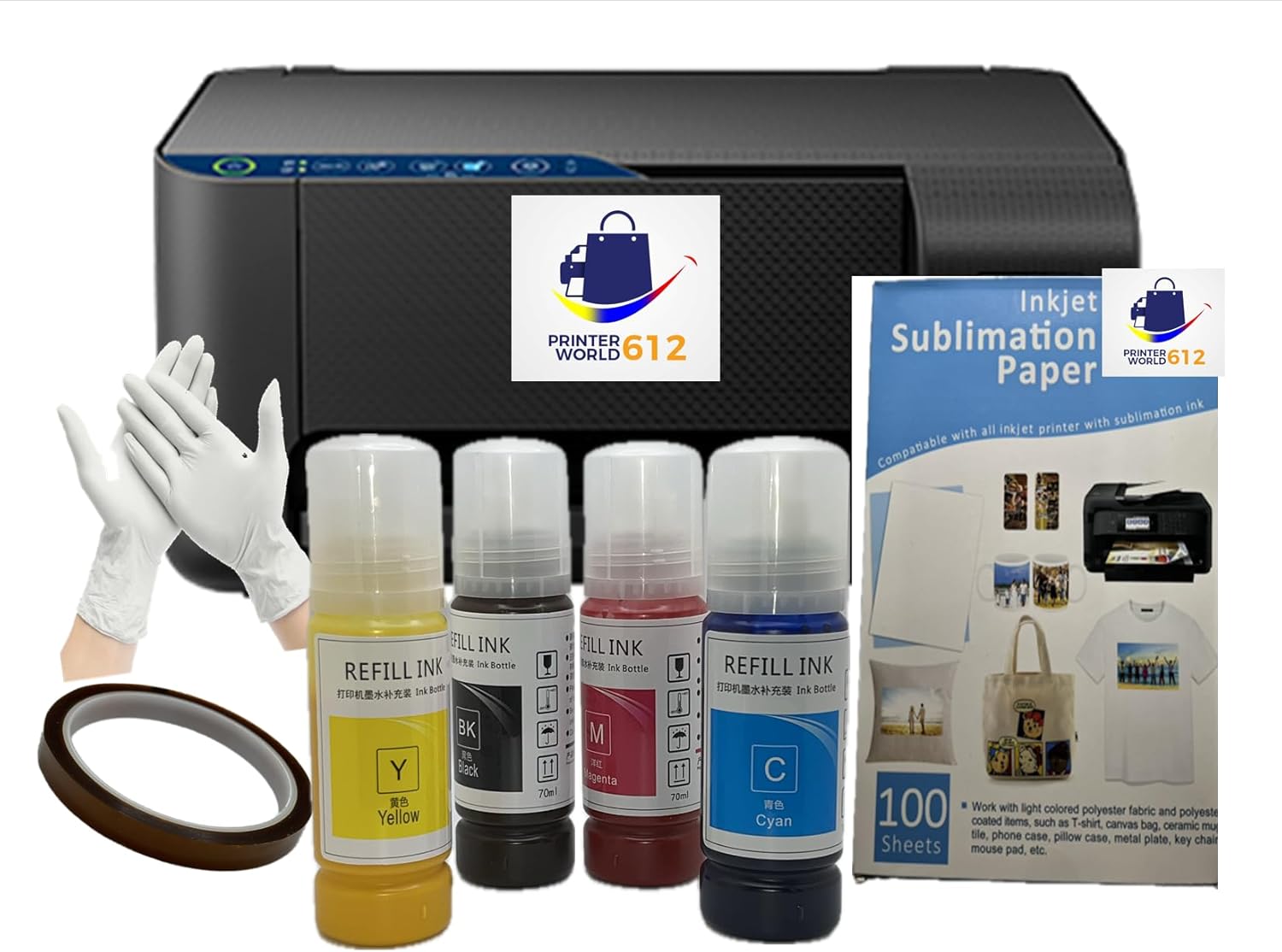
| Printer Type | Inkjet |
|---|---|
| Ink Color | Black, Cyan, Magenta, Yellow |
| Printer Connectivity Type | USB WIFI |
| Maximum Media Size | 8.5 x 11 inch |
| Color Pages per Minute | 17.5 pages_per_minute |
This refillable-tank inkjet is sold as a ready-to-use sublimation printer aimed at small businesses and crafters who need starter supplies included. It prints up to letter/A4 media, uses four 70 ml sublimation ink bottles, and supports USB and Wi-Fi connections so you can drive jobs from a laptop. The unit doubles as a flatbed scanner and copier, and the high-capacity ink tanks reduce refill frequency compared with cartridge-based machines. Practical extras in the kit include sublimation paper, heat tape, and gloves, which makes getting started faster for production runs or sample creation. Expect simplex only printing and consumer-grade build and support, so heavy continuous production will show limits compared with commercial dye-sublimation presses. For small-batch apparel, mugs, and promotional items this printer is a convenient, lower-cost entry point that balances print quality and operating convenience.
Best for: Small-business owners and hobby entrepreneurs who want an affordable, ready-to-run sublimation setup to produce samples, small batches, and customized merchandise without buying separate inks or media.
Less Ideal for: High-volume production shops that need industrial-level duty cycles or factory-grade color consistency should look at dedicated commercial sublimation presses instead.
- Comes with 70 ml sublimation ink bottles for all four colors so you can start immediately
- Refillable high-capacity ink tanks that cut down on cartridge replacements
- Includes sublimation paper, heat tape, and gloves for a complete starter kit
- USB and Wi-Fi connectivity for flexible placement and laptop workflow
- Simplex-only printing limits throughput for high-volume double-sided jobs
- Positioned as a consumer conversion unit so long-term heavy-duty reliability may be lower than commercial printers
Verdict: This ready-to-use sublimation printer is a cost-effective starter solution for small businesses that need complete supplies and easy setup to produce custom products quickly.
Pinckney Super-Tank Sublimation Printer

| Printer Type | Dye Sublimation |
|---|---|
| Maximum print Resolution Color | 5760 x 1440 dpi |
| Printer Connectivity Type | Wi-Fi |
| Maximum Media Size | 8.5 x 11 inch |
| Color Pages per Minute | 5 |
This Pinckney Super-Tank printer is a converted EcoTank-style all-in-one tuned for sublimation transfers, pairing refillable high-capacity tanks with a built-in scanner and copier. It is used by printing mirror images on sublimation paper and then heat-pressing onto textiles, mugs, and small items; the included dye-sublimation inks (one large black and three color bottles) make it ready for small production runs. Key features include wireless connectivity, an LCD control panel, app control, and a high optical resolution claim up to 5760 x 1440 dpi that helps preserve fine detail for transfers. The big ink bottles and easy-fill nozzle reduce downtime and supply cost compared with cartridge systems, which is useful for frequent printing. Limitations are that media handling is sized for letter/legal sheets only, duplexing is simplex only, and this is a converted consumer EcoTank platform so heavy industrial duty cycle expectations may not match commercial RIP-driven machines. Expect some setup and nozzle maintenance typical of sublimation workflows to keep color consistency for repeat jobs.
Best for: Small business owners and makers who need an affordable, cartridge-free sublimation setup for short to medium run production and value low ink cost and included inks to start printing right away.
Less Ideal for: High-volume production shops that require commercial-grade duty cycles, professional color management, or wide-format continuous media beyond letter/legal sizes should consider true commercial sublimation systems instead.
- Cartridge-free super-tank design lowers per-page ink cost and reduces refill frequency.
- Includes a full sublimation ink set sized for multiple small runs (Black 127mL; Magenta/Cyan/Yellow 85mL).
- Built-in scanner and copier add basic finishing and proofing without extra equipment.
- Wi-Fi and USB connectivity with app control simplify setup for small-shop workflows.
- High stated print resolution (5760 x 1440 dpi) preserves fine detail for transfers.
- Paper handling limited to sheet sizes up to 8.5 x 11 inch for standard workflows.
- Converted consumer platform may not match the duty cycle or color management features of commercial sublimation printers.
- Duplex printing is not supported; transfers require manual handling and heat pressing.
Verdict: A budget-friendly cartridge-free sublimation all-in-one that gives small businesses an inexpensive, ready-to-run ink supply and scanner/copier for short to medium print runs.
Brother SP-1 Sublimation Printer

| Printer Type | Dye Sublimation |
|---|---|
| Maximum print Resolution Color | 600 x 600 dpi |
| Color Pages per Minute | 10 |
| Printer Connectivity Type | Ethernet, Wi-Fi |
| Maximum Media Size | Legal (8.5 x 14 inches) |
The Brother SP-1 Sublimation Printer Starter Bundle is a compact dye-sublimation system aimed at hobbyists and small businesses that need quick, full-color transfers to fabric and coated blanks. It prints at up to 600 x 600 dpi and about 10 pages per minute, and the starter bundle includes a full CMYK ink set, 160 sublimation transfer sheets, heat-resistant tape, and 50 sublimation blanks so you can start producing samples right away. Connectivity options include Wi-Fi and Ethernet for easy integration into a small studio workflow, and the package also provides the Artspira design app for layout and design support. In practice the SP-1 is best for short-run personalized items like shirts, tote bags, and tumblers where consistent color and straightforward setup matter; the included supplies reduce initial setup hassle. Limitations are its simplex-only printing and modest resolution compared with higher-end sublimation units, so it is less suited to very large volume production or jobs demanding extreme fine detail.
Best for: Small-business owners or crafters who need a reliable, out-of-the-box sublimation solution to produce personalized items and prototypes quickly without a steep setup process.
Less Ideal for: Production shops that require high-resolution output, duplex or continuous high-volume printing should consider more industrial sublimation solutions.
- Complete starter bundle with CMYK inks, transfer paper, tape, and blanks to begin production immediately.
- Ethernet and Wi-Fi connectivity for flexible placement in a small studio or shop.
- Reasonable print speed of 10 ppm for short-run production and sample work.
- Compact footprint suitable for home studios and small business workspaces.
- 600 x 600 dpi resolution and simplex-only printing limit detail and throughput for high-volume commercial needs.
- Max sheet capacity and media handling are targeted to small runs rather than continuous production.
Verdict: A ready-to-run sublimation package that gets small businesses printing colorful personalized products quickly and reliably.
Epson SureColor F170

| Printer Type | Dye Sublimation |
|---|---|
| Maximum print Resolution Color | 5760 x 1440 Optimized DPI |
| Maximum Media Size | 8.5" Width |
| Maximum Sheet Capacity | 150 |
| Printer Connectivity Type | Wireless, USB, Ethernet |
The Epson SureColor F170 is a turnkey dye-sublimation printer aimed at hobbyists and small businesses doing on-demand personalization of items like mugs, mousepads, and small apparel pieces. It uses Epson PrecisionCore printhead technology and OEM dye-sublimation inks to produce high-resolution color output up to 5760 x 1440 optimized DPI, and arrives with a full set of genuine ink bottles and a 150-sheet auto-feed tray for short production runs. Connectivity includes wireless, USB, and Ethernet, so it can be added to a small network or run directly from a workstation. The compact footprint and closed paper tray help keep dust off media in a workshop environment, and the included inks use auto-stop refill bottles to reduce mess. Expect modest print speeds suitable for low-volume production rather than high-throughput shops, and note that handling sublimation inks requires care because some formulations can irritate skin. For small businesses that need professional-looking transfers without a large footprint, the F170 balances print quality and simplicity in a compact package.
Best for: Small business owners and crafters who prioritize consistent, high-quality sublimation results and want a compact, ready-to-run printer they can add to a small network.
Less Ideal for: High-volume production shops or users who need wide-format sublimation beyond 8.5 inches or faster throughput for large orders.
- High optical resolution up to 5760 x 1440 optimized DPI for detailed sublimation transfers.
- Comes with genuine Epson dye-sublimation ink bottles and auto-stop refill design to reduce mess and maintain color consistency.
- 150-sheet auto-feed tray and closed media path for easier short-run workflows and cleaner prints.
- Multiple connectivity options (wireless, USB, Ethernet) allow flexible placement in a small shop.
- Low page-per-minute speed geared to single-item or small-batch production rather than high-volume output.
- Designed for 8.5" width media so it cannot handle larger substrates without a different model.
Verdict: Choose the SureColor F170 when you need a compact, network-ready dye-sublimation printer that delivers Epson-quality transfers for small business and craft production.
Liene 4×6 Photo Printer DHP513

| Printer Type | Dye Sublimation |
|---|---|
| Maximum Media Size | 4 x 6 inch |
| Printer Connectivity Type | USB, Wi-Fi |
| Print Resolution | 300 x 300 dpi |
| Maximum Sheet Capacity | 20 |
The Liene DHP513 is a portable dye-sublimation 4×6 photo printer aimed at quick, lab-style prints from smartphones and computers. It connects via built-in Wi‑Fi hotspot or USB‑C and prints borderless 4×6 glossy photos using proprietary dye cartridges and a sealed paper cassette, so setup is mostly load paper, insert cartridge, and print from the Liene app or your device photo album. Prints are laminated by the sublimation process for water, scratch and fade resistance, and the app adds basic editing, filters, and ID/visa templates for simple customization. The unit is compact and easy to store, and it supports up to five simultaneous device connections which is handy for small-team or event use. Limitations for small-business use include a modest 20-sheet cassette capacity and relatively slow single-page throughput, so high-volume runs require frequent reloads or multiple units; the printer also uses proprietary cartridges and paper which restricts consumable sourcing. For low- to moderate-volume photo printing where consistent, durable 4×6 output is the priority, this model covers the basics well.
Best for: Buyers who prioritize reliable, lab-quality 4×6 prints for small runs or event printing and want a simple, phone-friendly workflow rather than high-volume industrial output.
Less Ideal for: Businesses that need continuous high-volume production, bulk printing efficiency, or the flexibility to use third-party consumables should consider higher-capacity desktop sublimation systems instead.
- Dye-sublimation printing produces laminated, water- and scratch-resistant 4×6 photos.
- Built-in Wi‑Fi hotspot allows direct phone printing without a local network.
- Cross-platform support for iOS, Android, Windows and Mac plus USB‑C connection options.
- Includes app with basic editing, templates and the ability to print ID/visa photos.
- Compact design with sealed paper cassette reduces dust contamination during storage.
- Small 20-sheet paper cassette and single-page print time limit throughput for high-volume jobs.
- Uses proprietary cartridges and paper which narrows consumable choices and sourcing.
Verdict: Choose the Liene DHP513 when you need compact, phone-ready dye-sublimation 4×6 prints with durable finishes for small-volume business or event use.
Choosing the Right Sublimation Printer for Small Businesses: Key Factors to Consider
Print Quality and Color Consistency
Color accuracy determines how closely your printed output matches the original artwork and customer expectations. For sublimation work, stable ink chemistry and precise printer calibration reduce the need for reprints and color adjustments. Regular profiling and using RIP or color management tools help maintain consistent results across multiple runs.
In small-business settings, color shifts between batches can lead to waste and customer dissatisfaction. Choose machines that support ICC profiles, host adjustable color controls, and produce smooth gradients without banding to keep returns and corrective labor to a minimum.
Production Speed and Throughput
Throughput affects how many orders you can fulfill in a single day. A faster printer with reliable continuous feeding will let you scale production without hiring extra staff. Consider both single-pass speeds for prints and real-world throughput when accounting for loading, finishing, and any required curing or pressing steps.
Also factor in warm-up time and how the printer handles long runs. Machines designed for business use often include features that reduce downtime between jobs, such as larger ink reservoirs and robust feeding mechanisms that tolerate heavier use.
Media Compatibility and Size Options
Small businesses often produce a variety of items, so a printer that supports multiple media widths and substrate types is more versatile. Confirm the maximum printable width and whether the machine supports rigid or rolled media if you plan to expand into items like plaques or signage.
Check how the printer handles specialty transfer paper and whether it requires any special pretreatment for certain substrates. Flexibility here reduces the need to buy separate machines as your product mix evolves.
Software, Color Management, and File Handling
Good software streamlines production by reducing manual steps between design and print. Look for printers that work with industry-standard file formats and offer reliable drivers. Built-in RIP functionality or compatibility with third-party RIPs gives finer control over color, halftones, and layout automation.
Automation features such as job queuing, nesting, and imposition can save time on repetitive tasks. For small teams, simpler, stable software can be preferable to feature-heavy suites that require steep learning curves.
Maintenance Needs and Long-Term Reliability
Maintenance frequency and ease affect operating cost and uptime. Small businesses benefit from printers with user-serviceable parts, clear maintenance schedules, and accessible consumables. Consider how often heads need cleaning, whether ink lines are easy to purge, and the availability of replaceable maintenance kits.
Durability under continuous use matters more than initial speed specs. Machines built for business workloads usually have sturdier mechanics and clear documentation for routine servicing, which reduces unexpected downtime and repair expenses.
Connectivity and Shop Integration
Networked connectivity and support for common workflows let the printer fit naturally into an existing shop. Wired Ethernet, USB, and compatible print servers enable centralized job management. Consider whether the printer can be integrated into automated production setups or print management systems used for invoicing and order tracking.
Remote monitoring features or status alerts can be especially helpful for small teams that need to multitask. Reliable connectivity reduces job errors and helps maintain a steady production schedule.
How Sublimation Printing Fits Small-Batch Production
Sublimation printing is well suited to small businesses that make personalized or short-run products. The process produces durable, full-color transfers that bond with polyester-based substrates, delivering vibrant graphics that withstand washing and handling when applied correctly.
For shops that handle variable orders, the main operational considerations are setup time for each job, how quickly you can finish transfers with a heat press, and the predictability of color. Choosing a printer that minimizes manual adjustments and integrates cleanly with your pressing workflow keeps per-item labor low and margins healthier.
- Best for polyester or coated substrates rather than untreated natural fabrics
- Pairs with heat presses for final transfer, so press capacity and heating consistency matter
- Works well for small runs, on-demand printing, and personalized items
Setting Up a Production Workflow
A reliable workflow reduces errors and increases throughput. Start by standardizing file formats and color profiles across your team so prints match expectations. Implement a simple job ticketing system that lists substrate type, transfer paper, print settings, and press parameters to avoid mix-ups.
Organize a prep area where papers are handled and stacked without smudging, and dedicate a station for post-print checks and trimming. If you plan to scale, map out how many prints per hour your press and finishing stations can realistically support and choose a printer that keeps pace with that throughput.
- Use consistent ICC profiles for different substrate families
- Label jobs with production notes to maintain repeatability
- Balance printer speed with press capacity to avoid bottlenecks
Consumables and Ongoing Operating Costs
Consumables include inks, transfer papers, maintenance kits, and any replacement parts. Ink usage varies by print coverage, so estimate consumption based on your typical designs rather than manufacturer page-yield numbers. Larger refillable reservoirs often lower per-print ink costs and reduce interruptions.
Transfer paper quality affects final color and ease of pressing. Investing in consistent, high-quality paper reduces mis-transfers and reprints. Track consumable usage and costs to calculate your actual per-item cost and set realistic retail pricing for profitability.
- Monitor ink coverage across common designs to forecast reorder timing
- Choose transfer paper compatible with your substrate mix
- Keep spare maintenance parts on hand to minimize downtime
Shop Layout and Environmental Needs
Printer placement affects workflow. Position machines near design stations and prep areas to minimize handling. Ensure adequate ventilation in spaces where inks are handled and consider environmental controls if your shop experiences wide temperature or humidity swings that can affect ink behavior.
Noise and heat output are also practical factors as they influence worker comfort and equipment placement. Make room for routine maintenance tasks such as head cleanings and allow clearance for roll-fed media if you will be using larger widths.
- Provide stable temperature and humidity for consistent ink performance
- Plan for waste disposal of used papers and maintenance residues
- Allow clearance for media rolls and access for servicing
Scaling From Hobby to Business
As order volume grows, look beyond peak speed specs and focus on systems that reduce manual intervention. Features like larger ink reservoirs, automated maintenance routines, and robust feed systems matter more at scale. Plan investment timing so you do not outgrow your press or finishing capabilities first.
Consider the skills and staff time required to maintain more advanced machines. Training for color management and basic servicing is a good early investment that pays off in fewer failed prints and better customer satisfaction.
- Prioritize durability and ease of maintenance when expecting growth
- Train staff in profile use and routine printer upkeep
- Reassess press capacity and finishing workflow as volumes increase
How We Chose the Best Sublimation Printer for Small Businesses
We evaluated options using criteria that matter in commercial small-batch sublimation work. Print quality and color accuracy were assessed as the primary considerations because consistent, repeatable output reduces waste and customer complaints. Throughput and speed were included to reflect real shop productivity—how many items you can produce per hour at acceptable quality. Media handling and size flexibility were evaluated to ensure machines support the substrates small businesses commonly use, from shirts to mugs and small signs. Software and workflow integration were considered to measure how easily files move from design to finished item, including driver stability and RIP feature sets. Reliability and maintenance demands were used to estimate downtime and recurring operational effort. We excluded consumer inkjet printers not designed for continuous commercial use, and we filtered out models that lack basic shop-oriented features such as replaceable maintenance parts or business-grade connectivity. The final selections prioritize machines that balance color fidelity, consistent throughput, manageable upkeep, and software support that helps small-business owners produce predictable results.
Our full evaluation process is outlined in our review methodology.
FAQ
Can a small business use a desktop sublimation printer for commercial orders?
Often yes. Desktop sublimation printers can handle small commercial runs if volumes are moderate and you manage throughput expectations. For continuous, larger orders you may need machines with higher duty cycles and larger ink supplies.
How important is color profiling for sublimation work?
Color profiling is usually essential for predictable results, especially when reproducing brand colors. Using ICC profiles and consistent substrate choices reduces the need for manual color corrections between jobs.
What maintenance should be expected with business use?
Expect routine head cleanings, occasional nozzle checks, and periodic replacement of maintenance parts. Frequency depends on print volume and ink type, but scheduling regular maintenance prevents clogs and downtime.
Do sublimation printers require special ventilation?
Most small-scale sublimation printing does not produce hazardous fumes, but good ventilation is recommended when handling inks and solvents. Adequate airflow improves worker comfort and helps control temperature and humidity.
Is transfer paper the same for all sublimation printers?
No. Transfer paper quality and coatings vary, and you should match paper to your substrate and printer output. Testing a few paper types under your press conditions helps identify the best match for color and transfer reliability.
Final Verdict
Choosing the right sublimation printer for small businesses means balancing consistent color output, reliable throughput, and manageable maintenance. Prioritize machines that fit your expected daily volume and that integrate smoothly with your pressing and finishing workflow. Remember that software stability and media support are as important as raw speed. Focus on the tradeoffs between initial capability and long-term operating ease. Pick a printer that matches your current production needs but leaves room for modest growth, and commit to routine maintenance and color management to keep output predictable and customers happy.