
Note: This article contains affiliate links. If you click on these links and make a purchase, we may earn a small commission at no extra cost to you. This helps support our research and content. Read our full affiliate disclosure here.
Choosing the right sublimation printer matters because it directly affects color accuracy, transfer consistency, and production speed. Whether you make apparel, mugs, or small signage, the printer you select determines how predictable and durable your final pieces will be. This guide shortlists the top sublimation printers that meet common maker and small-business needs, emphasizing color fidelity, media handling, and workflow reliability. We evaluated practical factors like print resolution, ink system design, media compatibility, and day-to-day maintenance to surface machines suited for repeated transfers and consistent output. Read on for a concise overview of the best options and the criteria we used to select them.
Top Picks at a Glance
| Best Overall The best all-around choice for most situations | Brother SP-1 Sublimation Printer |  |
| Best Quality Built to a higher standard if you want something more solid | Sawgrass SG1000 Sublimation Printer |  |
| Best Value The sweet spot between price and what you get | Pinckney Super-Tank Sublimation Printer |  |
| Best Budget The cheapest option that still gets the job done reliably | Liene 4×6 Photo Printer |  |
| Top Rated A top-rated pick with lots of positive feedback | Epson SureColor F170 Sublimation Printer |  |
| Most Popular A crowd favorite that many people choose with confidence | Epson SureColor F170 |  |
| Best Seller A high-volume bestseller chosen again and again | Liene PixCut S1 DHP700 |  |
Brother SP-1 Sublimation Printer

| Printer Type | Dye Sublimation |
|---|---|
| Maximum print Resolution Color | 600 x 600 dpi |
| Color Pages per Minute | 10 |
| Maximum Media Size | Legal (8.5 x 14 inches) |
| Printer Connectivity Type | Ethernet, Wi-Fi |
The Brother SP-1 bundle is a compact dye-sublimation printer aimed at hobbyists and small makers who want ready-to-run supplies included. It prints in full color using CMYK dye-sublimation inks at a maximum 600 x 600 dpi and handles up to legal-size media, making it suitable for shirts, tote bags, mugs and other craft blanks. The starter bundle adds 160 sheets of sublimation paper, 50 blanks, multiple heat-resistant tape rolls and an Artspira design app download, which reduces the time and extra purchases needed to begin producing finished items. Connectivity options include Wi-Fi and Ethernet for easy placement in a studio or workspace, and the rated 10 pages per minute gives reasonably quick turnaround for small batches. The main limitations are modest resolution and simplex-only printing, which means no automatic duplex, and the system is focused on sublimation workflows rather than general office printing. For someone wanting a compact, well-supplied entry into sublimation production, the SP-1 makes setup simple and dependable.
Best for: Crafters, hobbyists, and small makers who want an out-of-box sublimation solution with supplies included so they can start producing custom goods quickly.
Less Ideal for: High-volume production shops or users needing very high-resolution photo output or automatic duplexing should look at more specialized commercial sublimation or transfer systems.
- Includes full CMYK sublimation ink set and abundant starter media and blanks for immediate use
- Supports legal-size media so you can print larger transfers for apparel and craft items
- Wi-Fi and Ethernet connectivity allow flexible placement in a studio or home workshop
- Compact footprint and a dedicated sublimation workflow make setup and operation straightforward
- Maximum print resolution and 10 ppm speed are modest for highly detailed or high-volume commercial work
- Simplex-only printing limits two-sided workflows without manual intervention
Verdict: If you want a compact, well-supplied starter sublimation printer that gets you printing crafts and small-batch products quickly, the Brother SP-1 bundle is a practical pick.
Sawgrass SG1000 Sublimation Printer
| Printer Type | Dye Sublimation |
|---|---|
| Maximum Media Size | 11 x 17 inch |
| Maximum print Resolution Color | 4800×1200 dpi |
| Printer Connectivity Type | Wi-Fi |
| Color Pages per Minute | 10 |
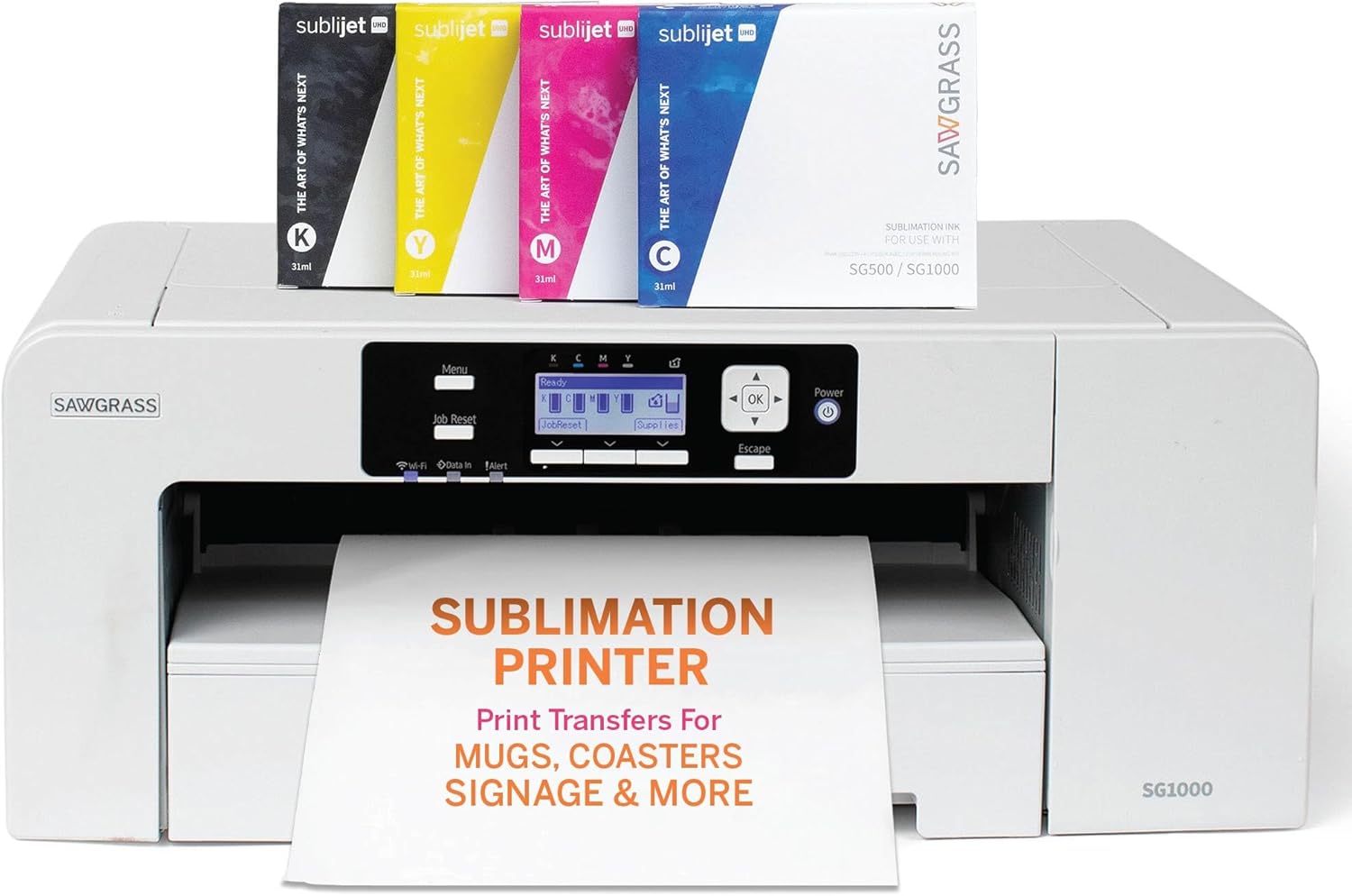
The Sawgrass SG1000 is a desktop dye sublimation printer built for makers and small businesses that need larger-format, high-color-quality prints up to 11 x 17 inches. It uses a four-color SubliJet UHD ink set and a print utility with color management to produce sharp, vibrant transfers for apparel, signage, mugs, and other sublimation projects. The unit is network-ready with Wi-Fi and USB connectivity, runs automatic maintenance to reduce clogged heads, and includes bundled TruePix paper and 31 mL ink cartridges so you can start printing immediately. Its 4800 x 1200 maximum resolution and automatic duplexing help deliver professional-looking results and smoother workflows, while a complimentary software suite and onboarding support lower the learning curve. Trade-offs are typical of dedicated sublimation systems: it is a single-purpose print-only device and intended for use with sublimation inks and papers rather than general office copy tasks, and users should plan for ongoing supply costs for specialty inks and media as volume grows.
Best for: Buyers who need reliable, production-capable sublimation prints for products or small-batch commercial work and prioritize color accuracy, larger media capability, and consistent uptime.
Less Ideal for: Casual home users who want an all-in-one office printer or those seeking the lowest-cost occasional-print solution should consider simpler inkjet or multifunction devices instead.
- Prints up to 11 x 17 inches for larger-format sublimation projects
- Includes 31 mL SubliJet UHD inks and TruePix paper bundle to start right away
- High maximum print resolution (4800 x 1200 dpi) for sharp, vibrant color
- Automatic maintenance system reduces head clogs and downtime
- Wi-Fi and USB connectivity plus included color-management software
- Print-only device not suited for scanning or copying tasks
- Ongoing cost and dependence on proprietary sublimation inks and papers
Verdict: Choose the SG1000 when you need a dedicated, larger-format sublimation printer that delivers professional color quality and reliable uptime for growing product-based printing.
Pinckney Super-Tank Sublimation Printer

| Printer Type | Dye Sublimation |
|---|---|
| Maximum print Resolution Color | 5760 x 1440 dpi |
| Printer Connectivity Type | Wi-Fi |
| Maximum Media Size | 8.5 x 11 inch |
| Ink set included | Black 127mL; Magenta 85mL; Cyan 85mL; Yellow 85mL |
The Pinckney Super-Tank Sublimation Printer is a converted EcoTank-style all-in-one aimed at hobbyists and small shops that make heat-transfer items like shirts, mugs, and phone cases. It uses large refillable sublimation ink bottles (Black 127 mL; Magenta, Cyan, Yellow 85 mL each) and an easy-fill nozzle to avoid cartridges and messy syringes, which keeps running costs down and refills simple. The unit prints at up to 5760 x 1440 dpi and supports letter and several other paper sizes, so fine details translate well through heat press transfers. Built-in Wi‑Fi, a scanner/copier and an LCD control make everyday use and scanning originals straightforward, while a 100-sheet input and simplex printing suit batch runs but not heavy duplex workflows. Expect modest color speed (around 5 ppm color) and occasional nozzle checks for sublimation workflows; the printer is optimized for transfers and may require nozzle maintenance to keep output consistent. For small-batch sublimation work the bundle provides good ink capacity and convenience, but it is not a production-grade dye-sublimation press for high-volume industrial use.
Best for: Buyers who want an economical, cartridge-free sublimation setup for small-batch heat-transfer projects and value high print detail and easy refills over industrial throughput.
Less Ideal for: Businesses that need fast, duplex, or high-volume production sublimation output should look at dedicated production equipment instead.
- High-capacity refillable sublimation ink bottles reduce cartridge waste and lower refill frequency
- Very high print resolution up to 5760 x 1440 dpi for detailed transfer images
- Built-in scanner and copier add versatility for creating and reproducing designs
- Wireless (Wi‑Fi) and USB connectivity with an LCD and app control for easy setup and remote printing
- Simplex-only printing and modest color speed limit efficiency for high-volume two-sided jobs
- Converted EcoTank hardware may require regular nozzle checks and occasional maintenance for sublimation inks
Verdict: A practical, cartridge-free sublimation all-in-one that delivers high-resolution transfers and low refill hassle for small-scale creators.
Liene 4×6 Photo Printer

| Printer Type | Dye Sublimation, Thermal |
|---|---|
| Maximum Media Size | 4×6 inches |
| Maximum Sheet Capacity | 180 |
| Print Resolution | 300 dpi |
| Connectivity | Bluetooth, Wi-Fi, Ethernet |
The Liene 4×6 photo printer is a compact dye-sublimation device meant for quick, on-demand 4×6 prints from phones or computers. It uses thermal dye-sublimation to produce glossy, water- and scratch-resistant photos and is controlled through a dedicated app or directly from your device. The bundle includes five ink cartridges and 180 sheets of 4×6 photo paper, so you can print extensively out of the box without immediate consumable purchases. Setup is straightforward: load the paper and cartridge, power the unit, and connect either to the printer's built-in Wi‑Fi hotspot, Bluetooth, Ethernet, or USB for printing. The app offers templates, status feedback during prints, and supports up to five devices simultaneously. Image quality tops out at 300 dpi, which is fine for standard snapshots but not for large professional enlargements, and the printer is simplex only. Practical strengths are its portability, bundled consumables, and easy direct-connection options; limitations are modest resolution for critical photo work and the 4×6 fixed paper size, which restricts larger formats or borderless specialty printing.
Best for: Buyers who want an affordable, ready-to-use sublimation printer for casual photo printing at home or small gatherings and value bundled paper and ink over professional-grade resolution.
Less Ideal for: Photographers or small businesses that need high-resolution prints, larger sizes, or advanced color management should consider higher-end photo printers instead.
- Dye-sublimation prints with protective top coat for water and scratch resistance
- Includes five ink cartridges and 180 sheets so you can start printing immediately
- Multiple connectivity options including built-in Wi‑Fi hotspot, Bluetooth and Ethernet for stable direct printing
- Compact and portable design suitable for home use and small events
- Maximum print resolution is 300 dpi, which is adequate for snapshots but not for high-detail professional prints
- Fixed 4×6 media size limits printing formats
Verdict: If you want a budget-friendly, portable sublimation printer that arrives with ample paper and ink for instant 4×6 prints, this bundle delivers ready-to-use value.
Epson SureColor F170 Sublimation Printer

| Printer Type | Dye Sublimation |
|---|---|
| Maximum print Resolution Color | 5760 x 1440 Optimized DPI |
| Maximum Media Size | 8.5" Width |
| Maximum Sheet Capacity | 150 |
| Printer Connectivity Type | Wireless, USB, Ethernet |
The Epson SureColor F170 is a turnkey dye-sublimation printer aimed at hobbyists and small shops that need reliable, shop-ready transfers for mugs, apparel, mousepads and similar items. It uses Epson PrecisionCore technology and comes with a full set of OEM dye-sublimation inks and Mac/Windows software so you can print professional-quality images from day one. A 150-sheet auto-feed tray and a closed, dust-resistant paper path reduce handling and make batch runs easier, while wired and wireless connectivity options let you print from a workstation or over a network. The printer's ink bottles include auto-stop refill tech to limit mess when topping up. Expect high-resolution output up to 5760 x 1440 optimized DPI, but plan for modest throughput since color and B&W speeds are rated at about 1 ppm and it prints simplex only. Safety notes about disperse red in some inks mean you should follow handling guidance. For users prioritizing predictable, factory-backed performance and good image quality in a small footprint, the F170 is a practical choice, though it is not built for high-volume production runs.
Best for: Buyers who value dependable, factory-backed image quality and an out-of-the-box sublimation workflow for small-batch personalization or a low-volume shop will appreciate this printer.
Less Ideal for: Those who need fast, high-volume production or duplex printing for heavy commercial throughput should consider larger format or production-focused machines instead.
- Includes full set of genuine Epson dye-sublimation inks for consistent color and factory support
- PrecisionCore printhead delivers high-resolution output up to 5760 x 1440 optimized DPI
- 150-sheet auto-feed tray and closed paper path reduce handling and keep prints cleaner
- Multiple connectivity options including wireless, USB and Ethernet for flexible setup
- Compact, space-saving design suited to small workspaces
- Relatively slow rated print speed (about 1 ppm) so not ideal for high-volume production
- Prints simplex only with no duplex capability
- Some dye-sublimation inks include Disperse Red which can irritate skin and requires careful handling
Verdict: Choose the SureColor F170 when you need a compact, factory-supported dye-sublimation solution that delivers consistent, high-resolution transfers for low- to moderate-volume production.
Epson SureColor F170

| Printer Type | Dye Sublimation |
|---|---|
| Maximum print Resolution Color | 5760 x 1440 Optimized DPI |
| Maximum Media Size | 8.5" Width |
| Maximum Sheet Capacity | 150 |
| Printer Connectivity Type | Wireless, USB, Ethernet |
The Epson SureColor F170 is a desktop dye-sublimation printer built for producing small-format heat-transfer prints for promotional items and personalized goods. It uses Epson PrecisionCore technology and high-resolution output up to 5760 x 1440 optimized DPI to deliver very fine color detail, and it includes a full set of sublimation ink to get you started. Paper is held in a closed 150-sheet tray for cleaner handling and the printer supports wireless, USB, and Ethernet connections so you can print from computers or mobile devices using Epson Print Layout or Epson Edge Print. Its simplex-only printing and modest page-per-minute speed reflect its focus on quality over volume, so expect slower throughput for large runs. The bundle notes factory ink bottles with auto-stop to reduce mess during refills, but ink-filled units are final sale so handle initial setup carefully. For small businesses or hobbyists producing transfers, the F170 balances image quality, compact footprint, and convenient connectivity while asking users to plan around slower speeds and one-way ink-loaded returns.
Best for: Buyers who want a compact, high-quality sublimation printer for producing promotional items or personalized gifts and who prioritize precision color and image detail over fast output speed.
Less Ideal for: Large-scale production shops or users who need fast, duplex-capable printers for high-volume, two-sided jobs should consider larger production models instead.
- High maximum print resolution for very detailed, color-rich sublimation transfers
- Includes full set of Epson sublimation ink and necessary start-up accessories
- 150-sheet closed input tray keeps paper dust-free and reduces prep work
- Wi-Fi, USB, and Ethernet support enable flexible connectivity for desktop workflows
- Slow page throughput not suited for high-volume production
- Simplex-only printing limits productivity when two-sided or faster workflows are needed
Verdict: Choose the SureColor F170 when you need a compact, factory-supported sublimation printer that prioritizes exceptional color detail for small-format personalized products.
Liene PixCut S1 DHP700

| Printer Type | Thermal Dye Sublimation |
|---|---|
| Maximum print Resolution Color | 300 dpi |
| Maximum Media Size | 4×7 inches |
| Printer Connectivity Type | Bluetooth |
The Liene PixCut S1 combines a 300 dpi thermal dye-sublimation printer with an integrated cutter and mobile app control to produce laminated, durable stickers and 4×6 or 4×7 photo prints. Designed for hobbyists, crafters, and small projects, you design or import an image in the Liene app, connect over Bluetooth, then print and have the S1 automatically laminate and precisely cut the output in about two minutes. Notable features include AI image extraction for quick background removal, an AI Lab with style templates, and a simple one-step print-and-cut workflow that reduces handling. Prints are described as waterproof, scratch-resistant, and produced using Liene-specific paper and ink cartridges; bundled media and a preinstalled blade get you started. Limitations to consider are the slow nominal print speed of roughly one page per minute and the restricted media format and proprietary consumables, which can raise ongoing costs and lock you to Liene papers for best results. The device is compact and app-driven, so it suits phone or tablet users more than those needing multi-user networked setups.
Best for: Buyers who want a low-effort, reliable way to make high-quality photo stickers and labels at home or for small craft projects and prioritize simplicity and predictable results over throughput.
Less Ideal for: Large-volume users, offices needing networked printing, or buyers who prefer open media choices and faster continuous printing workflows.
- Integrated print-and-cut workflow produces laminated, precisely cut stickers in a single run
- Thermal dye-sublimation at 300 dpi yields vivid, true-to-life color and laminated durability
- App control with AI tools simplifies background removal and creative templates
- Compact footprint and included starter media and blade make it ready for home or school projects
- Print speed is low at about one page per minute, so large runs are time-consuming
- Uses proprietary Liene sticker/photo paper and cartridges, limiting third-party options
Verdict: Choose the PixCut S1 if you want a compact, app-driven sublimation solution that prints and precisely die-cuts durable photo stickers with minimal setup.
Choosing the Right Sublimation Printer: Key Factors to Consider
Color Accuracy & Gamut
Accurate color reproduction matters because sublimation depends on predictable dye transfer from paper to substrate. A wide color gamut and strong color management options let you match brand palettes and photographic tones with fewer surprises. Look for printers that support ICC profiles, have stable color output across long runs, and use ink sets designed for strong saturation on polyester and coated substrates.
Inconsistent color between test prints and final transfers is a common time sink. Factors that influence results include the ink chemistry, print head performance, and calibration workflows. Prioritizing color accuracy reduces reprints and material waste, which matters for both hobbyists and small businesses.
Media Handling & Size Support
Sublimation projects vary from small blanks like coasters and mugs to garments and larger signs. The printer must accept media sizes you actually use and feed paper without skew or jams. Consider whether you need roll support for continuous printing or reliable sheet feeding for separate transfers, and check maximum printable width and margin behavior.
Proper media handling also includes backing and media type support. Some printers handle thicker transfer papers and heavier stock better than others. If you plan to print long runs or large-format transfers, choose a model whose paper path and cutter options match your workflow to avoid frequent manual adjustments.
Ink System Reliability
Ink delivery design affects both print consistency and the machine's downtime. Systems with refillable tanks, bulk reservoirs, or well-designed cartridges can reduce interruptions and improve long-run cost predictability. However, some bulk systems require careful priming and maintenance to prevent head clogging. Evaluate how easy it is to replace or top up ink, whether air-free delivery is supported, and how the printer handles idle periods.
A reliable ink system minimizes clogging, banding, and color shifts during production. For business use, uptime and predictable ink handling often matter more than marginal per-print cost savings.
Resolution & Print Speed
Print resolution determines how fine detail, gradients, and text reproduce on transfers. Higher DPI and fine droplet control help with photographic images and small text, while faster print modes increase throughput at the cost of some detail. Balance resolution against speed depending on whether your priority is photo-quality transfers or higher-volume production.
Consider how printers scale between draft and high-quality modes, and whether they maintain color accuracy across speed settings. For many users, a versatile printer that offers a range of quality/speed presets gives the best tradeoff between output fidelity and productivity.
Maintenance & Serviceability
Regular maintenance affects long-term reliability and operating costs. Easy access to print heads, user-replaceable maintenance parts, and clear cleaning routines reduce downtime and service complexity. Some machines provide automated cleaning cycles and built-in maintenance tanks that simplify upkeep, while others require more manual intervention.
When choosing a printer, factor in the time you can commit to upkeep. A device with intuitive maintenance procedures and widely available service parts will be easier to keep producing consistent results over months of regular use.
Preparing Artwork for Sublimation
Proper artwork setup reduces surprises during transfer. Work in the correct color space and use high-resolution images to avoid pixelation when prints are scaled. Embed or reference ICC profiles tied to your printer and paper combination to keep color shifts minimal.
Mirror your designs when creating transfer sheets for garments and certain substrates. Also check bleed and safe-zone margins so important elements are not cut or obscured during pressing. Save master files in a layered, editable format so you can quickly make adjustments for different substrate sizes or color requirements.
- Use 300 DPI or higher for photographic transfers
- Convert artwork to the printer-recommended color profile
- Include a 0.125–0.25 inch bleed for edge-to-edge transfers when possible
Choosing Transfer Paper and Press Settings
Transfer paper quality affects dot gain, ink release, and the sharpness of the final image. Different papers are formulated for fabric or hard substrates, so match the paper to the medium and your printer's ink chemistry. Test a few paper brands to find the balance of vibrancy and transfer efficiency you prefer.
Heat press parameters such as temperature, pressure, and dwell time are as important as the print itself. Record settings that work for specific substrate types and stick to those profiles when reproducing the same product. Small adjustments to pressure and time often resolve issues like incomplete transfer or excessive bleeding.
- Record press temperature, pressure, and time for each substrate
- Let freshly printed transfers dry or rest briefly to avoid smear
- Use Teflon sheets or parchment when heat pressing coated or delicate surfaces
Workflow Tips for Consistent Results
Consistency comes from repeatable workflows. Standardize prepress checks, media loading, and color management steps so each print run starts from the same baseline. Keep a log of settings, ink lots, and environmental conditions that might affect output such as humidity.
Batch similar items together to reduce setup changes. When switching media sizes or paper types, run a quick test print and transfer to confirm settings before committing a full production run.
- Log ink lot numbers when color matching critical projects
- Perform a quick transfer test after major maintenance
- Store ink and paper under manufacturer-recommended conditions
Scaling From Hobby To Small Production
If you plan to grow volume, evaluate features that support scaling such as roll-feed capability, larger ink reservoirs, and more automated maintenance. These features reduce manual loading time and interruptions during longer runs. Also consider shop layout and ventilation for heat press and dye migration concerns when increasing throughput.
Plan for consumables and spare parts in advance. Stock commonly replaced components so you can avoid production delays. Establish a simple preventive maintenance schedule to keep equipment running smoothly as demand increases.
- Prioritize machines with larger ink capacity for higher-volume work
- Designate a clean area for loading and unloading transfers
- Train anyone assisting with production on standard operating steps
Safety and Environmental Considerations
Sublimation involves heat and volatile ink solvents during printing and pressing. Ensure adequate ventilation in your workspace and follow safety recommendations for handling inks and cleaning agents. Use protective gloves when handling hot substrates and allow parts to cool before handling.
Consider environmental practices like recycling transfer backing or minimizing test prints. Properly dispose of cleaning fluids and used ink containers in accordance with local regulations. Choosing concentrated ink systems and minimizing wasted prints reduces environmental impact over time.
- Provide proper ventilation near printing and pressing stations
- Store inks in a cool, dry place away from direct sunlight
- Dispose of used fluids according to local regulations
How We Chose the Best Sublimation Printer
We focused on real-world variables that matter to people using sublimation printers for craft, small-batch production, or prototyping. Key evaluation criteria included color accuracy and gamut, since predictable reproduction of brand or artwork colors is crucial. We assessed media handling and platen options to ensure printers accept the sheet sizes and substrate types typical in dye-sublimation workflows. Print reliability and uptime were judged by looking at ink delivery systems, head technology, and user-serviceable components that reduce downtime. Maintenance burden and consumable costs were considered because ease of cleaning, ink replacement, and head care affect total operating effort. Finally, output resolution and speed were examined to balance fine-detail requirements against throughput needs. We excluded devices not intended for dye-sublimation workflows or printers that require extensive third-party modifications to function as sublimation systems. Machines were filtered for compatibility with sublimation inks and common transfer methods. The shortlist emphasizes measurable specs and user-impact features rather than marketing claims. In sum, we selected printers that combine repeatable color, manageable maintenance, and flexible media handling for makers and small shops.
Our full evaluation process is outlined in our review methodology.
FAQ
What media types can a sublimation printer handle?
Most sublimation printers are optimized for coated transfer paper and polyester fabrics. With the appropriate paper and transfer method, you can also produce transfers for coated hard substrates such as mugs and aluminum panels. Media handling depends on the printer's feed system and platen options.
How often should I perform maintenance on a sublimation printer?
Routine maintenance frequency depends on usage. Light hobby use might only require a weekly check and occasional head cleaning, while daily production workflows benefit from daily inspections, scheduled automated clean cycles, and regular maintenance tank checks. Follow the manufacturer's recommended schedule for best results.
Can I use third-party sublimation inks?
Third-party inks are available, but results vary. Using inks not recommended by the printer designer can affect color accuracy, clogging risk, and warranty coverage. Test any third-party ink thoroughly and ensure it is formulated for dye-sublimation processes and compatible with your print head technology.
What causes banding or streaks in sublimation prints?
Banding often stems from print head issues, clogged nozzles, or alignment problems, and can also result from low-quality paper or improper feed tension. Regular print head maintenance, correct media loading, and using appropriate profiles and paper help minimize these artifacts.
Do sublimation printers need special RIP software?
RIP software is not always required but can improve color management, layout efficiency, and batching capabilities. For complex color matching or large-scale production, RIPs provide finer control over color profiles, ink limiting, and print sequencing which helps deliver consistent results.
Final Verdict
Prioritize color accuracy, reliable ink delivery, and media handling when choosing a sublimation printer. Your decision should reflect the substrates you plan to produce, the volume of work, and how much time you can spend on maintenance. For photo-quality transfers, favor higher resolution and strong color management; for higher throughput, prioritize larger ink capacity and roll or sheet handling that suits your workflow. Weigh the tradeoffs between resolution, speed, and upkeep to match the printer to your production goals. With the right balance of features and a consistent workflow, you can get reliable, repeatable transfers for craft projects or small-scale production.