
Note: This article contains affiliate links. If you click on these links and make a purchase, we may earn a small commission at no extra cost to you. This helps support our research and content. Read our full affiliate disclosure here.
If you need clear, long-lasting labels without spending a lot, a budget thermal label maker can be a smart upgrade. These compact machines use direct thermal printing to produce crisp text and barcodes without ink or toner, which keeps ongoing costs low and simplifies daily use. For home offices, storage, or small retail tasks, the right budget-focused thermal label maker speeds organization while delivering dependable durability. This guide looks at seven shortlisted, affordable thermal label makers chosen for low operating cost, ease of use, and label quality. Below you will find what mattered in our selection, concise factors to consider when buying, and practical tips to get the best results from a low-cost thermal label maker.
Top Picks at a Glance
| Best Overall The best all-around choice for most situations | KNAON Y813BT Thermal Label Printer |  |
| Best Quality Built to a higher standard if you want something more solid | NIIMBOT B1 Label Maker |  |
| Best Value The sweet spot between price and what you get | Brother P-touch PTD220 Label Maker |  |
| Best Budget The cheapest option that still gets the job done reliably | NDYIN N12 Label Maker |  |
| Top Rated A top-rated pick with lots of positive feedback | HKHKPI N40 Label Printer |  |
| Most Popular A crowd favorite that many people choose with confidence | Phomemo D30 Portable Thermal Printer |  |
| Best Seller A high-volume bestseller chosen again and again | Nelko P21 Label Maker |  |
KNAON Y813BT Thermal Label Printer
| Printer Type | Thermal |
|---|---|
| Maximum Print Resolution | 203 dpi |
| Print media | Labels, Thermal Paper |
| Printer Connectivity Type | Bluetooth |
| B&W Pages per Minute | 60 pages_per_minute |
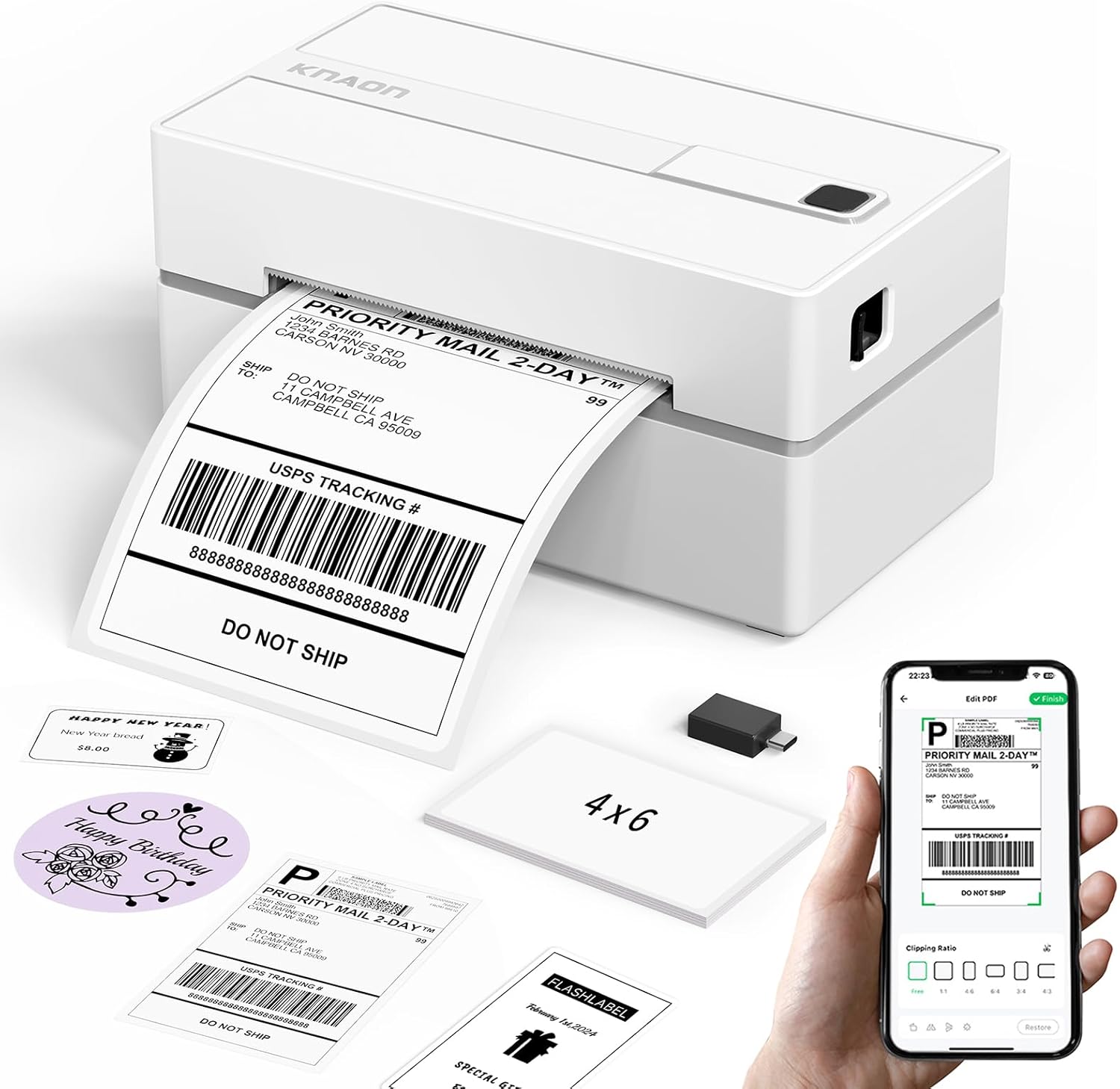
The KNAON Y813BT is a portable 4×6 thermal label printer built for small business and home shipping tasks. It prints monochrome thermal labels up to about 4.2 inches wide using Bluetooth or a USB connection and is intended to work with the FlashLabel Pro app on phones and desktop drivers for Windows, macOS, ChromeOS, and Linux. The unit is lightweight and compact, so it fits easily on a crowded desk or in a packing station, and the package includes starter label paper and a USB-C adapter for quick setup. Practical benefits include fast thermal printing suitable for 4×6 shipping labels, a large template library and font/icon support in the app for DIY labels, and preloaded drivers and tutorials to simplify installation. Important limitations are that printing is monochrome only and Bluetooth printing requires use of the vendor app rather than a universal OS-level pairing method, which adds a step when sending saved PDFs from some shipping sites. For buyers who need straightforward, affordable shipping label printing in a small footprint, this is a solid budget option.
Best for: Buyers who want an affordable, compact label printer for regular small-business or home shipping needs and who prefer an app-driven workflow for designing and printing labels.
Less Ideal for: Shippers who need color labels, enterprise-scale label production, or seamless OS-level Bluetooth printing without using a dedicated app.
- Portable, compact design that fits on small desks and packing stations
- Bluetooth and USB connectivity with drivers and tutorials included
- Supports wide template selection, fonts, and icons via the FlashLabel Pro app
- Fast thermal printing suitable for 4×6 shipping labels
- Requires the vendor app for Bluetooth printing rather than direct OS pairing
- Prints only in monochrome
Verdict: A budget-friendly compact thermal printer that delivers fast, app-driven 4×6 shipping labels for small businesses and home shippers.
NIIMBOT B1 Label Maker

| Printer Type | Thermal |
|---|---|
| Resolution | 203dpi |
| Maximum Media Size | 2 inches |
| Printer Connectivity Type | Bluetooth |
| Wattage | 1500 milliamp_hours |
The NIIMBOT B1 is a small, battery-powered thermal label printer that connects over Bluetooth to iOS/Android phones and via USB to Windows PCs, using the NIIMBOT app to design and send prints. It prints up to 2-inch-wide monochrome labels with a 203 dpi resolution, and the app auto-detects label size, offers many fonts, borders, and symbols, and saves templates for repeat jobs. Because it is inkless and uses thermal labels, there is no mess or cartridge swapping, and the internal 1500 mAh battery plus auto-shutoff makes it convenient for intermittent desktop or mobile use. Practical limits include the requirement to use genuine NIIMBOT labels for the patented detection system and the modest 203 dpi resolution, which is good for text and simple barcodes but not for high-detail graphics or photo-quality prints. For budget-focused users who need fast, simple label creation for storage, shipping, or small-business tagging, the B1 delivers straightforward, reliable performance in a compact package.
Best for: Buyers who want an affordable, portable thermal label printer that prioritizes fast, repeatable text and barcode printing for home organization or small-business labeling.
Less Ideal for: Users who need high-resolution photo-quality labels, extensive third-party label compatibility, or tablet-only workflows should consider other options.
- Bluetooth and USB connectivity for phone and PC workflows
- Inkless thermal printing eliminates cartridges and mess
- App auto-detects label size and saves templates for fast reprints
- Compact, rechargeable design with 1500 mAh battery and auto-shutoff
- Requires genuine NIIMBOT labels for reliable label detection
- 203 dpi resolution is limited for detailed graphics or photos
Verdict: A budget-friendly, portable thermal label maker that delivers fast, reliable monochrome labels for everyday home and small-business tasks.
Brother P-touch PTD220 Label Maker

| Printer Type | Thermal |
|---|---|
| Maximum Media Size | 12 x 9 mm |
| Resolution | 180 dpi |
| Connectivity | wired, USB |
| Built-In Memory | Store up to 30 labels |
The Brother P-touch PT-D220 is a straightforward, portable thermal label maker aimed at clearing clutter in homes and small offices. It prints 1- or 2-line labels on Brother TZe laminated tapes up to 12mm wide, previews text on a 15-character display, and offers one-touch formatting with 14 fonts, 11 styles, 99 frames and over 600 symbols for quick customization. The built-in QWERTY keyboard and 25 preset templates make common tasks fast, and you can store up to 30 frequently used labels for repeat printing. It runs on six AAA batteries or an optional AC adapter and connects to a PC via USB on supported models for limited desktop workflows. Practical benefits include durable laminated tapes for varied surfaces and a compact footprint that is easy to keep in a drawer or bring to a job. Limitations are the 12mm tape width ceiling and basic monochrome display and menus, which keep advanced layout and wider-format printing reserved for higher-end models.
Best for: Buyers who want a reliable, no-fuss label maker to streamline home and small-office organization and who prioritize speed, durability, and simple customization over wide-format printing.
Less Ideal for: Users who need wide labels, advanced on-device layout tools, or full-featured PC design software for complex label jobs should consider more advanced, larger-format models.
- Easy-to-use QWERTY keyboard and one-touch formatting for fast label creation
- Preview screen and memory for up to 30 saved labels speed repeat printing
- Prints durable laminated Brother TZe tapes suitable for many surfaces
- Compact, portable design runs on AAA batteries or optional AC power
- Maximum tape width limited to 12mm so larger labels are not possible
- Monochrome, small display and basic interface limit complex layout previewing
Verdict: A compact, budget-friendly thermal label maker that delivers durable, easy-to-create 12mm labels for fast home and small-office organization.
NDYIN N12 Label Maker
| Printer Type | Thermal |
|---|---|
| Printer Connectivity Type | Bluetooth |
| Resolution | 203 x 203 dpi |
| Built-In Media | 1×180 pre-cut white labels (14×40 mm) |
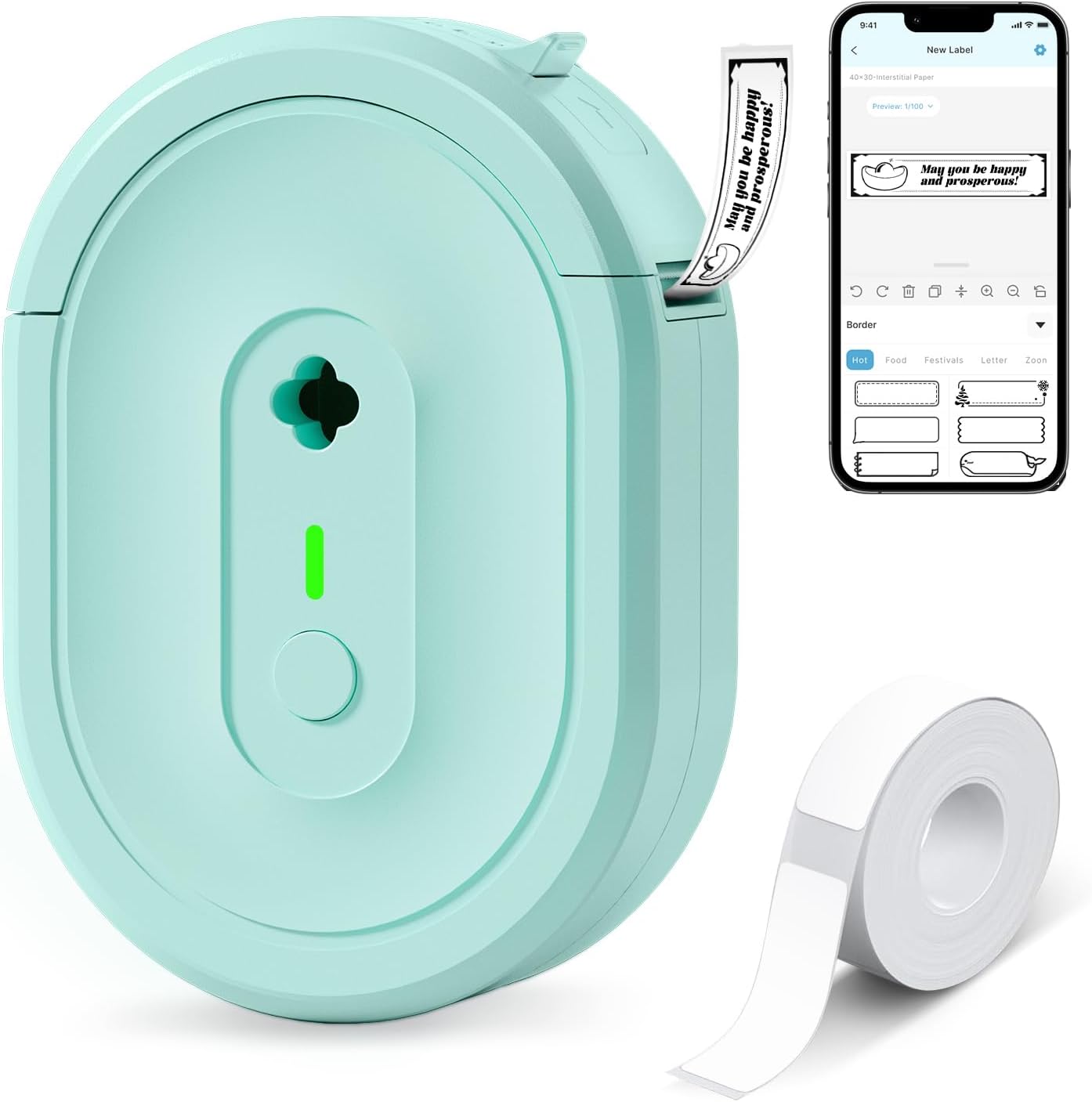
The NDYIN N12 is a pocketable thermal label maker that pairs over Bluetooth with the free Nada Print app to produce black-and-white self-adhesive labels without ink or ribbons. You set up label size in the app, pick from templates, symbols, frames and fonts, then print fixed-width labels that are useful for pantry jars, cable tags, file folders and small price tags. It includes a starter pack of pre-cut labels and a charging cable, and the built-in rechargeable battery makes it convenient for occasional mobile use around the home, classroom, or small shop. Print quality is typical for direct thermal printers at 203 dpi, which is fine for text and simple barcodes but not for photographic detail. Because it only prints monochrome and relies on the app for layout, you should expect some limits in customization speed compared with full-featured desktop label software. For buyers who want a low-cost, portable solution for straightforward labeling tasks, the N12 covers the essentials with minimal ongoing consumable expense.
Best for: Shoppers looking to save on consumables and buy an affordable, portable label printer for home, classroom, or light small-business use where simple monochrome labels are sufficient.
Less Ideal for: Users who need high-resolution graphics, multi-color labels, or heavy industrial labeling workflows should consider more capable desktop or commercial label printers.
- Direct thermal printing so no ink, toner, or ribbons required
- Bluetooth pairing with a mobile app that offers many templates and symbols
- Built-in rechargeable battery for portable use
- Includes starter roll of pre-cut labels and charging cable
- Print resolution limited to 203 dpi so text is sharp but fine graphic detail is limited
- Fixed label widths require choosing the correct roll size in the app before printing
Verdict: If you want a budget-friendly, portable label maker that eliminates ink costs and handles everyday household and small-business labeling, the N12 is a practical pick.
HKHKPI N40 Label Printer

| Maximum Media Size | 4 x 6 inches |
|---|---|
| Resolution | 203 x 203 dpi |
| Printer Connectivity Type | Bluetooth |
| Hardware Interface | USB |
| Maximum Sheet Capacity | 100 |
The HKHKPI N40 is a small thermal label printer built for shipping labels and light small-business workloads, offering Bluetooth and USB connectivity for phones, tablets, and computers. It prints direct-thermal labels at 203 dpi and handles up to 4 x 6-inch media, with automatic calibration and a smart paper ejection feature to reduce jams. Setup is straightforward when using the Nada Print app on iOS or Android, and Windows/Mac/Linux drivers are available for USB connection; the unit ships with a Type-C cable, power adapter, and a starter pack of 4×6 labels. In practice it produces crisp monochrome labels quickly thanks to a claimed top speed around 150 mm/s, and the lack of ink or ribbon keeps running costs low. The trade-offs are a basic feature set and modest print resolution compared with higher-end commercial units, and occasional need to recalibrate when changing label stock. For budget-minded sellers who need reliable, fast 4×6 shipping labels without extras, the N40 is a practical choice.
Best for: Buyers who prioritize a dependable, no-frills thermal printer for routine 4×6 shipping labels and want simple wireless or USB setup for small business or home fulfillment.
Less Ideal for: Large-scale shipping operations or users needing high-resolution labels, integrated databases, or advanced commercial features should consider more robust printers.
- Bluetooth and USB connectivity for phones, tablets, and computers
- Direct thermal printing at 203 dpi eliminates ink or ribbon costs
- Automatic calibration and smart paper ejection reduce label jams
- Compact, portable design with included cables and starter labels
- Basic feature set and 203 dpi resolution limit fine-detail printing
- May require manual recalibration when switching label sizes or types
Verdict: A budget-friendly, reliable 4×6 thermal printer that delivers fast, ink-free labels for small businesses that need simple wireless or USB printing.
Phomemo D30 Portable Thermal Printer

| Printer Type | Thermal |
|---|---|
| Printer Connectivity Type | Bluetooth |
| Resolution | 203 x 203 DPI |
| Power Consumption | 7 watts |
The Phomemo D30 is a pocket-sized thermal label maker designed for quick label runs from a phone or tablet via Bluetooth. It uses direct thermal printing so no ink, toner, or ribbons are required, and the included tapes (white, gold, clear) let you produce precut or continuous labels for home, school, or light business tasks. Setup is app-driven with templates, symbols, barcode and QR support, OCR and voice input, and simple size/profile selection to avoid misaligned prints. The rechargeable battery and small footprint make it easy to carry between rooms or take on the go, and print quality at 203 dpi is crisp enough for text, barcodes, and small icons. Limitations to note are monochrome output only — color requires patterned tapes rather than color printing — and label width is small, so it is not suitable for large-format tags or high-volume industrial labeling. The D30 is best for organizing, pricing, and personal or classroom projects where portability and low running cost matter more than heavy-duty throughput.
Best for: Buyers who want an inexpensive, portable label maker for home, classroom, or small-business organization and who prioritize low running costs and easy smartphone control backed by many user reviews.
Less Ideal for: Do not choose this if you need full-color printing, wide-format labels, or a heavy-duty printer for industrial volume labeling.
- Inkless direct thermal printing eliminates consumable ink, toner, or ribbons
- Bluetooth app control with templates, symbols, barcode and QR support
- Includes multiple label tapes (white, gold, clear) and supports continuous rolls
- Rechargeable battery and compact size for portable use
- 203 x 203 DPI resolution suitable for clear text and barcodes
- Prints only black text so color requires patterned tapes rather than true color printing
- Limited maximum media width means larger tags are not possible
Verdict: A budget-friendly, pocketable thermal label maker that delivers crisp black-on-label printing and very low ongoing costs for home, school, and small business organization.
Nelko P21 Label Maker

| Printer Type | Thermal |
|---|---|
| Resolution | 203 x 203 DPI |
| Printer Connectivity Type | Bluetooth |
| Print media | Labels |
| B&W Pages per Minute | 30 |
The Nelko P21 is a pocketable Bluetooth thermal label printer designed for quick, inkless label creation from iOS and Android phones via the Nelko app. You design labels in the app using templates, icons, borders, barcodes or QR codes, then send them to the P21 which prints at 203 DPI on supported 14mm and 15mm tapes. Its rechargeable battery and built-in cutter make it convenient for classroom, home or light office use, and the thermal printing avoids consumable ink. The app offers many creative templates and assets, but setup requires the Nelko app and pairing through the app rather than the phone's Bluetooth settings, and iOS users should keep the app updated for best compatibility. The device prints only black-on-thermal media and does not support continuous rolls or computer connections, so it is best for handheld labeling tasks rather than heavy-duty commercial runs.
Best for: Buyers who want an inexpensive, easy-to-use handheld labeler for home, classroom, or small-office organization and prefer a simple smartphone-driven workflow.
Less Ideal for: People who need high-volume, PC-controlled label production or full color printing should look at more capable desktop label printers.
- Portable, lightweight design that fits in a pocket for on-the-go labeling
- Direct thermal printing at 203 DPI gives clear, inkless monochrome labels
- Bluetooth app control with many templates, icons and design options
- Built-in rechargeable battery and integrated cutter for convenience
- Prints only black on thermal tape and does not support continuous rolls
- Requires the Nelko app for pairing and control and has limited computer compatibility
Verdict: A budget-friendly, pocketable thermal label maker that delivers clear, app-designed monochrome labels for light-duty home, school, and office organization.
Choosing the Right Thermal Label Maker on a Budget: Key Factors to Consider
Print Quality and Resolution
Print clarity determines whether small text, barcodes, and icons remain legible over time. Higher resolution helps with small fonts and dense barcodes; on budget models this typically ranges from acceptable clarity for text and basic barcodes to better detail on higher-end budget units.
Consider what you will print most often. Address labels and file tabs need only moderate resolution, while barcode labels for inventory may require crisper output. Also think about label longevity: direct thermal prints darken over time if exposed to heat or sunlight, so resolution and contrast settings can affect long-term readability.
Supported Label Sizes and Materials
Compatibility with common label widths and types keeps the printer useful across tasks. Look for models that accept a range of widths used in offices, shipping, and storage so you do not need multiple machines.
Label materials matter for durability. Direct thermal labels are inexpensive but less resistant to heat and abrasion than thermal-transfer alternatives. On a budget, prioritize models that accept standard stocked rolls and adhesive classes suitable for your surfaces to avoid costly specialty supplies.
Consumable Cost and Availability
The sticker price is only part of the cost equation. Ongoing expense for label rolls can dominate lifetime cost, so factor in the price and availability of replacement rolls. Models that use common roll sizes and widely available label materials tend to be less expensive to run.
Also check whether the machine requires branded or proprietary rolls. Even when upfront cost is low, proprietary consumables can make a budget option more expensive over time. Choose designs that balance low initial cost with easy access to inexpensive replacements.
Connectivity and Workflow Integration
How you connect to the label maker affects daily convenience. Simpler units offer built-in keyboards and small screens for standalone use, while others pair with a phone or computer over USB or Bluetooth for more complex label layouts.
Consider your workflow: if you create many labels from spreadsheets or inventory software, a model with PC or mobile app support can save time. For occasional household use, a standalone device with templates and quick-format keys may be faster and more intuitive.
Power Options and Portability
Budget models vary between plug-in units and battery-powered portable options. Battery models add flexibility for on-the-go labeling but require monitoring battery life and may need frequent replacements or recharges. Plug-in units avoid downtime but limit where you can place the device.
Think about where you will label most often. For pantry and closet organization, portability helps. For a fixed shipping desk or office area, a mains-powered label maker delivers consistent performance and avoids recurring battery costs.
Ease of Use and Setup
A simple setup and intuitive controls reduce the time it takes to start labeling. Look for clear instructions for loading rolls, adjusting margins, and changing font sizes. Usability features such as a preview screen, template keys, and straightforward roll replacement are particularly valuable on lower-cost models.
Customer support resources and readily available online guides can offset small interface quirks. Prioritize models that keep everyday tasks simple so you spend less time troubleshooting and more time labeling.
Choosing Between Standalone and Connected Label Makers
Standalone label makers include an integrated keyboard and display so you can create labels without a separate device. They are convenient for quick tasks, on-the-spot labeling, and situations where mobile or PC pairing would be awkward.
Connected models rely on a smartphone or computer app and typically offer more layout flexibility and template libraries. If you frequently print from spreadsheets or need precise barcode formatting, a connected unit may fit your workflow better despite a slightly higher setup complexity.
- Standalone: faster for ad-hoc labeling, no additional devices required
- Connected: better for batch printing, advanced templates, and barcode options
- Choose connected if you need spreadsheet integration; choose standalone for quick, portable use
How Label Material Affects Durability
Direct thermal labels are common on budget machines and avoid ink or ribbon costs, but they are sensitive to heat, sunlight, and abrasion. If labels will be exposed to harsh conditions, select premium thermal stocks rated for outdoor or industrial use when possible.
Adhesive choice also matters. Permanent adhesives are best for long-term storage and shipping, while removable adhesives work on painted or delicate surfaces. Matching the adhesive to the surface prevents peeling and saves time replacing failed labels.
- Direct thermal: low cost, no ribbon, less heat and light resistant
- Premium thermal stocks: extended life, better resistance to handling
- Adhesive types: permanent, removable, high-tack for rough surfaces
Label Sizes and Common Use Cases
Smaller labels are ideal for file tabs, cable tags, and barcode stickers, while wider rolls are suited to shipping, product, and shelf labels. Think about the largest label you will need and confirm the model supports that width.
Some models accept continuous tape that you can cut to custom lengths. This flexibility helps when labeling irregular items or producing nonstandard sizes without extra supplies.
- Narrow rolls: cables, files, small inventory tags
- Medium rolls: pantry, storage, address labels
- Wide rolls: shipping, product, shelf labels
Practical Tips to Reduce Running Costs
Buy commonly used roll sizes and stock up during sales so you reduce per-roll cost and avoid last-minute purchases of expensive specialty labels. Standard widths are typically cheaper and more widely available.
Use templates and consistent formats to avoid wasted labels. Also, calibrate margins and preview labels before printing batches to reduce misprints. For battery models, use rechargeable batteries to lower long-term power expenses.
- Stock common roll sizes to lower cost
- Use templates to avoid waste
- Rechargeable batteries reduce power expenses for portable models
Maintenance and Troubleshooting Basics
Keep the print head clean and free of adhesive buildup to maintain consistent print quality. Many issues with faint or uneven printing are resolved with a simple head cleaning following the manufacturer's instructions.
Ensure rolls are loaded correctly and that the label sensor is unobstructed. Frequent misfeeds often stem from improperly seated rolls or incorrect label type settings in the device's menu.
- Clean the print head regularly to avoid streaks
- Verify roll orientation and sensor position when misfeeds occur
- Store spare rolls in a cool, dry place to prevent pre-activation
How We Chose the Best Thermal Label Maker on a Budget
We shortlisted units that deliver dependable direct thermal printing on a budget while keeping long-term operating costs low. Key filters emphasized print reliability, label material compatibility, and overall build quality for light to moderate daily use. We prioritized ease of setup, available label sizes and widths, and interface simplicity so fewer steps are needed to produce a correct label. Battery or power flexibility and replacement roll availability were also central, since inexpensive models often offset lower upfront cost with higher consumable or power friction. Excluded were units designed only for heavy industrial throughput and models that required proprietary, hard-to-find supplies that dramatically raise running costs. We also excluded printers lacking basic connectivity or that had no common label-width options. The dimensions that actually mattered were print speed and resolution, supported label types and widths, consumable cost and availability, and real-world ease of use for routine tasks like address, barcode, and file-box labeling. These criteria align with the scoring metrics below and aim to reflect what matters to everyday buyers on a budget.
Our full evaluation process is outlined in our review methodology.
FAQ
Are thermal label makers on a budget reliable for everyday use?
Often yes. Budget thermal label makers can handle routine home and small-business tasks reliably if you choose a model with solid feed mechanics and common label compatibility. Expect lighter duty than professional industrial printers, but sufficient performance for frequent household and office labeling.
Can budget thermal label makers print barcodes that scan reliably?
Usually. Barcode readability depends on print resolution, contrast, and label material. Many budget models produce scannable barcodes for standard retail and inventory use, especially when you use appropriate label stock and correct resolution settings.
Do thermal label makers require special labels or ribbons?
Direct thermal models do not use ribbons, but they do require direct thermal label rolls. Avoid models that force proprietary rolls that are hard to find. If you need extra durability, consider thermal-transfer options which require a ribbon, though those are less common in strict budget categories.
How long do direct thermal labels last?
It depends. Direct thermal labels can remain legible for months to years in cool, dark conditions, but exposure to heat, sunlight, or oils accelerates fading. Choosing higher-quality thermal stock and storing printed labels away from heat extends their lifespan.
Is battery power worth it for a budget label maker?
It depends on your workflow. Battery power increases portability and is useful for on-site tasks or labeling around a home. For heavy daily printing, mains-powered units avoid battery replacement or recharge hassles and deliver steady performance.
Final Verdict
When shopping for a thermal label maker on a budget, prioritize the features that match how you will use the device rather than the lowest upfront cost. Focus on print resolution and supported label widths if you need precise text or barcodes, and favor models that accept common, widely available label rolls to keep running costs down. Balance portability against power needs and choose a unit with a straightforward interface to reduce setup friction. With those tradeoffs in mind, you can confidently pick a low-cost thermal label maker that delivers reliable labeling for home, office, or small-business tasks.