
Note: This article contains affiliate links. If you click on these links and make a purchase, we may earn a small commission at no extra cost to you. This helps support our research and content. Read our full affiliate disclosure here.
If you print shipping, inventory, or product labels regularly, the right thermal printer for labels can save time and prevent costly mistakes. You need a device that delivers crisp text and barcodes, works reliably under daily use, and connects to your workflow without friction. This guide covers the top shortlisted thermal label printers across common use cases, from light-duty desktop labeling to higher-volume packing stations. We evaluate each pick on print quality, connection options, build durability, and ease of setup so you can match a unit to your printing volume and integration needs. Read on to find the best options for your specific label workflow.
Top Picks at a Glance
| Best Overall The best all-around choice for most situations | Arkscan 2054A Label Printer |  |
| Best Quality Built to a higher standard if you want something more solid | Rollo USB Thermal Printer X1038 |  |
| Best Value The sweet spot between price and what you get | MUNBYN RealWriter 130B |  |
| Best Budget The cheapest option that still gets the job done reliably | Rongta RP425 Thermal Label Printer |  |
| Top Rated A top-rated pick with lots of positive feedback | HKHKPI N40 Label Printer |  |
| Most Popular A crowd favorite that many people choose with confidence | JADENS JD268BT Thermal Label Printer |  |
| Best Seller A high-volume bestseller chosen again and again | KNAON Y813BT Thermal Label Printer |  |
Arkscan 2054A Label Printer

| Power Source | USB Powered |
|---|---|
| Connectivity Technology | USB Cable |
| Compatible Devices | Laptop, PC |
| Print speed | 5 inches per second |
The Arkscan 2054A is a compact direct thermal label printer made for small shipping stations and home offices that need reliable 4×6 shipping labels without ink or toner. It connects via USB and accepts roll or fanfold direct thermal media, printing common shipping sizes and Zebra-compatible labels at about 5 inches per second. It ships with a power cable, USB cable, a label rod and a quick-start guide, and includes BarTender Ultralite software for Windows to design basic labels. In practice the unit is straightforward to load and use for printing FBA, eBay, Shopify and carrier labels, and its USB-only design keeps setup simple for a single workstation. Limitations to note are the lack of native Wi-Fi or Bluetooth on this model and the Windows-only bundled label software, so Mac or Chromebook users will rely on third-party drivers or host software. For sellers who print moderate volumes and want a no-fuss thermal solution, the 2054A covers the essentials at a compact footprint.
Best for: Small sellers and home office users who need a compact, reliable desktop printer for routine 4×6 shipping and product labels and who prioritize straightforward USB setup over wireless connectivity.
Less Ideal for: Businesses that require wireless printing, multi-station network access, or advanced label software out of the box should consider models with Wi-Fi or Ethernet and broader software support.
- Direct thermal printing eliminates the need for ink or toner
- Accepts roll and fanfold media and supports common shipping label sizes including 4×6
- USB-powered connection simplifies setup for a single workstation
- Includes BarTender Ultralite label software for Windows to design basic labels
- No built-in Wi-Fi or Bluetooth for wireless printing
- Bundled label software is Windows-only, limiting out-of-the-box support for Mac and Chromebook users
Verdict: A practical, USB-only thermal label printer that reliably handles common 4×6 shipping labels for small sellers and home offices.
Rollo USB Thermal Printer X1038

| Print Resolution | 203 x 203 DPI |
|---|---|
| Paper Size | 4 inch x 6 inches |
| Maximum Media Size | 4.1 Inch Width |
| Printer Connectivity Type | wired |
| Controller Type | Mac, Windows |
The Rollo USB Thermal Printer X1038 is a commercial-grade direct thermal printer built to churn out 4×6 shipping labels and a variety of barcode or sticker labels without ink. It connects over USB to Windows and Mac systems, installs with vendor drivers, and prints at a 203 dpi resolution so text and barcodes scan cleanly. The unit is aimed at high-volume shipping workflows, capable of continuous printing and using fan-fold or roll labels up to 4.1 inches wide; Rollo advertises speeds of roughly one 4×6 label per second, which speeds packing and shipping tasks. Because it uses direct thermal technology there is no ink or toner to replace, lowering running costs, though labels can fade over long-term exposure to heat or sunlight. Setup is straightforward for desktop use, and the included power adapter and USB cable make it ready for an office packing station, warehouse desk, or small business shipping counter. The printer lacks wireless connectivity on this USB model and does not support color printing, so it is strictly a fast, economical monochrome label solution.
Best for: Buyers needing a fast, no-ink label printer for heavy shipping or fulfillment tasks who prioritize print speed and long-term running cost savings over wireless convenience.
Less Ideal for: Users who need wireless or mobile printing from phones or tablets, or who require color labels and long-term outdoor durability for printed labels.
- Direct thermal printing eliminates ink and toner costs
- Supports standard 4×6 labels and up to 4.1 inch width for flexible label sizes
- 203 dpi resolution produces clear, scannable barcodes and text
- High advertised throughput suitable for high-volume shipping (about one 4×6 label per second)
- Includes power adapter and USB cable for quick desktop setup
- USB-only wired connection on this model limits placement and mobile printing
- Direct thermal labels can darken or fade over time when exposed to heat or sunlight
Verdict: Choose the Rollo USB X1038 if you need a fast, economical, high-throughput monochrome label printer for heavy shipping and fulfillment use.
MUNBYN RealWriter 130B
| Printer Type | Thermal |
|---|---|
| Maximum Media Size | 4 x 6 inch |
| Resolution | 203 x 300 dpi |
| Printer Connectivity Type | Bluetooth |
| Control Method | App |
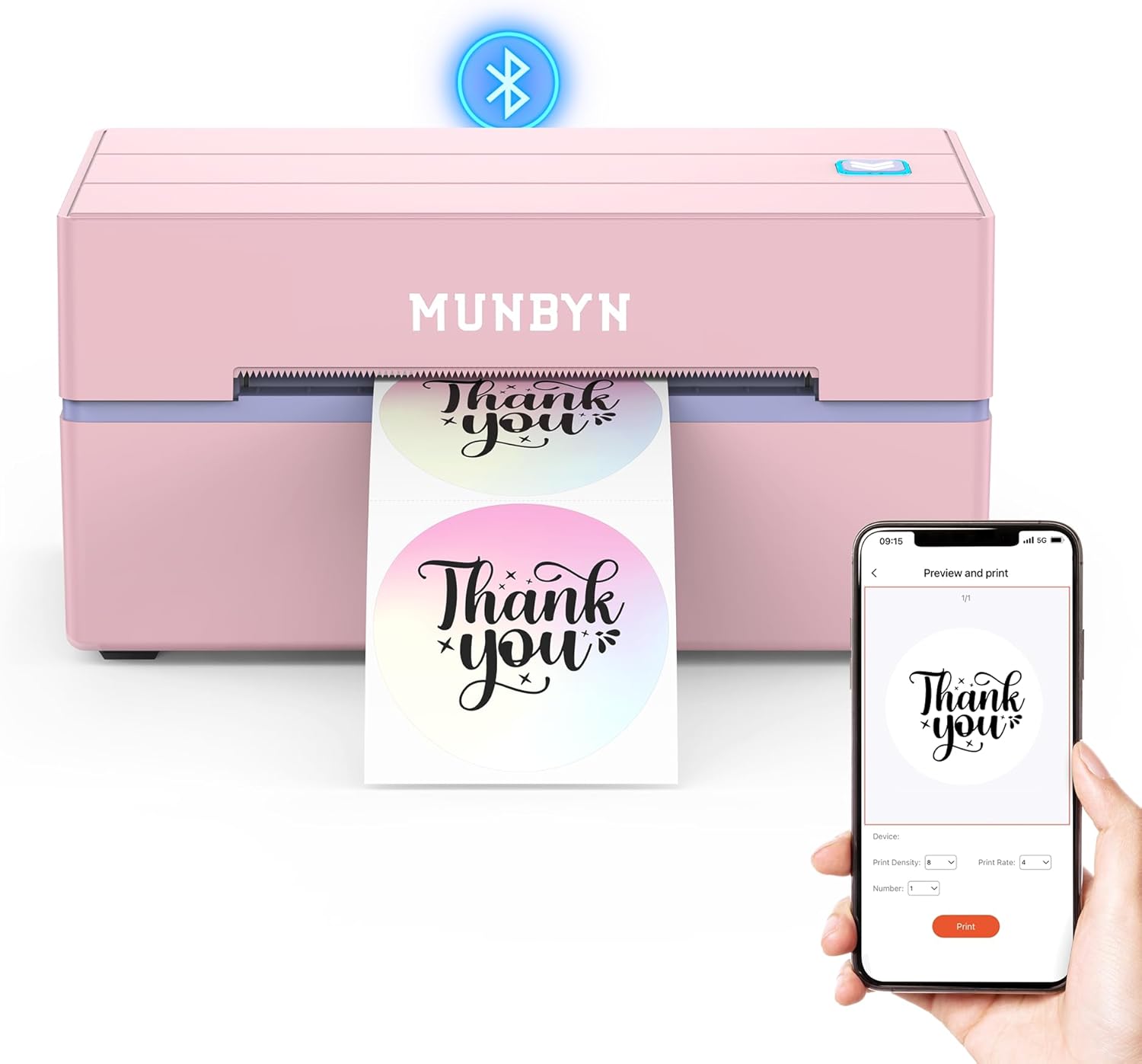
The MUNBYN RealWriter 130B is a small thermal label printer that connects over Bluetooth or USB and is aimed at shipping, retail, and home-organization tasks. It prints monochrome thermal labels up to 4 x 6 inches at 203 dpi and is controlled via the MUNBYN Print mobile app or the Munbyn Editor in Chrome for desktops, which provides templates, fonts, and design elements for barcodes, QR codes, and shipping labels. Setup is straightforward: pair on mobile or plug into a PC, choose a template and print, and the app supports importing PDFs and basic OCR. The unit is portable and inkless, so running costs are limited to label media, and the 203 dpi resolution is sufficient for standard shipping barcodes and address labels. Trade-offs are that it is a single-function, thermal-only printer without color output or duplexing, and the vendor recommends using Munbyn labels for best results since compatibility with some UPS thermal paper may be problematic. For small businesses and heavy home shippers it handles core label tasks with minimal fuss, but it is not a replacement for full-size multi-function printers or color label needs.
Best for: Buyers who want a compact, no-fuss label printer to speed packing and shipping workflows and who prioritize reliable barcode and address label printing over color or multifunction features.
Less Ideal for: Those who need color labels, full-page document printing, or a multi-function office printer should look at other options that include color printing and wider media versatility.
- Bluetooth and USB connectivity for mobile and desktop printing
- Inkless thermal printing reduces consumable costs
- Supports up to 4 x 6 inch shipping labels and common barcode/QR workflows
- Includes mobile app and web editor with templates, fonts, and PDF import
- Compact and portable footprint for small offices or home use
- Monochrome thermal only so no color labels or full-page printing
- Manufacturer recommends using its own labels for optimal results due to some compatibility issues
Verdict: A compact, app-driven thermal label printer that streamlines shipping and barcode label tasks for small businesses and home shippers.
Rongta RP425 Thermal Label Printer

| Printer Type | Thermal |
|---|---|
| Resolution | 203 x 203 dpi |
| Maximum Media Size | 4 x 6 inches |
| Printer Connectivity Type | Bluetooth, USB |
The Rongta RP425 is a budget-focused direct thermal label printer designed for shipping and small business label tasks. It prints 4×6 labels at a modest 203 x 203 dpi resolution and connects via Bluetooth for phone/tablet printing or USB for a computer, with drivers available for Windows and macOS. Setup is straightforward: pair over Bluetooth or install the Windows/Mac driver, load roll or fan-fold labels, and print shipping labels from common devices. The unit is inkless, so running costs are limited to label media, and the single-port USB plus wireless option keeps a tidy workspace. Expect basic monochrome output only and simple simplex printing, so it is best for text, barcodes, and standard shipping artwork but not high-resolution logos or color tags. Its small footprint makes it suitable for tight counters, and included compatibility with smartphones is handy for mobile packing stations. If you need a low-cost, reliable printer for routine label printing, the RP425 covers essentials without frills.
Best for: Small businesses or home sellers who need an affordable, no‑frills label printer for regular 4×6 shipping labels and value low running costs and simple wireless or USB setup.
Less Ideal for: Users who require color labels, high-resolution branding artwork, or advanced duplex and networking features should look at higher-end models.
- Bluetooth and USB connectivity for printing from phones, tablets, and PCs
- Direct thermal, inkless printing reduces ongoing ink costs
- Accepts standard 4×6 media used for shipping labels
- Compact footprint fits small packing stations or counters
- Monochrome only at 203 x 203 dpi, not suited for high-detail graphics
- Single USB port and basic feature set limit advanced workflow integrations
Verdict: A low-cost, compact thermal printer that reliably prints standard 4×6 monochrome shipping labels with Bluetooth and USB convenience.
HKHKPI N40 Label Printer

| Printer Type | Thermal |
|---|---|
| Resolution | 203 x 203 dpi |
| Printer Connectivity Type | Bluetooth, USB |
| Maximum Media Size | 4 x 6 inches |
| Paper Size | 25mm-110mm |
The HKHKPI N40 is a small desktop thermal label printer aimed at small businesses and home sellers who need fast, inkless 4×6 shipping labels. It uses thermal printing at 203 x 203 dpi and supports roll or foldable media from 25mm up to 110mm, with a stated maximum media size of 4 x 6 inches and a maximum sheet capacity of 100. Connectivity includes Bluetooth for printing from iPhone and Android via the Nada Print app and a USB Type-C port for wired connections. In practice the printer is simple to set up, calibrates media automatically to reduce wasted labels, and the thermal head life is advertised for very high volume use so you do not need ink or toner. The device is portable and light enough to move around, and it works with major shipping platforms and common label formats. Limitations to be aware of are the 203 dpi resolution, which is adequate for most shipping and barcode labels but not for high-detail graphics, and a modest monochrome-only output. For reliability-focused buyers the N40 delivers straightforward, maintenance-light label printing at a compact footprint.
Best for: Buyers who prioritize a dependable, low-maintenance label printer for regular shipping and barcode printing in a small business or home office.
Less Ideal for: Those who need color labels or very high-resolution graphic printing should consider other printers.
- Inkless thermal printing eliminates ink and toner replacement
- Bluetooth and USB connectivity for phone, tablet, and PC printing
- Automatic calibration and self-diagnostics reduce paper jams and waste
- Supports standard 4×6 labels and a wide roll width range (25mm–110mm)
- 203 dpi mono output is not suitable for high-resolution graphics or color labels
Verdict: A compact, maintenance-light thermal printer built to reliably produce standard 4×6 shipping and barcode labels for small businesses.
JADENS JD268BT Thermal Label Printer

| Printer Type | Thermal |
|---|---|
| Resolution | 203 x 203 DPI |
| Maximum Media Size | 4 x 6 inches |
| Printer Connectivity Type | Bluetooth |
| Maximum Sheet Capacity | 50 |
The JADENS JD268BT is a compact 4×6 thermal label printer aimed at small shipping operations and home offices. It prints directly to thermal media so there is no ink or toner to replace, and supports a range of label sizes from about 1.57 to 4.1 inches wide including fanfold and roll stock. Connectivity is primarily Bluetooth for mobile devices and USB for Windows and Mac, and the unit includes a feed/calibrate function to set label size when you swap rolls. Practical benefits include quick setup from the included driver and demo labels, a modest paper capacity and a 203 x 203 DPI head that yields clear shipping barcodes and text. Limitations to consider are that iPhone/Android printing requires the vendor app for full support and Bluetooth printing behavior varies by platform, and the printer is single-function simplex thermal only so it is not suited for multi-color or high-resolution label graphics. It is a reasonable choice for sellers who need reliable, inkless shipping labels but not for users who require advanced network features or native mobile printing without an app.
Best for: Buyers who want a budget-friendly, inkless printer for regular shipping label production and prefer a compact unit that pairs with phones or a single workstation.
Less Ideal for: Organizations that need centralized network printing, native mobile printing without a vendor app, or color/high-resolution label printing should consider higher-end networked models.
- Thermal printing requires no ink or toner, lowering running costs and mess.
- Supports common shipping label sizes including 4×6 and smaller sticker sizes.
- Bluetooth and USB connectivity cover mobile and desktop workflows.
- Includes test labels and basic drivers for quick out-of-box setup.
- 203 x 203 DPI printhead produces sharp barcodes and legible text for shipping.
- Mobile printing on Android and iOS depends on the vendor app and may not integrate natively with every shipping app.
- No built-in Wi‑Fi or advanced network features for multi-user environments.
- Single-color thermal output cannot produce color labels or high-detail graphics.
Verdict: A compact, inkless Bluetooth thermal printer that reliably handles everyday 4×6 shipping labels for small sellers and home offices.
KNAON Y813BT Thermal Label Printer
| Printer Type | Thermal |
|---|---|
| Maximum Print Resolution Black and White | 203 dpi |
| Maximum Media Size | 4.2 inches |
| Printer Connectivity Type | Bluetooth |
| Compatible Devices | Laptops, PC, Smartphones, Tablets |
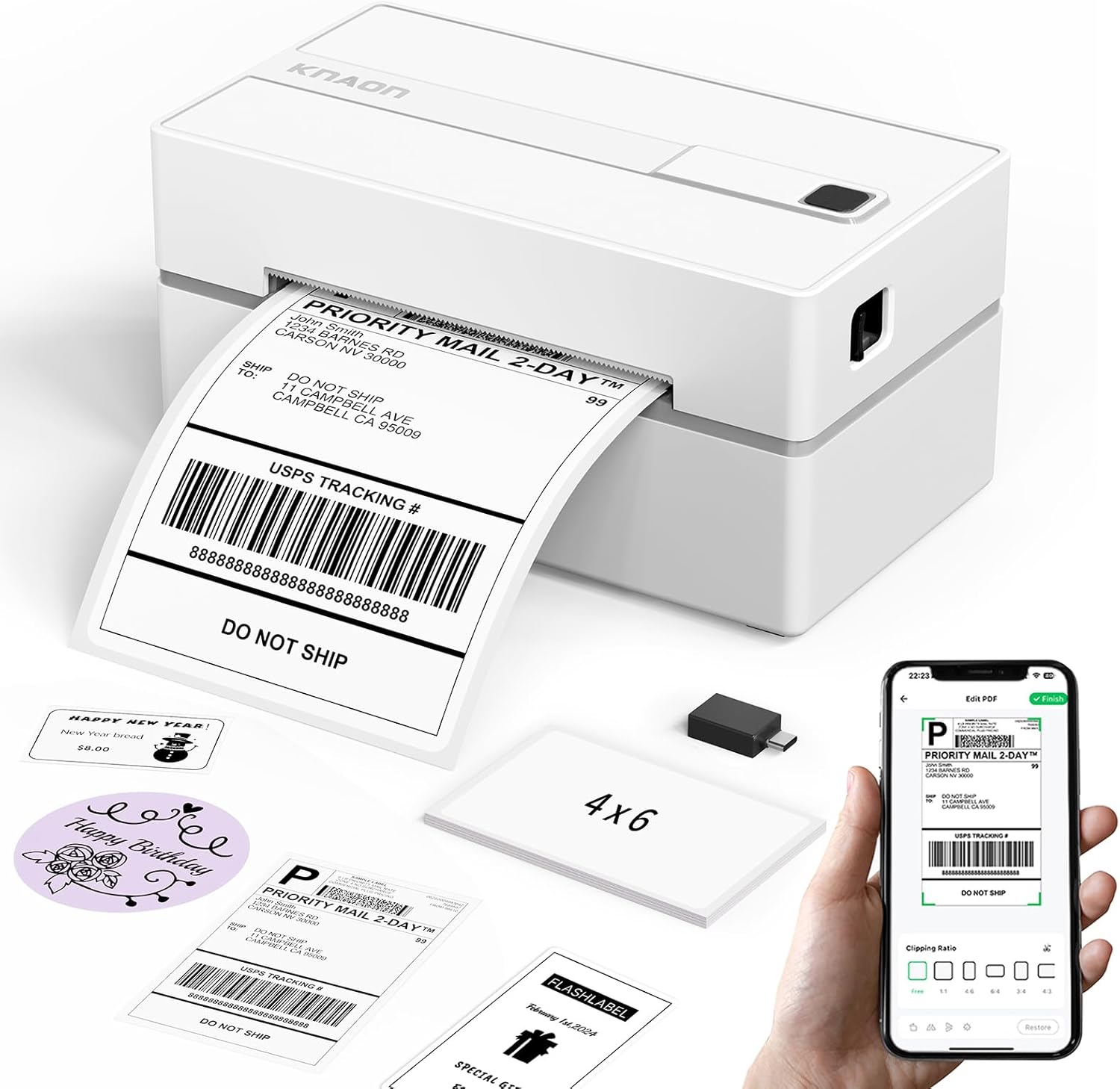
The KNAON Y813BT is a small thermal label printer made for printing shipping labels, barcodes, and DIY tags without ink. It connects over Bluetooth or USB and uses the FlashLabel Pro app to import PDFs or design labels from hundreds of templates and icons, so it works with phones, tablets, Windows, macOS and ChromeOS with the provided drivers and extensions. Setup is straightforward thanks to onboard driver files and tutorial videos, and the printer handles label widths up to 4.2 inches at a claimed top speed (about 180 mm/s) with 203 dpi resolution for clear shipping addresses and barcodes. The unit is lightweight and portable, and the box includes starter label stock and a USB-C adapter. Expect practical benefits like quick single-sided label printing and broad platform support, but be aware it requires the vendor app or drivers for Bluetooth printing and that advanced print formatting requires saving labels as PDFs on some shipping platforms before import.
Best for: Buyers who want a dependable, easy-to-set-up label printer for shipping and inventory tasks that works with phones and common desktop OSes and values convenience over advanced specialty features.
Less Ideal for: Users who need very high-resolution graphic or photo printing or who require a printer that can pair as a native OS Bluetooth printer without third-party apps.
- Bluetooth and USB connectivity for mobile and desktop printing
- Includes starter label stock and onboard driver/tutorial files for faster setup
- Supports multiple label sizes up to 4.2 inches and many app templates/fonts for custom labels
- Compact, lightweight design suitable for small workspaces and portability
- Bluetooth printing requires the vendor app and cannot pair as a standard OS printer without it
- Resolution is 203 dpi which is adequate for shipping labels but not for very small high-density graphics or photo-quality prints
Verdict: A compact, app-friendly thermal label printer that makes reliable shipping and barcode labels quickly for small businesses and home offices.
Choosing the Right Thermal Printer for Labels: Key Factors to Consider
Print Resolution and Barcode Fidelity
Resolution determines how sharp text, logos, and especially barcodes print. Higher DPI yields crisper small text and denser barcodes that scan reliably, which is essential for shipping and inventory labels.
Poor barcode fidelity leads to misreads at packing and at carrier scanning stations, causing delays and rework. When choosing a thermal printer for labels, check the spec sheet for DPI and sample output or test files when possible. Consider the smallest barcode size you need to print and confirm the printer maintains readability at that scale.
Connectivity and Integration
A printer that does not connect seamlessly to your systems creates friction and slows operations. Look for the connection types you need now, such as USB for a single workstation, Ethernet for shared network access, or reliable Wi-Fi for flexible placement.
Also verify driver compatibility with your operating systems and whether the printer supports common label software or print languages. Built-in network features like static IP support and remote management simplify deployment across multiple workstations.
Duty Cycle and Build Quality
Duty cycle indicates the monthly or daily print volume a printer can handle without accelerated wear. Choose a unit whose rated duty cycle exceeds your typical monthly label count to avoid premature failure.
Robust mechanical design and quality materials reduce jams and maintenance needs in busy environments. Metal chassis components, solid feed mechanisms, and reliable platen rollers make a measurable difference in uptime for high-volume label printing.
Media Compatibility and Sizes
Label width, core size, and media type compatibility matter because they determine whether a printer can handle your existing label stock. Thermal printers may support direct thermal media or thermal transfer ribbon; the right choice affects durability and outdoor resistance of printed labels.
Confirm supported label widths, maximum roll diameter, and whether the printer accepts standard cores to avoid sourcing custom supplies. If you need durable, long-lasting labels, ensure the unit supports thermal transfer ribbons and the ribbon types you plan to use.
Ease of Setup and Ongoing Maintenance
Quick setup reduces downtime and accelerates adoption. Clear setup guides, intuitive drivers, and user-friendly label design software minimize technical hurdles for nontechnical staff.
Maintenance considerations include ease of replacing media, cleaning the print head, and accessing common wear parts. A design that allows fast media loading and jam clearing keeps throughput high and reduces the need for specialized technician visits.
Which Label Types Work Best with Thermal Printers
Thermal printers are optimized for direct thermal labels and thermal transfer labels. Direct thermal labels darken when heat is applied and are best for short-lived labels such as shipping tags or receipts. Thermal transfer printers use a ribbon that transfers ink to the label for more durable, long-lasting prints suitable for product labeling or outdoor exposure.
Consider the environment the label will face. For items stored outdoors, in humid locations, or exposed to abrasion, thermal transfer printing with a compatible ribbon typically produces a more resilient result. For temporary labels that move quickly through a supply chain, direct thermal media is often sufficient and simpler to manage because it does not require ribbons.
- Direct thermal: no ribbon, simpler supplies, best for short-term labels
- Thermal transfer: ribbon required, more durable labels, better for longevity
- Check media roll width and core size compatibility with your chosen printer
Label Sizes, Margins, and Formatting Tips
Match the printer to the most common label sizes you use. Many desktop thermal printers support a range of widths but have limits on minimum margins and printable height. When designing labels, leave adequate quiet zones around barcodes and avoid extremely dense elements that can reduce scan reliability.
Use native print drivers or label-design software to set correct margins and calibration. Calibrate the sensor so the printer correctly detects label gaps or black marks; incorrect calibration is a frequent cause of misaligned prints and wasted media.
- Leave quiet zones around barcodes for reliable scanning
- Calibrate sensors for the media type to prevent misfeeds
- Preview labels at actual print size before running large batches
Workflow Placement and Network Considerations
Decide where printers will sit relative to packing, shipping, and inventory stations. For a single user, a USB-connected desktop unit may suffice. For shared or remote printing, prefer wired Ethernet or enterprise-grade wireless to reduce connectivity drops. Networked printers with static IP options are easier to manage in crowded networks.
Consider whether you need print server software, mobile printing support, or cloud-based label generation. Some setups benefit from centralized label templates hosted on a server to ensure consistent branding and data compliance across multiple workstations.
- Use wired Ethernet for stable, shared access
- Plan for mobile and remote printing if workers use tablets or phones
- Centralize templates to maintain consistent label formatting
Maintenance Tips to Maximize Uptime
Routine maintenance keeps a thermal printer running smoothly. Clean the print head with recommended solvent swabs and remove adhesive buildup from rollers to avoid print defects. Replace worn platen rollers and feed components before they cause repeated jams.
Keep spare common consumables on hand, such as replacement platen rollers and media rolls sized to your workflow. Training staff on simple maintenance tasks reduces downtime and the need to involve external technicians for routine issues.
- Clean print head regularly to prevent streaks and missed dots
- Inspect feed path for label residue and remove adhesive deposits
- Stock common spare parts to minimize downtime
Safety and Environmental Considerations
Thermal printers generate heat at the print head and can become warm during extended runs. Provide adequate ventilation and avoid placing flammable materials on or near the device. Follow manufacturer recommendations for duty cycles to prevent overheating.
Consider the environmental impact of disposable ribbons and label stock. Choose recyclable label materials when possible and manage ribbon waste responsibly. For operations prioritizing lower waste, direct thermal printing reduces consumable parts but may shorten label lifespan.
- Allow airflow around the printer during extended use
- Dispose of ribbons according to local waste guidelines
- Choose recyclable media where feasible to lower environmental impact
How We Chose the Best Thermal Printer for Labels
We focused on the real-world factors that matter when selecting a thermal printer for labels. Key evaluation criteria included print resolution and accuracy for small text and barcodes, because readable codes are critical for scanning and shipping. We assessed connectivity options, such as USB, Ethernet, and reliable wireless protocols, to ensure the printer integrates smoothly with common point-of-sale and shipping systems. Duty cycle and build quality were considered to determine how well a printer performs under daily or burst-volume use. We also looked at ease of setup and software support, including driver availability and label-formatting utilities that reduce configuration time. Additional filters removed units lacking essential label-size support or those with limited replacement media availability. Printers with poor barcode fidelity, unreliable connections, or inadequate duty-cycle specifications were excluded. The final list prioritizes durable, accurate, and easy-to-integrate thermal label printers suitable for small business and warehouse workflows.
Our full evaluation process is outlined in our review methodology.
FAQ
Can a thermal label printer print barcodes reliably?
Yes, when the printer has sufficient resolution and the label is designed with proper quiet zones. Higher DPI units produce clearer barcodes, and correct calibration prevents distortion that can cause read failures.
Do I need thermal transfer ribbon for all label types?
No. Direct thermal labels do not require a ribbon and are fine for short-term uses. Thermal transfer ribbons are necessary when you need durable, smudge-resistant labels that last outdoors or in harsh conditions.
What connection should I choose for a shared packing station?
Ethernet is the most reliable for shared networked printers because it offers stable connectivity and easier remote management. Wi-Fi can work but may be less consistent in congested environments.
How often should I clean the print head?
Clean the print head whenever print quality degrades or after several media rolls, and follow the manufacturer interval if provided. Regular cleaning prevents streaks and prolongs head life.
Will label size changes require a different printer?
Not necessarily. Many printers handle a range of widths, but you should confirm the minimum and maximum supported label widths and the roll diameter to ensure compatibility with your label sizes.
Final Verdict
Choosing the right thermal printer for labels comes down to matching print resolution, connectivity, and duty cycle to your daily volume and environment. Prioritize barcode fidelity and integration with your existing systems if scanning and automated workflows are central to operations. For longer-lasting labels, select a printer that supports thermal transfer ribbons and the media widths you use most. Balance upfront convenience against long-term durability and maintenance needs. With clear requirements for print quality, connection type, and media compatibility, you can select a thermal label printer that delivers reliable, consistent labels for your workflow.