
Note: This article contains affiliate links. If you click on these links and make a purchase, we may earn a small commission at no extra cost to you. This helps support our research and content. Read our full affiliate disclosure here.
Choosing a wireless printer with cheap ink matters because ink expenses quickly outpace any initial savings from a low purchase price. For homes and small offices that print regularly, ongoing ink cost and simple wireless reliability determine total ownership cost and daily convenience. This guide shortlists seven leading wireless printers with cheap ink that balance low running costs, usable print quality, and hassle-free network setup. Below you will find clear evaluation criteria and practical buying guidance to help you pick a model that fits your monthly print volume and workflow.
Top Picks at a Glance
| Best Overall The best all-around choice for most situations | Brother Work Smart 1360 MFC-J1360DW |  |
| Best Quality Built to a higher standard if you want something more solid | Epson EcoTank Photo ET-8500 |  |
| Best Value The sweet spot between price and what you get | HP Smart Tank 5003 |  |
| Best Budget The cheapest option that still gets the job done reliably | HP DeskJet 2955 All-in-One |  |
| Top Rated A top-rated pick with lots of positive feedback | Canon PIXMA TR4720 |  |
| Most Popular A crowd favorite that many people choose with confidence | Epson EcoTank ET-2800 |  |
| Best Seller A high-volume bestseller chosen again and again | Canon PIXMA TS6520 |  |
Brother Work Smart 1360 MFC-J1360DW

| Printer Type | Inkjet |
|---|---|
| Duplex | Automatic |
| Maximum Sheet Capacity | 150 |
| Color Pages per Minute | 9 pages_per_minute |
| B&W Pages per Minute | 16 pages_per_minute |
The Brother Work Smart 1360 is a space‑saving all‑in‑one designed for home and small home‑office use. It prints, copies, and scans, and adds a 20‑sheet single‑pass automatic document feeder plus a flatbed for multi‑page jobs. Connectivity includes Wi‑Fi and USB with support for AirPrint and Mopria and a simple 1.8” color display for on‑device cloud access. Print speeds are practical for daily tasks at up to 16 ppm black and 9 ppm color, and automatic two‑sided printing helps reduce paper use. Page Gauge and compatibility with Brother Genuine LC501 cartridges plus eligible Refresh subscription plans make ink management straightforward and potentially cheaper with high‑yield options. The 150‑sheet tray keeps refill frequency low for typical home workloads, though this is not built for heavy office duty and color photo quality will be limited compared with higher‑end photo printers. Setup through the Brother Mobile Connect app is straightforward, but ongoing ink costs depend on cartridge choices and subscription use.
Best for: Buyers who want a compact, easy‑to‑use wireless all‑in‑one for everyday home or home‑office printing and who value simple mobile and cloud printing plus low maintenance workflows.
Less Ideal for: Users who need high monthly print volumes, pro‑level photo quality, or large office fleet features should consider more heavy‑duty or specialized printers.
- Compact multifunction design with print, copy, and scan plus a 20‑sheet ADF for multi‑page jobs
- Wireless printing with AirPrint, Mopria and mobile app support for easy printing from phones and cloud services
- Automatic duplexing to save paper and a 150‑sheet tray to reduce how often you reload paper
- Page Gauge and eligibility for Brother Refresh subscription make ink monitoring and reordering simple
- Standard yield starter inks are low page yield so you will likely purchase replacement cartridges soon
- Not intended for heavy office throughput or professional photo printing
Verdict: A compact wireless multifunction printer that pairs easy mobile/cloud printing with simple ink management, making it a practical, cost-conscious choice for home and small home‑office users.
Epson EcoTank Photo ET-8500

| Printer Type | Inkjet |
|---|---|
| Color Pages per Minute | 12 pages_per_minute |
| B&W Pages per Minute | 16 |
| Printer Connectivity Type | Ethernet, USB, Wi-Fi |
| Duplex | auto |
The ET-8500 is a cartridge-free, 6-color EcoTank all-in-one built for photographers and creative users who want lab-quality color prints without frequent cartridge changes. It prints borderless photos up to 13 x 19 inches, handles cardstock and thicker media via a straight-through feeder, and includes a 4.3-inch color touchscreen, Ethernet, USB and Wi-Fi for flexible connectivity. Epson's Claria ET Premium dye inks and high-resolution print engine (up to 5760 x 1440 dpi for black and 4800 x 1200 dpi for color) deliver detailed photos and sharp graphics, while large refill bottles dramatically reduce running costs compared with cartridges. The scanner is a native 4800 dpi flatbed suitable for photo scanning and the printer supports automatic duplexing for two-sided documents. Downsides are its relatively modest input/output sheet capacity and substantial physical footprint, so it is less suited to users needing heavy-duty office throughput or a compact desktop fit; occasional color shifting can occur if you print very infrequently. For buyers prioritizing print quality and low ink cost, the ET-8500 is a strong wireless photo-capable choice.
Best for: Creative-minded users who prioritize photo print quality and minimal ongoing ink expense and who want flexible wireless connectivity for home or small studio use.
Less Ideal for: High-volume office environments that need large paper trays and faster continuous throughput or users who need a very compact desktop printer.
- Cartridge-free EcoTank system with large refill bottles for much lower ink cost per page
- Six-color Claria ET Premium inkset for richer, more accurate photo colors
- High maximum print resolution for detailed photos and graphics
- Borderless printing to 13 x 19 inches and straight-through feed for thicker media
- Multiple connectivity options including Wi‑Fi, Ethernet, USB and SD card support
- Low standard paper capacity limits high-volume document jobs
- Printer is relatively large and heavy compared with compact models
Verdict: Buy this if you want wireless, photo-quality printing with dramatically lower ink costs thanks to the EcoTank refill system.
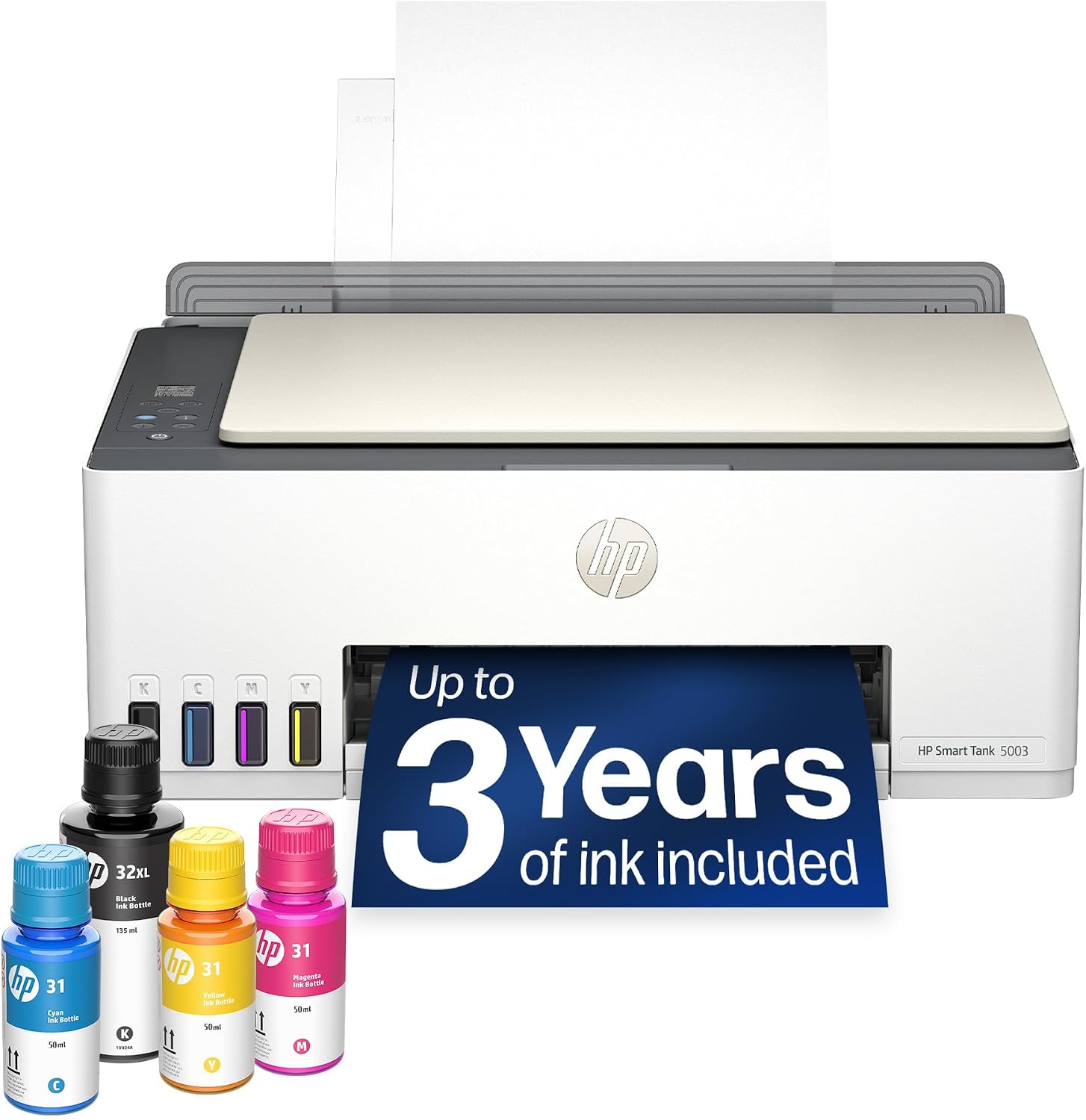
HP Smart Tank 5003
| Printer Type | HP Thermal Inkjet |
|---|---|
| Print Output Type | Color |
| Maximum Sheet Capacity | 100 |
| Color Pages per Minute | 5 pages_per_minute |
| Printer Connectivity Type | Apple AirPrint; HP ePrint; Mopria; USB; Wireless (Wi-Fi); Print Anywhere |
The HP Smart Tank 5003 is a cartridge-free all-in-one inkjet that focuses on low running costs and wireless convenience for home printing. It uses refillable ink tanks with multiple original HP bottles included in the box so you can print a large number of pages before buying more ink, and it supports mobile printing via AirPrint, HP ePrint and Mopria. The unit handles everyday color documents, borderless prints and flatbed scanning and copying, and its maximum sheet capacity is 100 sheets with legal-size media support. Print speeds favor text and black jobs, with up to 10 ppm black and about 5 ppm color; color photo quality can be good thanks to high optimized dpi settings when printing from a computer. Setup and refill are designed to be mess-free compared with cartridges, but duplex printing is manual and there is only a single USB port. For buyers who prioritize low per-page cost and wireless mobile workflows, this model delivers practical savings and easy operation, while those needing automatic duplexing or a faster office-grade throughput should look elsewhere.
Best for: Someone who wants to minimize ink costs and print frequently from phones or laptops at home and values simple, low-maintenance refillable ink over cartridge convenience.
Less Ideal for: Small offices or users who need fast, automatic duplexing, heavy multi-user throughput, or multiple wired connections.
- Cartridge-free refillable ink tanks with several HP ink bottles included for low-cost, high-volume printing
- Wireless and mobile printing support including Apple AirPrint, HP ePrint and Mopria
- High optimized color resolution for better photo and color document quality when printing from a computer
- Flatbed scanner and copy functions make it a true all-in-one for home use
- No automatic duplexing; duplex printing requires manual page flipping
- Single USB port and modest print speeds limit use in busy shared-office environments
Verdict: Choose the HP Smart Tank 5003 if you want a wireless, cartridge-free all-in-one that cuts ink costs for frequent home printing while keeping mobile printing simple.
HP DeskJet 2955 All-in-One

| Printer Type | HP Thermal Inkjet |
|---|---|
| Maximum Sheet Capacity | 60 |
| Color Pages per Minute | 5.5 pages_per_minute |
| B&W Pages per Minute | 7.5 pages_per_minute |
| Printer Connectivity Type | Apple AirPrint; USB; Wireless (Wi-Fi); Wireless direct printing; Mopria |
The HP DeskJet 2955 is a small, budget-focused all-in-one that handles everyday home printing, scanning, and copying. It connects over dual-band Wi‑Fi, AirPrint, Mopria, or USB and includes an icon LCD for simple local control plus an HP app for printing from a smartphone. Print speeds are modest — up to about 7.5 ppm black and 5.5 ppm color — and it uses HP 68 cartridges; the printer ships with a three-month Instant Ink trial which can reduce ink costs for light to moderate users. The flatbed scanner and manual duplex support make basic document workflows straightforward, though manual two-sided printing adds an extra step. Build and layout are compact and use recycled plastics, so it fits small desks and home offices. This is not built for high-volume or photo-heavy work because of the limited 60-sheet capacity and lower print throughput, but it is a practical, inexpensive choice when you need reliable wireless printing and a simple scanner/copier at home.
Best for: Buyers prioritizing a low-cost, compact wireless printer for occasional home documents and schoolwork who want straightforward mobile printing and low upfront cost.
Less Ideal for: Users who need high-volume daily printing, fast photo printing, or an automatic duplexing workflow should consider higher-capacity models instead.
- Compact all-in-one design saves desk space while providing print, scan, and copy functions
- Dual-band Wi‑Fi plus AirPrint and Mopria make phone and tablet printing easy
- Includes 3-month Instant Ink trial to reduce short-term ink costs
- Uses common HP 68 cartridges that are widely available
- Print speeds and 60-sheet capacity are limited for heavier workloads
- Duplex printing is manual so two-sided jobs require user intervention
Verdict: A cheap, compact wireless all-in-one that keeps upfront costs low and pairs well with HP Instant Ink for budget-conscious home printing.
Canon PIXMA TR4720

| Printer Type | Inkjet |
|---|---|
| Printer Connectivity Type | Wi-Fi |
| Duplex | Automatic |
| Compatible Cartridge | PG-275, CL-276 |
| Maximum print Resolution Color | 4800 x 1200 dpi |
The Canon PIXMA TR4720 is a compact 4-in-1 inkjet that prints, copies, scans and faxes while offering wireless mobile printing and an auto document feeder for multi-page jobs. Setup is straightforward using the Canon PRINT app and the printer supports automatic duplexing for two-sided prints, which saves paper in everyday use. Photo and color document output use a high nominal resolution (4800 x 1200 dpi) for sharper color prints, and the starter PG-275 and CL-276 cartridges are easy to install. Practical benefits include a single-tray workflow with up to 100-sheet capacity and built-in fax support for small home offices. Trade-offs are typical for a compact home inkjet: it is not built for heavy duty volumes or very fast page-per-minute throughput, and ongoing ink costs depend on replacement cartridge prices and your print habits. For buyers who want a simple, app-controlled wireless all-in-one that handles occasional multipage scanning and two-sided printing, the TR4720 is a reliable choice.
Best for: Buyers who prioritize a reliable, easy-to-set up home or small-office printer that covers printing, scanning, copying and faxing with convenient mobile control.
Less Ideal for: Users who need heavy continuous daily printing, the fastest throughput, or the lowest long-term cost per page from high-capacity ink systems.
- All-in-one functions: print, copy, scan and fax in a compact footprint
- Wireless mobile printing via Canon PRINT app for easy setup and control
- Automatic duplex printing reduces paper use for two-sided jobs
- Auto document feeder handles multi-page scans and copies
- High nominal color resolution (4800 x 1200 dpi) for detailed color output
- Starter ink cartridges are small so frequent replacement may be needed with higher use
- Not designed for high-volume or very fast commercial printing workloads
Verdict: A dependable, app-friendly wireless all-in-one that delivers versatile home-office functionality with straightforward setup and reliable everyday performance.
Epson EcoTank ET-2800

| Printer Type | Inkjet |
|---|---|
| Printer Connectivity Type | USB, Wi-Fi |
| Maximum print Resolution Color | 5760 x 1440 dpi |
| B&W Pages per Minute | 10 |
| Maximum Sheet Capacity | 100 |
The ET-2800 replaces cartridges with high-capacity refillable ink tanks to deliver long runs of prints without frequent replacements, making it a practical choice for home users who want lower ongoing ink cost. It prints, scans and copies with a flatbed scanner and supports wireless and app-based control plus voice-activated printing for easy mobile workflows. Photo and document output benefit from Epson's PrecisionCore/Micro Piezo heat-free technology and a high maximum resolution, while print speeds are modest at about 10 ISO pages per minute for black and 5 ppm for color. Setup and refilling are straightforward using keyed EcoFit bottles, and the 100-sheet capacity handles typical household jobs. Limitations include simplex-only printing (no automatic duplex) and only basic paper handling, so heavy office users may find the feature set thin; Epson also recommends genuine ink to maintain performance and warranty coverage.
Best for: Buyers who prioritize low ongoing ink expense and want a reliable, easy-to-use home all-in-one with wireless mobile printing backed by many user reviews.
Less Ideal for: Users needing heavy-duty office features like automatic duplexing, large paper trays, or faster professional color throughput should consider more fully featured models.
- Very low running cost thanks to high-capacity refillable ink tanks and included ink set
- Wireless, app and voice printing make mobile workflows simple
- High maximum print resolution for detailed photos and graphics
- All-in-one functions (print, copy, scan) with an easy-to-use color display
- No automatic duplex (single-sided printing only)
- Basic paper handling and modest color print speed compared with higher-end models
Verdict: Choose the ET-2800 if you want a wireless home all-in-one that cuts ink costs with refillable tanks while keeping setup and mobile printing simple.
Canon PIXMA TS6520

| Printer Type | Inkjet |
|---|---|
| Printer Connectivity Type | USB, Wi-Fi |
| Duplex | Automatic |
| Display Type | OLED |
| Compatible Cartridge | PG-295 & CL-286 |
The Canon PIXMA TS6520 is a budget-friendly home all-in-one that handles everyday printing, copying, and flatbed scanning with reliable wireless connectivity. It uses a two-cartridge hybrid ink system (pigment black and dye color) to produce sharp text and vibrant photos, and the 1.42" OLED display and intuitive control panel make basic tasks and status checks straightforward. Dual-band Wi-Fi plus mobile printing support from the Canon app, AirPrint, and Mopria means setup and printing from phones or laptops is convenient. Automatic two-sided printing and borderless photo capability help reduce paper use and expand creative options, while compact styling keeps it desk-friendly. Limitations include a single paper tray with low sheet capacity and no automatic document feeder, so heavy multi-page scanning or high-volume office work will be slow; also initial starter inks are modest, so expect to replace cartridges sooner under frequent photo printing. For routine home, student, or small household use it balances print quality and ease of use without unnecessary complexity.
Best for: Buyers seeking a dependable, easy-to-use home printer for documents, schoolwork, and occasional photos who prefer a straightforward setup and stable wireless connections.
Less Ideal for: Users who need high-volume printing, frequent multi-page scanning, or office-level throughput should consider higher-capacity or business-class models instead.
- Wireless printing with dual-band Wi-Fi and mobile app, AirPrint, and Mopria support
- Automatic duplex (two-sided) printing to save paper
- Good document and photo quality from the hybrid two-cartridge ink system
- Compact footprint and simple OLED control make setup and everyday use easy
- Single tray with very low sheet capacity limits high-volume printing
- No automatic document feeder, making multi-page scans or copies manual
Verdict: A compact, risk-averse choice for home users who want reliable wireless printing and decent photo quality without complicated setup or features.
Choosing the Right Wireless Printer with Cheap Ink: Key Factors to Consider
Ink Cost And Yield
Ink cost per page and cartridge yield are the most important factors for anyone buying a wireless printer with cheap ink. Low sticker prices do not protect you from high running costs if cartridges need frequent replacement. Consider both the unit price and the advertised or lab-tested yield for black and color cartridges.
High-yield or XL cartridges, refillable ink tanks, and support for third-party refill options can dramatically lower per-page costs. If you print many pages monthly, choose a printer whose replacement cartridges are inexpensive relative to their yield to avoid frequent replenishment.
Wireless Connectivity
Simple, stable wireless setup reduces frustration and keeps a shared printer usable across devices. Look for printers that support standard Wi-Fi networks, easy mobile printing (AirPrint or equivalent), and clear on-device or app-based setup flows.
Reliable Wi-Fi performance matters for multi-user households and small offices. Printers that frequently drop connections or require manual reconnection add hidden time costs that negate savings from cheap ink.
Print Quality For Everyday Tasks
Even when prioritizing low ink cost, you still need readable text and acceptable graphics. Assess how well a printer renders small fonts, solid fills, and simple charts. For occasional photos, check how color reproduction and gradients hold up at normal document print settings.
Printers tuned for low ink consumption sometimes compress halftone patterns or reduce ink density, so find a balance where documents remain professional-looking without excessive ink use.
Maintenance And Ease Of Replenishment
Consider how easy it is to replace cartridges, top up refillable tanks, and perform routine maintenance. Printers with accessible cartridges and straightforward front-loading bays save time and reduce the risk of mess during changes.
Availability of replacement cartridges in local stores or online also affects long-term convenience. Systems that require specialty or hard-to-find parts increase downtime and total cost despite low per-cartridge pricing.
Speed And Paper Handling
Page-per-minute ratings indicate throughput, but real-world speed depends on complexity and driver settings. For users who print occasional long documents, a modestly faster unit can be worth slightly higher ink cost. Check duty cycle and recommended monthly volume to ensure a chosen printer matches expected usage.
Paper handling options such as a multi-page feeder, duplex printing, and an adequate input tray reduce manual intervention and improve productivity for higher-volume households or small offices.
How Cheap Ink Systems Differ
Manufacturers use several strategies to lower long-term ink costs: high-yield cartridges, refillable tanks, and economy printing modes. High-yield cartridges increase the number of pages per purchase, while refillable tanks shift cost from cartridges to bulk ink bottles. Economy modes reduce ink density at a slight quality cost to save money over time.
Understanding those system differences helps you prioritize what matters for your usage. If you print hundreds of pages monthly, look for tank-based systems or printers with large XL cartridges. If your monthly volume is low, high-yield standard cartridges might be more convenient without the hassle of refilling.
- High-yield cartridges increase longevity between changes
- Refillable tank systems lower per-page costs and reduce waste
- Economy or draft modes reduce ink usage for internal documents
Setting Up Wireless Printing Smoothly
Prepare your network name and password before starting setup. Use the printer manufacturer's app or web interface to join your Wi-Fi network and complete firmware updates before adding mobile devices. Keeping firmware up to date can resolve connectivity quirks and improve stability.
For multi-device households, enable standard mobile printing protocols if available. These make it easy to print directly from phones and tablets without installing full drivers, which is particularly helpful for guests or casual users.
- Place the printer within good Wi-Fi range of your router
- Complete initial firmware updates to fix known issues
- Use mobile printing protocols for quick device access
Optimizing Settings To Save Ink
Adjust driver settings to reduce ink consumption when top-quality color or photos are not required. Switching to draft or economy mode for internal documents can cut ink use substantially without affecting legibility. Also, use grayscale printing for text-only documents to avoid color cartridge usage.
Set duplex printing as the default for multi-page documents to save paper and reduce the number of pages you print overall. Regularly preview before printing to avoid unnecessary pages and wasted ink.
- Use draft mode for internal or preliminary documents
- Switch to grayscale for text-only printing
- Enable duplex to reduce paper and overall printing
Managing Replacement Ink and Supplies
Keep a spare set of cartridges or an extra bottle of bulk ink on hand if your printing cadence is steady. This minimizes downtime and often yields a lower per-cartridge or per-bottle cost if you buy in packs. Label cartridges with install dates if you do occasional large print runs to track usage.
Recycle empty cartridges where possible to reduce waste and, in some programs, get exchange discounts. Proper storage of spare ink—cool and dry—helps maintain ink quality until use.
- Buy replacement ink in bulk or multi-packs when possible
- Store spare cartridges in a cool, dry place
- Recycle empties through local programs
When To Prioritize Speed Over Ink Cost
If you often print long documents under tight deadlines, workflow speed may outweigh marginal differences in ink cost. Faster printers with larger input trays reduce manual handling and can be more efficient for regular high-volume use. Balance throughput needs with reasonable ink economics to avoid choosing an overly costly model.
For intermittent, low-volume printing, prioritize low ink cost and convenience over peak speeds. Many budget-friendly units provide adequate performance for occasional heavier jobs without excessive running costs.
- Match duty cycle to expected monthly volume
- Consider larger input trays for frequent batch printing
- Weigh the value of faster engines against per-page ink costs
How We Chose the Best Wireless Printer with Cheap Ink
We evaluated printers based on factors that most influence lifetime ownership costs and real-world usability for people seeking a wireless printer with cheap ink. Primary criteria included cartridge yield and cost per page, since low-cost ink only matters when yield and compatibility are strong. We also considered wireless setup and connection stability, because a cheap-ink printer that drops from the network is still a poor fit for everyday use. Print quality for text and occasional photos was measured against ink efficiency so models that sacrificed legibility or grayscale gradients were deprioritized. Speed and paper handling were included as operational filters for users who need moderate throughput. Finally, ease of maintenance and replacement ink availability influenced selection; units that use widely available high-yield cartridges or refillable tanks scored higher. We excluded devices that rely on proprietary subscription-only ink services that obscure true per-page costs. Also excluded were printers with very low-capacity cartridges or models intended only for photo enthusiasts where ink costs are typically higher. The result is a set of seven printers that strike a sensible balance between affordable ink, dependable wireless performance, and practical everyday printing needs.
Our full evaluation process is outlined in our review methodology.
FAQ
How much can I expect to save with a cheap-ink wireless printer?
Savings vary widely depending on monthly volume and cartridge yields. For steady, moderate printing, choosing a high-yield or tank-based system typically reduces per-page cost by a substantial margin compared with low-capacity cartridges.
Are refillable tank systems better than high-yield cartridges?
Refillable tanks usually offer the lowest per-page cost, but they require occasional manual refilling and can be bulkier. High-yield cartridges are simpler to replace and may be preferable for users who want minimal maintenance.
Will economy print modes noticeably reduce document quality?
Economy or draft modes reduce ink density and may soften fine details, but they usually preserve legibility for everyday text and internal documents. For client-facing materials, use standard or high-quality settings.
How important is duplex printing for reducing costs?
Duplex printing reduces paper consumption and the total number of pages you print, which indirectly lowers ink usage over time. It is a useful feature for reducing overall operating costs in offices and busy households.
Can I use third-party ink to save more?
Third-party inks can reduce costs but vary in quality and compatibility. Using reputable third-party suppliers and checking compatibility helps avoid printhead issues. Some manufacturers discourage third-party use, so weigh potential savings against warranty and reliability considerations.
Final Verdict
When choosing a wireless printer with cheap ink, prioritize true running costs over initial purchase price. Focus on ink cost per page, cartridge yield or refillable tank design, and wireless reliability to ensure the printer is affordable to operate and seamless to use. Balance print quality and speed against monthly volume so the chosen model supports your typical workflow. Selecting a printer that matches your monthly pages and maintenance tolerance helps you minimize long-term costs while keeping everyday printing reliable and straightforward.