
Note: This article contains affiliate links. If you click on these links and make a purchase, we may earn a small commission at no extra cost to you. This helps support our research and content. Read our full affiliate disclosure here.
If you run a small production shop, promotional goods business, or on-demand signage operation, a UV printer can be a game changer. The right model speeds turnaround, expands material options, and produces durable, color-rich prints that hold up in retail and outdoor use. This guide looks at seven shortlisted UV printers for small businesses, each chosen for commercial reliability, print quality, and real-world workflow fit. We evaluate key criteria such as print resolution, ink system robustness, and throughput to help you decide which machine matches your production volume and product mix. Read on to compare features and operational tradeoffs before you choose.
Top Picks at a Glance
| Best Overall The best all-around choice for most situations | RAINBOWDGT A3 UV Printer |  |
| Best Quality Built to a higher standard if you want something more solid | OMTech Spectra Pro A3+ UV Printer |  |
| Best Value The sweet spot between price and what you get | DSV X13 DTF Printer |  |
| Best Budget The cheapest option that still gets the job done reliably | XP600 UV Flatbed Printer A3 |  |
| Top Rated A top-rated pick with lots of positive feedback | DXZ A3 UV DTF Printer |  |
| Most Popular A crowd favorite that many people choose with confidence | DSV X13 A3 DTF Printer |  |
| Best Seller A high-volume bestseller chosen again and again | DXZ A4 UV Printer |  |
RAINBOWDGT A3 UV Printer

| Print area | 19.7 x 12.6 inches |
|---|---|
| Ink set | CMYK + White + Varnish |
| Ink bottle size | 500 ml each |
| Included computer | Windows laptop with drivers |
| Vacuum platform | Built-in vacuum adhesion |
The RAINBOWDGT A3 UV Printer is a compact flatbed solution aimed at small shops and creators who need direct-to-object printing. It accepts rigid and cylindrical substrates up to A3, uses CMYK plus white and varnish inks with a circulation/agitation system to reduce white-ink settling, and offers an infrared auto-height sensor plus a vacuum adhesion platform for steady, accurate prints. The package includes a Windows laptop with drivers and tutorial software, making setup easier for beginners and speeding up workflow for production use. Notable capabilities include glossy/varnish printing, waterproof and UV-resistant output, and a 3D embossing mode that helps stickers and textured prints stand out. Practical limitations are its weight and footprint for tight benches, reliance on Windows-only software, and a learning curve for color management and maintenance despite automated cleaning features. For small businesses it delivers a versatile, production-ready feature set, provided you have a dedicated workspace and willingness to learn routine upkeep.
Best for: Small business owners and creators who need a versatile, production-capable UV printer that is ready to run out of the box and who prioritize uptime and material versatility over minimal footprint.
Less Ideal for: Hobbyists or mobile vendors who need ultra-portable, lightweight equipment or users who require macOS-native software support.
- Includes Windows laptop and preinstalled drivers for faster setup
- White ink circulation and agitation reduce nozzle clogging and improve uptime
- Vacuum platform and auto-height sensor keep substrates aligned for accurate prints
- Supports multiple modes including gloss/varnish, 3D embossing, and cylindrical printing
- Ships with a substantial ink supply and tutorial software suited for beginners
- Software and drivers are Windows-only, limiting macOS users
- Relatively heavy and takes dedicated bench space
- Color management and maintenance still require operator learning despite automation
Verdict: A ready-to-run A3 UV printer bundle that gives small businesses versatile direct-to-object printing with robust white-ink handling and a production-focused feature set.
OMTech Spectra Pro A3+ UV Printer

| Printer Type | UV Flatbed |
|---|---|
| Ink Color | CMYK + White + Gloss/Varnish |
| Maximum Media Size | 13.8 x 17.7 inches |
| Printer Connectivity Type | Ethernet |
| Warranty Type | 2 Years Comprehensive Service |
The OMTech Spectra Pro A3+ is a compact commercial UV flatbed printer intended for businesses that need direct-to-substrate printing on materials like wood, acrylic, metal, glass, and leather. It uses dual F1080 printheads and supports CMYK plus white and gloss/varnish for vivid, durable output, and the A3+ bed handles media up to 13.8 x 17.7 inches. For production it offers a quoted 2.4 m²/h throughput and features convenience-oriented systems such as automatic 12-hour cleaning cycles, white ink circulation to prevent settling, and auto-moisturizing to reduce nozzle drying. The open ink platform and included ink/varnish kit lower ongoing ink costs and let you use commercial UV inks without vendor lock-in, while AI HD image optimization and one-click white/varnish simplify file prep. Expect a workflow suited to small-batch, high-quality customization rather than heavy industrial volumes—the printer is desktop-sized but still requires routine maintenance, proper ventilation, and operator familiarity with UV inks and substrates. Its Ethernet connectivity fits shop networks but there is no multifunction scanning or finishing built in.
Best for: Small businesses and customization shops that prioritize print quality, substrate variety, and reliable daily throughput for short-run commercial jobs.
Less Ideal for: Operations that need nonstop, warehouse-scale production or integrated finishing equipment should consider larger industrial systems instead.
- Dual F1080 printheads plus varnish and white ink support for richer, tactile finishes
- Automatic cleaning, white ink circulation, and auto-moisturizing reduce downtime and nozzle clogs
- Open ink platform and included ink kit let you use commercial UV inks to lower operating costs
- A3+ flatbed size and up to 5.5 inch height allow direct printing on varied rigid substrates
- AI image optimization and one-click white/varnish speed prepress and simplify setup
- Designed for commercial desktop use but not for continuous high-volume industrial production
- Requires operator familiarity with UV inks, ventilation, and routine maintenance
Verdict: A compact commercial UV flatbed that balances A3+ print area, dual-printhead quality, and automated maintenance to deliver reliable short-run production for small businesses.
DSV X13 DTF Printer

| Maximum print Resolution Color | 2880×1440 dpi |
|---|---|
| Maximum Media Size | A3 |
| Printer Connectivity Type | USB |
| Color Pages per Minute | 0.4 pages_per_minute |
| Ink Color | cyan, magenta, yellow, black |
The DSV X13 is a dedicated DTF printer built for small shops and high-volume custom apparel work. It prints up to 13-inch-wide film at a claimed 2880×1440 dpi and uses a fast F1080 printhead and electric roller for consistent media feeding, which helps reduce misfeeds when running batches. The unit emphasizes uptime with timed auto-clean cycles, dual alarms for low ink and waste-ink overflow, and a touch panel to schedule maintenance without much hands-on attention. The 2-year ink and supply plan that ships replacement ink and cleaning solution on a cadence reduces risk of mid-season shortages for steady production. On the downside the X13 is a purpose-built DTF device with USB-only connectivity and simplex output, so it is not a general-purpose office printer and requires space and ventilation for workshop use. Expect a learning curve to dial in powder application and curing despite the automated features. For small businesses prioritizing continuous, factory-style DTF output, the X13 focuses on reliability and image quality rather than multifunction office tasks.
Best for: Small print businesses and apparel decorators who need a reliable, high-resolution DTF workhorse that minimizes downtime and keeps batch production moving.
Less Ideal for: Buyers who need a multi-function office printer, networked printing, or a compact device for occasional hobby use should look elsewhere.
- High 2880×1440 dpi resolution for detailed transfers
- Electric roller and secure feeding reduce film jams and setup time
- Auto-timed printhead cleaning and dual alarms improve reliability and uptime
- Two-year ink and supply plan helps avoid consumable shortages during production
- USB-only connectivity limits networked workflow integration
- Simplex-only printing and niche DTF function make it unsuitable as a general office printer
Verdict: Choose the X13 if you run continuous DTF production and want a high-resolution, maintenance-automated printer that keeps batches moving with minimal downtime.
XP600 UV Flatbed Printer A3

| Printhead | Epson XP600 six-color |
|---|---|
| Resolution | 1440×1440dpi, 2880×1440dpi (up to 5760×1440dpi support noted) |
| Print area | 12.6 x 19.7 inch (max height 5.9 inch) |
| Ink supply mode | 6 Color (CMYK+WV or CMYK+2W) |
This XP600 UV flatbed printer is a small-format A3 machine aimed at shops that need direct-to-object printing on items like phone cases, bottles, glass, leather and stickers. It uses an Epson XP600 six-color printhead and supports high resolutions (1440×1440dpi and up to 2880×1440dpi) for sharp, detailed output. The unit includes a vacuum suction platform and a matched bottle holder for cylindrical printing, plus a white-ink circulation and self-cleaning system to reduce nozzle clogging when using white. Package accessories include six ink bottles, a bottle holder, ink damper, syringe and software on USB with an operation video, and it runs on Windows 7–11 with AcroRIP White software. Practical benefits are strong image quality for small runs, the ability to handle mixed flat and cylinder work, and built-in features to maintain white ink reliability. Expect some setup and driver installation time and a need to follow maintenance steps for consistent long-term performance; it does not support PP or PE substrates and the usable print area and cylinder diameters are limited by the A3 bed and supplied bottle holder.
Best for: Small businesses and makers needing a compact, versatile UV printer for short runs of promotional items and customized products who prioritize print quality over high-volume throughput.
Less Ideal for: High-volume production shops that need full-scale throughput or businesses that must print on polypropylene or polyethylene materials.
- Epson XP600 printhead delivers high-resolution prints for fine detail.
- Supports both flat and cylindrical printing with a vacuum platform and bottle holder.
- White ink circulation with self-cleaning reduces nozzle clogs for white printing.
- Includes necessary accessories and RIP software on USB for Windows systems.
- Can apply varnish and 3D embossing effects for added finishing options.
- Not compatible with PP or PE materials.
- Requires driver/software setup and periodic maintenance to keep white ink stable.
Verdict: A budget-focused A3 UV flatbed that delivers high-resolution, mixed flat-and-cylinder printing with built-in white-ink maintenance, making it a strong choice for small businesses doing custom short runs.
DXZ A3 UV DTF Printer
| Printer Type | UV DTF |
|---|---|
| Maximum Media Size | A3 |
| Ink Color | white, cyan, magenta, yellow, violet |
| Printer Connectivity Type | USB |
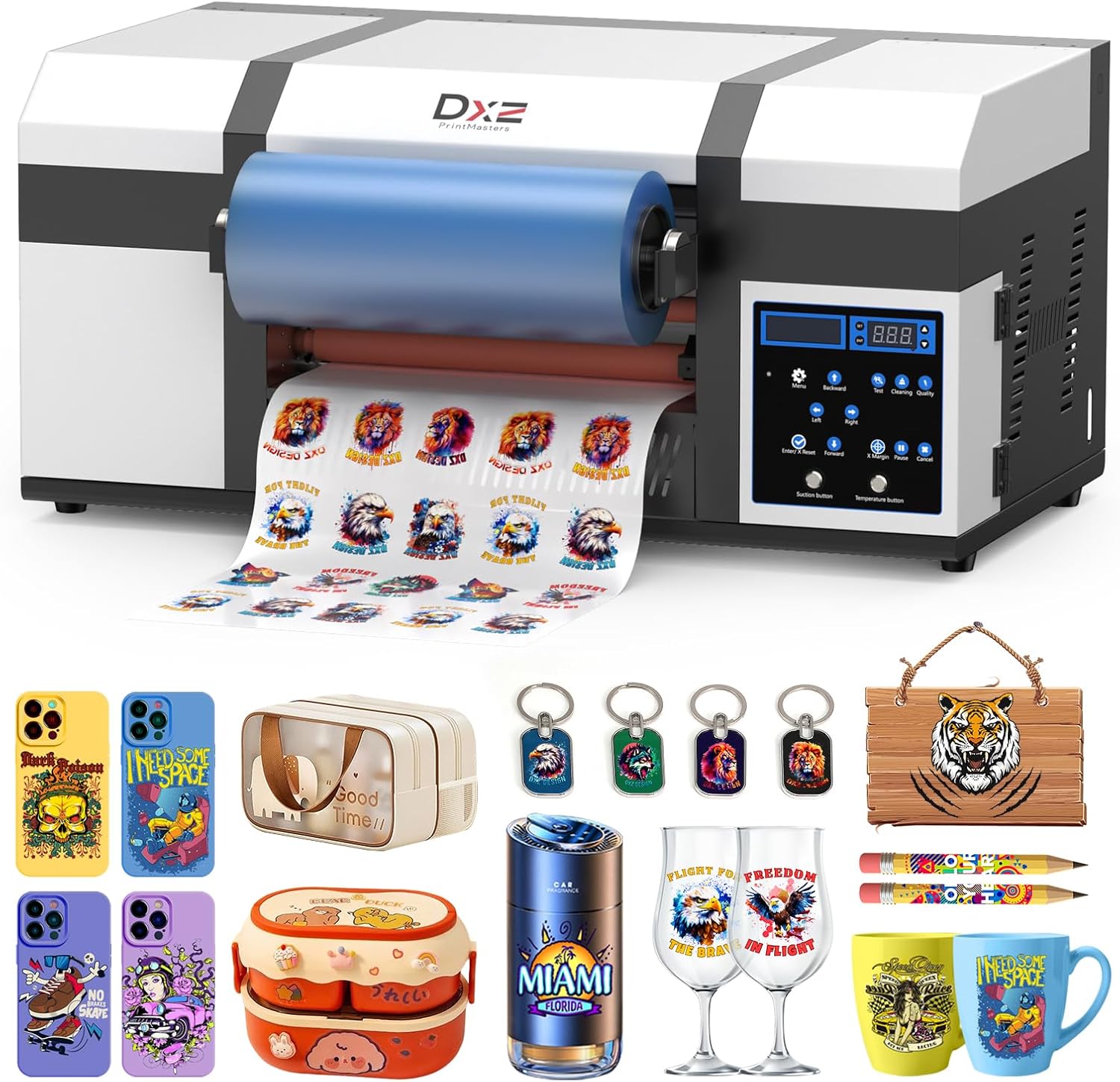
The DXZ A3 UV DTF Printer combines an A3 UV DTF printer with a built-in laminator to produce ready-to-apply decals for tumblers, phone cases, signs, and other surfaces. It uses dual XP600 print heads and a 12-channel CMYKWV ink arrangement to deliver vibrant, detailed prints while the included white ink stirring and auto-cleaning systems help reduce nozzle clogging during regular use. The machine is supplied as a starter package with films, UV inks, cleaning solution, and basic accessories, and it connects to a PC over USB and works with RIP software for workflow control. Practical benefits include the space-saving all-in-one layout that removes the need for a separate laminator, higher throughput from dual heads, and built-in maintenance features that make daily production more consistent. Important limitations are the A3 maximum media size, which restricts larger-format work, and the product weight and footprint that require a stable workspace and two-person handling for setup.
Best for: Small-business creators and boutique print shops that need a reliable, compact solution for producing high-quality UV DTF stickers and decals for commercial orders and personalized products.
Less Ideal for: Shops that regularly need larger-than-A3 prints or mobile vendors who must frequently move equipment between locations should consider larger-format or lighter alternatives.
- Integrated printer and laminator streamlines sticker production without a separate machine
- Dual XP600 print heads increase print speed and throughput for small-batch commercial use
- White ink stirring and automatic cleaning reduce nozzle clogging and maintenance downtime
- Starter kit includes films, UV inks, and cleaning supplies so you can begin printing quickly
- Maximum media size limited to A3, so it cannot handle larger prints
- Heavier, larger unit requires a dedicated, stable workspace and careful setup
Verdict: A dependable all-in-one A3 UV DTF printer and laminator built to keep small commercial sticker production moving with minimal maintenance.
DSV X13 A3 DTF Printer

| Printer Type | Inkjet |
|---|---|
| Maximum Media Size | 13 x 19 inches |
| Resolution | 2880 x 1440 |
| Printer Connectivity Type | USB |
| Power Consumption | 30 watts |
The DSV X13 is a bundled A3 DTF system aimed at small apparel or merch shops that need ready-to-run garment printing. It combines an XP600/F1080-class printhead, white-ink circulation, touch-dry heating plate and a curing oven so you can print, powder, dry and cure transfers without sourcing many third-party accessories. The printer emphasizes uptime with automatic maintenance cycles, white-ink agitation and a one-key refill to reduce clogs and messy refills, and dual alarms for low ink and waste overflow to avoid mid-job failures. Practical benefits include high-resolution output up to 2880×1440 for sharp transfers, roll/flat feeding with a pressing roller to protect the head, and a built-in cutter to trim film precisely. The bundle also includes powder shaker and starter supplies plus a two-year ink plan to limit supply risk. Trade-offs are its footprint and weight typical for an A3 production unit and USB-only connectivity, which may limit networked workflows and longer-term scalability compared with factory-networked machines.
Best for: Small apparel entrepreneurs and shops that prioritize fast setup, reliable uptime and supply continuity so they can produce custom transfers and small batches with minimal startup fuss.
Less Ideal for: Businesses that need centralized networked printing, remote job queuing, or a compact desktop printer for occasional hobby use should consider other options.
- Complete out-of-box DTF bundle including oven, powder shaker and starter inks to start production immediately.
- F1080/XP600-class printhead with up to 2880×1440 dpi for detailed, vibrant transfers.
- White ink circulation and one-key refill reduce settling, bubbles and downtime.
- Automatic maintenance cycles and dual alarms help prevent clogs and messy overflows.
- Built-in cutter and heating plate speed finishing and reduce material waste.
- USB-only connectivity limits networked printing and remote job management.
- Large and heavy A3 production unit requires dedicated floor space and handling.
Verdict: Buy this if you want a turnkey A3 DTF production bundle that prioritizes uptime and supply continuity so you can start printing apparel transfers quickly and reliably.
DXZ A4 UV Printer

| Printer Type | Inkjet |
|---|---|
| Maximum Media Size | 8.5x 13.5 inches |
| Printer Connectivity Type | USB |
| Built-In Media | 6×500ml UV inks, bottle holder, maintenance kit, cleaning kit |
| Resolution | 1440×2880 DPI |
The DXZ A4 UV Printer is a small-format flatbed machine built for personalized products and low-volume production. It prints at up to 1440×2880 DPI and can produce raised 3D emboss effects and true-to-life color on rigid substrates, making it useful for phone cases, acrylic signage, wood, metal and similar items. The unit includes a white ink mixing system to keep pigment suspended and a vacuum platform to hold pieces steady for repeatable alignment. DXZ supplies six 500 ml UV inks and basic maintenance and cleaning kits, and the package includes software and instructional videos to help set up. Practical benefits include broad material compatibility and a compact footprint suitable for a studio or small shop, plus a two-year ink program that reduces supply concerns. Important limitations are that connectivity is USB only, the print area is limited to A4-size jobs, and the machine is a specialist device that requires familiarization and routine maintenance to keep white-ink circulation and vacuum systems working reliably.
Best for: Small-business owners and studio operators who need a compact printer to produce high-resolution, custom rigid items and want a bundled starter kit and support to reduce setup risk.
Less Ideal for: Businesses that need larger-format printing, heavily automated networked production, or a plug-and-play device with minimal operator maintenance should look elsewhere.
- High maximum resolution for detailed, high-quality prints
- White ink mixing system to reduce settling and improve consistency
- Stable vacuum platform for secure, repeatable positioning of rigid media
- Includes six 500 ml ink bottles and maintenance/cleaning kits to get started
- Compact A4 bed suitable for small studios and personalized product work
- A4 maximum media size limits larger signage or wide-format jobs
- USB-only connectivity may be restrictive for some workflows
- Requires regular maintenance and operator familiarity to keep ink and vacuum systems reliable
Verdict: If you run a small shop that sells custom rigid prints and want a compact, high-resolution UV flatbed with a white-ink system and starter supplies, this DXZ A4 model is a practical choice.
Choosing the Right UV Printer for Small Businesses: Key Factors to Consider
Print Quality and Color Accuracy
Print resolution and color accuracy are central to whether your finished goods look professional. Higher native resolution and finer droplet control produce sharper graphics and better halftone transitions, which matters for small runs of branded merchandise, labels, and display graphics.
Color management matters for brand consistency. Look for machines that support ICC profiling and have solid RIP software to manage color conversion and gamut mapping. Accurate color reduces reprints and customer complaints.
Ink Chemistry and Cure Performance
Ink formulation affects adhesion, flexibility, and overall durability on different substrates. UV-curable inks harden when exposed to ultraviolet light, so the effectiveness of the curing system determines scratch resistance and outdoor longevity.
Consider the ink's adhesion to plastics, wood, glass, and coated papers. Also evaluate how easily inks can be cleaned from heads and whether the system supports spot colors or white ink for specialty work, as those capabilities expand the range of viable products.
Production Throughput and Duty Cycle
Throughput is a core business metric. Measure expected prints per hour at the quality settings you plan to use rather than relying on top-line speed claims. Duty cycle and rated uptime indicate whether a machine can handle sustained small-business demand without excessive downtime.
Also factor in setup times between jobs. Some designs offer quicker media loading, automated bed leveling, or faster curing arrays that reduce per-job overhead and improve overall daily output.
Media Handling and Size Flexibility
Small businesses benefit from printers that accept a wide range of substrate sizes and thicknesses. Consider maximum printable area, the bed type (flatbed, hybrid, or roll-to-roll), and the ability to handle rigid pieces vs flexible rolls.
Look at fixturing options, jigs, and vacuum tables for repeatable placement. If you plan to print on odd-shaped or thick items, verify maximum Z-height and any recommended fixturing accessories.
Operational Cost and Consumables
Consumable costs quickly affect profitability. Track ink yield, cost per milliliter, and how often parts like lamps or belts require replacement. Energy consumption for curing can also be a significant ongoing expense.
Think about waste management and the availability of replacement parts. Machines that use common consumables and have straightforward maintenance procedures usually keep operating costs and downtime lower.
Serviceability and Support
Small businesses need dependable service and accessible maintenance. Machines designed with modular parts, easy access to printheads, and clear maintenance workflows reduce technician time and repair cost.
Consider the ease of obtaining service manuals, the clarity of error reporting, and whether routine maintenance can be done in-house. A machine that is difficult to service will slow production when issues arise.
Common UV Printing Workflows for Small Shops
Small businesses typically operate two main workflows: short runs of customized products and periodic larger batches of consistent SKUs. Short-run workflows prioritize quick setup, color proofing, and minimal per-job overhead, while batch workflows emphasize steady throughput and consistent calibration.
Effective workflows combine a reliable RIP and clear file preparation standards with simple fixture systems and a staging area for post-cure inspection. Automating repetitive steps such as bed alignment and color profiling saves time and reduces operator error.
- Preflight files with embedded color profiles and trim marks
- Use jigs or vacuum tables for repeatable positioning
- Schedule preventive head maintenance during low-production periods
Material Preparation and Pretreatment
Surface preparation often dictates adhesion. Some plastics, metals, and coated substrates need a primer or surface activation to accept UV ink reliably. Light abrasion or chemical primers can make the difference between a durable product and one that delaminates.
For porous materials, consider sealing layers or print passes that enhance durability. When printing on heat-sensitive materials, check recommended cure settings to avoid warping or thermal damage.
- Test adhesion on sample pieces before committing a production run
- Document pretreatment steps that worked for each substrate
- Keep a rapid drying area to handle sticky or uncured finishes
Managing Color and Profiles
Consistent color across runs requires a repeatable profiling process. Use calibrated targets and the printer's profiling tools to build ICC profiles for the inks and substrates you use most often. Reprofile after major ink changes or when switching substrate lots.
Maintain a library of standard profiles for common substrates to speed job setup. When exact brand matching is mandatory, proof on the same material as the final product whenever possible.
- Create and store ICC profiles for each substrate
- Include process control charts to monitor drift
- Use soft-proofing in your RIP to preview final output
Layout, Nesting, and Job Optimization
Efficient nesting and optimal layout reduce material waste and shorten print time. For small businesses, batching similar jobs and nesting artwork tightly on the bed improves yield and decreases per-piece costs.
Consider step-and-repeat workflows for small items and use the RIP to automate common tiling and imposition tasks. Properly organized job queues and priority settings keep urgent orders flowing without derailing scheduled batches.
- Batch like jobs to minimize setup changes
- Use automated nesting to maximize bed utilization
- Prioritize jobs in the RIP to manage deadlines
Health, Safety, and Environmental Considerations
UV inks and curing systems have specific safety requirements. Ensure adequate ventilation and minimize operator exposure to uncured inks. Follow manufacturer recommendations for PPE and handling procedures for primers and cleaning fluids.
Think about waste handling for unused ink and cleaning solvents. Proper disposal and responsible purchasing decisions help small businesses meet local regulations and reduce environmental impact.
- Provide training on safe ink handling and curing equipment
- Install suitable ventilation or fume extraction
- Track and responsibly dispose of chemical waste
How We Chose the Best UV Printer for Small Businesses
We shortlisted UV printers for small businesses using a practical, production-focused framework. Our selection criteria prioritized print output characteristics that matter for commercial use: native print resolution and color accuracy for product photography and brand-critical items; ink formulation and curing reliability to ensure durability on diverse substrates; and duty-cycle and throughput metrics that reflect real small-batch and short-run workflows. We also evaluated mechanical build and serviceability, including platform rigidity, head maintenance accessibility, and the availability of replaceable wear parts. Workflow integration was considered through RIP software capability, connectivity options, and media handling versatility. Energy and consumable efficiency were measured by ink usage control and curing energy needs. Exclusions included hobby-grade machines rated for occasional home use and units lacking commercial warranty or documented small-business deployments. The result is a focused list of machines suited to small businesses that need dependable, repeatable results and manageable operating costs.
Our full evaluation process is outlined in our review methodology.
FAQ
Can a small business run a UV printer every day?
Often yes. Many small-business-grade UV printers are designed for daily use, but expected uptime depends on duty-cycle ratings and maintenance. Regular preventive maintenance and proper operating procedures extend reliable daily operation.
Do UV printers need special ventilation?
Usually some ventilation or fume extraction is recommended, especially during cleaning and when curing inks on certain substrates. Follow safety guidance for the specific ink system and use PPE as directed.
What substrates can I print with a UV printer?
UV printers can handle a wide range of substrates including plastics, wood, glass, metal, and coated papers. Adhesion varies by material, so test and, if needed, use primers or surface activation to ensure durability.
Is white ink necessary for small-business printing?
White ink is often essential for printing on dark or transparent substrates because it provides an opaque base layer. Whether it is necessary depends on the product mix and the visual effects you need to achieve.
How often do UV printheads need maintenance?
Maintenance frequency depends on usage and ink chemistry. Regular daily or weekly head clean cycles are common, with deeper servicing scheduled based on runtime and any observed nozzle issues. Good housekeeping reduces the need for major interventions.
Final Verdict
Choosing a UV printer for a small business comes down to balancing print quality, ink and curing reliability, and throughput that matches your expected workload. Prioritize machines that support the substrates you sell, have accessible service procedures, and integrate with your workflow software. Expect to trade off top speed for better color fidelity or media flexibility depending on your product mix. Focus on the criteria that matter most to your operation and plan for maintenance and consumable costs as part of the purchase decision. With the right match, a UV printer can expand your product offerings and improve turnaround without overwhelming your shop.