
Note: This article contains affiliate links. If you click on these links and make a purchase, we may earn a small commission at no extra cost to you. This helps support our research and content. Read our full affiliate disclosure here.
Choosing the right Wi-Fi smart thermostat changes how you control heating and cooling every day. The right unit should match your HVAC setup, be easy to install or have clear installer support, and offer reliable remote access so you can adjust settings from anywhere. This guide highlights seven shortlisted Wi-Fi smart thermostats that are well-suited for modern homes and a range of HVAC systems. Below we evaluate each option against real-world criteria like compatibility with common heating and cooling systems, setup and user experience, and the features that affect energy savings and comfort. Use this guide to find a thermostat that fits your system and lifestyle.
Top Picks at a Glance
| Best Overall The best all-around choice for most situations | ecobee Smart Thermostat Enhanced |  |
| Best Quality Built to a higher standard if you want something more solid | ecobee Smart Thermostat Premium |  |
| Best Value The sweet spot between price and what you get | Amazon Smart Thermostat |  |
| Best Budget The cheapest option that still gets the job done reliably | Riseem STN701W Smart Thermostat |  |
| Top Rated A top-rated pick with lots of positive feedback | Sensi Touch ST75 |  |
| Most Popular A crowd favorite that many people choose with confidence | Google Nest Thermostat |  |
| Best Seller A high-volume bestseller chosen again and again | Sensi Smart Thermostat ST55 |  |
ecobee Smart Thermostat Enhanced

| Connectivity Technology | Wi-Fi |
|---|---|
| Controller Type | Amazon Alexa, Android, Apple HomeKit, Google Assistant, iOS |
| Power Source | Corded Electric |
| Voltage | 24 volts |
| Display Type | LCD |
The ecobee Smart Thermostat Enhanced is a wall-mounted, hardwired Wi‑Fi thermostat designed to reduce heating and cooling costs while giving remote and voice control. It uses built-in radar occupancy sensing and learning software to adjust temperature based on presence and schedule, and includes eco+ features that automatically lower temperatures when you are away or asleep. The device connects to major smart platforms including Apple HomeKit, Alexa, and Google Assistant and is controlled via the ecobee app or voice commands. The box includes a power extender kit and trim plate to simplify DIY installation on systems without a C wire, and a touchscreen LCD makes local adjustments straightforward. Practical benefits include potential energy savings, integration with smart home ecosystems, and the option to add room sensors for improved comfort balancing. Limitations to note are its requirement for 24 VAC HVAC systems and that line-voltage or millivolt systems are not compatible, so verifying system compatibility before purchase is essential.
Best for: Buyers who want a full-featured smart thermostat that integrates with major voice assistants and prioritizes automated energy savings and occupancy-aware comfort.
Less Ideal for: Homes with non-24VAC HVAC systems, those needing a battery-only or totally wireless thermostat, or users who require support for legacy line-voltage setups.
- Built-in radar occupancy sensing for presence-based temperature control
- Works with HomeKit, Alexa, and Google Assistant plus app control for remote management
- Includes Power Extender Kit and installation hardware for DIY installs without a C wire
- Energy-saving eco+ features that automatically adjust temperature when away or sleeping
- Not compatible with line-voltage, millivolt, or 0-10VDC systems
Verdict: A robust Wi‑Fi smart thermostat for buyers who want voice and app control plus occupancy-based energy savings in compatible 24VAC HVAC systems.
ecobee Smart Thermostat Premium

| Power Source | Battery Powered |
|---|---|
| Voltage | 24 volts |
| Connectivity Protocol | Wi-Fi |
| Controller Type | Amazon Alexa, Android, Apple HomeKit, Google Assistant, iOS |
| Included Components | Smart Thermostat Premium, SmartSensor, Backplate, Wire labels, Screws, Power Extender Kit, Trim plate, Quick start guide |
The ecobee Smart Thermostat Premium is a high‑end Wi‑Fi thermostat designed to optimize comfort and energy use across a home. It pairs with the ecobee app and smart platforms like Siri, Alexa, Google Assistant, and HomeKit, and includes a SmartSensor to reduce hot and cold spots by prioritizing occupied rooms. Built‑in air quality monitoring and radar occupancy sensing add health and security awareness, while the integrated voice speaker lets the thermostat act as a convenient control point and music player. Installation is DIY friendly for most 24VAC systems and the box includes a Power Extender Kit for homes without a C‑wire. The large, vibrant LCD and metal trim give it a premium look and the system targets energy savings through automated schedules and occupancy-aware adjustments. Expect the main limits to be compatibility with certain high‑voltage or millivolt systems and the need to use the ecobee ecosystem for full feature access, but for homes that fit supported HVAC types this thermostat delivers advanced sensing and smart integrations that real users will notice daily.
Best for: Buyers seeking a performance‑focused smart thermostat that prioritizes precise comfort control, energy savings, and advanced sensing across a whole home while using voice and app integrations.
Less Ideal for: People with nonstandard high‑voltage or millivolt HVAC setups or those who want a simple, basic programmable thermostat without app‑driven features.
- Built‑in voice assistant (Siri or Alexa) and speaker for hands‑free control and audio playback
- Includes SmartSensor to detect occupancy and prioritize specific rooms, reducing hot/cold spots
- Integrated air quality monitor provides alerts and filter reminders
- Radar occupancy sensor improves presence detection for smarter scheduling
- Power Extender Kit and trim kit included for easier DIY installation on many systems
- Not compatible with line‑voltage, millivolt, or 0–10VDC HVAC systems
- Some advanced features require use of the ecobee app and ecosystem for full functionality
Verdict: Choose the ecobee Smart Thermostat Premium if you want a feature‑rich, performance‑oriented Wi‑Fi thermostat that uses room sensors and advanced occupancy sensing to deliver precise comfort and energy savings.
Amazon Smart Thermostat

| Manufacturer | Amazon |
|---|---|
| Connectivity | Wi‑Fi |
| Requires | C‑wire |
| Compatible voice | Alexa |
| Technology base | Honeywell Home |
The Amazon Smart Thermostat is a Wi‑Fi programmable thermostat designed to replace a traditional wall thermostat and bring Alexa-based automation to heating and cooling. It connects to the Alexa app for on-the-go temperature control, lets you create home/away/sleep schedules, and integrates presence-based features when paired with compatible Alexa devices to adjust temperature automatically. The unit is built on Honeywell Home thermostat technology, so it offers familiar control logic and straightforward DIY installation guided by the Alexa app, though a C-wire is required. Practical benefits include remote access, routine and Alexa+ automation for hands-free adjustments, and potential energy savings through schedule and presence optimization. Limitations are the need for a C-wire, reliance on the Alexa ecosystem for the fullest feature set, and fewer on-device advanced controls compared with some higher-end smart thermostats. For buyers focused on simple Alexa integration and energy-aware scheduling, it delivers a clean, usable experience; power users wanting granular local controls or multi-platform integrations may find it restrictive.
Best for: Buyers who prioritize simple Wi‑Fi control and tight Alexa voice and routine integration to reduce energy use with minimal setup effort.
Less Ideal for: Users who need advanced on-device controls, broad third-party platform support, or want a thermostat that operates independently of the Alexa ecosystem.
- Easy Alexa integration for voice control and routines
- Remote temperature monitoring and scheduling via the Alexa app
- Presence-based automation when paired with compatible Alexa devices
- Built with Honeywell Home thermostat technology for reliable control logic
- Requires a C-wire for installation
- Best features depend on using Alexa ecosystem rather than standalone operation
Verdict: Choose this thermostat if you want straightforward Wi‑Fi temperature control and deep Alexa integration to automate comfort and save energy.
Riseem STN701W Smart Thermostat
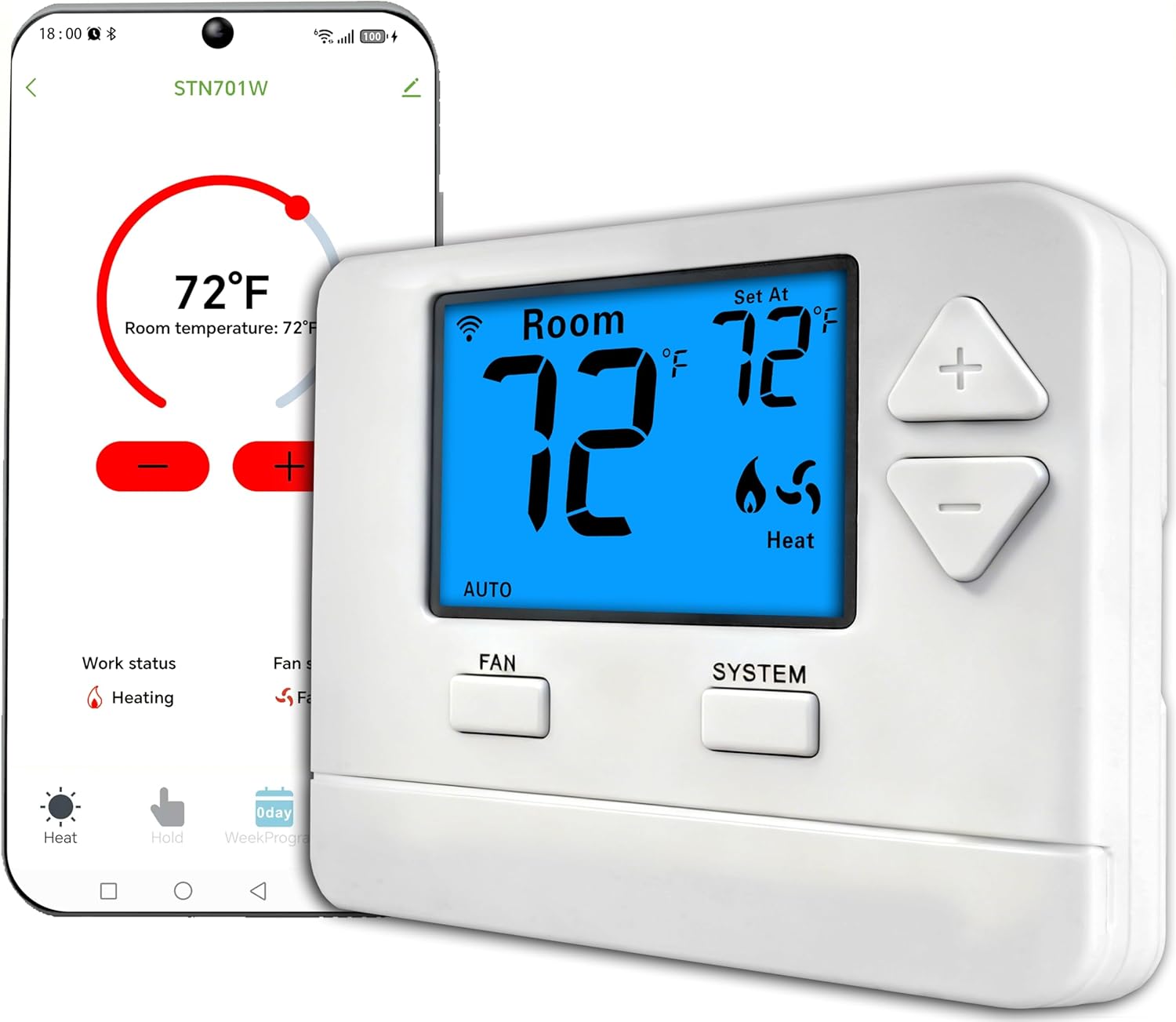
| Connectivity Technology | Wi‑Fi |
|---|---|
| Temperature Control Type | Smart/Remote |
| Power Source | Corded Electric |
| Display Type | LCD |
| Control Type | APP Remote Control or Button Control |
The Riseem STN701W is a budget‑focused Wi‑Fi smart thermostat designed for single‑stage heating and cooling systems. It pairs with your home network so you can change setpoints, run schedules, and control the unit from the companion app or on‑device buttons. Key features include a 7‑day programmable schedule, LCD display for at‑a‑glance temps, and straightforward wall‑mount installation using the included screws and cable label. Because it relies on a 24V C‑wire for power it provides stable operation compared with battery units, but that also means installers without a C‑wire will need to add one or use an adapter. The interface is simple rather than flashy, which keeps costs down, and the thermostat covers typical residential needs without advanced learning algorithms or multi‑stage HVAC support. If you want a basic, networked thermostat that saves energy through scheduled setbacks and remote access, this offers solid value; if you need multi‑stage, voice assistant integration, or an energy‑learning hub, look elsewhere.
Best for: Buyers wanting a low‑cost smart thermostat that provides basic remote control and weekly programming for a standard single‑stage home HVAC system.
Less Ideal for: Homes with multi‑stage heating or cooling, users who need advanced learning features or built‑in voice assistant support should consider more feature‑rich models.
- Wi‑Fi and app remote control for adjusting temperature from anywhere
- 7‑day programmable schedules for tailored weekday/weekend or daily control
- Requires 24V C‑wire for reliable, continuous power
- Simple LCD and button interface that is easy to use and install
- Includes screws, anchors, and cable label for straightforward mounting
- Supports only single‑stage (1H/1C) systems so not suitable for multi‑stage HVAC
- No battery backup or battery operation; C‑wire required for power
Verdict: A straightforward, wallet‑friendly Wi‑Fi thermostat that delivers basic app control and 7‑day scheduling for single‑stage systems.
Sensi Touch ST75

| Connectivity Technology | Wi-Fi |
|---|---|
| Display Type | LCD |
| Screen Size | 4.3 inches |
| Temperature Control Type | programmable |
| Controller Type | Amazon Alexa, Apple HomeKit, Google Assistant, SmartThings, Vera |
The Sensi Touch ST75 is a straightforward Wi‑Fi smart thermostat aimed at making reliable temperature control simple to manage. It mounts on the wall and pairs with the Sensi mobile app for remote scheduling and control, and it supports voice assistants and common smart home hubs. Notable features include a 4.3-inch color touchscreen, Energy Star certification, usage reports and smart alerts for maintenance like filter reminders. Installation is designed for DIY users with illuminated easy-click terminals and an in-app guide, but a common wire (C‑wire) is required. In everyday use the ST75 provides stable connectivity on 2.4 GHz networks and practical energy-saving schedules; the interface is clear and the app makes remote adjustments and geofencing convenient. Limitations to consider are the C‑wire requirement and reliance on the Sensi app ecosystem for advanced features, which may matter if you prefer a battery-only or completely local solution. For buyers who want a dependable, app-driven thermostat with a color touchscreen and factory-quality HVAC pedigree, the ST75 is a solid, no-frills choice.
Best for: Buyers who prioritize a reliable, factory-quality smart thermostat that pairs clear local controls with dependable app and voice control for everyday temperature management.
Less Ideal for: People who need a battery-only thermostat or who require a fully local solution without dependence on a vendor app should look elsewhere.
- Color touchscreen and intuitive menus for easy local control
- Wi‑Fi remote access with app control and voice assistant support
- Energy Star certified with usage reports and smart alerts for maintenance
- Designed for DIY installation with illuminated easy-click terminals and in-app guidance
- Requires a common wire (C‑wire), so not compatible with some older thermostat wiring without modification
- Advanced features are tied to the Sensi app ecosystem rather than fully local controls
Verdict: A dependable, app-driven smart thermostat with a color touchscreen and Energy Star certification for buyers who want reliable remote control and HVAC-grade build quality.
Google Nest Thermostat

| Connectivity Technology | Bluetooth, Wi-Fi |
|---|---|
| Control Type | Remote Control, Voice Control |
| Power Source | Battery Powered |
| Display Type | LCD |
| Number of Batteries | 2 A batteries required (included) |
The Google Nest Thermostat is a compact smart thermostat designed to replace a standard wall thermostat and give remote control from the Google Home app or voice assistants. You set schedules or use Quick Schedule in the app, and the device will automatically set an Eco Temperature when it senses the house is empty to reduce energy use. It supports Wi‑Fi and Bluetooth, works with Alexa, Google Assistant and Matter-certified voice assistants, and includes simple HVAC monitoring that can send alerts if something seems off. Installation is marketed as a quick DIY task for typical HVAC systems and it runs on two included A batteries, with compatibility for many homes without a C wire. Practical benefits include easy remote control, energy-saving suggestions via Savings Finder, and basic system alerts for maintenance. Limitations are that advanced energy features like Nest Renew and some alerts require additional Google services or specific utility participation, and very complex or high-voltage systems may be incompatible so you should check system compatibility before buying.
Best for: Buyers who want an affordable, easy-to-use smart thermostat that integrates with Google Home and common voice assistants and who value remote control and basic energy-saving features backed by many user reviews.
Less Ideal for: Homeowners with unusual or high-voltage HVAC systems, or buyers who need enterprise-grade diagnostics and advanced utility integrations handled entirely on-device.
- Remote control and scheduling via Google Home app for temperature changes from anywhere
- Voice control with Google Assistant, Alexa, and Matter-certified assistants
- Energy-saving features like Eco Temperatures and Savings Finder that suggest schedule tweaks
- Simple DIY installation for most homes and runs on included A batteries
- Basic HVAC monitoring that can alert you to potential system issues
- Some advanced services and grid-based features require enrollment or specific utility support
- May need a C wire or power accessory for certain HVAC setups
- Not suitable for incompatible high-voltage or unusual wiring systems
Verdict: A cost-conscious smart thermostat that delivers simple app and voice control plus practical energy-saving features for most standard home HVAC systems.
Sensi Smart Thermostat ST55

| Connectivity Technology | Wi-Fi (2.4 GHz) |
|---|---|
| Controller Type | Amazon Alexa, Apple HomeKit, Google Assistant, SmartThings, Vera |
| Power Source | Corded Electric (24 VAC) + 2 AA batteries |
| Display Type | LED |
| Specific Uses For Product | Air Conditioner, Boiler, Furnace, Heat Pump |
The Sensi ST55 is a straightforward Wi‑Fi smart thermostat meant to replace a conventional wall thermostat and give remote control and scheduling through a mobile app. It connects to 2.4 GHz Wi‑Fi and integrates with Alexa, Google Assistant, Apple HomeKit, SmartThings and Vera so you can control temperature by app, touch or voice. The unit is Energy Star certified and provides usage reports, smart alerts and a filter indicator to help manage HVAC efficiency and maintenance. Installation is designed for DIY: the kit includes mounting hardware, wire labels, step‑by‑step app guidance and a built‑in level, and most homes do not require a common wire. The display is an LED panel with button controls rather than a large touchscreen, which keeps the interface simple but less flashy than some competitors. It runs on 2 AA batteries and 24 VAC power and is backed by a three year warranty. If you want dependable remote scheduling, energy reports and broad smart home compatibility in a privacy‑focused, easy‑to‑install package, the Sensi ST55 delivers; those wanting a large color touchscreen or advanced in‑unit controls may prefer a different model.
Best for: Buyers who prioritize reliable, privacy‑minded smart control and easy DIY installation over a fanciful in‑unit touchscreen, and who want Energy Star backed energy reporting.
Less Ideal for: Users who want an oversized color touchscreen interface or more advanced on‑device controls should consider other models with richer displays.
- Works with Alexa, Google Assistant, Apple HomeKit and other major platforms for flexible voice and smart home control
- Energy Star certification with usage reports and smart alerts to help monitor and reduce HVAC energy use
- Designed for DIY installation with included mounting hardware, wire stickers and in‑app step‑by‑step guidance
- Simple LED display and button controls that fit the same footprint as a traditional thermostat so no wall patching is needed
- No large color touchscreen—controls are via buttons and the app rather than an advanced in‑unit display
- Requires 2 AA batteries and 24 VAC wiring, which may be unfamiliar to users who expect battery‑free operation
Verdict: A privacy-focused, Energy Star certified smart thermostat that delivers dependable remote control and easy DIY installation for mainstream buyers.
Choosing the Right Wi-Fi Smart Thermostat: Key Factors to Consider
System Compatibility
Not all thermostats support every HVAC setup. Confirm whether the thermostat works with your system type, such as conventional heat/cool, heat pump, or multi-stage systems. Many smart thermostats require a common wire or specific terminal connections to power the device and support Wi-Fi. If your system uses 24V control circuits, check terminal labeling and compatibility notes before buying.
Compatibility affects whether the thermostat will control heating and cooling reliably, whether full feature sets are available, and whether you will need a professional installer. Understanding the wiring and system type ahead of time reduces returns and ensures the thermostat can actually deliver the advertised smart features.
Installation Complexity
Installation ranges from simple swap-outs for typical setups to more involved jobs that require a common wire adapter or professional wiring changes. Consider your comfort with electrical wiring and whether you have access to a licensed technician if needed. Clear step-by-step instructions, labeled terminals, and included mounting hardware reduce installation time and errors.
If a thermostat requires a professional, include that time and cost in your decision. Some installers can also verify system compatibility and configure advanced features, which may be worth the additional expense for complex HVAC systems.
Connectivity and Reliability
A Wi-Fi smart thermostat depends on a stable home network to deliver remote control and cloud-based features. Look for units that support common Wi-Fi bands and offer robust reconnection behavior after outages. Reliable firmware updates and active manufacturer support also help maintain long-term performance.
Unreliable connectivity can cause delayed temperature changes, lost schedules, or inability to access the thermostat remotely. For homes with weak Wi-Fi at the thermostat location, consider mesh networks, a Wi-Fi extender, or thermostats that support alternative connectivity options.
App Experience and Smart Features
The smartphone app and on-device interface determine how easy it is to set schedules, create temperature presets, and monitor usage. Evaluate whether the app provides intuitive scheduling, geofencing, remote sensors, and multi-zone support if you need it. Compatibility with voice assistants or home automation platforms can add convenience but is not essential for basic operation.
A good app should present energy usage clearly, allow quick manual overrides, and make firmware updates straightforward. If advanced automation or integrations are important, verify the thermostat supports those specific features before choosing.
Energy Reporting and Savings Tools
Energy reporting features help you track consumption patterns and identify opportunities to save. Look for thermostats that provide clear, frequent usage summaries and actionable suggestions for efficiency. Some units estimate savings from schedule adjustments or offer adaptive learning to optimize runtime.
While energy reporting alone does not guarantee lower bills, better data leads to smarter behavior. Consider whether the reporting granularity meets your needs and whether the thermostat can export or share data with other home energy tools.
Durability and Support
A thermostat is a long-term installation, so build quality and manufacturer support matter. Check for a reliable warranty, accessible customer service, and a track record of timely firmware updates. Durable materials, secure mounting, and stable user accounts reduce the risk of premature failure or frustrating service interactions.
Good post-purchase support is especially important if your setup is nonstandard or you plan to integrate the thermostat into a larger home automation system. Consider how the company handles firmware issues, account problems, and replacement parts.
DIY Vs Professional Installation
Many homeowners can install a Wi-Fi smart thermostat themselves if their system has standard wiring and a labeled C wire. DIY installation saves time and can be completed in under an hour for typical single-stage systems. Always turn off power at the breaker and document wire positions before disconnecting the old thermostat.
Professional installation is advisable for multi-stage systems, heat pumps with auxiliary heat, or when the home lacks a common wire. An installer can verify system wiring, add a common wire adapter if necessary, and configure more advanced settings to ensure optimal operation.
- DIY is suitable for single-stage gas, oil, or electric furnaces with 24V control.
- Call a pro for multi-stage systems, complex heat pump setups, or any unclear wiring.
- Keep a photo of your original wiring to simplify installation or to share with a technician.
Optimizing Thermostat Placement
Where you mount the thermostat affects how accurately it reads home temperature. Avoid locations near direct sunlight, drafts, exterior doors, or heat sources like radiators and ovens. A central interior wall at about eye level typically yields the most representative reading for the living space.
If you have rooms that run significantly hotter or colder than the rest of the house, consider remote temperature sensors or multi-zone controls. Remote sensors can improve comfort by basing control decisions on frequently used rooms rather than a single hallway temperature.
- Avoid mounting near windows, vents, or reflective surfaces.
- Place on an interior wall away from kitchens and direct sunlight.
- Use remote sensors for rooms with persistent temperature differences.
Network Tips to Maintain Connectivity
Thermostat location and home Wi-Fi coverage directly influence remote-control performance. Test signal strength at the planned mounting spot and consider a mesh Wi-Fi system or extender if coverage is weak. Some thermostats support 2.4 GHz networks, which penetrate walls better than 5 GHz, so confirm supported bands.
Keep firmware up to date to benefit from stability improvements. If you encounter frequent disconnections, check router settings for client isolation or MAC filtering that might block the thermostat from accessing cloud services.
- Verify Wi-Fi signal strength at the thermostat location before installation.
- Prefer 2.4 GHz where supported if range is a concern.
- Update firmware and avoid router settings that block device cloud access.
Using Schedules, Geo-Fencing, and Learning Modes
Built-in scheduling is the simplest way to reduce energy use while maintaining comfort. Set temperature setbacks for sleep and away periods to limit runtime without sacrificing convenience. Geo-fencing adds automation by adjusting the home when the last person leaves or when someone is approaching.
Some thermostats offer adaptive or learning modes that gradually build a schedule based on your adjustments. These can be convenient but review and tweak learned behaviors to ensure they match your lifestyle and seasonal needs.
- Start with a simple schedule and refine it over a few weeks.
- Use geo-fencing for hands-off away/home transitions.
- Monitor learning modes and correct unwanted learned changes.
Privacy and Account Management
Smart thermostats create user accounts that store scheduling and usage data. Review privacy policies and account settings to control how data is shared and whether aggregated usage is used for analytics. Use strong, unique passwords and enable two-factor authentication if available to protect remote access.
Consider how accounts are transferred or managed if you sell the house or change service providers. A clear reset and transfer process simplifies ownership changes and prevents lingering account access.
- Read the privacy policy to understand data collection and sharing.
- Enable two-factor authentication for remote accounts when available.
- Know the account reset and transfer steps for future ownership changes.
How We Chose the Best Wi-Fi Smart Thermostat
We selected units that balance real-world compatibility, dependable connectivity, and practical features that drive comfort and energy savings. Our editorial filters prioritized thermostats that support common low-voltage HVAC configurations, provide clear installation paths for DIYers or technicians, and offer robust mobile and web control for scheduling and remote adjustments. Key evaluation criteria included wiring and system compatibility, app and interface usability, reliability of Wi-Fi connection and cloud services, and the accuracy of scheduling and temperature control algorithms. We also considered energy reporting and smart features that integrate with typical home automation setups. Units with unclear wiring requirements, unresolved connectivity issues, or limited control options were excluded. We focused on measurable and verifiable product attributes rather than marketing claims. Where possible we favored products with straightforward setup documentation and transparent feature lists. The final list highlights thermostats that are likely to work well in most homes while clearly flagging any common installation constraints.
Our full evaluation process is outlined in our review methodology.
FAQ
Do I need a common wire for a Wi-Fi smart thermostat?
Often a common wire is required to power a Wi-Fi thermostat continuously. Some models work without it by using power-stealing techniques or an included adapter, but these approaches may not be compatible with all systems. Verify your HVAC wiring and the thermostat's requirements before installation.
Will a smart thermostat save me money on energy bills?
Smart thermostats can reduce energy use by enabling schedules, setbacks, and remote control, and by providing usage insights. Actual savings depend on your heating and cooling habits, local climate, and how actively you use the device's efficiency features.
Can I control a Wi-Fi thermostat if my internet goes out?
Local control via the thermostat's interface typically still works without internet, but remote control from a phone or cloud features require a working internet connection. Some thermostats also offer limited LAN-based control if the home network remains up.
Are smart thermostats compatible with heat pumps?
Many Wi-Fi smart thermostats support heat pump systems, including multi-stage configurations, but compatibility varies. Confirm the thermostat explicitly lists heat pump support and check any notes about auxiliary heat or staging to ensure proper operation.
How do remote sensors improve thermostat performance?
Remote sensors provide additional temperature data from other rooms, helping the thermostat make control decisions that reflect occupied areas rather than a single location. This can improve comfort in homes with uneven temperature distribution, especially when paired with multi-sensor averaging or priority settings.
Final Verdict
When choosing a Wi-Fi smart thermostat, prioritize compatibility with your HVAC system and a clear installation path. Reliable connectivity and a usable app experience will determine how often you interact with the device and whether you realize energy benefits. Balance desired smart features against installation complexity and support quality. Focus on models that match your wiring and system type, provide straightforward setup or access to installer help, and offer the connectivity and reporting features you will actually use. That approach will deliver comfort and efficiency without unnecessary complexity.