
Note: This article contains affiliate links. If you click on these links and make a purchase, we may earn a small commission at no extra cost to you. This helps support our research and content. Read our full affiliate disclosure here.
Picking the right Z-Wave thermostat affects daily comfort, energy use, and how smoothly your smart-home automations run. A good Z-Wave thermostat gives dependable remote access, accurate temperature control, and integrates with your existing heating and cooling wiring without surprises. This guide highlights the top shortlisted options across common home setups and explains how each was evaluated for connectivity, compatibility with typical HVAC systems, automation features, and ease of use. Read on to see the picks and learn the practical tradeoffs that matter when installing a Z-Wave thermostat in your home.
Top Picks at a Glance
| Best Overall The best all-around choice for most situations | Ecolink Z-Wave TBZ500 Thermostat |  |
| Best Quality Built to a higher standard if you want something more solid | 2GIG Smart Z-Wave Thermostat STZ-1 |  |
| Best Value The sweet spot between price and what you get | Remotec Z-Wave Thermostat ZTS-500 |  |
| Best Budget The cheapest option that still gets the job done reliably | Radio Thermostat CT30 |  |
| Top Rated A top-rated pick with lots of positive feedback | PORTEXA T6 Pro Z-Wave Thermostat |  |
| Most Popular A crowd favorite that many people choose with confidence | Honeywell T6 Pro Z‑Wave Thermostat |  |
Ecolink Z-Wave TBZ500 Thermostat

| Connectivity Technology | Z-Wave |
|---|---|
| Power Source | Battery Powered |
| Display Type | LCD |
| Control Method | App, Push Button |
The Ecolink TBZ500 is a Z-Wave Plus certified smart thermostat that brings basic remote control and automation to standard gas/electric and heat pump HVAC systems. It runs on batteries, mounts to the wall, and uses a backlit monochrome LCD with a short message bar for on-device control while offering app control when paired with a Z-Wave home hub. The thermostat supports multi-stage heating and cooling and includes fan control and an emergency heat option for heat pump setups, which makes it suitable for common residential HVAC configurations. Because it relies on Z-Wave, it integrates into existing Z-Wave automation and benefits from S2 security, but it requires a compatible hub to access most smart features. Expect straightforward functionality rather than a touchscreen or advanced learning algorithms, and plan for periodic battery replacements since it is not line-powered. The TBZ500 is a solid choice if you want a simple, hub-driven Z-Wave thermostat without extra frills.
Best for: Homeowners who want a straightforward, hub-driven Z-Wave thermostat to add remote control and basic automation to a standard HVAC system without needing advanced AI features.
Less Ideal for: Buyers who want a feature-rich, Wi-Fi native thermostat with touchscreen controls, built-in learning, or who prefer a hardwired power setup.
- Z-Wave Plus certified with S2 security for secure hub integration
- Supports multi-stage heating and cooling and emergency heat for heat pumps
- Backlit LCD and push-button controls for basic local operation
- Battery powered for installations without a C wire
- Battery power means recurring battery changes and no power-hungry features
- No touchscreen or advanced learning features compared with premium smart thermostats
Verdict: A no-frills, Z-Wave Plus thermostat that reliably adds secure hub-based control and multi-stage HVAC support for buyers who prioritize integration over advanced smart features.
2GIG Smart Z-Wave Thermostat STZ-1

| Connectivity Technology | Z-Wave |
|---|---|
| Power Source | Hardwire (24VAC 'C' wire) or batteries |
| Display Type | graphical LCD |
| Screen Size | 5.75 inches |
| System Mode | Off, Heat, Cool, Auto, E-Heat |
The 2GIG Smart Z-Wave Thermostat (2GIG-STZ-1) is a networked programmable thermostat built to integrate with Z-Wave hubs and 2GIG security panels. It provides digital temperature control, humidity sensing and on-screen humidity display, and supports SmartStart and S2 authentication for secure pairing. Installation can use either 24VAC C-wire power or included batteries, and the fixed-format graphical LCD shows setpoints, clock, and humidity; basic fan and mode controls are accessible from the unit. For everyday use it handles multi-stage systems and heat pump setups, offers auto changeover, and exposes common setup options like HVAC type and sensor calibration on-screen. Performance-focused users will appreciate the 700-series Z-Wave Plus support for extended wireless range and reliable remote control through compatible Z-Wave controllers. Limitations include a fixed-format display rather than a large touchscreen and button control instead of a modern capacitive interface, so advanced on-unit navigation is modest compared with high-end smart thermostats, and advanced cloud ecosystems are dependent on the paired hub rather than built into the thermostat.
Best for: Buyers who prioritize reliable Z-Wave performance and secure, local smart home integration and need a thermostat that handles multi-stage HVAC systems and humidity control.
Less Ideal for: Users seeking a large touchscreen interface, built-in cloud services, or a thermostat with native Wi-Fi mobile app features without a hub should look elsewhere.
- 700-series Z-Wave Plus support for longer-range and robust wireless control
- Built-in humidity sensing and on-screen humidity control
- Supports SmartStart and S2 authentication for easier and secure pairing
- Works with either 24VAC C-wire power or battery power for flexible installation
- Programmable with multi-stage heating and cooling support and auto changeover
- Fixed-format graphical LCD and button controls are less modern than touchscreen interfaces
- Relies on a Z-Wave hub or compatible 2GIG panel for advanced remote/cloud features
Verdict: Choose this thermostat if you want a secure, performance-focused Z-Wave thermostat that adds humidity control and strong wireless range for multi-stage HVAC systems.
Remotec Z-Wave Thermostat ZTS-500
| Connectivity Protocol | Bluetooth, Z-Wave |
|---|---|
| Voltage | 24 volts |
| Control Method | App |
| Display Type | digital |
| Number of Batteries | 4 AA batteries required. |
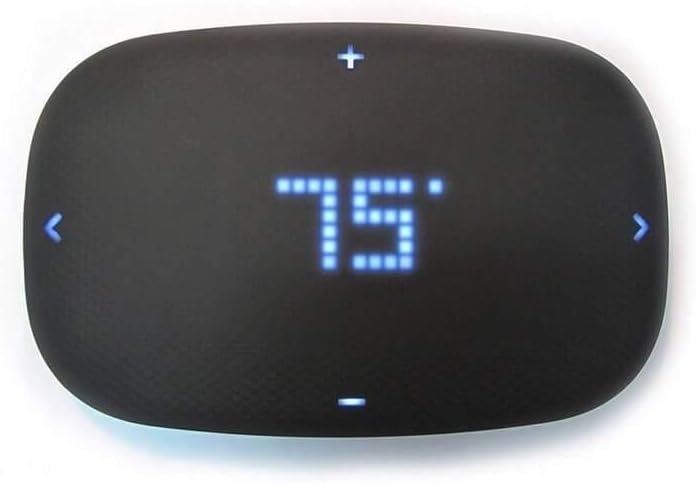
The Remotec ZTS-500 is a Z-Wave Plus wall thermostat designed to give basic smart control of conventional and heat pump HVAC systems via a compatible Z-Wave hub. It connects over Z-Wave (and also lists Bluetooth) and is controlled from an app after pairing with a gateway, letting you change temperature and schedules remotely and take advantage of energy-saving setpoints. The display is a simple digital readout with button controls rather than a touchscreen, and the unit can run on four AA batteries or be powered by a C wire. Installation supports a wide set of inputs for one- and two-stage heating and cooling systems and some zoned setups, so it fits many 24 VAC systems. Practical buyers will appreciate the straightforward, minimalist interface and the ability to update firmware over the air, but the basic controls and small display mean it lacks advanced local features and the polish of higher-end smart thermostats. Expect to rely on your hub for most automation and voice integrations.
Best for: Buyers who want a practical, no-frills Z-Wave thermostat to add remote control and basic automation to an existing 24V HVAC system without premium touchscreen features.
Less Ideal for: People who want a polished touchscreen interface, built-in advanced learning schedules, or integrated Wi-Fi operation without relying on a Z-Wave hub should look elsewhere.
- Z-Wave Plus connectivity for hub-based remote control and automation
- Compatible with many 24 VAC systems including conventional and heat pump setups
- Runs on four AA batteries or can use a C wire for constant power
- OTA firmware updates and advanced configuration options via hub
- Small digital display and button controls lack the advanced local interface of premium thermostats
Verdict: A solid, budget-friendly Z-Wave thermostat for adding reliable remote control and basic automation to compatible 24V HVAC systems.
Radio Thermostat CT30

| Connectivity Technology | Z-Wave |
|---|---|
| Control Type | App Control |
| Power Source | Battery Powered |
| Display Type | Digital |
The Radio Thermostat CT30 is a basic programmable thermostat with Z-Wave connectivity for app control and integration with compatible smart home hubs. It provides 7-day heat/cool scheduling, a digital display, and runs on three AAA batteries which simplifies installation by avoiding a common C-wire requirement in some setups. The unit is pared down compared with premium smart thermostats — it focuses on simple scheduling, remote control through a Z-Wave controller, and straightforward wall-mount operation rather than advanced learning features or elaborate touch interfaces. Practical benefits include easy replacement for older thermostats, low power draw, and compatibility with Z-Wave systems used in many DIY and professionally installed smart-home setups. Limitations are its modest feature set and dated interface compared with modern Wi-Fi thermostats, and it depends on a Z-Wave hub or controller for remote app control rather than working directly with cloud services.
Best for: Buyers who need an inexpensive, no-frills Z-Wave thermostat to add to an existing smart home hub and prefer easy installation and basic scheduling over advanced smart features.
Less Ideal for: Users who want cloud-native Wi‑Fi control, voice assistant setup without a hub, or advanced learning and energy-optimization features should look elsewhere.
- Z-Wave connectivity enables integration with compatible smart home hubs.
- 7-day programmable heat/cool scheduling for weekly temperature control.
- Battery powered with three included AAA batteries simplifies installation.
- Digital display and straightforward wall-mount design make controls easy to read and use.
- Lacks advanced smart features like learning algorithms or cloud-native Wi‑Fi integration.
- User interface and visual design are basic compared with modern touchscreen thermostats.
Verdict: A budget-friendly Z-Wave programmable thermostat that gives basic remote scheduling and easy installation for users with an existing Z-Wave hub.
PORTEXA T6 Pro Z-Wave Thermostat

| Connectivity Technology | Z-Wave Only |
|---|---|
| Power Source | Battery Powered, Hardwired |
| Display Type | LED |
| Control Method | Touch |
The T6 Pro Z‑Wave is a wall‑mounted programmable thermostat built for Z‑Wave smart home hubs rather than Wi‑Fi control. It offers a large touch LED display for local setup and scheduling, and can be powered by three AA batteries or hardwired to a C‑wire. The unit supports up to 3 heat/2 cool heat pump or 2 heat/2 cool conventional systems, and is Z‑Wave Plus V2 certified for improved range and battery life when paired with a compatible hub. In practice it is used like a conventional programmable thermostat but integrates with Z‑Wave occupancy and automation to adjust temperatures automatically and save energy. Notable benefits are straightforward on‑device scheduling, broad HVAC compatibility for multi‑stage systems, and the option to use batteries if a C‑wire is not present. Limitations are the lack of native Wi‑Fi or cloud app control without a Z‑Wave hub and reliance on hub software for remote access or complex automations beyond basic local scheduling.
Best for: Buyers who prioritize a dependable, hub‑based smart thermostat that integrates with Z‑Wave systems and expects simple on‑device scheduling and long battery life.
Less Ideal for: Users who want direct Wi‑Fi app control or cloud‑based voice integrations without adding a Z‑Wave hub should consider Wi‑Fi thermostats instead.
- Z‑Wave Plus V2 certified for better range and battery performance with compatible hubs
- Supports multi‑stage HVAC setups including heat pump and dual fuel systems
- Large touchscreen LED display for easy on‑device scheduling and control
- Can run on 3 AA batteries or be hardwired to a C‑wire for flexible installation
- No built‑in Wi‑Fi or vendor cloud access without a Z‑Wave hub
- Requires a compatible Z‑Wave controller for remote control and advanced automations
Verdict: Choose the T6 Pro when you need a reliable, Z‑Wave certified programmable thermostat that integrates tightly with hub‑based smart homes.
Honeywell T6 Pro Z‑Wave Thermostat

| Connectivity Technology | Z-Wave |
|---|---|
| Power Source | Ac/dc |
| Voltage | 24 volts |
| Display Type | Touch Screen |
| Number of Batteries | 3 AA batteries required. |
The Honeywell T6 Pro Z‑Wave thermostat is a programmable wall thermostat that adds Z‑Wave smart home control to conventional 24‑volt HVAC systems. It learns heating and cooling cycle behavior, allows setting minimum cool and maximum heat limits, and provides a 2.3‑inch touch display with button controls for local adjustments while also supporting app‑based control through Z‑Wave controllers like SmartThings and Vera. Typical use is replacement of a standard thermostat to gain remote scheduling, automation, and basic energy management features; installation includes the supplied mounting hardware and three AA batteries for backup. Practical benefits include straightforward integration into existing Z‑Wave ecosystems, programmable schedules to reduce runtime, and a compact, unobtrusive design. Important limitations are that it requires a Z‑Wave hub or controller to access full remote and automation features and it is built for conventional 24V systems so it is not suitable for line‑voltage or proprietary HVAC interfaces.
Best for: Buyers who want a straightforward, Z‑Wave compatible thermostat to add remote scheduling and basic automation to a conventional 24V heating and cooling system while relying on community feedback and proven integration.
Less Ideal for: People who need a thermostat for line‑voltage systems, specialized HVAC interfaces, or who want built‑in Wi‑Fi app control without a separate Z‑Wave hub.
- Z‑Wave connectivity enables integration with SmartThings, Vera and other Z‑Wave hubs
- Programmable schedules and learning of HVAC cycles help reduce runtime
- Compact touch screen and button controls allow simple local operation
- Includes mounting hardware and batteries for straightforward replacement install
- Requires a Z‑Wave hub for remote control and advanced automation
- Only compatible with 24‑volt HVAC systems, not line‑voltage setups
Verdict: Choose the T6 Pro if you want a compact, proven Z‑Wave thermostat to add reliable smart home scheduling and automation to a conventional 24V HVAC system.
Choosing the Right Z-Wave Thermostat: Key Factors to Consider
Z-Wave Network Reliability
A thermostat is a critical node in a home automation network, so the stability of its Z-Wave connection affects remote control and automations. Look for devices that support the Z-Wave Plus feature set and offer clear pairing instructions. Consider how the device behaves when the hub is offline and whether local controls remain functional.
Signal range and mesh participation matter in larger homes. Thermostats that act as repeaters for mains-powered nodes can strengthen the mesh, but battery-powered add-on sensors may not repeat. Factor in placement relative to the hub and other powered Z-Wave devices to avoid dead spots.
HVAC System Compatibility
Not all thermostats support every heating and cooling configuration. Confirm support for conventional single-stage systems, multi-stage heat or cool, heat pump configurations, and accessories like humidifiers or dehumidifiers if applicable. Check whether the thermostat requires a common wire for power or offers alternate power options.
Mismatch between thermostat outputs and the HVAC control board can prevent proper operation or could require a professional adapter. Verify terminal labels and supported control voltages to ensure straightforward replacement of your existing unit.
Installation and Wiring Requirements
Installation complexity ranges from simple substitutions for modern systems to involved rewiring for older homes. Many smart thermostats need a common (C) wire to maintain power; others include adapters to avoid running new wiring. Assess whether you are comfortable with basic low-voltage wiring or will need a technician.
Mounting footprint, clearance for wallboxes, and whether the unit needs a separate power module for certain systems are practical concerns. Pick a thermostat with clear wiring diagrams and good customer support documentation to reduce setup time and errors.
Scheduling, Scenes, and Automation Features
Thermostats differ in their on-device scheduling versus hub-driven automations. Decide if you prefer robust local scheduling on the thermostat or centralized rules managed by your Z-Wave hub. Look for flexible weekday/weekend scheduling, setback modes, and temporary hold options.
Also consider compatibility with presence-based automations, multi-zone setups with remote sensors, and whether the thermostat exposes the necessary variables to your hub for advanced scenes and energy reports.
Sensing Accuracy and Remote Sensors
Accurate temperature sensing prevents short-cycling and maintains comfort. Some thermostats include or support remote sensors to measure temperature in another room or near sleeping areas. Understand how the device blends multiple sensor inputs—averaging, priority, or user-selectable—and whether remote sensors connect wirelessly or via the main hub.
Calibration options and temperature resolution influence perceived comfort. Devices with poor sensing or limited sensor support can cause uneven heating or cooling across the home.
Maintenance and Long-Term Support
Consider firmware update practices and how the vendor communicates security and compatibility updates for Z-Wave devices. Regular updates can add features and maintain interoperability with evolving hub software. Evaluate whether replacement parts or accessories are available and whether the interface receives periodic improvements.
Also consider the ease of factory resets, backup of schedules or settings, and how the product handles power interruptions to minimize downtime and preserve user configurations.
Confirming Your Current Wiring Before You Buy
Start by removing the existing thermostat cover and photographing the terminal block. Common labels such as R, C, W, Y, G, and O/B indicate power, common, heat, cool, fan, and heat-pump reversing functions. Match those labels to the new thermostat's requirements so you can confirm compatibility before purchasing.
If you do not see a C wire, check the furnace control board for an unused terminal or consider a power extender kit. In some installations a dedicated adapter or professional wiring is the safest option to avoid power issues or system damage.
- Document wire color and terminal labels with a photo
- Check whether the replacement needs a C wire or offers an adapter
- Note any uncommon terminals like W2, E, or AUX for multi-stage or emergency heat
Using Remote Sensors and Multi-Zone Strategies
Remote sensors can improve comfort by measuring temperature in priority rooms rather than at the thermostat location. Decide whether you want averaging across sensors or the ability to prioritize one sensor, for example a bedroom at night.
For multi-zone heating and cooling, ensure the thermostat exposes sensor data to your hub and supports the control logic you need. Some setups use one master thermostat with wireless sensors, while others require separate thermostats on each zone subcontroller.
- Place sensors away from direct sunlight and drafts
- Use sensors on the same floor and similar occupancy patterns for best results
- Confirm how the thermostat aggregates multiple sensor readings
Integrating a Z-Wave Thermostat Into Hub Automations
When adding a Z-Wave thermostat to scenes and automations, think about which functions you want your hub to control. Typical actions include setpoint changes for away/home modes, fan control, and mode switching between heat and cool.
Ensure the thermostat exposes the relevant Z-Wave command classes to your hub so automations can trigger reliably. Test critical automations like vacation holds and presence-based setbacks before relying on them fully.
- Map hub variables to thermostat setpoints and modes
- Use automation delays or confirmations to avoid rapid mode toggles
- Test automations at different times and conditions to confirm behavior
Power Considerations and Backup Behavior
Understand how the thermostat is powered and how it behaves during power or network outages. Units that store schedules locally will continue basic operation when the hub is offline, while those that rely heavily on cloud services may lose remote functions temporarily.
Battery backup or capacitor-based charging can keep non-powered displays alive, but continuous operation of Z-Wave radios typically requires a stable low-voltage supply. Plan for scenarios where the home network or hub is unavailable and verify local control remains possible.
- Confirm local schedule retention during hub outages
- Check whether the display and controls function without the hub
- Ensure any battery backup option is easy to service
Security and Firmware Updates
Z-Wave devices receive periodic firmware updates that address security and compatibility. Choose devices with a clear update process and a track record of maintaining firmware over time. Your hub may mediate firmware delivery, so check that your platform supports managing updates for third-party thermostats.
Also consider network security best practices such as enrolling devices with secure keys, using a hub that supports secure inclusion, and keeping the hub firmware current to protect automation traffic.
- Use secure inclusion when joining Z-Wave devices
- Keep the hub and thermostat firmware up to date
- Limit unnecessary remote access and review account permissions
How We Chose the Best Z-Wave Thermostat
We focused on criteria that matter for real-world Z-Wave thermostat ownership. Connectivity reliability was prioritized first, including stable Z-Wave association, support for common network topologies, and robust signal handling. Compatibility with HVAC wiring and system types was next, ensuring models support common control configurations such as conventional heat/cool, heat pump, and multi-stage systems. Feature set and automation friendliness were evaluated for scheduling flexibility, remote temperature and mode control, and support for scenes or hub-based automations. Usability covered local setup, on-device controls, app clarity, and setup guidance for installers or DIYers. Energy and sensing capabilities looked at sensor support, temperature accuracy, and any learning or adaptive scheduling features that reduce runtime. We excluded devices that rely solely on proprietary wireless protocols or that offer Z-Wave only via optional adapters. Final selections represent thermostats that balance reliable Z-Wave integration, broad HVAC compatibility, practical automation features, and straightforward installation.
Our full evaluation process is outlined in our review methodology.
FAQ
Do Z-Wave thermostats require a hub?
Often a Z-Wave thermostat needs a hub to join the Z-Wave network and enable remote control or automations. The thermostat may still offer local controls and schedules without a hub, but hub-based scenes and remote access usually require one.
Can I install a Z-Wave thermostat myself?
Usually installation is within the scope of a competent DIYer for straightforward low-voltage systems, especially when a C wire is present. Complex multi-stage systems, heat pumps, or unfamiliar wiring warrant professional installation to avoid system damage.
What happens if the Z-Wave network goes down?
If the Z-Wave network or hub is offline, most thermostats retain basic local functions and schedules. Remote access and hub-driven automations will be unavailable until the network or hub is restored, so critical controls should still be testable locally.
Are remote sensors necessary for a good setup?
Remote sensors are useful when the thermostat location does not represent the occupied space, such as hallways or rooms with different sun exposure. They are not always necessary, but they can reduce hot or cold spots when used correctly.
Will a Z-Wave thermostat save energy?
It depends on how you use it. A thermostat with programmable schedules, setback features, and good sensor placement can reduce runtime and energy waste. Savings are driven primarily by behavior and how well schedules match occupancy patterns.
Final Verdict
Prioritize compatibility with your HVAC wiring and a reliable Z-Wave connection when choosing a thermostat. Balance installation complexity against the automation features you need, such as remote sensors, hub-driven scenes, or advanced scheduling. Focus on devices that retain local controls and expose useful variables to your hub so automations are predictable. With those tradeoffs in mind, select the thermostat that best fits your system topology and the level of automation you plan to use.