
Note: This article contains affiliate links. If you click on these links and make a purchase, we may earn a small commission at no extra cost to you. This helps support our research and content. Read our full affiliate disclosure here.
A Wireless 4×6 Label Maker can speed packaging, shipping, and home organization by producing standard 4-by-6-inch labels without tethering to a desktop. If you handle occasional shipments, run a small business, or simply want cleaner labeling around the house, the right 4×6 wireless label maker saves time and reduces misprints. This guide shortlists the top models currently available and evaluates them on setup, print reliability, and label durability. Read on to see which options fit high-volume printing, portable use, or occasional batch jobs, and what to expect from setup and maintenance.
Top Picks at a Glance
| Best Overall The best all-around choice for most situations | Nelko PL70E Bluetooth Label Printer | 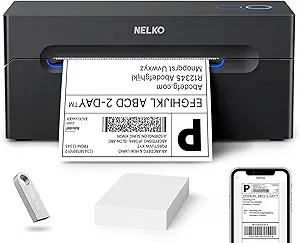 |
| Best Quality Built to a higher standard if you want something more solid | Rollo Wireless Shipping Printer X1040 |  |
| Best Value The sweet spot between price and what you get | Labeer Y43BT 4×6 Label Printer |  |
| Best Budget The cheapest option that still gets the job done reliably | TATTMUSE A646 Thermal Label Printer |  |
| Top Rated A top-rated pick with lots of positive feedback | HKHKPI N40 Label Printer |  |
| Most Popular A crowd favorite that many people choose with confidence | JADENS JD268BT 4×6 Label Printer |  |
| Best Seller A high-volume bestseller chosen again and again | KNAON Y813BT Thermal Label Printer |  |
Nelko PL70E Bluetooth Label Printer

| Maximum Media Size | 4 x 6 inch |
|---|---|
| Resolution | 203 x 203 DPI |
| Printer Connectivity Type | Bluetooth, USB |
| B&W Pages per Minute | 72 |
| Print media | Labels |
The Nelko PL70E is a direct-thermal 4×6 label printer aimed at small businesses and home shippers that need fast, ink-free label output. It connects over Bluetooth (via the Nelko app) or USB for desktop use and handles fan-fold or roll labels with widths from about 1.54 to 4.1 inches. At 203 x 203 DPI it produces clear shipping and barcode labels, and the listed print speed (up to 150 mm/s or roughly 72 4×6 labels per minute) makes it useful for batch shipping. Setup is straightforward using the vendor app and included drivers, and the unit ships with a cable, power adapter, and 50 4×6 labels so you can print right away. Limitations to note are the modest 203 DPI resolution if you need very fine graphics or small text, and Bluetooth printing requires using the Nelko app and a specific workflow (saving labels as PDFs then importing), which may add steps compared with printers that accept direct cloud printing. For everyday shipping labels, barcodes, and price tags this printer is a compact, efficient choice.
Best for: People who ship regularly or run small e-commerce operations and want a compact, fast label printer that works from phones and computers without ink hassles.
Less Ideal for: Buyers who need ultra-high-resolution label graphics or seamless cloud/BYOD direct printing workflows should consider other models.
- Bluetooth and USB connectivity for mobile and desktop printing
- Direct thermal printing requires no ink or toner
- Handles standard 4×6 shipping labels and multiple label widths
- Fast listed print speed suitable for batch label jobs
- Includes cables, power adapter and 50 labels to start immediately
- 203 x 203 DPI resolution can be limiting for very small text or high-detail graphics
- Bluetooth printing requires using the Nelko app and an extra PDF-import step for many logistics sites
Verdict: A compact, fast thermal 4×6 printer that lets small sellers print shipping and barcode labels from phones or PCs without ink.
Rollo Wireless Shipping Printer X1040

| Print Resolution | 203 x 203 DPI |
|---|---|
| Connectivity | USB, Wi-Fi |
| Maximum Media Size | 4.1 inch wide |
| Paper Size | 4 x 6, 2 x 1 inches |
| Print Speed | 150 mm/s (≈ one 4×6/sec) |
The Rollo Wireless Shipping Printer X1040 is a high‑speed direct thermal label printer built for printing 4×6 shipping labels and a range of custom labels without ink. It connects via Wi‑Fi with AirPrint support for iPhone, iPad and Mac and also offers USB for Windows, Chromebook, Linux and Android, so you can print from desktop platforms or mobile devices. The printer uses a 203 dpi thermal head and Rollo rates its speed at about one 4×6 label per second, which makes it useful for moderate to high throughput shipping workflows. The complimentary Rollo Ship Manager app and broad shipping platform compatibility simplify label creation and batch printing, while the claimed long print head life reduces maintenance. Limitations to note are the 203 dpi resolution, which is fine for shipping barcodes but not ideal for very small text or high‑detail graphics, and the lack of duplex or color printing because it is a monochrome thermal unit. Setup is straightforward for standard label sizes and the device is compact enough for busy packing stations.
Best for: Buyers who need a fast, reliable 4×6 label printer for high‑volume shipping or small business fulfillment and want easy wireless printing from mobile and desktop devices.
Less Ideal for: Not a good choice if you need color labels, very high print resolution for small graphics, or a multifunction office printer with scanning or duplex features.
- Fast direct thermal printing suitable for bulk shipping labels
- AirPrint and Wi‑Fi support for printing from iPhone, iPad and Mac without drivers
- Wide platform compatibility including Windows, Chromebook, Linux and Android
- Works with major shipping platforms and includes the Rollo Ship Manager app for streamlined batch printing
- Long rated print head life designed for high‑volume use
- 203 dpi resolution limits fine‑detail or high‑quality graphic printing
- No color printing or duplex capability
Verdict: A speedy, wireless 4×6 thermal printer designed for high‑throughput shipping workflows and seamless mobile or desktop printing.
Labeer Y43BT 4×6 Label Printer

| Printer Type | Thermal |
|---|---|
| Resolution | 203 x 203 dpi |
| Maximum Media Size | 4×6 inches |
| Printer Connectivity Type | Bluetooth |
| Maximum Sheet Capacity | 50 |
The Labeer Y43BT is a compact Bluetooth 4×6 thermal label printer designed for shipping, inventory, and general organization labels. It connects wirelessly to phones, tablets, and computers and also includes a USB interface and driver bundle for quick setup on Windows, macOS, ChromeOS, Linux, iOS and Android. Using 203 dpi direct thermal printing, it produces clear, scannable barcodes and address labels without ink, toner, or ribbons, which keeps ongoing supply costs low. The unit supports a range of label widths from about 1.57 to 4.41 inches and accepts standard 4×6 rolls, with an automatic duplex capability listed for streamlined handling. Its small footprint and included sample labels and cables make it easy to start printing for a home office or small shipping station. Limitations include modest 203 dpi resolution compared with higher-resolution label printers and a relatively small maximum sheet capacity, so very high-volume operations may need a more heavy-duty desktop unit.
Best for: Buyers who want a compact, cost-efficient wireless label printer for shipping and inventory tasks and who prioritize easy setup and low running costs for small business or home office workflows.
Less Ideal for: Those running a high-volume shipping operation or needing ultra-high-resolution labels for dense graphics should consider a larger industrial model instead.
- Bluetooth and USB connectivity for versatile device pairing
- Direct thermal printing so no ink, toner, or ribbons are required
- Compatible with a wide range of operating systems and PDF label files
- Supports standard 4×6 labels plus multiple other label widths
- Compact, lightweight design with sample labels and cables included
- 203 dpi resolution may be insufficient for very small text or fine graphics
- Limited maximum sheet capacity not ideal for very high-volume daily printing
Verdict: A small, easy-to-setup Bluetooth thermal printer that delivers affordable, no-ink 4×6 label printing ideal for small businesses and home shipping stations.
TATTMUSE A646 Thermal Label Printer
| Printer Type | Thermal |
|---|---|
| Maximum Media Size | 4 x 6 inches |
| Maximum Print Resolution Black and White | 203 dots_per_inch |
| Printer Connectivity Type | Bluetooth, USB |
| B&W Pages per Minute | 72 pages_per_minute |
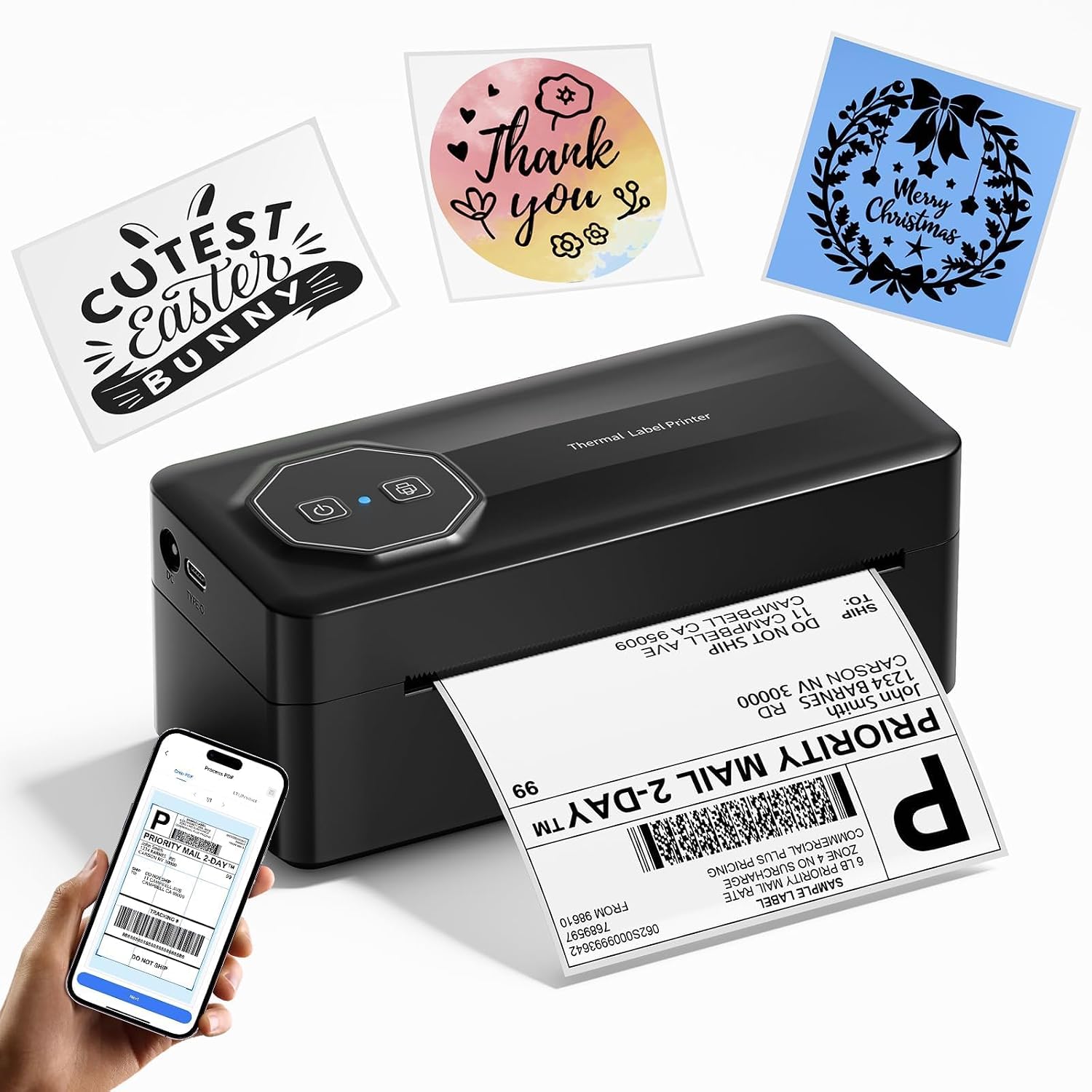
The TATTMUSE A646 is a small, portable thermal label printer aimed at quick shipping and barcode tasks. It connects via Bluetooth to iOS and Android devices or via USB Type-C to computers, and uses the Labelife app or a downloadable driver for PC printing. The unit handles label widths from 0.78" to 4.6" and prints standard 4×6 shipping labels at up to 72 labels per minute with 203 dpi resolution, so labels are legible for carriers and barcodes scan reliably. Because it is thermal, it needs no ink or toner, lowering ongoing costs, and the built-in starter pack of 20 4×6 labels helps you get started. On the downside it prints only monochrome thermal output and requires app or driver setup for different platforms, which may add a short setup step for less technical users. Its compact footprint and Bluetooth support make it useful for tight workspaces or mobile stations where a simple, low-cost label solution is needed.
Best for: Buyers seeking an inexpensive, space-saving label printer to handle regular 4×6 shipping labels and barcode or address labels for a small business or home office.
Less Ideal for: Users who need color printing, full-featured desktop label design software bundled out of the box, or those who want a plug-and-play networked office printer without driver setup.
- Supports Bluetooth and USB Type-C connectivity for phones, tablets, and PCs
- Prints common label sizes including 4×6 with up to 203 dpi resolution
- High nominal print speed (up to 72 labels per minute) for busy shipping tasks
- Thermal printing removes the need for ink or toner, reducing operating costs
- Prints only black and white thermal labels, no color capability
- Requires app or driver installation for some platforms which adds setup steps
Verdict: A budget-friendly, compact Bluetooth thermal printer that delivers fast, ink-free 4×6 labels for small shipping operations.
HKHKPI N40 Label Printer

| Printer Type | Thermal |
|---|---|
| Maximum Media Size | 4 x 6 inches |
| Resolution | 203 x 203 dpi |
| Printer Connectivity Type | Bluetooth |
| Hardware Interface | USB |
The HKHKPI N40 is a portable thermal label printer built for printing 4×6 shipping labels from phones, tablets, or a computer. It connects over Bluetooth for mobile printing via the Nada Print app and also supports USB for Windows, macOS, and Linux, making it practical for both on-the-go and desktop workflows. The printer uses direct thermal technology at 203 dpi so you do not need ink, toner, or ribbons, and it can handle 1–4.2 inch paper widths plus both roll and fanfold labels. Built-in features like automatic calibration and smart paper ejection help reduce jams and wasted labels, and the unit ships with a small starter roll of 4×6 labels. Expect fast output suitable for shipping workflows, though the 203 dpi resolution is standard for text and barcodes but not for high-detail graphics. You will need to install drivers for certain desktop setups and re-calibrate when changing label types. For reliability-focused users this model offers a straightforward, low-maintenance printing experience with the common platform and carrier integrations needed for shipping tasks.
Best for: Buyers who prioritize dependable, low-maintenance shipping label printing for small business or home shipping and want both mobile Bluetooth and wired desktop options.
Less Ideal for: Users needing photo-quality or very high-resolution label graphics or those who want a fully plug-and-play desktop printer without any driver installs or periodic calibration.
- Bluetooth and USB connectivity for mobile and desktop use
- Direct thermal printing requires no ink, toner, or ribbons
- Automatic calibration and smart paper ejection reduce jams and wasted labels
- Supports standard 4×6 labels and multiple paper widths including roll and fanfold
- Includes starter labels and common shipping platform compatibility
- 203 dpi limits fine-detail graphics compared with higher-resolution printers
- Requires driver installation on some desktop OSes and manual re-calibration when changing label types
Verdict: A compact, reliable 4×6 thermal label printer that keeps shipping workflows simple by combining Bluetooth mobility with low-maintenance direct thermal printing.
JADENS JD268BT 4×6 Label Printer

| Printer Type | Thermal |
|---|---|
| Maximum Media Size | 4 x 6 inches |
| Resolution | 203 x 203 DPI |
| Printer Connectivity Type | Bluetooth |
| Maximum Sheet Capacity | 50 |
The JADENS JD268BT is a compact thermal label printer built for printing 4×6 shipping labels and smaller label sizes without ink or toner. It connects via Bluetooth to Windows and Mac (and via the vendor app for Android and iOS) and also supports USB for direct connection, making it useful at a desktop or a small shipping station. The unit prints at 203 DPI using a thermal print head and accepts roll or fanfold media in widths from about 1.57 to 4.1 inches, with a reported output capacity around 50 sheets. Setup is straightforward: install the driver or the Jadens app, load labels, calibrate with the feed button, and begin printing. Practical strengths include fast, clean inkless printing for online sellers, broad label size support, and simple wireless pairing. Limitations are the modest 203 DPI resolution compared with higher-end models, Bluetooth printing on phones requires the vendor app which may be less seamless than native AirPrint or generic drivers, and the small built-in buffer and sheet capacity mean heavy-volume users may prefer a more industrial unit.
Best for: Buyers who want a compact, no-ink 4×6 label printer for shipping and small-business packing stations that can print wirelessly and from a desktop to speed order fulfillment.
Less Ideal for: Large warehouses or high-volume shippers who need industrial duty cycles, higher resolution printing, or enterprise-grade native mobile printing support should consider heavier-duty models.
- Thermal inkless printing eliminates ink and toner mess
- Bluetooth and USB connectivity for desktop and mobile workflows
- Accepts standard 4×6 shipping labels plus several smaller sizes
- Compact footprint suitable for small offices or shipping tables
- Includes test labels and basic accessories for quick setup
- Mobile Bluetooth printing on Android/iOS requires the vendor app rather than native drivers
- 203 x 203 DPI is adequate but not as sharp as higher-resolution thermal printers
- Small sheet/output capacity may require frequent refills in high-volume use
Verdict: A compact wireless thermal 4×6 printer that delivers clean, no-ink shipping labels for small sellers and home offices.
KNAON Y813BT Thermal Label Printer
| Printer Type | Thermal |
|---|---|
| Maximum Media Size | 4.2 inches |
| Printer Connectivity Type | Bluetooth |
| Maximum Print Resolution Black and White | 203 dpi |
| Compatible Devices | Laptops, PC, Smartphones, Tablets |
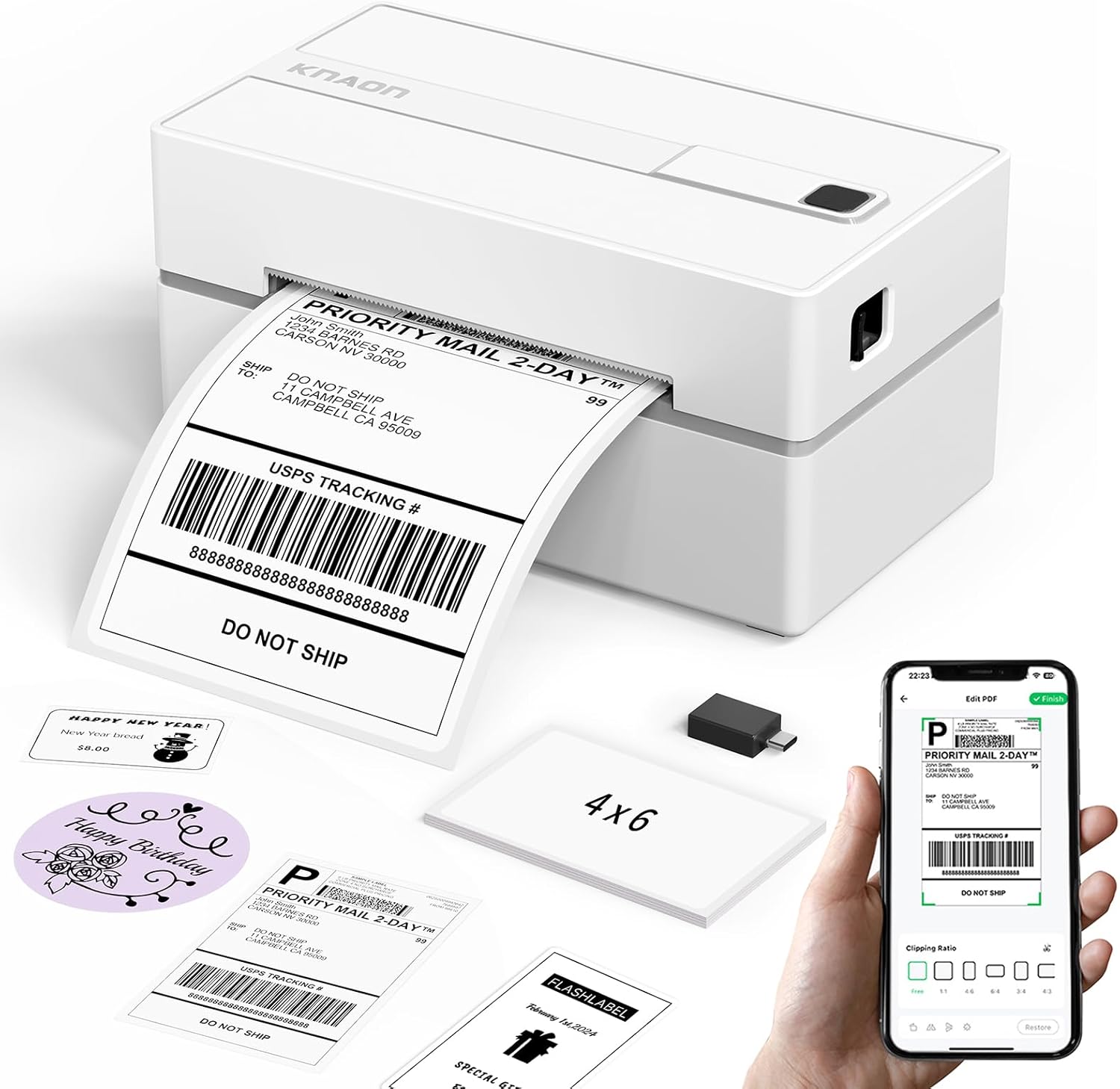
The KNAON Y813BT is a small Bluetooth thermal label printer aimed at home and small-business shipping tasks. It prints monochrome thermal labels up to about 4.2 inches wide and connects wirelessly via Bluetooth or by USB to Windows, macOS, ChromeOS, and Linux systems using the FlashLabel Pro app or bundled drivers. Setup is simplified by a preloaded USB drive with drivers and tutorial videos, and the app provides thousands of templates, icons, and fonts for DIY shipping labels, barcodes, price tags, and thank-you stickers. The printer is lightweight and portable, and it ships with test label paper so you can start immediately. Print quality is basic thermal resolution (203 dpi), so fine graphics or photo-quality prints are not its strength, and it prints in monochrome only. Also, Bluetooth printing requires using the vendor app rather than native OS pairing, which can add a small setup step for some users. For straightforward 4×6 shipping labels and small-batch label work, it is a practical, no-ink solution.
Best for: Buyers who want a simple, low-maintenance wireless 4×6 label printer for shipping and small-batch labeling that is easy to set up and use with phones or computers.
Less Ideal for: Users who need high-resolution color prints, professional photo-quality labels, or native Bluetooth printing without a vendor app should look elsewhere.
- Bluetooth and USB connectivity for mobile and desktop printing
- Bundled drivers, tutorial videos, and starter label paper speed initial setup
- Extensive template, icon, and font library in the FlashLabel Pro app for quick label design
- Inkless thermal printing means no consumable ink or toner to buy
- Compact, lightweight design suitable for tight workspaces or mobile use
- Monochrome 203 dpi thermal output limits fine-image or high-detail printing
- Bluetooth printing requires using the vendor app rather than standard native pairing
Verdict: A portable, easy-to-setup Bluetooth 4×6 thermal printer that reliably handles shipping and small-batch monochrome labels without ink.
Choosing the Right Wireless 4X6 Label Maker: Key Factors to Consider
Connectivity and App Support
Wireless setup determines how quickly you can start printing from phones, tablets, or laptops. A device with clear Wi-Fi setup routines or reliable Bluetooth pairing reduces downtime, especially when multiple users need access from different devices.
App features matter because they shape everyday workflows. Look for apps that offer label templates, barcode generation, and integration with common shipping or inventory tools. Consider whether the device supports direct printing from cloud services or requires file conversion steps; the latter adds friction for busy users.
True 4X6 Media Compatibility
Confirm the label maker accepts 4-by-6-inch media without cropping or forced scaling. True 4×6 compatibility avoids manual cutting and ensures barcodes and addresses meet carrier sizing rules.
Media compatibility also includes adhesive strength and paper finish. Choose media types that match your use case, such as weather-resistant or matte shipping labels. Devices that support a range of label stocks give more flexibility for different tasks.
Print Resolution and Legibility
High print resolution is critical for small text, scannable barcodes, and crisp logos. Lower-resolution printing can result in unreadable barcodes or smeared addresses, which leads to scanning errors and delivery issues.
Consider how the device handles fonts and graphic elements. Some label makers render crisp text but struggle with halftones or logos. If you rely on barcodes, prioritize models with demonstrated barcode readability at typical scan distances.
Reliability and Media Path Design
A straight, simple media path reduces jams and misfeeds, which is valuable when printing batches of shipping labels. Feed rollers and guides that keep the label flat during printing improve consistency and reduce waste.
Durability of internal components matters for high-volume use. Look for machines with replaceable feed rollers or accessible maintenance points. Devices designed for frequent use will require less hands-on troubleshooting and fewer interrupted print runs.
Battery Life and Portability
If you need labels in multiple locations or at a packing station that lacks a dedicated outlet, battery-powered models or those with optional rechargeable packs add convenience. Consider how many labels you can print per charge and whether the device supports quick recharging or hot-swap batteries.
Portability also includes physical footprint and weight. A compact, lightweight unit is easier to move between stations, but check that portability does not come at the expense of media capacity or print robustness.
Software Features and Template Availability
Robust software simplifies repetitive tasks like batch printing, address import, and barcode generation. Built-in templates for shipping, inventory, and product labeling speed setup for common tasks.
Also evaluate export and import options. The ability to print directly from spreadsheets or cloud contacts reduces manual entry and the chance of typographical errors. Look for software that updates regularly and supports current mobile and desktop operating systems.
Choosing the Right Speed for Your Workload
Print speed matters differently depending on volume. If you only print a few labels a day, a slower but simpler unit may be fine. For dozens or hundreds of labels per shift, a faster printer with consistent throughput cuts packing time and reduces queueing at the station.
Look beyond quoted ppm numbers and consider real-world batch behavior. Does the unit pause between labels? Is there a warm-up delay? Faster continuous printing and minimal per-label latency are more important in a packing environment than top-end single-label speed.
- Small batch use: prioritize ease of use over raw speed
- High volume: prioritize continuous feed and fast duty cycles
- Mixed usage: look for balanced speed and reliable media handling
Label Material Choices and Durability
Label stock varies by finish and adhesive. Shipping labels typically need a tacky adhesive and a finish that resists scuffs during handling. For storage or archival labels, acid-free papers or laminates may be preferable.
Weather-resistant or synthetic labels are worth considering if packages move through cold, wet, or abrasive environments. Ensure the label maker can handle the thickness and stiffness of reinforced or synthetic stocks to avoid jams.
- Paper vs synthetic: choose based on exposure to moisture and abrasion
- Permanent vs removable adhesive: match to the intended surface
- Precut 4×6 rolls reduce prep time compared with continuous stock
Integrating with Shipping and Inventory Workflows
Wireless 4×6 label makers should fit into the software systems you already use. Check for app-level integrations, or at minimum, smooth printing from spreadsheets and common mobile platforms. Direct printing from order-management or shipping apps avoids export steps.
Consider label templates that include required elements such as addresses, return addresses, and barcode fields. Batch printing features and CSV import are key when processing multiple orders or inventory items.
- Look for CSV import and batch printing support
- Ensure barcode types required by your workflow are supported
- Verify whether the device can print return addresses or multi-line labels automatically
Maintenance Tips to Reduce Downtime
Regularly clean feed rollers and the print head to prevent streaks and misfeeds. Follow manufacturer guidance for cleaning intervals based on print volume. Having basic cleaning supplies on hand avoids avoidable downtime.
Keep replacement label rolls and spare power options close to the packing station. For battery models, maintain a charging rotation so one unit is always ready. Track consumable usage to anticipate when to restock before a big run.
- Schedule routine print head cleanings
- Store spare media in a clean, dry place
- Rotate batteries or maintain a charged backup
Security and Network Considerations
If multiple users share a wireless label maker, check whether the device supports secure network connections and user management. Unsecured devices can be susceptible to accidental or unauthorized prints that waste media and cause workflow confusion.
Use a dedicated network or strong Wi-Fi security settings when possible. Some business-focused models offer user access controls or require pairing approval for new devices, which helps in multi-operator environments.
- Enable WPA2 or higher on networks used by the printer
- Restrict access to the printer app with account controls if available
- Consider network isolation for printing devices to limit exposure
How We Chose the Best Wireless 4X6 Label Maker
We focused on features and performance that matter to people who need reliable 4×6 labels on demand. Our selection filters prioritized wireless connectivity options that include stable Wi-Fi or robust Bluetooth pairing, native support for common 4×6 label stock, and straight paper-feed paths that reduce jams. We filtered for devices that offer clear print resolution for barcodes and shipping addresses, adequate print speed for batch jobs, and durable output compatible with standard mailing and storage conditions. We evaluated software and app usability, including label template availability, mobile printing workflows, and compatibility with common shipping or inventory apps. Battery life or power options were considered for portable use. We excluded devices that cannot accept true 4×6 label media or that lack wireless printing altogether. We also excluded single-purpose badge or tiny-label machines that do not meet size or throughput needs. The final list balances setup simplicity, print quality, media flexibility, and real-world reliability.
Our full evaluation process is outlined in our review methodology.
FAQ
Can a wireless 4×6 label maker print directly from a phone or tablet?
Often yes. Many wireless 4×6 label makers support mobile apps and Bluetooth or Wi-Fi printing so you can send labels directly from a phone or tablet. Confirm the device supports your mobile operating system and has app features you need for templates or batch printing.
What types of 4×6 label media will these printers accept?
Most 4×6 label makers accept precut 4-by-6 rolls or continuous media formatted to 4×6 output. Check the device specifications for media thickness and finish compatibility, especially if you plan to use synthetic or weather-resistant stocks.
How do I ensure printed barcodes scan reliably?
Use the recommended printer settings for barcode density and print resolution, and test with your typical scanner before committing to a large run. Also choose label stock that offers a smooth, matte finish for best scan consistency.
Are battery-powered wireless 4×6 label makers practical for regular shipping work?
Battery-powered models can be practical for light to moderate mobile use, but for continuous high-volume shipping a mains-powered unit or one with hot-swap battery capability is often more reliable. Consider expected daily print counts and charging logistics.
How often should I replace feed rollers or other wearable parts?
Replacement intervals depend on volume, but inspect feed rollers and guides periodically for wear and debris. Replace parts when you notice increased misfeeds, frequent jams, or worsening print consistency.
Final Verdict
Prioritize wireless stability, true 4×6 media compatibility, and durable print quality when choosing a Wireless 4×6 Label Maker. Balance speed against reliability depending on whether you print occasionally or run regular batch jobs. Consider software and template support if you need batch imports or barcode generation. Focus on a device that fits your usual workload and offers straightforward maintenance and app features. That approach will minimize interruptions and deliver consistently legible labels for shipping, inventory, and organization needs.